
Hands up if you read the release notes when you go to update a piece of software. Anyone? Just me?
My actual answer is “occasionally moving towards regularly”. In photographic terms I am most definitely an old dog and whilst I wouldn’t say that I enjoy learning new tricks I definitely benefit from quite a few of them. I write about them on here from time-to-time as well.
This blog post was triggered because I actually took the time to read the blurb for the two main bits of software that I use day in and day out: Photo Mechanic and Adobe Camera RAW within Adobe Photoshop. Neither update was spectacular but my rabbit hole tendencies made me go back and see what else I had missed in previous updates and I think that I found one or two gems that will be very useful going forward. I’m not going to go through and list everything but I thought that it would be useful to mention a few.
Photo Mechanic (Photo Mechanic 2026.1, build 9024).
- The ability to turn code replacement lists on and off without having to delete them. This is going to be a great addition for people like me who use this on a daily basis. It’s a technical change that will save a few seconds here and there but that is a real help. What we need now is for the same option to be added to the autocomplete. The Camera Bits website explains all of this stuff really well but there’s plenty on this blog to give my take on how useful it all is.
- The ability to add coloured labels to items in your favourites list in the contact sheet. Another very small step forward but something that I am already using with a good deal of enthusiasm.
- Improved options for adding your own keyboard shortcuts. I am a complete sucker for a keyboard shortcut and being able to add my own has been a blessing.
- This isn’t a new option but I have recently started using the snapshots option for locations in the Photoshelter uploader. This becomes incredibly useful when you have deeply nested folders within folders and need to switch rapidly between them.
Adobe Camera RAW.
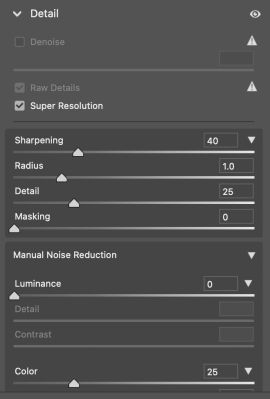
- Super resolution. A simple checkbox allows you to effectively double the length of the image along the longest side. For example, Canon R6 MkII files which are 6,000 x 4,000 pixels out of the camera become 12,000 x 8,000 pixels and the quality is surprisingly good, especially with lower ISO photographs. It’s not often that I need to upsize files to this extent but now it’s really easy. I have been using the option to upsize images in the Save dialogue box (since I discovered it many, many years ago) but this is more convenient and in side by side tests marginally higher quality.
- AI Denoise which I don’t use for news pictures but can do an amazing job on very high ISO images. It was OK when it created a new DNG from the file but now that it cuts out that part of the process it is very useful and has the added positive side effect of not having to keep the DNG and all of the increased storage headaches that brought.
- Raw Details is a simple tool that produces crisp detail and more accurate renditions of edges, improving colour rendering, and reducing artifacts. The resolution of the enhanced image stays the same as the original image.
- The option to customise the way that the RAW editing window looks and create snapshots so that you can switch between (in my case) corporate, headshot, news and personal photos editing set-ups.
There are plenty of other options that I could mention that have been added or that I have stumbled across over the last few months. Workflow is something that has become a bit of an obsession for me as I have got older. I try really hard to find the balance between being set in my ways as one of the “this is how I do it and I’m not changing” brigade and adopting the newest and greatest things “just because they are new” gang.
Making some time when updating and when work is less full-on to investigate the changes that developers make to the software that we rely on is important and something that I’m going to make more of a priority. Spotting weaknesses and potentially useful upgrades and suggesting them to developers is equally something that might be good to do.
Camera Bits have a well-used feature request forum on their website and I have made a few suggestions and requests over the years. Adobe are a massive business and don’t have the same openness to users and their ideas but I’ve made a few suggestions to them regarding Camera RAW as I have come up with them as well.
Anyone who fancies telling me about their favourite updates that have changed or enhanced their workflow would be most welcome. I find that the best “cor blimey” moments come around when another photographer tells me about their ideas.
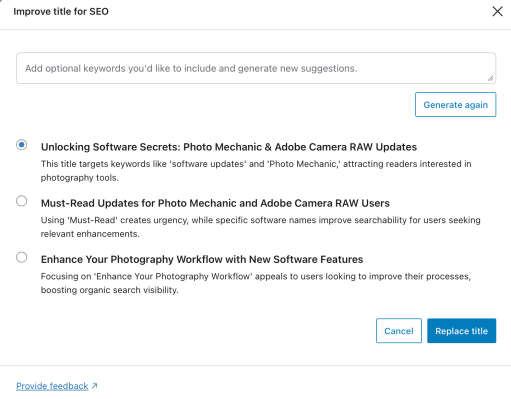
Footnote: Out of interest I asked the AI assistant built into WordPress what I should call this piece because “Old dog, new tricks” is probably a bit too British for a lot of my audience. It threw up three options that I considered and then thought “no, I can’t do that”!
 Neil Turner Photographer