news

Folio photo #03: Primed for disaster

©Neil Turner, March 2009

Visiting business “guru” lecturer Richard Roberts from GE Capital explains the subprime mortgage crisis to sixth form business and economics students at a Camden secondary school. This was shot as part of a story about a school doing everything it could to give their sixth form students as many extra opportunities as possible. The set included portraits of the head teacher, vox-pops of other students and audience shots of the sixth formers.

Define the word ‘portrait’?

The word portrait is used by photographers all over the world, but it’s meaning is a little blurred. Many use the term to describe photographs of people’s head and shoulders and others use it to refer to any old picture of a person so I want to tie down what I mean by potraiture and then talk a little bit about the subject.

©Neil Turner/TSL, June 2006

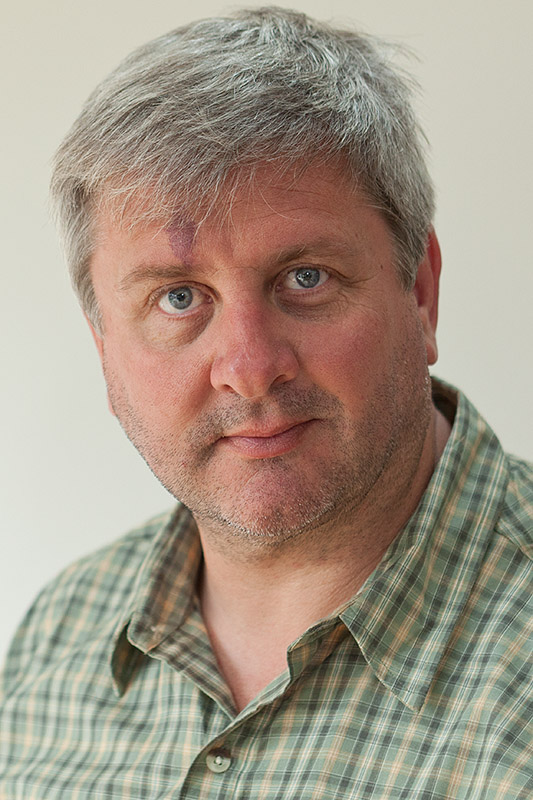
In my book a portrait is a photograph deliberately used to say something about the person in the picture. A simple ‘mug shot’ can be a portrait, but only if it says something about the subject and isn’t just an identity card style image. Even a characteristic expression is enough to turn the bland ID card photograph into a portrait. You then have a wide range of images that can legitimately be called a portrait until you get to the other extreme where a photograph of someone becomes more about an activity or a mood than about that person. Although there doesn’t have to be any interaction between the photographer and the subject for the picture to be a portrait, it really helps. I have read all sorts of nonsense about the kind of lens you have to use to make a portrait, or the kind of light that you must use. None of these things matters, a good portrait can be made using any lens and using a huge variety of lighting situations.

There are many traps in making good portraits, and I fall regularly into at least one of them, but the bottom line is that the photographer needs to free themself of as many constraints as possible in order to achieve creative results. With this in mind here are a list of do’s and don’ts that might help you to shoot good portraits – starting with my most regular failing:

  • Resist the temptation to always use the same style and fit each subject into it giving you the same picture over and over with different faces in.
  • Each face is different, so allow the light to help to show that. Not everyone benefits from soft lighting and good portraits are made better with thoughtful lighting.
  • Don’t crowd the sitter. If you get right in someone’s face, you will put them on edge and spoil the photograph – of course if you purposefully want to make someone uncomfortable, then go ahead. A relaxed sitter makes the shot easier to get.
  • Think about relating the sitter to their surroundings. One of the easiest ways of saying something about your subject is to shoot them in their own environment.
  • Think about using props. Well selected items can really add to the message of the portrait- it could be an author with a copy of their book or a child with their favourite toy, be imaginative.
  • Resist the tempation to always use the same focal length lens. Nothing annoys me more than to read conversations about “the ideal lens for portraiture”, it does not exist.
  • Try a wide variety of compositions, portraits can be stunning if the subject occupies only a tiny percentage of the image, and can be equally strong if just their eyes fill the frame.
  • There is no rule that says that ‘you must flatter your subject’ but harsh lighting and cruel angles should be kept for those situations where they are suitable.

To be effective a portrait must say more about the sitter than it does about the photographer and it must say more about the sitter than it does about what they are doing. Most great portraits have interesting but not overpowering light. If the first thing that you notice is the lighting then the photograph is not a complete success, if the first thing that you notice is the ‘nice blotchy backcloth’ then the portrait has truly failed.

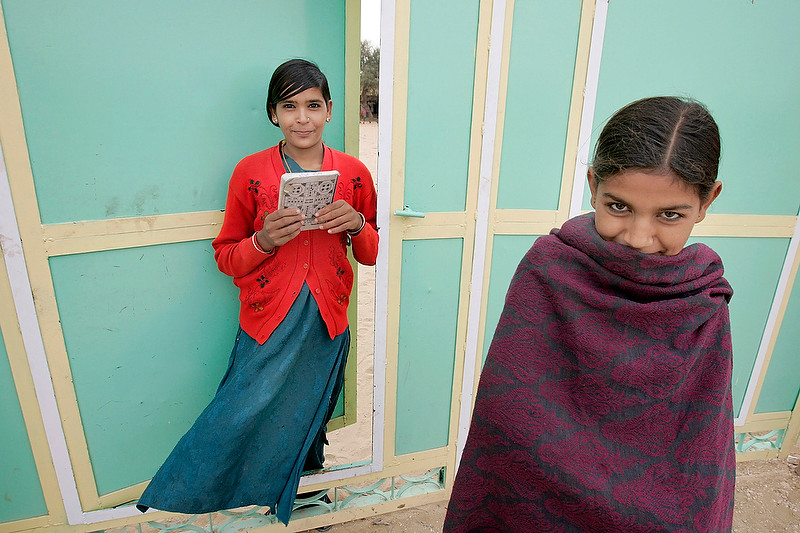
Folio photo #02: Girls’ education project, Rajasthan

©Neil Turner/TSL, May 2005

The UK based charity SAVE THE CHILDREN funds a scheme in northern Rajasthan to allow girls between 12 and 15 years old who do not get access to education to come to a boarding centre for a few months in which time they cover the syllabus normally expected to take five years. The students take it in turns to do chores such as fetching water and washing clothes but still take books to read as they work. This picture was taken at dawn when some of the girls were already reading whilst others were fetching water, fuel and cooking breakfast.

Professionalism 101 (or P101 for short)

©Neil Turner/TSL

The hardest part of the transition from good photographer to professional photographer is in understanding the difference between the two. I once wrote that the best definition of “professional” is someone who gets the shot 99.9% of the time and has a damned good excuse for the rest. Still true, but professionalism has another side to it – one that can be learned pretty easily.

Clients are used to dealing with professionals: Slick presentation, questions being answered before they are asked and great customer service. These are all things that we expect as consumers and in business we expect even more. As a professional, you are in a market place and you have to compete.

We work in an image-conscious business and we live in an increasingly image-conscious world. Even as self-employed freelancers we need to have corporate identities of our own. The vast majority of our clients have proper business cards and 99.9% of them have email addresses that tell you who they are and who they work for.

I am constantly amazed by the number of decent photographers who hand out slightly apologetic home-made inkjet printed cards and I’m shocked by the number of Yahoo and Hotmail accounts that people rely on. Webmail is useful but it does nothing to positively affirm you as a professional. Buying and running your own web domain is not difficult or expensive and it really helps to give potential customers the impression that you are in business and that you have been for some time. If your email address matches your portfolio website there is a certain synergy. If your on-line presence is a gallery on Flickr and your email is london-snapper@webmail.com then you really are missing a trick.

Keeping everything the same, presenting a corporate image and playing the game doesn’t detract from your photography. Quite the opposite; it removes a potential barrier to clients taking you seriously. Having a well-designed and easily navigated portfolio on the internet is almost as important as owning a camera. Being a member of at least one of the professional bodies that offer searchable freelance directories is also a very good idea.

Moving on in the story a little, you have met the client, they like your folio and they give you some work. Professionalism moves up a gear and this is your first job for them so you cannot make presentational mistakes now. Be clear when accepting the commission what the fees and expenses are, what rights you are selling them and what they are expecting from you. Get technical specifications, deadlines, delivery addresses (FTP, email or postal) sorted out and then go and do what you are there to do – shoot the pictures.

Let’s say, for arguments sake that the job requires a CD with twenty high-resolution, post-produced RGB JPEG files in the post. P101 says that the client will be used to proper presentation and so your CD should not be a PC World own brand disc with a few illegible words written in marker pen in a cracked plastic case. Printing proper CD labels is very cheap. Getting discs printed on an upmarket Inkjet printer isn’t expensive and having a few hundred professionally screen-printed will not break the bank. Slim CD cases are OK but softer plastic flexible cases are better and they will cope with the postal system far better. Of course the disc should be labelled with the date but the main impression should be that this came from Joe Bloggs – professional. The packaging should be professional, the label on the outside should be neat and tidy and you should have a properly printed compliment slip in there too.

None of this makes you a better photographer, none of this will actually impress the client. But none of this costs much money either. What it will do is not raise any negative thoughts. The hand written scrawl on the cheap disc stands a good chance of making a negative impression – yet hundreds of photographers still do it.

So what about what is actually on the disc. There are the pictures of course. It’s important to make sure that they meet any specification given to you by the client and it’s also vital to make sure that the client can open the disc on whatever system they use – but what else? Make space on the disc for a PDF file containing licensing information and a second PDF with the caption details (it’s amazing how many picture buyers still don’t understand or see the metadata that you embed in the images). For some clients a set of clearly marked low resolution, screen sized sRGB JPEGs can be useful too.

Going deeper still, think about the metadata that you attach to the files. Professionals have to add IPTC caption details. Who, what, why, when and where. No matter which imaging application you use you have to put into words what is in the picture – which balding middle aged man is which, where they were taken with a date and possibly a time. You also have to add your details. Stamp your identity right there in the metadata. Use the © symbol liberally so that everyone knows who owns the pictures. The tricky thing here is to know which box you put this information into. Many newspapers want you to put everything into the main caption/description box. Others only want the names and places in the main box. Most magazines and commercial clients don’t have a preference. If in doubt put it all in the main caption/description box and add it all in the other relevant boxes too.

Metadata has another face – EXIF. These are the shooting details that your camera will add to digital files. Some are useful – time, day and date. Others are annoying – which lens, shutter speed, white balance. Does the client need to know this stuff? Probably not – so delete it.

This is not rocket science 101. This is, however, a very competitive market. P101 says that you have to do everything that you can to give the client confidence that you are a pro and that you will deliver the goods. I was giving a talk on this very topic at a college when a very-self-assured young man told me that he wasn’t interested in any of this “plastic b******t” and that his clients would have to take him for what he was – an excellent photographer. This kind of approach might have worked twenty years ago but it doesn’t have a snowball-in-hell’s chance in the 21st Century.

Having a “USP” (unique selling point) is a great idea as a photographer, but being the one who eschews good presentation and good practice is a pointlessly high-risk strategy. If you want to take pictures for a living, you have to get people to pay you. Most of the people who control the market place wear suits and respond well to corporate image. It’s a game and you would be well advised to play it.

Welcome to the new Blog…

I have finally done it. The pre-blog was intended to last about six months and it made it past three years. I have finally found the time to migrate a lot of the newer posts to this shiny new WordPress version with all of the bells and whistles that you’d expect from a templated site.

When I get time, I will migrate even more of the old content over to here so that it can be better indexed, more easily searched for and release some space on my main dg28 site. To those of you who have followed the blog patiently checking back from time to time I’d like to say ‘thank you for your patience’ and to let you know that the RSS feed is up and running.

It’s not really that funny…

I’ve just had yet another conversation with a keen photographer who wants to become a photojournalist. For the sake of anonymity, let’s call him Charlie. I have quite a few of these chats and they regularly leave me feeling in need of a joke or two to help overcome the worries I have for some of these (mostly) young people looking for the right career. Last year I uploaded a load of photographer based jokes to a web forum where a lot of news, sports and press photographers hang out. You know the kind of thing:

Q. How many photojournalists does it take to change a lightbulb?
A. None – they aren’t allowed to change anything…

The silly thing is that I spent several minutes agonizing over whether to answer the question as ‘we’ or ‘they’. Am I a photojournalist or aren’t I? In the end, I chickened out and went with they telling myself that just because I used ‘they’ it didn’t mean that I couldn’t count myself in. Typical cop-out!

There were plenty more jokes in a similar vein:

Q. How many art directors does it take to change a lightbulb?
A. Does it have to be a lightbulb?

Q. How many newspaper photographers does it take to change a lightbulb?
A. No time for that, just stick the ISO up to 6400 and shoot it with available light.

I think that the list (and my colleagues’ patience) eventually stretched to ten lightbulb jokes and I’m pretty sure that I could have managed a few more.

Anyway, let’s get back to the point of this blog post. I was talking to Charlie (our potential student) a few weeks ago and I was telling him how tough the market is right now and how competitive it is to even get a foot on the ladder. I pointed out that news photography and photojournalism were careers in which you were most unlikely to ever make a lot of money and I even told him the other photographer joke that I know: “What is the best way to make a small fortune in photojournalism? Start with a large fortune!”

Charlie was still keen and was still interested in studying the subject but there was something about him and his manner that made me think that he still didn’t really understand what the job was really about and how tough it would be – even if the economy made a rapid recovery and even if advertising revenues came back to newspapers and magazines in sufficient quantities to help remove some of the financial pressures that we battle with every day. We shook hands, I gave him my card and offered to talk again if needs be.

He rang me this morning saying that he had been to a university for an interview where they were offering him a place on a three-year degree course at huge expense and that my opinion of the current market was not shared by the teachers he had met there. They had sold him the dream and he was considering buying into it. Don’t get me wrong, being a photographer and working for the media is often exciting, regularly rewarding and always unpredictable but I am worried by educators selling courses that are largely not fit for purpose. These days a three year degree is a huge investment to make and I have written before about the pros and cons of formal study versus the kind of shorter course (that I now teach on) versus learning as you go.

My main advice to Charlie was to consider what the worst thing that could happen if he did the course and in three years time he had £30,000 worth of debts and no clear idea how he was going to start to earn enough to repay the money. That was a question his parents had asked and he said he had ignored. Now that someone from within the business was asking it he seemed to take it more seriously. It was a telephone conversation but I could sense that his passion for photography had become more real since we had first met. It seemed to me that he had been bitten by the bug.

We talked a little more and I suddenly remembered two more photographer lines that always make me smile:

(Tongue in cheek)

You know when you are a photographer when…

Somebody asks you what your favourite colour is and you consider answering “18% grey”.
Somebody asks what your lucky number is and you find yourself wanting to say “1.4”.

There you go – I’m smiling again. Good luck Charlie… (even if that’s not your real name)

The 11″ Apple MacBook Air

A couple of weeks ago I took the plunge and bought a new laptop. I have been looking at small lightweight notebooks for quite a while and I have been trying to work out out whether the iPad or any of the other tablets would be OK for the work that I do. You see, I am getting a little bit older and I want to carry less weight – partly because I seem to be getting on and off of planes a lot more and partly because I would like to use trains instead of automatically driving everywhere.

Until very recently nobody made the right piece of kit. Apple have been promising to come close with the first and second generation MacBook Air models as well as the 13″ MacBook Pro but, somehow, none of their kit has quite got it right. I have looked at Windows notebook and sub-notebook models from a range of manufacturers and both HP and Sony have come close.

Then along came the third generation Apple MacBook Air and I am delighted by the 11″ model that I now own. I bought an i5 powered model with 4Gb of RAM and a 128Gb SSD drive and I am blown away by the performance – even compared to my 2010 15” MacBook Pro with an i5 processor and 8Gb of RAM.

When I got the new Air I posted on a Facebook group that I would report back about it. Two weeks later and having done a few jobs with it I thought that it was time to post my opening thoughts about it. It came with OSX Lion loaded which threatened to present a few compatibility issues with older versions of applications. Indeed, my main workhorse application Photo Mechanic was being reported as having one or two issues with slide shows. Two days after getting the Air Camera Bits released a Beta version of the software designed for OSX Lion and I have been using it ever since. In fact the second Beta is now loaded and it all seems to be going swimmingly. Issue number one sorted.

Issue number two concerned the software that controlled the two 3G USDPA mobile broadband dongles that I rely on when I am on the road. The 3 network posted an update for their drivers within a day or two and so I was left waiting for Vodafone to follow suit. It wasn’t a deal-breaker though because I have a Mifi unit for the Vodafone network and the new Air seems to work flawlessly with that. A few days ago a fellow Apple enthusiast and Vodafone customer Edmond Terakopian noticed that Vodafone had quietly put an update on their website and that meant that issue number two was sorted as well.

Issue number three was to do with loading Apple’s own Final Cut Express. It just would not load onto the MacBook Air and work. The first attempt to load it ended with having software in the Apps folder that wouldn’t open without getting a compatibility error message and the second attempt left me without even that. I searched some forums looking for the answer and the Apple community finally pointed me in the direction of an upgrade to Apple’s plug-in manager which let issue number three finally sorted.

What happened next is still a mystery. It seems as if getting Final Cut Express working stopped Aperture from functioning. Every time I try to launch Aperture I get an error message telling me to check with the developer to see if the version of Aperture is compatible with the latest OSX. Well, as far as I know I have the latest version having downloaded it from the App Store. Issue number four is most definitely NOT sorted!

That’s enough of problems – what about the good stuff? Well, the Air is small and light and pretty quick considering the specification. It runs my basic applications (Photo Mechanic, Photoshop CS5 for Adobe Camera RAW and Transmit) very well and the gloss screen is far less of an issue than I feared it might be. The lack of a Firewire 800 port means that my workflow has had to change a little – I am not ingesting everything as a matter of course on this laptop. Instead I am using the UDMA enabled Lexar USB card reader to do a rapid initial edit and only import the pictures that have a chance of making it into the edit – cutting a stage out of my usual workflow.

Someone, somewhere wrote that the best camera is the one that you have with you and with the MacBook Air that same description will be applied to laptops. So many times in the past I have left my laptops in the car or at home because they are heavy enough to notice. Even with the small power supply I would be happy to carry the Air almost all of the time.

The big bonus, apart from the size and weight of the MacBook Air is its solid state hard drive – which is a revelation. To say that it is fast to boot would be an understatement. To say that it is quick to perform it’s tasks would be to equally shortchange it’s efficiency. I hope that I will always get SSDs from now on, they make all sorts of sense and they are tougher, quieter and see to produce a lot less heat. Finally, a laptop you can use on your lap without getting second degree burns! This new MacBook Air is as quick as my seemingly far better specified MacBook Pro. It weighs very little, has excellent battery life and stays cool.

Given the choice between buying either a MacBook Pro OR a MacBook Air I would probably say that a Pro with a SSD would be the best option if it is your only computer. I am lucky, the Air isn’t my only computer and it isn’t crammed full of Apps that I use twice a month so it is running sweetly and I love it.

Social networking. Is it working?

I’ve been to seminars and I’ve read the opinions of experts. I’ve been to workshops and I have wasted time listening to gossip – and I still don’t really have a grasp of how I should be doing social media. I’m on Twitter and I am on Facebook but the one that I have put the most effort into is LinkedIn. Of course I could have been fooled by the ‘professional’ and ‘business’ tags that get applied to that particular on line network but, hallelujah, it has actually paid off and brought some work in. Great news, but then so has Twitter.

I’ve had a website – this website – for almost twelve years now and so I guess that you could say that I completely ‘get’ the need to be on line. On top of ‘getting it’ I also enjoy it and the ease with which we can all share information and network is amazing but I am finding it hard to break out of my comfort zone – talking with photographers about photography.

Where I need to concentrate my effort is in marketing myself to existing and potential customers but that’s the part of the business that I don’t enjoy. Spending a morning ringing Art Directors, Picture Editors and other buyers trying to get to see them with a portfolio used to be something that I endured because I always loved the bit that (hopefully) came next – meeting people, talking to them and showing them my work. These days the return on time invested in making calls is very poor. Eight calls this morning and nothing. Nobody wants to see my work.

There was a time when I thought that emailing people would work – based on the fact that just after I turned freelance again in 2008 I sent out twenty emails to potential customers and got six replies, three portfolio viewings and a good number of commissions. That day must have been a fluke because it has never worked again since.

Recently I have tried local business networking groups and one industry specific networking group. I met a lot of people, handed out a lot of business cards and it looks as if there will be some work coming from it.

So, back to the social media thing: I still have high hopes for it. I have started getting and giving recommendations on LinkedIn and I have started to join non-photographer discussion groups. My tweets are getting better and I seem to be getting more followers. I am a professional and I always advocate that people use a professional so that’s my next step. I’m going to get a pro’ in to sort out my on line profile so watch this space – and the many other spaces that I virtually hang-out in