equipment

Colour calibrating digital camera bodies

When you work with one camera and you shoot RAW all of the time it really doesn’t matter if that camera has a tendency towards magenta, yellow or cyan – the shift will be consistent and you can cope with it very easily in post-production. If, on the other hand, you work with more than one camera and each of them has a subtle shift in a different direction then your workflow can be slowed down when you have to constantly colour correct images shot under identical lighting in different directions. Like all things in photography, there is more than one way to solve this problem.
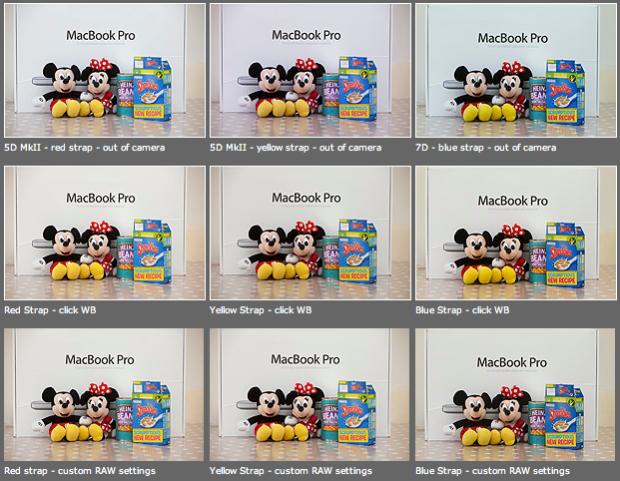
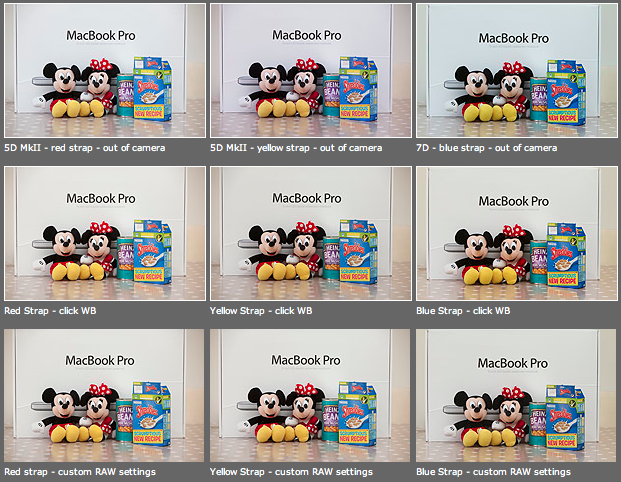
As you can see from the top row of images above – the three cameras that I use have different colour shifts with my slightly newer 5D MkII (codename yellow strap… because it has a yellow strap!) displaying quite a strong magenta shift whilst the 7D (codename blue strap, you can guess why) is a little cold and my oldest 5D MkII (red strap) is pretty neutral but maybe 1/3 of an f-stop brighter. I am going to use the red strap body as my basis for changing the colours on the other two a) because it is the most neutral to start with and b) because it has been serviced and cleaned by Canon quite recently.

Obviously these pictures were shot under controlled conditions using the same light source, the same lens on a tripod and have been converted from their RAW using no adjustments whatsoever. I shot multiple frames using each body as a sample just to make sure that there was no shift between frames on the same camera.

The second row of examples are the same RAW files with a white balance applied to exactly the same spot on the white box between Mickey and Minnie’s ears. As you can see this gets us a whole lot closer to matching the pictures for colour and this technique is fine when you have something in the frame which allows you to use the eye-dropper tool in Adobe Camera RAW (and in other similar raw conversion applications) and it is also fine when you only have a few images to process in this way. If you shoot an event where there are hundreds of frames, then you would spend an unnecessary amount of time balancing in this way.

The third row of examples utilises one of the cool features of the latest versions of Adobe Camera RAW in either Photoshop or Lightroom (and I’m sure that other software does this too) which allows you to set a default set of settings ranging from white balance to black levels, contrast, saturation to sharpening and noise control for each camera which the software detects from the serial number in the EXIF data as you bring it into the RAW conversion control pane. This is great for a lot of work and is a good option if you usually shoot on a fixed white balance.

These three techniques work for pretty much every digital camera and every scan. Some, more modern and more expensive, cameras allow you to go one crucial step further and that is to tell the camera to automatically shift by a fixed amount of colour for every frame – so that if your camera has a magenta shift like my yellow strap camera you can counterbalance that in camera and your images will show up as they should – no matter which white balance you are using at the time. The next few illustrations are based on a Canon 5D MkII using Canon’s own EOS Utility:
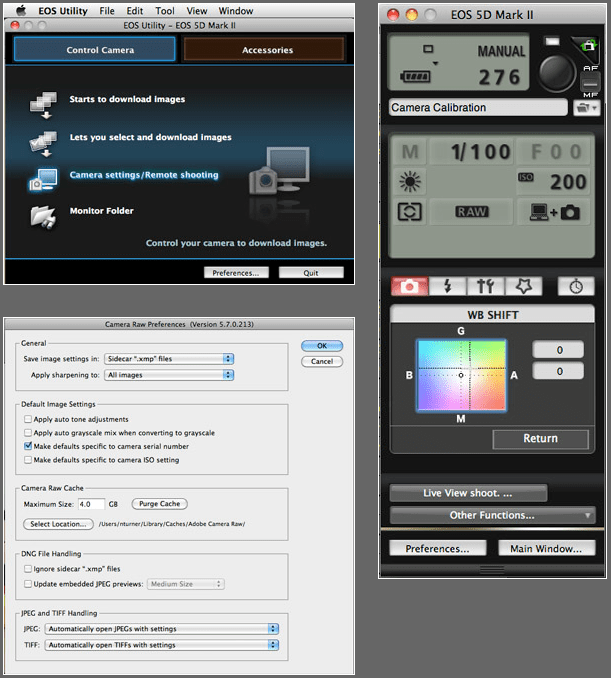
The illustration above top left of the three shows the home screen of the EOS Utility application and the “camera settings/remote shooting option is what you need.

This brings up the window on the top right which has an option marked WB shift that allows you to control the cross hairs and set an exact shift for the camera that is connected at the time. It is simple and very, very useful.

The illustration bottom left refers to the technique in Adobe Camera RAW (Photoshop CS4 in this case) in which you set a custom import for each camera and this is the preference pane that you need to find it.

It would be great if there was some software that allowed you to perform an exact “chip” calibration in the same way that you can calibrate a computer screen. Of course, the ability to calibrate the LCD on the back of a DSLR would be cool too but in the mean time here are three ways that you can use the combination of a good RAW converter and your camera’s built-in options to get all of your cameras working the same way as each other. It takes time, it’s fiddly but will save you a great deal of hassle over the course of a few weeks work.

Modified beauty dish

A couple of years ago I bought a slightly used 14″ beauty dish with a fitting that I couldn’t identify. I used it a couple of times with my old Lumedyne kit and kept meaning to make an adapter so that it was easy to attach and detach without looking like a “bodger”. I never got around to it – largely because the work that I was doing didn’t really call for that kind of light. A couple of months ago I came accross the dish and decided to adapt it for use with my Elinchrom Ranger Quadras.

To make it work properly with the Ranger Quadras I had to remove the orginal fitting. The dish is made out of relatively thin aluminium and it was very easy to use a hacksaw to take the whole of the fitting off. There were three screws holding the wires that keep the dome on position and I removed those to get ready to use the same holes to attach the Elinchrom fitting. This was made from a 13cm reflector which was cut through the reflector bowl in three places, allowing me to spread the metal of the reflector wider so that it could be bent to mirror the curviture of the beauty dish. I then drilled three holes in the modified Elinchrom reflector to match the three existing screw holes in the beauty dish and screwed the whole thing back together. Finally I used some gaffer tape to cover the slightly sharp edges of the Elinchrom reflector where I had cut it.

What you see in the three images above is the “finished” beauty dish. It is lightweight which is great for heads as small as the Elinchrom ones and it puts out a beautiful even light. I have shot some portraits using it but I cannot show them here yet because the client hasn’t used them in the magazine for which they were shot.

The total cost was £20.00 for the secondhand beauty dish, about £25.00 for the Elinchrom reflector that was sacrificed to make the adapter and some gaffer tape. Change from £50.00!

As a footnote, the colleague who proofread this piece for me asked why the cable has two yellow stripes around it. The answer is that I like to be able to identify bits of kit from a distance and the two stripes signifies that it is a two (and a bit) metre cable and that it was bought at the same time as the head. Newer purchases get different colours and a three metre cable would have three stripes. A simple idea but it really helps when you are working quickly and need to set up kit or make changes in a hurry.

Five levels of image manipulation

The Curve section of the EPUK website has always been a great source of information for photographers already working in editorial markets and for those who would like to do so in the future. I have written a few pieces for them over the years and my latest piece is about five different levels of image manipulation and how they should be used in newspapers and magazines.

As we celebrate the twentieth birthday of Photoshop we should take a few minutes to think about how the subject of image manipulation is regarded both inside and outside of our profession. In truth there is a sizeable majority of the population who think that every image that they see has been heavily retouched or altered.

Documentary, news and reportage photographers have a real battle to convince a sceptical world that their images tell the truth.

You might find it helps you to form your own thoughts on image manipulation by looking at these five categories of altering pictures and deciding for yourself which are appropriate for the kind of work that you do, and then using them to educate clients, friends and colleagues about how we as an industry view this very important subject.

  1. Normal darkroom practices – correction of colour, tone, contrast and saturation to reflect the way the image should look. Light dodging and burning.
  2. Darkroom interpretation – changes limited to colour, heavier dodging and burning, unnatural saturation and contrast that make the image an interpretation of reality.
  3. Minor alterations – adding or removing elements to or from the image, other than by cropping, that do not change the essential message of the image.
  4. Major alterations – adding or removing elements to or from the image that heighten or change the essential message of the image.
  5. Image montage – using elements of more than one image to make a photograph that is no longer a genuine representation of the scene.

For the purposes of news I would say that 1 is OK, and that 2 might be.

By the time you get to 3 then I would say that was unacceptable for news – unless there is a label attached or there are good public interest reasons for the manipulation (such as preserving the anonymity of vulnerable people).

The real danger here is that much of the public assume everything we do is altered. It does us no favours for this assumption to go unchallenged. The real sadness is that so many photographers supplying news images ignore the ethical implications – largely because they know no better.

Image manipulation is a serious subject and one that should be addressed by every photographer every time they sit at their screen and every time they see their work in print

Bad weather and batteries

OK, so I forgot to post and say “happy new year”. I’m trying to make my blog posts count and my new year’s blog resolution is to be “relevant, regular and interesting”. The first thing that I want to do is to heap praise on the batteries used in the Elinchrom Ranger Quadra system. The weather in the UK over Christmas was pretty cold and in Perthshire, where we spent Christmas, it was very cold indeed. I had my Ranger Quadra kit in the car boot for well over a week of sub-zero temperatures and the batteries still worked perfectly.

The same cannot be said for the Quantum turbo that was also there. I know that this might seem a small point to most of you but the ability of batteries to keep their charge in cold weather is a big selling point for professional gear. Obviously this wasn’t a scientifically controlled experiment but I am really pleased to know that the gear seems to have this very welcome durability.

One light, big space

It’s very useful to be able to kill two birds with one stone – especially when you have a limited amount of time. I have been very busy this month and blogging time has ben limited. I had intended to carry on my review of the ERQ and maybe post a new technique piece as well. I was sent on a job the other day that allows me to do both.

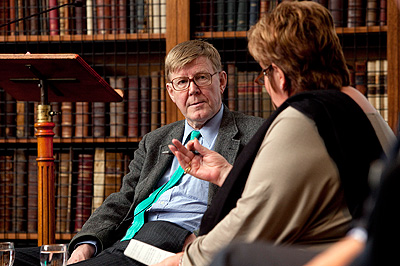
The quality that you can get at 3200 ISO with the latest generation digital cameras is amazing but sometimes you really would rather light something. I was asked to shoot some pictures of “An Evening with Alan Bennett” – an event staged to raise awareness and funds for the Christie NHS Hospital Foundation Trust. The Christie is a world renowned hospital in Manchester and they decided to hold an event in London to raise their profile. The venue was the Royal College of Physicians in London’s Regents Park. The library is a spectacular blend of 20th century modern architecture and the fixtures, fittings and books from earlier centuries. The light is kept deliberately low and that presented me with a few issues. At 3200 ISO I was only getting 1/60th at f2.8 and so I used my Elinchrom Ranger Quadra kit to give the room a lot more light.

Allan Bennett talks to Jenni Murray. ©Neil Turner

My idea was simple. I set up the light as far away from the interview as I could get it and bounced the light off of a wall. This gave me a light source of about eight feet (2.4 metres) by four feet (1.2 metres) at almost 90 degrees to the subject and at a distance of over thirty feet (9 + metres). Quite a decent soft light, but very directional and it looks utterly unlit.

This is an effect that I have written about before but the power of the ERQ kit, given that it is only rated at 400 w/s, made this very easy. I was able to be quite a distance away using a 70-200 f2.IS L lens on an EOS5D MkII and frame my shots with relative ease. I was shooting between rows of chairs and invited guests and had been asked by the organisers to severely limit my use of flash so I only got half a dozen goes at the shot. This was my favourite frame and it shows the interviewer – Radio 4’s Jenni Murray – asking Alan Bennett a question right at the start of the session.

This was shot at 1/60th of a second at f5.6 at 800 ISO. The available light was non-existent and the effect is very interesting. I had been worried about the range of the Elinchrom Skyport triggers but they worked very well at a range of at least thirty feet, probably nearer to forty feet and my only gripe with them is their lack of a locking mechanism to keep them in the hot shoe. The ERQ system passe another important test here and I’m still very very happy with the kit.

Brutal architecture and portraits

I have an admission to make… I love shooting portraits on cloudy days around concrete buildings with urban skylines. There, I’ve said it. As a photographer I find brutal architecture and grey winter days both challenging and creatively stimulating. Combine the two and you have a blank canvas for interesting images – as long as you have a cooperative subject.

©Neil Turner, February 2009

This portrait is of an academic working at a central London research and teaching institute. The building is a classic modern brutal concrete one and I have shot pictures there dozens of times over the years. I have never managed to get access to the roof before and I have always imagined that it would be a great place to shoot, with decent views of the surrounding skyline.

It was a windy and dark February day and so I wanted to find a spot out of the wind. The roof features a couple of large concrete towers which contain lift machinery and other services and the southerly one has a short walkway running through it. On a sunny day this would be perfect shade in which to place your subject. On this day it was equally perfect shelter from the wind and probable rain. There are also railings which are perfect for attaching lighting stands to so that they don’t blow away.

The picture above wasn’t the first that I shot. I had tried quite a few angles to get the London skyline in but the wind forced a retreat into the covered walkway. I decided that being out of the wind gave me the chance to shoot with a 24″ x 36″ (60cm x 90cm) Chimera soft box on my Lumedyne flash head. The softbox is old and has both the inner and outer diffusers permanently sewn in and I wanted to make use of it’s softness so I placed it as close to the subject as possible. In this frame it is about three feet (90cm) from his face off at about a 45 degree angle to the left of the camera with the bottom of the softbox about level with his chin.

I always try to start with an available light reading for the sky which came out at about 1/250th of a second at f5.6 on 200 ISO. I wanted the sky to be darker and so I decided to shoot at f8 instead. This meant that I had to adjust the power output on the flash to give me the aperture that I wanted and that meant 1/4 power (50 watt/seconds). The first test shot told me that I needed some separation between his hair and the dirty grey concrete and so I set a second flash (Vivitar 285 HV) on a stand directly behind him on 1/16th power to give him a fairly aggressive hair/rim light. This isn’t a technique that I use very often but in this case it made the difference between a muddy image and one with some real edge. The combination of the big soft light and the hard hair light gives the portrait a particular mood which compliments the sky and the architecture.

Like many of the techniques that I use, this one needs to be used sparingly so that it has maximum effect when it does get used.

Owning up to some bad habits

“It’s all about light”. That’s a message that I hope everyone who visited the technique pages on my web site will take away. When you are the one who controls that light, you have a large number of options open to you. This month I have been trying a new toy and I thought that I’d use that as an excuse to write about how and why I choose the quality of the light.

©Neil Turner/TSL | London | December 2004

The first thing I have to do is own up to some fairly bad habits:

The first is that I go through personal fashions in the way I light and in the kit that I carry with me. One month I’ll use softboxes and then the next month I’ll use umbrellas. One week I will keep the flash as only one element of the scene and the next the flash will overwhelm the ambient light.

My second bad habit is that I will light women in a different way to men. 99% of the time I will use a much softer set up for female subjects than I would for males.

Thirdly, I’m aware that I tend to use a harder light on older skin (especially men). Older people seem to have a lot less moisture in their skin and so their faces have a lot less shine.

I’m much more likely to direct a spectacles wearer about the angle of their head, simply to avoid getting bad reflections in their glasses. I also try to find out if people wear contact lenses and get them to look more squarely at me to avoid getting any strange shapes in their eyes.

So far I’m painting myself as a bit of a lazy photographer. I like to think that it’s not laziness – more a realistic attitude towards getting the shot right. When you are shooting people, you often end up shooting a very different picture than the one that you first envisaged so my bad habits are there to simply give me an easy starting point. Getting on with the shoot is part of my style. I rarely spend very much time wandering around formulating ideas, largely because I am regularly expected to set up, shoot and break down in a matter of minutes. Having the “safe shot” in the bag is something of a religion to me and I find that giving in to my “bad habits” makes my practice a lot easier.

Many photographers use the same technique day in and day out. I cannot claim to do everything differently every day, and sometimes I feel like a chef who has a limited range of ingredients that I can select, mix and adapt to create new and interesting combinations. Every once in a while a new ingredient becomes available, a new toy to play with. Does that make me gadget boy? Or does it simply help to keep my work fresh?

The photographer’s “uniform”…

I was told the other day that I was wearing my uniform with pride. What uniform you may ask? It seems that the uniform in question was that of a freelance news photographer. I have known for many years that many of us tend to dress in similar ways: we all spend a lot of our time kneeling down or lying down to get the best angle. In the winter we all get cold when we are working outdoors and so it comes as no surprise that we all choose similar clothing. So what was I wearing?

The first thing that I did was to look down and make a mental note of my attire. Heavy duty winter coat, fleece scarf, heavy weight denim jeans and my much loved Timberland boots. They are ancient, they are warm and the tread is still pretty good. These boots have waded into the sea, they have stomped through Scandinavian snow and they have marched across many miles of the New Forest with the family. Most importantly of all, they have seen me through a lot of miles on the streets of London.

You’d be right to think of this as a uniform – how many of my colleagues have a black or grey North Face jacket on their backs? It wouldn’t be an exaggeration to say “most”! I have no idea if mine is the latest technology (its Hyvent, whatever that is) or the coolest (black and grey?) but it works amazingly well. This too has kept me warm in the northern areas of Finland in the depths of winter. In fact, I even have a warmer one that I find it hard to wear. That McMurdo parka was a big investment for me and I’ve worn it twice.

I have just remembered that I was also wearing some amazing grey fleece gloves that my brother bought me a while back. They are made by Rohan and they are perfect for a photographer. They allow you to use the camera well enough (even the tiny buttons on the back of a Canon EOS 5D MkII) and manage to keep the worst of the chill off of your hands. The trouble is that they don’t have a name on them and the Rohan website doesn’t show any gloves so I guess that the recommendation isn’t all that helpful.

I’ve written before (although I really cannot remember were) about the photographer as chameleon. The idea is that we need to adapt to our surroundings and sort of blend in. In the city, surrounded by other members of the media it is pretty simple – once you’ve seen one black winter jacket with cameras hanging from it then you’ve pretty much seen them all. It gets trickier when you are the only one there. I’ve done jobs that required a dinner suit and others which asked for high visibility vests and construction helmets (more of the latter recently) but the majority of the jobs don’t come with a written dress code. The trick is to go for the right kind of smart casual wherever possible and to cover it all up with an expensive looking coat.

What you wear says plenty about you. Looking like a photographer tends to help you be accepted as a professional and helps you shortcut the whole credibility issue. I want my Doctor to wear a white coat and my postman to have the right clothing too. If you look like an archetype, if you play along with people’s prejudices it tends to relax them. If I turn up to shoot someone’s photograph dressed like a postman or a doctor I’m going to have to work that little bit harder to convince them that I know what I’m doing and that I am a professional photographer.

So that’s my winter uniform sorted. What shall I wear this summer?