advice

Grumpy old photographers’ charter

I do a lot of seminar and teaching work these days and one of my most popular presentations is about professionalism. The talk is aimed at new entrants to the profession but it seems to go down well with photographers who have been around a while as well. I have even delivered the same talk to a group of lawyers because actually replacing the word ‘photographer’ with ‘lawyer’ brings a lot of the meaning around to the central idea that, in many ways, professionalism is the same no matter what you do for a living.
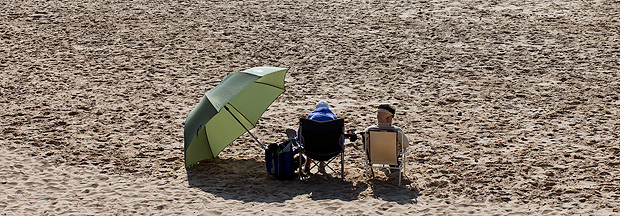
©Neil Turner. March 2009, Bournemouth Beach

The final part of the talk is a bit of a dig at myself and my peers. Those of us who have been in the job for a long time and who might just be getting a little complacent about things. I call this part of the talk “The five worst habits of those of us who should know better”:

1. Harking back to a golden age that may, or may not, have existed

It’s a simple idea really – we all look back with slightly misty eyes at the time a few years ago when things were good and before something new came along to spoil everything. Take your pick from the use of colour in newspapers, the whole move to digital, the adoption of multimedia by newspaper websites and several other developments in the industry. The truth is that when I was just starting out there were a few photographers who complained about the arrival of 35mm film and the loss of their beloved Rolleiflex cameras and even one or two who bemoaned the passing of half plate cameras and dark slides with sheet film. I reckon that every photographer has a ‘golden age’ that they look back at and that you can calculate when that was for each of us using a simple formula which compares how long the photographer has been working with when they got their first big front page and divide it all by the first major change in the industry that they went through. There never was a true golden age was there?

2. Forgetting why we came into the job in the first place

Easy to do this… most of us had a desire to tell stories, create arresting and beautiful pictures and to make the world a better place with our photography. Very few of us did it for the money, not many of us did it so that we could play with ever more expensive toys and only a tiny number came into it so that they could work unsocial hours and have to chase clients for money the whole time. If you take a step back and think about your original motivation and it isn’t there any more you really need to make your mind up about whether this is still the business that you want to be in. The older I get, the more I feel the need to shoot pictures that I want to shoot just to keep myself sane and sharp.

3. Failing to keep up with new business practices

“I’ve always done it that way, why should I change now?” is a common lament from photographers who are in trouble of getting it wrong. From the way you buy and use equipment to the way you store your archive and from the way you word your invoices to the way you put your portfolio together should be the subjects of constant review and possible change. Technology affects every single aspect of who we are and what we do and anyone who decides to stop keeping themselves up-to-date with what is happening is consigning themselves to a parallel dimension where they may get some work but where that might  be a temporary state on the road to going out of business.

4. Throwing money and effort into the latest thing

Exactly the opposite of the last problem really. Keeping abreast of developments and knowing where the market is a good idea whereas automatically jumping on every new idea, fad or fashion is not. So many new developments turn out to be ideas that don’t stand the test of time and too many of us have invested too much time and money chasing them. The worst way to do this is to assume that somebody younger and hipper than you automatically knows what to do – that, in my experience, is rarely the case. There’s always a middle-aged geek who you can ask…

5. Letting professionalism slip

Another thing that is far too easy to do. I know that I’ve done it – mainly through over-confidence. You have to remember the maxim that “professionalism is everything we do, everything we say and everything we produce” in our working lives. You can get too close to clients, you can cut corners in your workflow and you can rely too much on automated systems. This is far from a full list but it illustrates the potential pitfalls when it comes to losing our professional edge.

Being a professional photographer is a fulfilling and interesting way to make a living but we all need to remember that it is a profession and not a lucrative hobby. I’ve been wracking my brains to come up with a clever and punchy pay-off line for this blog post but I’ve struggled. I’ll just content myself with some advice: when things are feeling tough and not all all like the ‘old days’ just remember the five worst habits of those of us who should know better and if that doesn’t help… get some help!

The best lens for portraits?

On a photographers’ forum last week there was a lot of discussion about the best lens for portraits. Can of worms opened. Mac vs PC or Nikon vs Canon style debate well and truly started.

I have written before about portrait lenses and I won’t bore you with repeating my previous post (if you missed it, catch up here) except to say that when people ask this question they normally mean headshots or mug shots where the subjects head and shoulders will fill most of the frame.

©Neil Turner, February 2012. Bournemouth.

This portrait of a local artist was shot using an 85mm f1.8 Canon lens wide open but what lens should you use for this kind of picture. The debate will rage and answers anywhere between 85mm and 135mm (all measured on full-frame cameras) will be given, supported, doubted and even ridiculed. Most arguments that don’t get broad agreement also don’t have a simple answer. Sure there’s something lovely about the feel of a portrait shot on an 85 but what about the degree to which you have to invade the subject’s ‘personal space’ to get the composition? What about those 85mm lenses where the close focus isn’t good enough to get that bit tighter still? With a 135mm lens the personal space issues largely go away and the close focus issues almost always go away too – but is the effect as nice? Can you ever include something of the environment in those pictures? Would you even want to?

The actual answer (as always) is that it depends on you, your technique and your own taste in pictures. A few weeks ago I was looking back at some corporate headshots that I had shot and I had to tell another photographer on the other side of the world how I had shot them so that he could replicate them so that when his pictures and my pictures were printed on the same page nobody (hopefully) could tell that two photographers were involved. One of the things I needed to give him was the focal length of the lens used so I got the pictures, went through the EXIF data and noted it all down. I had used a 70-200 f2.8L lens and so the actual focal length was between 120mm and 130mm.

I was a little surprised that it was that long and so I grabbed a folder of images that I keep on my hard drive of corporate portraits to show prospective clients some examples of what I have done in the past and looked through the EXIF on those. These were pictures that, by definition, I really like and it quickly transpired that the tighter compositions were all shot between 120mm and 150mm on the 70-200. Again, quite a surprise – I had always seen myself as an 85mm lens user!

Well, one thing led to another and I decided to do a quick ‘audit’ of all of my favourite environmental portraits to see what lenses I have favoured. This was less of a shock because in the folder of 120 of my favourites the widest lens used was 16mm (on a 1.3x crop body, so we’ll call that 21mm for the purposes of this exercise) and the longest was a 300mm (on a 1.6x crop body which becomes 480mm in this context). There was a lot of bunching in the 35-45mm area and some more around the 120-150 area but the spread of focal lengths was otherwise pretty even – which pleased me greatly because it confirmed what I always say to others;

“There is no such thing as THE perfect portrait lens”.

This exercise is a bit time-consuming but it could have a lot of uses in professional photography. For example, anyone used to zooms wanting to buy a couple of prime lenses should think about going through the exercise to help them decide which ones would suit their style. Anyone wanting to know what lenses to replace as a matter of priority in these cash-strapped times could also benefit from a focal length analysis. The reverse is also true – a photographer who wants to change the way they do stuff could see what they normally shoot with and deliberately avoid those focal lengths. The possibilities are endless once you start to think and we can all do with a bit of style analysis from time to time. How we choose and use lenses has always been a preoccupation of mine and this exercise has helped me to rationalise that.

Indeed why stop there? EXIF data is amazingly useful and so you could also do an aperture comparison. My quick one revealed that I shoot a surprisingly large amount of pictures using three apertures f2.8, f8 and f22. In my sample, those three apertures accounted for over 50% of my pictures. I’m not sure what to make of it but I will work it out one day.

©Neil Turner/TSL. January 2008, London. 173mm focal length on a 1.3x crop body = 225mm

What started out as a simple answer to a simple question somehow turned into statistical analysis. Many people would say that is the exact opposite (they might even use the word antithesis) of what we, as creative people, should be doing. I have a lot of sympathy for that argument but, in a world where there are tens of thousands of great photographers vying for work, every little advantage we can eek out for ourselves and every piece of information that we have to work with could just be worth it’s weight in fluorite glass.

Capture One Pro and other workflows…

One of the subjects that I teach is workflow. I know that I’ve mentioned that before but I thought that I’d remind you of that when I explain why and how I have been learning all about Capture One Pro – the professional RAW conversion, tethered shooting and image enhancement tool from Phase One. I am on version 6.3.5 (the latest available) and this is the first time that I have seen it since version 4 a few years ago.

Principally designed to make the most of Phase One’s own imaging systems, it also works rather well with the whole gamut of professional file formats. I have been using it for quite a few days now and I thought that I’d post some thoughts on here.

Before I get down to my opinions on Capture One Pro I need to say that every piece of software that I’ve used has needed quite a long time to get used to and anyone who does “full reviews” based on a few hours of use is kidding both themselves and their readers. I also need to make it clear that I paid for this software and that I have absolutely no ties to Phase One.

I have now used Aperture, Lightroom, Photoshop, Photoshop Elements, Canon DPP, Graphics Converter and a few others and Capture One Pro is probably the easiest of the lot to get to like. My knowledge of Adobe Camera RAW in Photoshop has been gained over many years and many thousands of edits and it has only taken me a few days to feel almost as comfortable with Capture One. I’m still learning more and the more that I learn the more I like it. That isn’t always true of new software packages – even if you really want to like them…

The workspace that I'm currently using on a 15" MacBook Pro

I like lots of things about the way it works, about the interface and about how good the customer support and instruction manual are. Every time I think that I’ve found a flaw in the feature set of this software I search the knowledge bank or put a note on Twitter and there it is – the answer that tells me that everything I wanted was there all along. That is great but there seems to be one feature from Adobe Camera RAW that I use all of the time that isn’t there with Capture One Pro – good and accurate profiles of all of my Canon lenses ready to apply corrections.

My first impressions of the user interface centred around my inability to find the tools that I actually wanted. I knew that most were there because the literature told me they were and a very brief exchange on Twitter with the workflow genius that is Nick Wilcox-Brown let me know how to find them and add them to my custom user interface or “workspace” as the application calls it. Better still, you can create a range of custom workspaces and save them alongside the suggested ones for dual monitors, simple workflow, black & white or even a replica of the previous version (5) of the software. Being able to customise the workspace is not unique to this application but I believe that they have implemented it really well.

All of the adjustments and all of the options have easily controlled and finely adjustable controls (mostly sliders) and I found myself easing very quickly into the Phase One way of doing things.

Time for a short list of likes:

  • Customisable user interface
  • Easy to learn how to use
  • Extraordinary range of functions
  • Tethered shooting
  • Fantastic image quality
  • Value for money
  • Web contact sheets
  • Output of files to specific sizes

… and dislikes

  • Cannot find profiles for my Canon lenses
  • The sessions menus
  • Applying adjustment “recipes” seems hit and miss
  • The way that it handles IPTC metadata (I know that the sister app Media Pro does that better)
  • Speed of processing batches of files
  • Not recognising the simple tags that I can apply in camera or by using the ‘tag’ function in Photo Mechanic

That is a short list of dislikes and you have to actually use it to decide if you agree about the sessions menus – the way that Capture One likes to create a virtual time bubble for each job in much the same way that Aperture does by default. I may be doing something wrong when I’m trying to create, save and apply “recipes” which are a great idea (again shared with Aperture and others) that allow you to copy all of the adjustments that you have applied to one image to one or more others as well as keeping that set of adjustments for future use/adaptation. Sometimes the recipes worked and other times they didn’t.

My background is in news and editorial photography and IPTC metadata is a fundamental requirement for me and it forms a big part of my own workflow and the personal workflows of people that I work with when I’m doing coaching. Capture One Pro handles IPTC and is compliant with all of the IPTC fundamentals – it just doesn’t do it very well. The same can be said for quite a few image processing applications and I still love good old Photo Mechanic for the speed, accuracy and flexible way that it handles everything except RAW conversions and long term storage.

My final dislike is the speed when processing batches of files. On a two year old Apple MacBook Pro with an i5 2.4Ghz processor, 8GB or RAM it takes 50-60% longer to process a batch of 36 CR2 images from a Canon EOS5D MkII than Adobe Camera RAW inside Photoshop CS5 does. Individual files are shot through in almost the same time but batches are slower. I tried very hard to be scientific when comparing like with like but I am prepared to be proved wrong on this.

This isn’t really a full review – just some thoughts on an application that I am sure to have to teach very soon. Several people have already asked what advantages Capture One would give them over Lightroom or Adobe Camera RAW in Photoshop and, to be honest, I couldn’t really name any. If you already use and are happy with either Adobe product for processing RAW files then it doesn’t really make sense to spend more money and get Capture One Pro. BUT (and it is a but worthy of being in upper case) if you are looking at designing a new workflow for news and editorial work from the ground up and you don’t already have licenses for anything else I would strongly recommend getting Capture One Pro and using it in tandem with Photo Mechanic. Between the two you have a solid, reliable and well priced set of options that will, without doubt, deliver the goods. That would leave you in need of an archiving option and for that Phase One’s Media Pro might be a good solution. There are those who’d argue that between the two Phase One applications you have everything you’d need and they would be right but there is no getting away from the fact that Photo Mechanic does what it does so well that it is worth the money and then some. The same goes for Capture One Pro too.

Re-working old files

With all of the time that I have spent recently trying to get used to the beta versions of Photoshop CS6 and Adobe Camera RAW 7 I have been having quite a few conversations on forums and over email with others going through the same process. One conversation led me to think about even older versions of the software and how I used them and in turn that got thinking about finding an old CR2 two file that I was never truly happy with and having another go with the up-to-date version of ACR. Without looking at the original “finished” JPEG I grabbed a CR2 file from 2008 that I remember being unhappy with and gave it “the treatment”.

©Neil Turner/TSL. May 2008 - RAW file straight out of the camera

©Neil Turner/TSL. May 2008. RAW file Converted with using .xmp settings from 2008 in Photoshop CS5

©Neil Turner/TSL. May 2008. RAW converted today using ACR 7 in Photoshop CS6 Beta

Whilst I was doing the conversion it became obvious to me that I wasn’t really comparing versions of the software – it was that my taste in the way images look has changed. I have no doubt that knowing far more about converting RAW files than I did four years ago helps enormously. You can also factor in the improvements in the adjustment tools available as well but the sum total of all of that means that the newer version is far more subtle and (in my eyes) far better. I made use of the fill-light and the graduated filters. I used a much warmer white balance and my approach to both noise reduction and sharpening has moved on too – although you’d never notice that from these 620 pixel samples.

So there we go. If it wasn’t blindingly obvious before, it is now. RAW conversions depend on a mixture of software and taste and this little experiment has proved to me that my tastes have changed and so, therefore, must the tastes of other people. The final conclusion has to be that every time you create a new folio, make changes to your website or supply a picture you have to make a choice between re-working the files to bring everything up to they way you like things now or leave well alone and allow your images to be “of their time”. Fat chance of the latter happening here…

Get yourself some defaults

©Neil Turner/TSL. London, May 2005.

Surprise, surprise – yet another blog post in response to a question! I was asked “what one single piece of advice could I give to someone who had already read the previous “one piece of advice” blog post on here?”

That’s a really cheeky and rather good question and, having shot myself in both feet by saying that I was a sucker for people who used please and thank you I felt duty bound to answer.

In three words I’d say “default staring point”. What’s that? you ask… “Good question” I respond. It is the notion that every time you go to do something you have two choices: you can mess about working out where to start and what to do first OR you can go to your default starting point and get stuck in straight away.

In photography this takes a wide variety of forms. For example, when I’m shooting a lot portrait my default position for placing a light is parallel to my subject’s torso – imaging that their chest is one line and the front of my light source is another, those two line would be parallel. Another example is “what gear shall I use today” the answer (if you are lucky enough to have sufficient kit that you need to choose) is my default kit: two 5D MkII bodies with 24-70 and 70-200 f2.8L lenses and a couple of 580exII flashes in the bag with a 16-35 “just in case”.

Every part of the job has a default setting. From the preferences locked into Photo Mechanic and Adobe Camera RAW to leaving my cameras on daylight white balance and 200 ISO. Default starting positions. I know that if I start there I can move away as soon as my imagination starts to flow and as soon as I start to get a feel for the situation. Sometimes the defaults get changed with seconds but it is amazing how often they stay a lot longer.

One photographer I explained this concept to a few years ago compared it to putting his left sock on first, followed by his right sock and then his trousers. No real reason why, it just means that you can concentrate on the interesting stuff safe in the knowledge that you have the basics covered.

When you really start to think about it we all have defaults in every area of our lives. Toothpaste onto wet brush, small amount of cold water onto that and away I go. Why would I do it any other way? Off to shoot a portrait, tightish head shots on a long lens first to avoid spooking the subject and then gradually get closer and wider. It makes sense to me and that’s my default.

I could go on with the list but I’m guessing that you have the idea by now. A default starting position for everything just helps you to organise your thoughts and get stuff done. Good advice?

Photographic education… again…

Here I am again writing about photographic education. Every time I’ve started down this road it has been entirely due to one or more conversations that I’ve had with someone unhappy about the way the system is working out for them. This morning I spoke to three students who have ended up on the wrong course. I may come back and write about them another day but the main outcome of those conversations has been to make me think about a wider question.

When you speak to professional photographers about photographic education in the United Kingdom you are very likely to hear tales of second year undergraduates who don’t know what an f-stop is and third years who haven’t had any training in digital workflow. On the face of it, that sounds absolutely indefensible. It doesn’t, however, tell the whole story.

Thousands of eighteen and nineteen year olds go off to university every September to study English and thousands more go to study History. Does anyone bemoan the lack of jobs for writers and historians? Do working authors and working historians complain loudly about the lack of training that these young people are getting in the technicalities of doing their jobs? No. The truth about photographic education is that not all courses are there to train people to be photographers.

A sizeable number of courses are designed to teach photography as more of an academic subject – learning for learning’s sake and mind expansion rather than training for a career behind the camera.

This kind of learning is still a relatively new concept for photography. Our colleagues who are engaged in fine art, the history of art and even fashion are further down the road towards embedding the study of their subject into the world of academe and photography needs to catch up.

I have no doubt that lecturers engaged in teaching photography as an academic pursuit know what they are doing and know what, when and how they are teaching it. The thing that I am a lot less sure about is whether all of the students enrolled on those courses realise that they are pursuing an academic study. In fact, I am convinced that a surprisingly large number don’t realise that until they are well into the first year and that many don’t really wake up and smell the coffee until they are even further into their studies.So as far as I can see we have two separate but parallel problems here:

  • A lack of realisation from the profession that not all photographic courses are there to train photographers.
  • A problem for students who don’t understand that not all photographic courses are there to train photographers.

What should we do? Two parallel problems with a single solution: Better PR. Photographic education needs better PR. Looking towards schools, colleges, parents, students, the public and the profession all courses – especially the academic ones – need to make it clear who they are and what they are doing.

Photography should be studied as an academic subject; its cultural presence and power is worthy of research and study. Its history and even its technology are topics equally as valid as others that are understood and accepted as legitimate subjects in a way that photography is struggling to be.

Photography is also a vocation and courses that set out to train students for a career behind the lens need to make it clear that that is their goal and set about doing it to a standard that the industry requires and the students deserve.

We need two distinctly different approaches to photographic education and we need the courses following each route to be confident, open and clear about what they are doing. Courses that attempt to steer a course between the two and produce graduates who haven’t had a proper academic workout or whose technical knowledge and creative talents haven’t been optimised and refined are failing everyone. Let’s get behind photographic education and let’s help to get the courses to get their PR right.

Having an eye for detail

The choice between taking the same photograph as everyone else and standing back and getting something different becomes a matter of survival when you work on a weekly newspaper and the other five photographers around you will be publishing the next morning. Even if that weren’t the dilemma of every photo-call I go to, I like to think that as a photographer I am an individual. It’s a pretty useful mindset to sign up to, no matter how much or little photography you do.

Photo: NEIL TURNER. ©TSL. 04/09/2000. TES news.

This photograph of an elephant’s eye is a classic example of taking a mental step back from the herd and shooting something different. It is also an advertisement for having more than one camera with different lenses on. There were five other photographers at the job. The story was about this young Indian elephant who paints pictures, and about how he was being used to launch an environmental art competition for schoolchildren. We were all trying to make the same picture of the elephant, three kids, some paint and an easel. The composition was looking messy, and there were just too many elements in it. We all had 16-35 lenses on and were getting nowhere. I was getting nowhere faster than the other five who would all go to press that night leaving me with two more days during which the story could easily get scrapped without a strong image. My second camera had my 70-200 on it and I grabbed it, zoomed in and the picture almost took itself. Strong, arresting, different and wide open for headline writers to do their thing. Just about every base covered. I shot some of a paint brush in the elephant’s trunk too, but this was the picture chosen.

When an image is competing for space on a newspaper page it has to stand out. The enlightened editors at our papers allow images to arouse the reader’s interest and don’t insist that photographs tell the whole story all of the time. This approach works on every level, from the family album through e-mailed postcards to published images. Getting in close works.

See also: MINDSET FOR NEWS PHOTOGRAPHERS

Compose the picture and then wait

I have a folder full of images on my hard drive that I use for teaching. They aren’t always my best work but they help to illustrate a point better than others from my portfolio. This is a perfect example of that idea.

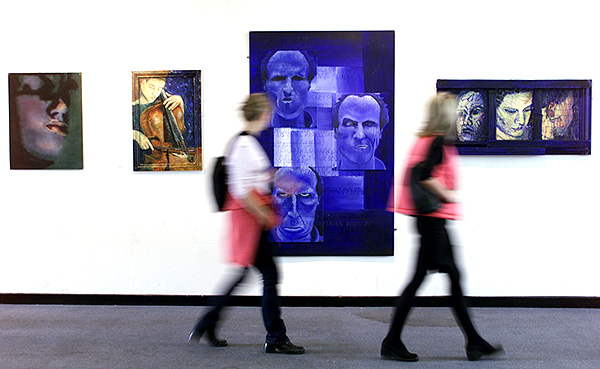
Sometimes you can see the potential for a picture but the picture isn’t happening. This is a common issue for news photographers who have to shoot pictures to go with stories about something quite specific but aren’t allowed to set a lot of shots up. This picture was to go with a very small story about an art exhibition that had been put on by some young female artists on a very tight budget. The venue was a shopping centre (mall if you are from the USA) and I could see that some human interaction with the work was the best way to cover it. I grabbed a tripod from the car and stuck my camera on it. Composing the frame was pretty easy and all I had to do was wait for the right people to walk past and look at the work. People came along and I tried various shutter speeds to get some blur in order to keep the ‘focus’ of the story on the art. Soon I was happy with my plan (1/10th of a second at f4.5 on 200 ISO) and I waited, shooting frames as people came past in ones, twos and threes.

©Neil Turner/TSL | London | October 1999

I could see these two women with very similar pink in their outfits coming. I could see that they were in perfect step and so the plan went from the occasional frame to a full burst (about 3 frames a second in those days) and got this shot. Of course I did a few more but the deep joy of those early digital SLRs was that you had great confidence in what you saw on the rear LCD.

The idea remains one that I use over and over again. I see pictures and I compose them around what’s there and then I just have to be patient and wait for someone or something to come along and complete the photograph. You can see the same idea here in an old post about walking with speed lights which has pictures taken a lot more recently!

For those who love detail, this was shot with a Kodak DCS520 camera (1.9 megapixels of class) and a Canon 17-35 f2.8L lens at the 35mm end of the range perched on a Manfrotto 055 tripod (which I still use).