photography

Education… over on EPUK…

I write a lot for other websites and towards the end of last year the Editor of the Editorial Photographers UK site asked me to write something about photography education. It started like this:

What price your dream?

In Britain a staggering 1600 photography courses will be touting for students in 2012. Neil Turner, professional photographer and tutor on a new photojournalism course that starts in Bournemouth this month, asks whether enough of these courses actually prepare students for the harsh realities of professional photography today.

If you get a dozen professional photographers together and ask them about the state, standard and suitability of photographic education in this country you’ll get two dozen anecdotes about graduates who don’t know their arse from their f-stop, and a consensus that higher education is failing the students and the industry. Is this true? Are we missing something, or is the system getting it wrong big-time?

If you’d like to read the rest, you can go to THE EPUK WEBSITE

Good, bad and ugly purchasing decisions

If you talk to any photographer they will almost certainly tell you about the catalogue of bags, cases and pouches that they have bought thinking and hoping in equal part that their lives would be made better by owning and using the perfect holdall. We all know it’s a myth but we all keep buying in the hope that one day that elusive bag will be made and that it will (somehow) save our poor battered spines. Well that’s one kind of bad purchase that we will all own up to but I was put on the spot the other day by a young photographer and asked about my best and worst purchases of recent years. Hmmm…

My reply was that I had been pretty fortunate where cameras and lenses were concerned. I had made pretty good choices on the ‘big ticket’ items – my camera bag is full of the same kit that it was two years ago and (apart from getting newer versions of the same) I’m still happy with my gear. It’s the small things and the software where the good and bad choices seem to come – maybe because they are the nearest thing to impulse purchases that I make.

The Good, the bad and the ugly…

Software tops my list good purchases that I’ve made recently and at the very top is the invoicing software that I’ve been using since I went freelance again in 2008. I found BILLINGS as a ‘staff pick’ at the Apple Store on line and right from day one I have genuinely enjoyed using it and the development that has since taken place from version 2 to version 3 and the addition of an iPhone app has made a good package very good and there is nothing like getting your invoicing right to make you a happier photographer. My other good/great purchase was the iPhone itself. I had tried a Blackberry and I had used a Nokia smart phone but from day one the iPhone has proved itself. It seems as if I get a new ‘life enhancing’ app every week: from cinema bookings to a brilliant parking control app the iPhone becomes more and more important and having the back-up of Mobile Me really helps too.

Back to software – I have used Photo Mechanic for many, many years and I still love it. It is fast, intuitive and does exactly what I need it to do. One colleague refers to it as ‘old school’ and I’ve heard people say that it’s functions are available within newer programmes but I’m far from convinced. Workflow is completely central to the work that we do and so I’m a sucker for anything that is presented as a ‘better, faster, easier’ in the workflow area.

My first ‘bad’ purchase was Adobe Lightroom 3. There is nothing wrong with it. The RAW conversion is exactly the same in Photoshop CS5 but the rest of the file handling and workflow part of it’s capabilities require huge computing power and the patience of a saint. Out of the box it is set up to be thorough but that makes it really slow for the kind of work that I do. By working out the preferences you can decrease it’s thoroughness and speed it up quite a bit but it is still never going to replace Photo Mechanic in my life. That’s an expensive mistake to make but that’s life.

My next ‘bad’ purchase was Apple’s Aperture. Once it came down to just £45.00 in the App Store I was tempted and I gave in. Aperture was an attempt by Apple to take professional workflow, give it the Cupertino treatment and give us a workflow designed from scratch. From version 1 it was flawed and my first experiment with it left me feeling “if only” – in fact a whole list of “if onlys”. Version two came along and they had ticked a couple of boxes but left far too many questions to make it worth pursuing. I bought version 3.1 safe in the knowledge that several of my peers are using it, loving it and even teaching it. I wanted to love it. I tried for well over a month to get on with it but two weeks ago I finally admitted that it was never going to be. Aperture needs power – my Mac has plenty, a Core i5 processor and 8Gb of RAM, but it still never seemed enough. I think that the realisation that Aperture is only at it’s best when you have some expensive plug-ins was a turning point but I soldiered on.

You also need plenty of screen real estate to make the interface appear anything other than cluttered and I do half of my work on a 15″ laptop. I disliked the keyboard shortcuts to start with but got used to those but the reality check was that using Photo Mechanic plus Adobe Camera Raw just makes sense for me.

And here is the truth – what makes a ‘bad’ purchase for one photographer doesn’t mean that it was a bad product. I have owned an Canon 85mm f1.2L lens and sold it again because it didn’t suit me – it’s a hell of a lens, just not for me – I prefer the bargain 85mm f1.8.

So what about an ‘ugly’ purchase? I’m struggling to think of one in the software field. Had I actually bought version 1 of Aperture instead of doing the free trial, that would qualify but I didn’t. I cannot be bothered to list all of my ‘ugly’ camera bag mistakes and so I come to the countless times that I have bought cheap options and regretted them. If I’m shooting with Canon or Vivitar flash units on stands I use the bomb-proof Manfrotto Light-Tite adapters. I tried to use a couple of cheaper ones but they were rubbish and broke under heavy use.

Tripod heads are another way to spend money unwisely. When I left college in 1986 I bought a Manfrotto 155 tripod with a basic head. That got stolen and so I bought another one just the same. When I joined the staff on the newspaper they bought me a new tripod – exactly the same again but with a three-way pan and tilt head complete with a quick-release system and spirit levels. It was a good buy, it worked well and I still have it but I have always wanted an even easier to use tripod head and have bought and sold about half a dozen ball and socket, joystick, friction controlled and fluid heads. I did spend time watching eBay for a geared head at a good price – safe in the knowledge that it would be exactly what I didn’t need and I’ve abandoned the search.

My ugliest purchase ever was a Maxtor USB2 portable hard drive. It failed within days, having never really worked that well anyway. I took it back, they swapped it and the new one failed too. I didn’t lose any data and my only expense was two round trips to the shop to get drives replaced. After the second failure I got a LaCie Rugged drive which is still absolutely fine nearly four years on. I know that it will fail one day and I have duplicates and triplicates of the data stored on it but it has done it’s job.

Making purchasing decisions as a photographer is a tough job but when photography is your livelihood as well as your passion choosing when and what to buy becomes a really tough call. I have a basic kit and I have back-ups for most of it. I have rental accounts with four different companies and I have insurance that should cover my kit against loss, theft and breakages. But what about new, different or specialist gear? The more commercial work that I do, the more that I find myself needing to rent or borrow specialist kit. I have spent hundreds of pounds hiring Canon tilt and shift lenses over the last year or so. I need to seriously consider investing in one or two TSEs because the cost of renting might well be greater than buying, using and then selling on. If a lens costs £2000.00 to buy and it costs £50.00 a day to hire, how many days in a year should you hire before it becomes a better idea to buy? It isn’t 400 days because the lens can be sold. The depreciation on a £2000.00 lens would be somewhere between 1/3 and 1/4 over six months or between £500.00 and £700.00 which is only ten to fourteen days rental (if the days are not continuous) and maybe twenty to thirty days given that you would hire by the week from time to time.

To buy or not to buy, to rent or not to rent – a couple of big questions. One thing is for sure, had I ever been able to rent a Crumpler rucksack camera bag for a few days before lashing out £130.00 I would never, ever, have bought it!

Photographs of children

The beautiful bold headline above Jemima Lewis’s article on the Daily Telegraph’s website reads “There is no law against photographing children”. Whilst that is sort of true, I wish that it was that easy. I have photographed over 3,500 schools in 13 different countries during my career and I wish that I had a one pound sterling for every time that someone has quoted a law about photographing kids that doesn’t exist. I can tell you now that the amount of money that I could have raised would mean that I wasn’t driving a four year old car with almost 100k miles on the clock.

So what is the law here in the UK? One of my jobs at the Times Educational Supplement was to draft a set of guidelines for the picture desk team (when we had one) and the editorial teams to follow when commissioning, researching and using images of children. We also had a budget to get a Barrister to go over the relevant facts so that the guidelines (finished in 2007) could be adopted with confidence.

There is a subtle distinction between taking and publishing pictures and of course that takes us down the whole what constitutes “publication” debate but for the purposes of what I want to talk about here let us assume that anything you take might get published.

There are essentially two laws on the UK books that mention photographing children. First of all there is the The Child Protection Act 1978 which bans indecent photographs of children – that’s as it should be – indecent images of children should never be taken and should therefore be impossible to publish but what constitutes indecent? Where does innocent become exploitative? Is swimwear on the beach or in a swimming pool somehow indecent? These are all questions that have to be assessed on a case-by-case basis because you could not draft a set of rules about these kinds of pictures. I’m pretty sure that I know when something becomes indecent and I’m also pretty sure that 99% of the population would agree.

The trickier act to take into account is the Children & Young Persons Act 1933 which, in Section 39 says that you can never publish photographs that identify children as Wards of Court or subject to mandatory orders and goes on in Section 49 to place an automatic ban on the identification of any child, their school or location involved in youth court proceedings. Photographs used in print or online that in any way go against a court order could be classified as contempt of court.

And that’s it for legislation that specifically mentions photography but it doesn’t end there because several other laws have an effect on when and where you can take pictures of kids – even your own. The owner of land or premises or the promoter of an event can, quite legally, make it a condition of entry or access that you don’t take pictures. This would be a civil matter and so you can’t be arrested for it unless you have been asked to stop doing it and leave and then refuse to do so.

More worryingly, there is a small but growing amount of case law that concerns privacy. The best advice is that photographers need to be sensitive and apply their own tests of “public interest” before shooting the pictures. Under both domestic and international law, a child’s right to be protected from harm and to have their basic physical and social needs provided for is uncontroversial. In recent years, children have also come to be viewed as holders of a wider range of rights associated with expressing their views and participate in the making of decisions that affect them directly. For example, if a child states that they do not want their picture taken, even if parental and school permission has been granted, that decision should be taken into account.

Everyone has guidelines and rules. Everyone is scared of a US style litigation based culture becoming part of our system and because of this, the knee-jerk reaction of small bodies who know no better and of some large ones that really should know better is to stop people taking pictures of their own children “just in case” they get someone else’s kid in the same picture. This will strip a whole generation of having mementos of some of the most important and formative events in their lives. The words “disproportionate” and “ludicrous” come immediately to mind.

The whole “no pictures” culture has also turned photographers into subjects of suspicion who might somehow take an innocent picture of a kid and do bad things with it. Please, that is not happening. The truth is that abusers do their thing behind closed doors. The truth is that photography is a big part of the nation’s culture and denying the ability to take pictures is devaluing our culture. So, thank you to Jemima Lewis for keeping the issue on the pages of Telegraph’s website and thank you to everyone else who thinks that she is right.

Six feet up is bad?

©Neil Turner, October 2000. Oxford.

©Neil Turner, October 2000. Oxford.

This was first published in the Autumn of 2000 on the DP Review website as a follow-up to a review I did of the original Canon G1 Powershot

It is very easy to hold the camera to your eye and take a picture. Good photography requires us all to think about where we are taking the picture from as well as what we are taking. The best photographs are made when the photographer chooses a vantage point to suit the subject, and it is surprising how few subjects are suited by the height of a human standing at their full five to six feet. This is compounded by the fact that when someone views the image they will see pretty much what they themselves would have taken because they haven’t been told about bending your knees or climbing a ladder to shoot better pictures.

It is no accident that many of the world’s best photographers wear denims most of the time, and I take pride in the fact that I spend so much of my time kneeling that I have “housemaids knee”. Sooner or later I will end up flat on my face or up on a chair to give something extra to a composition – namely a point of view that the person looking at the image would not have seen themself.

This image was shot in the beautiful University City of Oxford on a Canon G1 using the swivel LCD to get the camera at ground level without having to lie in the dirt myself. The lens was less that two inches from the cobble stones and this ultra low angle gives the image a dynamic quality that would have been missing had I been standing at my full five foot ten inches. The photograph is different from most pictures taken of this tourist magnet and I’m sure that my antics were the reason for the puzzled look on the passer by’s face.

My point is that when you get your camera out think about the height of the lens. If you end up shooting from a standing position, well that’s OK – but I will lay good money that 90% of pictures are better when taken from below four feet or over seven.

Developing a new course

Several months ago I had a conversation with a man called Tom Hill who runs a private journalism school called Up To Speed Journalism in my home town of Bournemouth. We were looking at the options of expanding the range of courses on offer to include one for news photographers. A few weeks ago we started looking very seriously at the idea and Tom has now decided to start accepting applications for the first course which runs from January 2011.

I am delighted to have been involved in the development of the course and I will be teaching some of the elements of the course. The big tasks now are to attract the right students and to make sure that we bring the industry along with us at a time when there are very few jobs out there for new entrants to the profession. The idea is simple: to give those who come on the course the information, skills and techniques that they will need to start out on their careers as news photographers. It’s all very exciting and if you want to know more, go to the Up To Speed website where there is quite a bit of information and where you can ask questions about the course.

Colour calibrating digital camera bodies

When you work with one camera and you shoot RAW all of the time it really doesn’t matter if that camera has a tendency towards magenta, yellow or cyan – the shift will be consistent and you can cope with it very easily in post-production. If, on the other hand, you work with more than one camera and each of them has a subtle shift in a different direction then your workflow can be slowed down when you have to constantly colour correct images shot under identical lighting in different directions. Like all things in photography, there is more than one way to solve this problem.

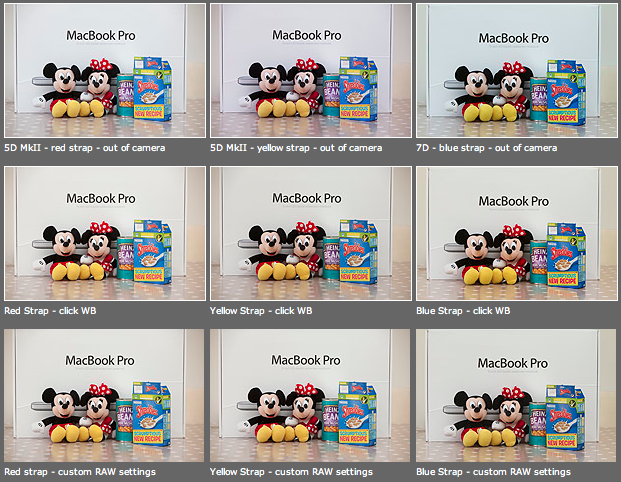
As you can see from the top row of images above – the three cameras that I use have different colour shifts with my slightly newer 5D MkII (codename yellow strap… because it has a yellow strap!) displaying quite a strong magenta shift whilst the 7D (codename blue strap, you can guess why) is a little cold and my oldest 5D MkII (red strap) is pretty neutral but maybe 1/3 of an f-stop brighter. I am going to use the red strap body as my basis for changing the colours on the other two a) because it is the most neutral to start with and b) because it has been serviced and cleaned by Canon quite recently.

Obviously these pictures were shot under controlled conditions using the same light source, the same lens on a tripod and have been converted from their RAW using no adjustments whatsoever. I shot multiple frames using each body as a sample just to make sure that there was no shift between frames on the same camera.

The second row of examples are the same RAW files with a white balance applied to exactly the same spot on the white box between Mickey and Minnie’s ears. As you can see this gets us a whole lot closer to matching the pictures for colour and this technique is fine when you have something in the frame which allows you to use the eye-dropper tool in Adobe Camera RAW (and in other similar raw conversion applications) and it is also fine when you only have a few images to process in this way. If you shoot an event where there are hundreds of frames, then you would spend an unnecessary amount of time balancing in this way.

The third row of examples utilises one of the cool features of the latest versions of Adobe Camera RAW in either Photoshop or Lightroom (and I’m sure that other software does this too) which allows you to set a default set of settings ranging from white balance to black levels, contrast, saturation to sharpening and noise control for each camera which the software detects from the serial number in the EXIF data as you bring it into the RAW conversion control pane. This is great for a lot of work and is a good option if you usually shoot on a fixed white balance.

These three techniques work for pretty much every digital camera and every scan. Some, more modern and more expensive, cameras allow you to go one crucial step further and that is to tell the camera to automatically shift by a fixed amount of colour for every frame – so that if your camera has a magenta shift like my yellow strap camera you can counterbalance that in camera and your images will show up as they should – no matter which white balance you are using at the time. The next few illustrations are based on a Canon 5D MkII using Canon’s own EOS Utility:

The illustration above top left of the three shows the home screen of the EOS Utility application and the “camera settings/remote shooting option is what you need.

This brings up the window on the top right which has an option marked WB shift that allows you to control the cross hairs and set an exact shift for the camera that is connected at the time. It is simple and very, very useful.

The illustration bottom left refers to the technique in Adobe Camera RAW (Photoshop CS4 in this case) in which you set a custom import for each camera and this is the preference pane that you need to find it.

It would be great if there was some software that allowed you to perform an exact “chip” calibration in the same way that you can calibrate a computer screen. Of course, the ability to calibrate the LCD on the back of a DSLR would be cool too but in the mean time here are three ways that you can use the combination of a good RAW converter and your camera’s built-in options to get all of your cameras working the same way as each other. It takes time, it’s fiddly but will save you a great deal of hassle over the course of a few weeks work.

The copyright symbol and Windows

I’m a Mac user and I have been for the last sixteen years. They make some great tools and some amazing gadgets but the best thing about Macs is that they seem to be made for people like me. I was having this conversation with a student on one of the excellent photographic courses at the Arts University College at Bournemouth and I realised that my preference for Apple computers can be summed up by the fact that the copyright symbol is just there – alt+g – whereas on a Windows machine you have to hunt for it. I have just Googled “how to find the copyright symbol on a Windows computer” and had to laugh out loud at the first website that came up:

“Hold down the Alt key and type 0169 if you have separate numeric keys on your keyboard. Alternatively you can go to programmes, accessories and select “character map” which allows you to assign a short cut to any symbol that you choose. Unfortunately not every copy of Windows has this loaded and you may need to reload it from your system discs”.

Does this seem long-winded to you? Shouldn’t a symbol as important as the copyright one just be there? I know that the option of using (c) is there and almost everyone recognises it but the correct symbol should be much easier to find than it is on most Windows machines.

The serious point here is that copyright is important. Actually, copyright is vital and we all need to mark our work at every opportunity to make sure that everyone knows that all intellectual property has an owner and stop copyright abuse.

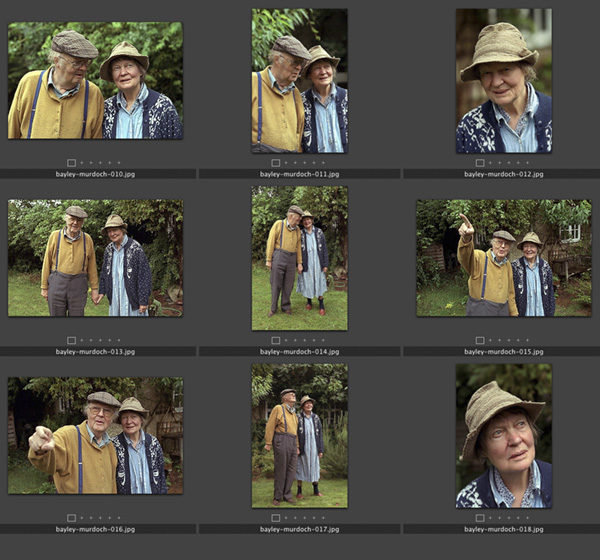
Contact sheet: Dame Iris Murdoch and John Bayley, Oxford, September 1998

When this set of photographs, one of the last of her, was taken Dame Iris was in the latter stages of Alzheimer’s and her husband described her as being like “a very nice 3-year-old,”. She died in Oxford on February 8, 1999. In his memoir “Elegy for Iris” John Bayley portrays his brilliant wife lovingly but unsentimentally. He was in turn very much in love with her and very caring about her when I spent a brief time shooting this set of pictures. She was unaware of who I was or what I was doing but his hand was always in hers and she seemed to accept that everything was OK because of that.

The original caption simply read: Professor John Bayley and Dame Iris Murdoch photographed in the back garden of their home in Oxford. 09.09.1998 photo: Neil Turner/Times Higher Education Supplement. ©News International

The Times Higher Education Supplement was running a review of Professor Bayley’s book about his wife and the Picture Editor had asked me to drive to Oxford to shoot his portrait. While I was driving between London and Oxford I was told that at least two other photographers would be shooting before me and that it was “unlikely” that Dame Iris would be in the pictures. I don’t mind doing portraits of authors on those days when you form an orderly queue with reporters and television crews for your chance to do the same five minute job but this one seemed a little less “organised”.

I arrived in that part of Oxford where it seems every second home is owned by a Nobel Prize winner or a celebrity academic to find their house looking a little sorry for itself. The front garden, the fences and the paintwork all needed some TLC and I quite like to shoot portraits around those areas. I had twenty minutes to wait and started to think about the light, the colours and watch for other photographers and journalists to come out. Nobody appeared so I grabbed my gear and knocked on the door. When Professor Bayley answered, he looked like the gardener but spoke exactly how you might imagine an Oxford Professor would.

In the film “Iris” which stars Dame Judi Dench as the older Iris Murdoch the house is untidy. Actually having been there I can tell you that untidy doesn’t even come close. There were books and newspapers everywhere. Televisions were on the BBC in almost every room and there was Dame Iris herself sitting quietly at the kitchen table. I was nervous about asking if she would be available for the pictures but Professor Bayley seemed to know what I wanted to ask and told me that he wanted her to be in the pictures with him but that she found flash disturbing. I was shooting 35mm colour negative film at the time and so we decided that the house was too dark and too untidy to be a good location for a portrait. Ironically these days I would have probably done some pictures on my 5D MkIIs using the small amount of available light indoors at 3200 ISO but there was no way that 800 ISO colour negative would cope.

The beauty of these pictures is that nobody from the publishers had been round to tidy up, dress them up or even attempt to sanitise the images. Because of that we were able to make some lovely portraits. We chatted about garden birds, foliage and the English weather. It was a surreal time.

In the end I shot 72 frames (two rolls of 200 ISO Fuji Colour Negative film) which I drove back to London where the film was processed by the newspaper darkroom and all scanned onto a Kodak Photo CD at a resolution unthinkable for a digital camera at the time – the equivalent of a 6 megapixel camera when the Kodak DCS520 was just becoming available with it’s 1.9 megapixel chip. The cameras used here were a Canon EOS1V and an EOS1N with 28-70 f2.8L and 70-200 f2.8L lenses.