Month: December 2017

Merry Christmas

After what has been a difficult year for me 2017 is ending on a good note. My fitness is still an issue but work is interesting and the rest of my life is good too.

I just want to wish everyone who reads this blog the very best for the holidays and a fun and interesting 2018.

iPad workflow part four

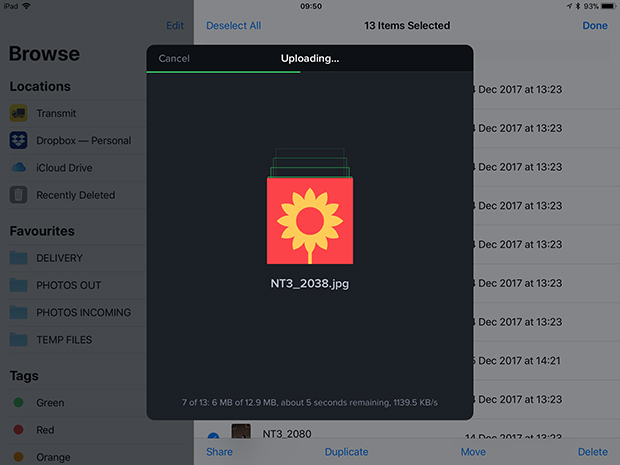
Screen grab from Transmit for iOS on my iPad showing a twelve image upload in action.

There are so many ways that I deliver images to various clients these days that I feel that I’m bound to leave something off of this list. The great news for users of the iPad or iPhone to do quick edits of their work is that every single option that I use on the desktop machine is also available on iOS devices;

  • FTP– I use Transmit on the iPad and iPhone. I also have FTP options inside FSN Pro and Shuttersnitch that can all do a good job but Transmit does it all better.
  • Email – adding large numbers of attachments on the iPad isn’t my favourite way to send pictures but it works.
  • Dropbox – The iOS Dropbox app means that I can easily add files to folders on the cloud service and send links to those folders before, during or after the job. It has a very simple interface and works really well.
  • WeTransfer – I wasn’t very happy when the WeTransfer iOS app went over to functioning as “Boards” – making it a very different user experience from the ever-so-simple desktop version but I’ve got used to it and it works really well.
  • Photoshelter – The professional image sharing platform has a dedicated iOS app which is fairly easy to use and very functional.
  • Third Light – This is a niche Digital Asset Management platform used by two of my corporate clients and the iOS app does its job well.

(more…)

iPad workflow part three

Welcome to the third instalment of my investigation of the best iPad workflow for the kind of work that I do. At the end of part two I came to the conclusion that adding images wirelessly to the iPad (or an iPhone) was the best way to go for me and in the few days since I made that observation I have largely moved towards using FSN Pro to get the pictures to where I need them to be.

I mentioned several times in part two that I wanted, wherever possible, to avoid storing anything in the Apple Photos app without explaining why I am so keen to avoid it. The simple answer is that my normal workflow for several clients involves keeping the original camera filenames intact so that it is possible to follow up at a later date and find them again without having to spend any time looking. Why Apple are so keen to rename every file with the clumsy “img_1234” formula is beyond me. I guess that it must make what goes on inside iOS easier for Apple – if not for photographers. By avoiding the app it is entirely possible to retain the original filename from start to finish. Don’t get me wrong; if I was rushing and getting a couple of quick edits away to a client then I’d happily rename files and/or settle for the img_xxxx option but when there are five, six or more photographs going through then renaming becomes a pain. (more…)

iPad workflow part two

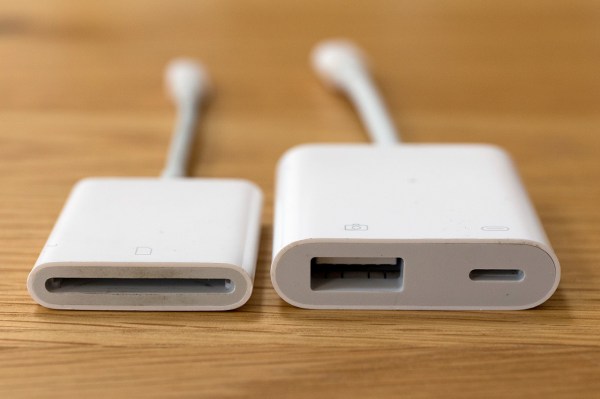
Apple’s Lightning to SD Card and USB3 to Camera adapters

A few weeks ago I promised to keep working on my iPad workflow and keep readers of this blog up-to-date with my thoughts. Lot of other things have got in the way lately but here is the second instalment. I’ve decided to break the whole process down into four parts:

  • Getting the images onto the iPad
  • Toning and captioning them
  • Getting the pictures to where they are needed
  • My conclusions and (hopefully) a settled workflow

The accessories that I’ve used to import images from memory cards onto an iPad for photo editing.Because I’m vaguely logical, I’m going to tackle them in order and so I’m going to outline the ways that I have looked at getting my pictures onto the iPad. Because this is an examination of the possibilities I’m going to consider all of my options and because I’m a Canon user I will tend to lean towards the options for EOS cameras although much of what I’m talking about is not make specific. I have experimented with several ways to get the pictures onto the iPad and I’ve tried all of them as JPEGs and RAW files too: (more…)