technique

Developing a new course

Several months ago I had a conversation with a man called Tom Hill who runs a private journalism school called Up To Speed Journalism in my home town of Bournemouth. We were looking at the options of expanding the range of courses on offer to include one for news photographers. A few weeks ago we started looking very seriously at the idea and Tom has now decided to start accepting applications for the first course which runs from January 2011.

I am delighted to have been involved in the development of the course and I will be teaching some of the elements of the course. The big tasks now are to attract the right students and to make sure that we bring the industry along with us at a time when there are very few jobs out there for new entrants to the profession. The idea is simple: to give those who come on the course the information, skills and techniques that they will need to start out on their careers as news photographers. It’s all very exciting and if you want to know more, go to the Up To Speed website where there is quite a bit of information and where you can ask questions about the course.

Colour calibrating digital camera bodies

When you work with one camera and you shoot RAW all of the time it really doesn’t matter if that camera has a tendency towards magenta, yellow or cyan – the shift will be consistent and you can cope with it very easily in post-production. If, on the other hand, you work with more than one camera and each of them has a subtle shift in a different direction then your workflow can be slowed down when you have to constantly colour correct images shot under identical lighting in different directions. Like all things in photography, there is more than one way to solve this problem.
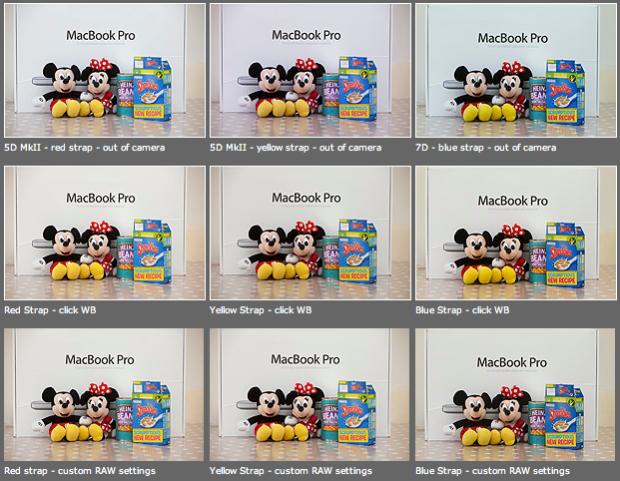
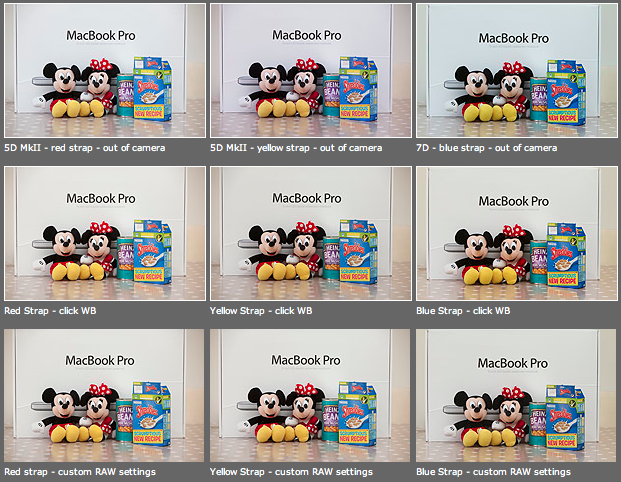
As you can see from the top row of images above – the three cameras that I use have different colour shifts with my slightly newer 5D MkII (codename yellow strap… because it has a yellow strap!) displaying quite a strong magenta shift whilst the 7D (codename blue strap, you can guess why) is a little cold and my oldest 5D MkII (red strap) is pretty neutral but maybe 1/3 of an f-stop brighter. I am going to use the red strap body as my basis for changing the colours on the other two a) because it is the most neutral to start with and b) because it has been serviced and cleaned by Canon quite recently.

Obviously these pictures were shot under controlled conditions using the same light source, the same lens on a tripod and have been converted from their RAW using no adjustments whatsoever. I shot multiple frames using each body as a sample just to make sure that there was no shift between frames on the same camera.

The second row of examples are the same RAW files with a white balance applied to exactly the same spot on the white box between Mickey and Minnie’s ears. As you can see this gets us a whole lot closer to matching the pictures for colour and this technique is fine when you have something in the frame which allows you to use the eye-dropper tool in Adobe Camera RAW (and in other similar raw conversion applications) and it is also fine when you only have a few images to process in this way. If you shoot an event where there are hundreds of frames, then you would spend an unnecessary amount of time balancing in this way.

The third row of examples utilises one of the cool features of the latest versions of Adobe Camera RAW in either Photoshop or Lightroom (and I’m sure that other software does this too) which allows you to set a default set of settings ranging from white balance to black levels, contrast, saturation to sharpening and noise control for each camera which the software detects from the serial number in the EXIF data as you bring it into the RAW conversion control pane. This is great for a lot of work and is a good option if you usually shoot on a fixed white balance.

These three techniques work for pretty much every digital camera and every scan. Some, more modern and more expensive, cameras allow you to go one crucial step further and that is to tell the camera to automatically shift by a fixed amount of colour for every frame – so that if your camera has a magenta shift like my yellow strap camera you can counterbalance that in camera and your images will show up as they should – no matter which white balance you are using at the time. The next few illustrations are based on a Canon 5D MkII using Canon’s own EOS Utility:
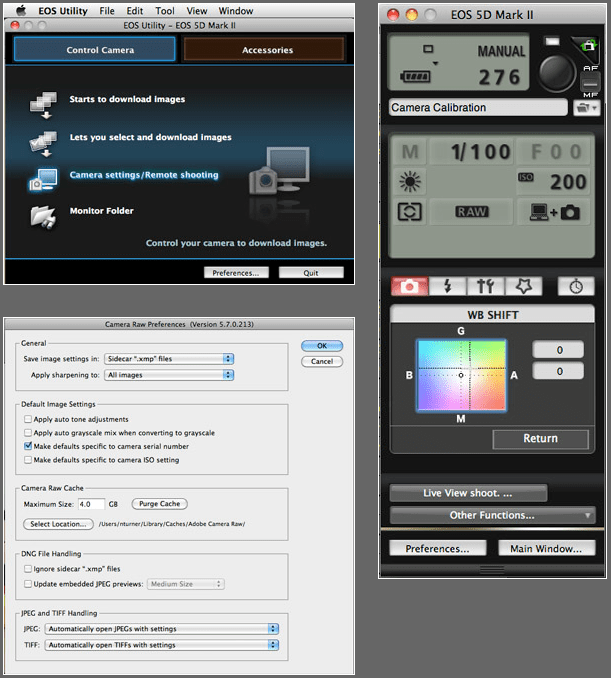
The illustration above top left of the three shows the home screen of the EOS Utility application and the “camera settings/remote shooting option is what you need.

This brings up the window on the top right which has an option marked WB shift that allows you to control the cross hairs and set an exact shift for the camera that is connected at the time. It is simple and very, very useful.

The illustration bottom left refers to the technique in Adobe Camera RAW (Photoshop CS4 in this case) in which you set a custom import for each camera and this is the preference pane that you need to find it.

It would be great if there was some software that allowed you to perform an exact “chip” calibration in the same way that you can calibrate a computer screen. Of course, the ability to calibrate the LCD on the back of a DSLR would be cool too but in the mean time here are three ways that you can use the combination of a good RAW converter and your camera’s built-in options to get all of your cameras working the same way as each other. It takes time, it’s fiddly but will save you a great deal of hassle over the course of a few weeks work.

Five levels of image manipulation

The Curve section of the EPUK website has always been a great source of information for photographers already working in editorial markets and for those who would like to do so in the future. I have written a few pieces for them over the years and my latest piece is about five different levels of image manipulation and how they should be used in newspapers and magazines.

As we celebrate the twentieth birthday of Photoshop we should take a few minutes to think about how the subject of image manipulation is regarded both inside and outside of our profession. In truth there is a sizeable majority of the population who think that every image that they see has been heavily retouched or altered.

Documentary, news and reportage photographers have a real battle to convince a sceptical world that their images tell the truth.

You might find it helps you to form your own thoughts on image manipulation by looking at these five categories of altering pictures and deciding for yourself which are appropriate for the kind of work that you do, and then using them to educate clients, friends and colleagues about how we as an industry view this very important subject.

  1. Normal darkroom practices – correction of colour, tone, contrast and saturation to reflect the way the image should look. Light dodging and burning.
  2. Darkroom interpretation – changes limited to colour, heavier dodging and burning, unnatural saturation and contrast that make the image an interpretation of reality.
  3. Minor alterations – adding or removing elements to or from the image, other than by cropping, that do not change the essential message of the image.
  4. Major alterations – adding or removing elements to or from the image that heighten or change the essential message of the image.
  5. Image montage – using elements of more than one image to make a photograph that is no longer a genuine representation of the scene.

For the purposes of news I would say that 1 is OK, and that 2 might be.

By the time you get to 3 then I would say that was unacceptable for news – unless there is a label attached or there are good public interest reasons for the manipulation (such as preserving the anonymity of vulnerable people).

The real danger here is that much of the public assume everything we do is altered. It does us no favours for this assumption to go unchallenged. The real sadness is that so many photographers supplying news images ignore the ethical implications – largely because they know no better.

Image manipulation is a serious subject and one that should be addressed by every photographer every time they sit at their screen and every time they see their work in print

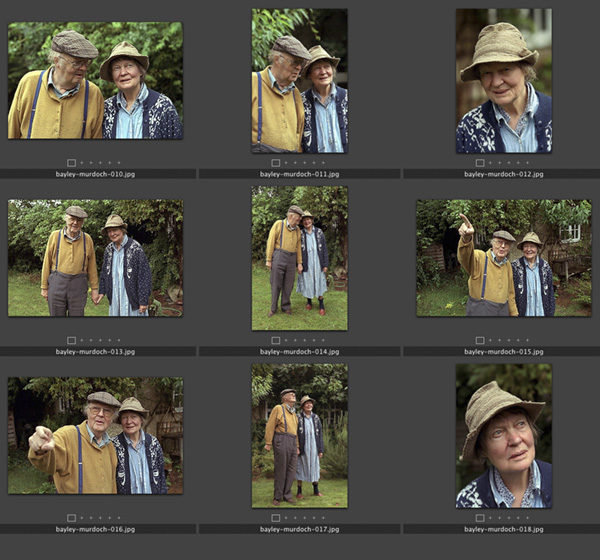
Contact sheet: Dame Iris Murdoch and John Bayley, Oxford, September 1998

When this set of photographs, one of the last of her, was taken Dame Iris was in the latter stages of Alzheimer’s and her husband described her as being like “a very nice 3-year-old,”. She died in Oxford on February 8, 1999. In his memoir “Elegy for Iris” John Bayley portrays his brilliant wife lovingly but unsentimentally. He was in turn very much in love with her and very caring about her when I spent a brief time shooting this set of pictures. She was unaware of who I was or what I was doing but his hand was always in hers and she seemed to accept that everything was OK because of that.

The original caption simply read: Professor John Bayley and Dame Iris Murdoch photographed in the back garden of their home in Oxford. 09.09.1998 photo: Neil Turner/Times Higher Education Supplement. ©News International

The Times Higher Education Supplement was running a review of Professor Bayley’s book about his wife and the Picture Editor had asked me to drive to Oxford to shoot his portrait. While I was driving between London and Oxford I was told that at least two other photographers would be shooting before me and that it was “unlikely” that Dame Iris would be in the pictures. I don’t mind doing portraits of authors on those days when you form an orderly queue with reporters and television crews for your chance to do the same five minute job but this one seemed a little less “organised”.

I arrived in that part of Oxford where it seems every second home is owned by a Nobel Prize winner or a celebrity academic to find their house looking a little sorry for itself. The front garden, the fences and the paintwork all needed some TLC and I quite like to shoot portraits around those areas. I had twenty minutes to wait and started to think about the light, the colours and watch for other photographers and journalists to come out. Nobody appeared so I grabbed my gear and knocked on the door. When Professor Bayley answered, he looked like the gardener but spoke exactly how you might imagine an Oxford Professor would.

In the film “Iris” which stars Dame Judi Dench as the older Iris Murdoch the house is untidy. Actually having been there I can tell you that untidy doesn’t even come close. There were books and newspapers everywhere. Televisions were on the BBC in almost every room and there was Dame Iris herself sitting quietly at the kitchen table. I was nervous about asking if she would be available for the pictures but Professor Bayley seemed to know what I wanted to ask and told me that he wanted her to be in the pictures with him but that she found flash disturbing. I was shooting 35mm colour negative film at the time and so we decided that the house was too dark and too untidy to be a good location for a portrait. Ironically these days I would have probably done some pictures on my 5D MkIIs using the small amount of available light indoors at 3200 ISO but there was no way that 800 ISO colour negative would cope.

The beauty of these pictures is that nobody from the publishers had been round to tidy up, dress them up or even attempt to sanitise the images. Because of that we were able to make some lovely portraits. We chatted about garden birds, foliage and the English weather. It was a surreal time.

In the end I shot 72 frames (two rolls of 200 ISO Fuji Colour Negative film) which I drove back to London where the film was processed by the newspaper darkroom and all scanned onto a Kodak Photo CD at a resolution unthinkable for a digital camera at the time – the equivalent of a 6 megapixel camera when the Kodak DCS520 was just becoming available with it’s 1.9 megapixel chip. The cameras used here were a Canon EOS1V and an EOS1N with 28-70 f2.8L and 70-200 f2.8L lenses.

Teamwork

Great news photography doesn’t just stem from a good photographer. There is are a whole number of people that come together in the planning, execution and reproduction of top class images and the real downside of being a freelancer is that I miss being part of a really great team.

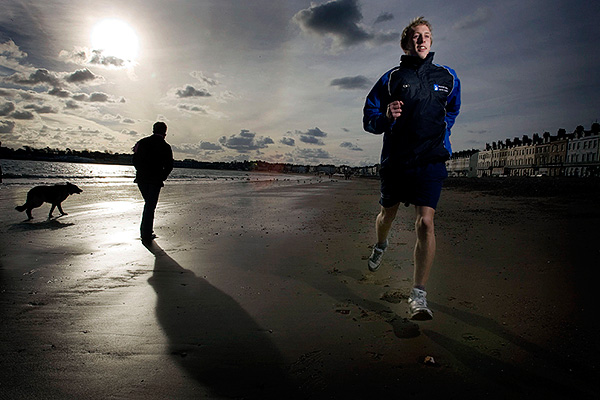
©Neil Turner/TSL | Weymouth, Dorset | December 2007

Being a photographer is usually part of a process. Images are commissioned, stories are bought and sold, edits are done and newspapers are printed. It’s a big and complicated jigsaw and being the person who operates the camera has to be the best part. There is no such thing as a run of the mill commission, but the process often goes like this;

  • The story is commissioned
  • The arrangements are made
  • The photographer is briefed
  • The photographs are taken
  • The edit is done
  • The pages are laid out
  • The newspaper/magazine is printed

There can be upwards of thirty people involved in the whole process and it’s important that the communication is good and that it goes in all directions. Some photographers aren’t as lucky as I am – this piece from the Sports Shooter site is a tongue in cheek rant against bad communications and poor commissioning. Unfortunately lot’s of photographers fail to live up to their obligations, indeed many don’t even recognise that they even have those obligations. It is up to us to talk to the picture editor, the journalist and ask the right questions. Getting the correct information from everyone else in the chain gives the photographer the best possible opportunity to shoot the right photographs and to tell the story in the best way possible. A failure to communicate ties the creative hands of the photographer and drastically reduces their chance of making a great set of pictures.

Sometimes the commissioning editor will forget an important detail, and at other times spelling mistakes and wrong addresses will get in the way of the pictures. Checking details, double checking spellings and discussing the story with the editorial staff will always prove to be time well spent:

  • It helps with the story under discussion
  • It improves your own relationship with the editorial team
  • It goes a little way to improving photographer editorial relations on a world scale!

Of course the picture desk need to do their bit in this vital piece of symbiosis because photographers really appreciate being given accurate information, input into the story and feedback after publication. Two way conversations work, and the industry needs more of them.

Being self-critical

One of the best things about studying photography at college was having so many of your peers around to help critique your work on a daily basis. It often hurt at the time and more than once I decided to ignore the advice of my friends and forge ahead with my own style. After college there was always the darkroom or the lab where you would talk to other photographers and get some feedback on what you were doing. Then there were a few years when we were hand processing film wherever we happened to be and scanning it, quickly followed by the early digital era. That brief period between the darkroom and the almost universal uptake of the internet and adoption of digital was a tough time for those of us who liked to talk about our work with other photographers.

Now we have choices. We can submit our work to picture sharing networks or publish them on our own sites and hope that others take the time to have a look. Excitingly, we have a growing number of photography discussion groups such as Photo Forum in London where like-minded folks can get together and see the work of others, talk about it, help each other and get inspiration.

There is, however, another option. Self-critcism. The concept is simple – you look at your own work very very closely and try to see how you could have done it better, more imaginatively or maybe just differently. As a freelancer, based a hundred miles from London, this is something that I am going to spend more and more time doing. It was easy to look at a friend’s work and pass a comment or two but it is a lot tougher de-constructing your own images. So much so that I have been giving some thought to having a structure for looking at my own pictures. My first thought was to have some headings under which to work: image quality, composition, light, first impression, suitability for the job were all there in my first list. It’s a decent way to analyse images but I can’t help thinking that there is a better and more enjoyable way to critique my own work.

I tried opening a small number of random images from the past months work and really studying them hard, trying to imagine that they weren’t mine. I found myself coming up against headings and categories again and so I marked six images with a numerical score out of ten under five separate headings and ended up with scores ranging from 20/50 to 44/50. An interesting exercise, but boring and outrageously bureaucratic! What would I have said if these pictures had been by someone else? The first thought that came into my head was that I wouldn’t have wanted to hear about how hard the job was or why certain compromises had been made – the very things that I know about my own work.

Taking a look at the pictures without giving myself a proverbial “pat on the back” for overcoming technical and physical difficulties brought me closer to the answer. Answering questions like “does it have instant appeal?”, “is it a good picture?” and “does it fulfil the brief?” without the excuses that I had been giving myself started to work. The next step was to try to put myself in the shoes of the client and factor in what they might have thought about them. It was getting complicated but I found myself looking at my own work in a far more detached way than I ever had done before.

Applying this process to an edit that I had done a week or so previously allowed me to go back and make that edit so much tighter. I have a very bad habit of editing far too loosely and giving myself a few rules to work with definitely helped me.

At the end of the process I made three decisions:

  • To be far tougher on myself when editing
  • To seek out help from other photographers to review what I’m doing
  • To have another look at my portfolio and see if I can re-shape it

It’s amazing where a few idle thoughts lead you

Dusk… my favourite time of day for shooting pictures

Bournemouth beach. ©Neil Turner, July 2009

Anyone who knows me or who has ever looked at my folio will know just how much I like being by the sea and that the beach is my single favourite location. I’m a lucky guy and I live on the south coast of England – in the same town in which I was born, Unimaginative, I know – but it’s a great place to live and take pictures. Shooting portraits against the background of a mean and moody sky at dusk is one of my favourite things to do and shooting those skies without people is almost as much of a joy.

Going on the beach as the sun goes away is also a great time to capture very saturated colours. The picture to the left of the breakwater (we call them groynes here in Dorset by the way) with the low angle sunshine is a great example of the clarity and beauty of the evening light when the sun actually shines in the UK. I have no other reason to post this picture than to show that every once in a while you get light so pure, so perfect that no amount of lighting can improve upon it.

Bournemouth beach. ©Neil Turner, July 2009

This picture of the sun going down over the cliff tops is another story. I was walking on my own and took an EOS50D along for the fun of it. I didn’t have anyone to photograph and my lights were back in the car anyway so I had to shoot the sky whilst wishing I had someone interesting in front of the camera!

This kind of sky seems to be most common at the end of the summer and into early autumn. I’m looking forward to a few more and, with luck, I’ll get to shoot some portraits with them too.

One light, big space

It’s very useful to be able to kill two birds with one stone – especially when you have a limited amount of time. I have been very busy this month and blogging time has ben limited. I had intended to carry on my review of the ERQ and maybe post a new technique piece as well. I was sent on a job the other day that allows me to do both.

The quality that you can get at 3200 ISO with the latest generation digital cameras is amazing but sometimes you really would rather light something. I was asked to shoot some pictures of “An Evening with Alan Bennett” – an event staged to raise awareness and funds for the Christie NHS Hospital Foundation Trust. The Christie is a world renowned hospital in Manchester and they decided to hold an event in London to raise their profile. The venue was the Royal College of Physicians in London’s Regents Park. The library is a spectacular blend of 20th century modern architecture and the fixtures, fittings and books from earlier centuries. The light is kept deliberately low and that presented me with a few issues. At 3200 ISO I was only getting 1/60th at f2.8 and so I used my Elinchrom Ranger Quadra kit to give the room a lot more light.

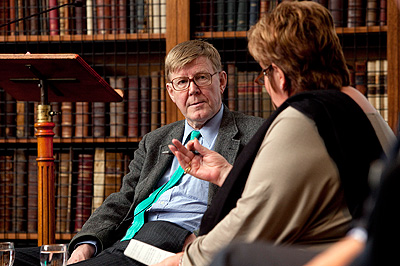
Allan Bennett talks to Jenni Murray. ©Neil Turner

My idea was simple. I set up the light as far away from the interview as I could get it and bounced the light off of a wall. This gave me a light source of about eight feet (2.4 metres) by four feet (1.2 metres) at almost 90 degrees to the subject and at a distance of over thirty feet (9 + metres). Quite a decent soft light, but very directional and it looks utterly unlit.

This is an effect that I have written about before but the power of the ERQ kit, given that it is only rated at 400 w/s, made this very easy. I was able to be quite a distance away using a 70-200 f2.IS L lens on an EOS5D MkII and frame my shots with relative ease. I was shooting between rows of chairs and invited guests and had been asked by the organisers to severely limit my use of flash so I only got half a dozen goes at the shot. This was my favourite frame and it shows the interviewer – Radio 4’s Jenni Murray – asking Alan Bennett a question right at the start of the session.

This was shot at 1/60th of a second at f5.6 at 800 ISO. The available light was non-existent and the effect is very interesting. I had been worried about the range of the Elinchrom Skyport triggers but they worked very well at a range of at least thirty feet, probably nearer to forty feet and my only gripe with them is their lack of a locking mechanism to keep them in the hot shoe. The ERQ system passe another important test here and I’m still very very happy with the kit.