Bournemouth

Capture One Pro and other workflows…

One of the subjects that I teach is workflow. I know that I’ve mentioned that before but I thought that I’d remind you of that when I explain why and how I have been learning all about Capture One Pro – the professional RAW conversion, tethered shooting and image enhancement tool from Phase One. I am on version 6.3.5 (the latest available) and this is the first time that I have seen it since version 4 a few years ago.

Principally designed to make the most of Phase One’s own imaging systems, it also works rather well with the whole gamut of professional file formats. I have been using it for quite a few days now and I thought that I’d post some thoughts on here.

Before I get down to my opinions on Capture One Pro I need to say that every piece of software that I’ve used has needed quite a long time to get used to and anyone who does “full reviews” based on a few hours of use is kidding both themselves and their readers. I also need to make it clear that I paid for this software and that I have absolutely no ties to Phase One.

I have now used Aperture, Lightroom, Photoshop, Photoshop Elements, Canon DPP, Graphics Converter and a few others and Capture One Pro is probably the easiest of the lot to get to like. My knowledge of Adobe Camera RAW in Photoshop has been gained over many years and many thousands of edits and it has only taken me a few days to feel almost as comfortable with Capture One. I’m still learning more and the more that I learn the more I like it. That isn’t always true of new software packages – even if you really want to like them…

The workspace that I'm currently using on a 15" MacBook Pro

I like lots of things about the way it works, about the interface and about how good the customer support and instruction manual are. Every time I think that I’ve found a flaw in the feature set of this software I search the knowledge bank or put a note on Twitter and there it is – the answer that tells me that everything I wanted was there all along. That is great but there seems to be one feature from Adobe Camera RAW that I use all of the time that isn’t there with Capture One Pro – good and accurate profiles of all of my Canon lenses ready to apply corrections.

My first impressions of the user interface centred around my inability to find the tools that I actually wanted. I knew that most were there because the literature told me they were and a very brief exchange on Twitter with the workflow genius that is Nick Wilcox-Brown let me know how to find them and add them to my custom user interface or “workspace” as the application calls it. Better still, you can create a range of custom workspaces and save them alongside the suggested ones for dual monitors, simple workflow, black & white or even a replica of the previous version (5) of the software. Being able to customise the workspace is not unique to this application but I believe that they have implemented it really well.

All of the adjustments and all of the options have easily controlled and finely adjustable controls (mostly sliders) and I found myself easing very quickly into the Phase One way of doing things.

Time for a short list of likes:

  • Customisable user interface
  • Easy to learn how to use
  • Extraordinary range of functions
  • Tethered shooting
  • Fantastic image quality
  • Value for money
  • Web contact sheets
  • Output of files to specific sizes

… and dislikes

  • Cannot find profiles for my Canon lenses
  • The sessions menus
  • Applying adjustment “recipes” seems hit and miss
  • The way that it handles IPTC metadata (I know that the sister app Media Pro does that better)
  • Speed of processing batches of files
  • Not recognising the simple tags that I can apply in camera or by using the ‘tag’ function in Photo Mechanic

That is a short list of dislikes and you have to actually use it to decide if you agree about the sessions menus – the way that Capture One likes to create a virtual time bubble for each job in much the same way that Aperture does by default. I may be doing something wrong when I’m trying to create, save and apply “recipes” which are a great idea (again shared with Aperture and others) that allow you to copy all of the adjustments that you have applied to one image to one or more others as well as keeping that set of adjustments for future use/adaptation. Sometimes the recipes worked and other times they didn’t.

My background is in news and editorial photography and IPTC metadata is a fundamental requirement for me and it forms a big part of my own workflow and the personal workflows of people that I work with when I’m doing coaching. Capture One Pro handles IPTC and is compliant with all of the IPTC fundamentals – it just doesn’t do it very well. The same can be said for quite a few image processing applications and I still love good old Photo Mechanic for the speed, accuracy and flexible way that it handles everything except RAW conversions and long term storage.

My final dislike is the speed when processing batches of files. On a two year old Apple MacBook Pro with an i5 2.4Ghz processor, 8GB or RAM it takes 50-60% longer to process a batch of 36 CR2 images from a Canon EOS5D MkII than Adobe Camera RAW inside Photoshop CS5 does. Individual files are shot through in almost the same time but batches are slower. I tried very hard to be scientific when comparing like with like but I am prepared to be proved wrong on this.

This isn’t really a full review – just some thoughts on an application that I am sure to have to teach very soon. Several people have already asked what advantages Capture One would give them over Lightroom or Adobe Camera RAW in Photoshop and, to be honest, I couldn’t really name any. If you already use and are happy with either Adobe product for processing RAW files then it doesn’t really make sense to spend more money and get Capture One Pro. BUT (and it is a but worthy of being in upper case) if you are looking at designing a new workflow for news and editorial work from the ground up and you don’t already have licenses for anything else I would strongly recommend getting Capture One Pro and using it in tandem with Photo Mechanic. Between the two you have a solid, reliable and well priced set of options that will, without doubt, deliver the goods. That would leave you in need of an archiving option and for that Phase One’s Media Pro might be a good solution. There are those who’d argue that between the two Phase One applications you have everything you’d need and they would be right but there is no getting away from the fact that Photo Mechanic does what it does so well that it is worth the money and then some. The same goes for Capture One Pro too.
Get yourself some defaults

©Neil Turner/TSL. London, May 2005.

Surprise, surprise – yet another blog post in response to a question! I was asked “what one single piece of advice could I give to someone who had already read the previous “one piece of advice” blog post on here?”

That’s a really cheeky and rather good question and, having shot myself in both feet by saying that I was a sucker for people who used please and thank you I felt duty bound to answer.

In three words I’d say “default staring point”. What’s that? you ask… “Good question” I respond. It is the notion that every time you go to do something you have two choices: you can mess about working out where to start and what to do first OR you can go to your default starting point and get stuck in straight away.

In photography this takes a wide variety of forms. For example, when I’m shooting a lot portrait my default position for placing a light is parallel to my subject’s torso – imaging that their chest is one line and the front of my light source is another, those two line would be parallel. Another example is “what gear shall I use today” the answer (if you are lucky enough to have sufficient kit that you need to choose) is my default kit: two 5D MkII bodies with 24-70 and 70-200 f2.8L lenses and a couple of 580exII flashes in the bag with a 16-35 “just in case”.

Every part of the job has a default setting. From the preferences locked into Photo Mechanic and Adobe Camera RAW to leaving my cameras on daylight white balance and 200 ISO. Default starting positions. I know that if I start there I can move away as soon as my imagination starts to flow and as soon as I start to get a feel for the situation. Sometimes the defaults get changed with seconds but it is amazing how often they stay a lot longer.

One photographer I explained this concept to a few years ago compared it to putting his left sock on first, followed by his right sock and then his trousers. No real reason why, it just means that you can concentrate on the interesting stuff safe in the knowledge that you have the basics covered.

When you really start to think about it we all have defaults in every area of our lives. Toothpaste onto wet brush, small amount of cold water onto that and away I go. Why would I do it any other way? Off to shoot a portrait, tightish head shots on a long lens first to avoid spooking the subject and then gradually get closer and wider. It makes sense to me and that’s my default.

I could go on with the list but I’m guessing that you have the idea by now. A default starting position for everything just helps you to organise your thoughts and get stuff done. Good advice?

Adobe Photoshop CS6 Beta

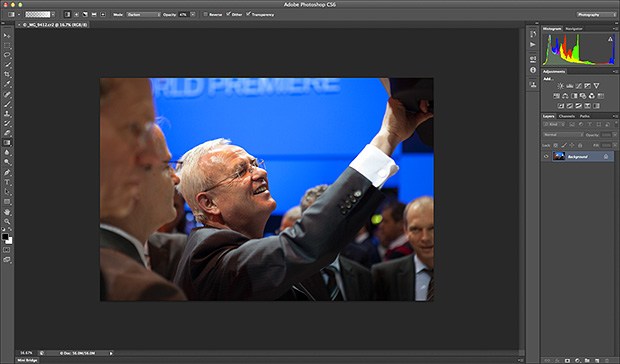
Like half of the photo geeks around the world, I have downloaded and started to play with the public beta version of Adobe’s latest version of Photoshop: CS6. This is a major revision of the software in terms of the interface which looks a lot more like Lightroom than ever before and is also a lot less “freestyle” than those used to versions such as CS3 and earlier would be familiar with. We now have a fixed window rather than the floating elements of previous versions and this will take quite a bit of time for me to get used to. It isn’t that I don’t like it, it’s just that it is a change.

Screen shot of the main window


To be honest, my main use of Photoshop is Adobe Camera RAW. I use it to convert the RAW files that I shoot into whatever file format the job requires, fine tuning the colours, composition and various other elements as I go. At first sight Camera RAW 7 is very little changed from Camera RAW 6xx that I use every day in Photoshop CS5. At least that’s what I thought until I used it in anger on a proper edit.

Screen shot of Adobe Camera RAW 7


If you look closely at the main adjustments palette to the right of the window, you suddenly see what the changes are and what they will mean for every day workflow. Gone are the labels such as Recovery, Fill-light and Brightness to be replaced with a set including Highlights, Shadows and Whites. So far, they seem to perform very similar functions when used on every day files but I have only edited two sets of pictures (neither of which have been “live” jobs) and so it may well be that I have missed something. Here are the two palettes side by side:

Adobe Camera RAW adjustments palettes from CS5 (ACR6) on the left and CS6 beta (ACR7) on the right.


I will continue to play with CS6 and ACR7 as long as the beta phase continues and I’m sure that I will come up with plenty more observations. I only use Photoshop as an optimisation tool and I don’t do any serious retouching or image manipulation with it so don’t expect an in-depth assessment of layers, filters and content aware fill from me – there are plenty of other photo geeks out there who will be able to blog about that kind of stuff!

Photographic education… again…

Here I am again writing about photographic education. Every time I’ve started down this road it has been entirely due to one or more conversations that I’ve had with someone unhappy about the way the system is working out for them. This morning I spoke to three students who have ended up on the wrong course. I may come back and write about them another day but the main outcome of those conversations has been to make me think about a wider question.

When you speak to professional photographers about photographic education in the United Kingdom you are very likely to hear tales of second year undergraduates who don’t know what an f-stop is and third years who haven’t had any training in digital workflow. On the face of it, that sounds absolutely indefensible. It doesn’t, however, tell the whole story.

Thousands of eighteen and nineteen year olds go off to university every September to study English and thousands more go to study History. Does anyone bemoan the lack of jobs for writers and historians? Do working authors and working historians complain loudly about the lack of training that these young people are getting in the technicalities of doing their jobs? No. The truth about photographic education is that not all courses are there to train people to be photographers.

A sizeable number of courses are designed to teach photography as more of an academic subject – learning for learning’s sake and mind expansion rather than training for a career behind the camera.

This kind of learning is still a relatively new concept for photography. Our colleagues who are engaged in fine art, the history of art and even fashion are further down the road towards embedding the study of their subject into the world of academe and photography needs to catch up.

I have no doubt that lecturers engaged in teaching photography as an academic pursuit know what they are doing and know what, when and how they are teaching it. The thing that I am a lot less sure about is whether all of the students enrolled on those courses realise that they are pursuing an academic study. In fact, I am convinced that a surprisingly large number don’t realise that until they are well into the first year and that many don’t really wake up and smell the coffee until they are even further into their studies.So as far as I can see we have two separate but parallel problems here:

  • A lack of realisation from the profession that not all photographic courses are there to train photographers.
  • A problem for students who don’t understand that not all photographic courses are there to train photographers.

What should we do? Two parallel problems with a single solution: Better PR. Photographic education needs better PR. Looking towards schools, colleges, parents, students, the public and the profession all courses – especially the academic ones – need to make it clear who they are and what they are doing.

Photography should be studied as an academic subject; its cultural presence and power is worthy of research and study. Its history and even its technology are topics equally as valid as others that are understood and accepted as legitimate subjects in a way that photography is struggling to be.

Photography is also a vocation and courses that set out to train students for a career behind the lens need to make it clear that that is their goal and set about doing it to a standard that the industry requires and the students deserve.

We need two distinctly different approaches to photographic education and we need the courses following each route to be confident, open and clear about what they are doing. Courses that attempt to steer a course between the two and produce graduates who haven’t had a proper academic workout or whose technical knowledge and creative talents haven’t been optimised and refined are failing everyone. Let’s get behind photographic education and let’s help to get the courses to get their PR right.

Elinchrom Ranger Quadra – 32 months on…

Most of the camera equipment reviews that you read are written after using the kit for a few days – or even a few minutes in extreme cases. I know. I’ve done several two or three day reviews myself. I was looking at my kit the other day and thought that it would be very useful to write a few lines about my Elinchrom Ranger Quadra system which I have been using for very nearly three years and which has been used on hundreds of assignments.

Build Quality:

When I wrote my first “mini-review” about the system in June 2009 I had only been using it for a couple of weeks but, after years of using the similarly specified Lumedyne Signature and Classic outfits, I can safely say that the Elinchrom fitted straight into my way of working very quickly. Back then I decided to talk about build quality first:

MAY 2009: The first point is to re-emphasise just how small and light this kit is compared to most other portable flash equipment – even Canon and Nikon Speedlights with external battery packs aren’t that much bigger or heavier.

The second point is that being small and light doesn’t appear to make this gear any less robust or well made than anything else. As a long time user of Lumedyne kit I can vouch that the combined weight of a Lumedyne Signature pack and head is almost identical to the Elinchrom Ranger Quadra. The Elinchrom pack, however, seems infinitely more robust with it’s rubberised edges and properly weather resistant control panel whilst the head is both simple and tiny. Connecting the two is a sensible and nicely made piece of cable with easy to use fittings. I have just been and tried the “heavy winter gloves test” and can report that it is very easy to attach and detach the cable with them on.

At this point I had better introduce a small criticism, lest anyone think that I’m doing a PR puff for the manufacturers. I like to attach my packs to the stand to give a bit more stability in the wind and the Lumedyne packs had very functional ‘D’ rings at either end that allowed you to attach a strap and anchor the pack to the stand. The Elinchrom Ranger Quadra pack has well made but small eyelets through which you have to slot either a large split ring or the small karabiner type ring that was supplied with my kit. Neither is a good solution and I will be on the lookout for a better way of attaching a small strap.

Whilst I’m doing the criticism thing, I have an admission to make: I wasn’t all that keen on the battery catches when I first got the kit. I found them to be stiff and not easy to use. Something has happened and I’m now completely fine with them. Maybe they have loosened off a touch or I have just worked out my technique. Probably a bit of both, but the end result is that the batteries come on and off nicely now and I withdraw my earlier criticism.

Now in 2012, to be completely honest, my opinion has barely changed. The battery clips have eased a little more and the ‘D’ rings still bug me. The screw caps that cover the two power lead sockets have survived all this time and still work very well and are still attached. I know that Elinchrom have made a few design changes since I got my kit but these three things have not changed at all.

The size and weight of the heads was flagged up as a potential issue by a couple of early reviewers but I can honestly say that 32 months on I have not had any problems other than a bad drop of a head which buckled the small ‘spill-kill’ reflector to the extent that I had to replace the reflector. No damage to the head, the flash tube or the modelling light. I had early reservations about the strength of the stand adapter on the heads and for a while I chose to remove the swivel completely and replace it with a brass stud which then fitted into a Manfrotto Light-Tite. In the end, my worries abated and I went back to the original tilt mechanism.

Not long after buying the kit I experimented with ways of attaching a soft box without buying the Elinchrom adapter. You can see my best attempt in the picture to the left. It was a complete fluke that the spill-kill reflector wedged directly into a blank Photoflex Speed Ring and I still use this IF I need two soft boxes on a single shoot. In the end I gave in and bought it and I now feel rather silly that I didn’t do it straight away. The adapter is a decent option and it works very well with my Elinchrom and Chimera soft boxes.

Thirty-two months down the line and the kit still looks great and works like new. I have looked after it, kept it in decent bags and cases and always put it away properly. The few times that I have used it in the rain, I have used plastic covers made from heavy duty PVC and freezer bags to keep the rain off. There are a few bits of paint missing on the pack and the batteries. The one exception, and the main reason that I chose to write this now, is that the two batteries are starting to lose power. I have no idea how many charge cycles they have been through but it is a large enough number for me to start to think about replacing them. Three years is a good life for this kind of batteries and I’m not going to hold any loss of capacity after that time against Elinchrom. The cables are tough and well made and all of mine are still OK.

In Use:

After a few months I fed some thoughts back to Elinchrom via the folks at The Flash Centre in London and those were:

  1. that the digital display was hard to see in bright light
  2. that lining up the power leads with the sockets was difficult in low light
  3. that the Skyport triggers needed a locking ring so that they didn’t keep popping out of the camera’s hot shoe.

I wasn’t the only person making these suggestions and in an upgrade they fixed the display issue and the Skyport trigger issue as well. But what else did I think back 32 months ago?

MAY 2009: That’s the construction out of the way. What about actually using them? I have read through the manuals for the head, pack and Skyport remote trigger system and it is all pretty logical. If you buy this kit, I would strongly recommend that you go through a few practice sessions before going live because some bits of the menu system are not too obvious without the book. Changing stuff like the duration of the beep that signifies that the pack has recharged or whether the readout is in f-stops or watt/seconds isn’t too much of a problem but switching Skyport channels for the first time isn’t all that easy. Getting the hang of how the asymmetrical flash output works with two heads attached to one pack isn’t something is obvious either.

The manual is well written and it doesn’t take long to master these functions once you know what goes where and which button to press first. It isn’t second nature yet, but that will come soon. Much excitement has been generated by the LED modeling light and the idea that it can double as a video light. I have a pair of Canon EOS5D MkII bodies and am starting to shoot some video with them. The amount of fill light that these LEDs put out is very useful and I would argue that they give the Elinchrom a really strong market advantage over other systems. The real joy of this system is the light that it puts out.

The light quality is great in every measurable way. Every flash at a given setting gives out an identical amount of light and the colour of the light doesn’t change when you dial the power up or down. The colour temperature of the tubes seems to be about 5300K and so I have set up a custom balance on my cameras for that. The only light modifier that I’ve used with it so far has been an Elinchrom 40″ (100 cm) shoot through umbrella and my gut feeling is that I will use this combination a lot over the next few weeks. The maximum power output is 400 w/s and for my money that figure is accurate. More importantly, it seems to be more than 1 f-stop more powerful than my old Lumedyne 200 w/s outfits. There could be any number of reasons for this but the outcome remains that I have more power at my disposal than I had before. Having the audible charge indicator is great and being able to turn it off is also a bonus. I have already made use of that function on more than occasion. The recycle time is a little slower than the Lumedyne 200 w/s kit and I found on the first couple of shoots that this was a possible issue. It has gone away now and I am getting used to the extra half second delay – especially when using the audible indicator.

The final point that I wanted to make was about the Skyport system. The pack has a Skyport receiver built-in as well as a synch socket (3.5 jack) and an optical slave. My kit came with a single skyport trigger and I have bought a second one along with a receiver that will work with either a Canon speedlight or one of my old Vivitar 285s. The system seems to work very well and I am not missing my Pocket Wizards enough to get them out of the boot and connect them up. My only criticism of the Skyports is that the transmitters don’t lock into your hot shoe and can be knocked out relatively easily. I’d like to see a transmitter with a lever style lock on the market from Elinchrom so that the system is foolproof rather than just very good.

In practice, 400 watt/seconds is quite a lot of power. Whether it is enough for every eventuality is debatable but in 32 months I have only found it wanting (by a stop or two at most) on two occasions and even then I made it work. Most of my work is portraiture and most of that is lit with this system and I have a real confidence in the kit that makes doing my job a lot easier.

If I were designing this system from scratch I would probably have not bothered with the complete miniaturisation of the heads. I think that I would have gone for a larger head with the standard Elinchrom bayonet fit and a stronger tilt mechanism. Of course that is based entirely on the way that I work and what I use the kit for. I have got used to the tiny heads and, for me, it would make sense for Elinchrom to bring out a version of the head built into the larger Ranger housing as well as this small version. That would eliminate any issues with adaptors as well as maximum umbrella size. It would also remove the need to only use Elinchrom’s own narrower shafted umbrellas.

The newer version of the Skyport trigger solved one problem and introduced a different one. It now stays in the shoe nicely but the words are now moulded in instead of being painted on which makes actually changing some settings quite tricky in low light. I’d also prefer a slightly larger version of the trigger with easier to change channels, a battery level indicator, AA or AAA batteries and at least 50% more range.

In my 2009 review I was confident that I would learn all of the functions and not need to bring the manual with me. I was WRONG. I have never completely mastered the menu system and I have a paper version of the instructions in the case as well as a PDF version on my iPhone. I don’t need to consult it often but when I want to do something in the menu it is helpful to have the manual there with me.

Conclusions:

In May 2009 I was “a happy bunny”. Not much has changed there. Actually, nothing has changed there.

I have some minor niggles but I still love using the Elinchrom Ranger Quadra and I would still advise any photographer in the market for a portable battery powered system to strongly consider it. In value for money terms, it is hard to beat. In light quality terms it is excellent and it passes the most important test of all – it is portable enough to actually take with you, even if you are a photographer working alone and a long way from the car.

If the folks at Elinca came to me with their notebooks and asked me to advise them where to take this system next, I’d be very happy to talk to them. This is a 9/10 product for the kind of work that I do. I have even used my own kit a dozen times when teaching location lighting courses with groups of six to eight people and nobody has managed to break it. I’m glad that the version two pack is better than my nearly three year old one which makes it even easier for me to recommend. There are half a dozen accessories that I would find useful – ranging from an adapter to be able to use a Canon or Nikon Speedlight with the Elinchrom bayonet mount accessories to a properly fitted rain jacket for the pack and a mains AC battery eliminator for when I am using the kit indoors for long periods.

BMX Rider: Contact Sheet

©Neil Turner. Ringwood, Hampshire. 2011

©Neil Turner. Ringwood, Hampshire. 2011

This was a set of pictures shot on location as part of a “how to do it” technique piece for Photography Monthly magazine. The idea was simple – use flash to make something very cool from some sort of active sport. I was put in contact with the tier, Keegan Walker, through a young photographer that assists me from time to time on commercial shoots and we arranged to shoot at the skatepark near where they both live which is about ten miles from my own home.

I used a couple of Canon EOS5D MkII cameras with 16-35 f2.8L, 24-70 f2.8L and 70-200 f2.8L IS lenses as well as the excellent Elinchrom Ranger Quadra flash system supplemented by a couple of Canon 580exII Speedlights with Elinchrom Skyport receivers triggering them. There were plenty of clamps, gels and light modifiers in use too – including my rather lovely modified beauty dish and the equally great Chimera 24″ x 32″ soft box.

The sky at dusk is my favourite backdrop for all kinds of shoots and the May evening sky provided us with something special to work with. Keegan is pretty good at what he does and I had to ask him several times to actually get less height from the ramps so that my pictures looked better! Two hours on a nice evening messing around and shooting pictures is a pretty good way to make a living. The unfortunate part of this particular commission was that I had to write the words that described exactly what I had done and how I had done it. One day I will get around to reproducing the whole piece for you.

Observational, interactional and ‘dictational’ photojournalism

If you believe the old saying, “there is more than one way to skin a cat” and if you want to carry that thought over into photographic journalism there is definitely more than one way to shoot a story. If you listen to some debates about photojournalism you would find that hard to believe but regular readers of my opinion pieces about photography will know that I am a big fan of the ‘black to white, left to right theory of just about everything’.

©Neil Turner. Bournemouth, Dorset. 11 minutes past 11 on the 11th of the 11th 2011

The idea goes like this: imagine a line from one side of a page to the other and that one extreme of something is placed at the left hand end of that line. Now imagine that the opposite extreme is placed at the right hand end of that line. For illustrative purposes, let’s make those two extremes black on the left and whit on the right. What have you got in between? Every tone of grey that you could imagine. You can have one smooth gradient or you can have it in steps – it really doesn’t matter but what you will have is a smooth transition from one extreme to the other. Salt to sweet. Short to tall. Narrow to wide. It really doesn’t matter.

So how does this translate to different ways of shooting photographs? We are talking about photojournalism here and so I’d like to place “observational” at the left hand end of our imaginary line and “interactional” in the middle with dictational at the other end. That’s the easy bit. What exactly are these three approaches and what else sits along our line?

Observational photography can be defined as a ‘fly-on-the-wall’ approach where the photographer is an almost ghost like figure who tries to have little or no impact on the situation and their subject matter. Some types of street photography where the photographer tries their best to remain unseen and unnoticed are classic examples of observational photography. Some would argue that a lot of sports photography fits these criteria too – after all, the cameras are there but nobody is changing their behaviour for them for 90% of the event. By definition observational photojournalists don’t seek any meaningful contact with their subjects whilst they are shooting and most would eschew contact once they have finished taking the pictures either.

Good photojournalism is nearly always accompanied by good and accurate captioning – which is easy if you are photographing a Manchester United game or the Olympic 100 metres final because the participants have names and/or numbers on their kit and they are all famous athletes. If you are taking pictures of people running from an approaching storm then you would like to know who they are and where they are heading but the only way to find that out is to ask. I can remember a number of occasions where I’ve shot lovely street photos whose value as works of curiosity is pretty high but whose value as a piece of photojournalism is a lot lower because I didn’t have the details of the people in the pictures. When I was young and keen I regularly followed people and plucked up the courage to get their name. These days I tend not to shoot the picture if having no details for the caption devalues the image.

So that’s observational photojournalism dealt with. What about it’s interactional cousin? This is where I’m happiest. Shooting pictures with the full knowledge and either permission or acquiesence of my subjects in ways that allow me to interact with them whilst maintaining the integrity of the pictures is, for me, the gold standard. You can tell stories, relay passions and miseries and generally get under the skin of people. Interesting people. By interacting with your subject the nature of your pictures changes and they will have a lot more of you and a lot more of your subjects soul in them.

Back to that pesky scale… you have observation at one end and interaction in the middle and dozens of shades of whatever you would call it in between. Then there’s the final form of getting the pictures: dictational – where you tell your subjects what you want them to do and then shoot it but I’d find it hard to label that as photojournalism at all. I’ve put it there on our scale miles away from observation and a fair distance from interaction too.

Let’s say that observation is the black on our scale and ‘dictatorial’ is white. What colour is interaction? 18% grey of course! (photographer joke – if you don’t get it, I apologise)

The anguish of editing your own pictures

©Neil Turner. London, January 2011

I’ve written about this kind of thing many times but it seems to come to the forefront of my photographic consciousness over and over again so I hope that you will forgive me if none of this is new.

There are a lot of great reasons why photographers have to edit their own work. They are the only ones who truly know what was shot, why it was shot that way and how well the pictures reflect the situation. For news photographers the idea of someone else doing their edits is, largely, a far-fetched and even unwelcome notion. It is happening more and more though.

Some of the big wire agencies and more progressive newspapers are using direct wireless transmission from cameras to editors on big sports and news jobs where the time between shooting the pictures and getting them to market is absolutely critical.

If, however, time is not quite so much of an issue photographers like to sit down and go through their own pictures, make their own selections, add their own captions and prepare the files for delivery. That’s how I’ve worked for the last fifteen years or so and even before then I was often in charge of my own edits because that was how things were done.

Every once in a while (mostly on commercial shoots) someone else edits my pictures. I find it both liberating and scary in equal measure. The liberation is that I get to concentrate on shooting pictures and the scary bit is that someone else gets to see everything – the good, the bad and the downright indifferent. What if they miss the subtlety of that amazingly constructed picture on the second memory card? What if they don’t appreciate the ultra-shallow depth of field that I grafted so long and hard to realise?

There’s a good counter-argument to that of course: If a professional editor doesn’t get what I was trying to do, neither will the client, neither will the designer and neither will the viewer. There are some pictures that you take on almost every shoot that are there for you and for you alone. That is true but every once-in-a-while those pictures do get used. Every once-in-a-while somebody else gets your vision and loves the ‘weird one’ as much as you hoped that they would.

Editing your own work is a tough thing to do. Try editing a full set of someone else’s pictures and you will realise just how easy it is to be dispassionate and just how readily you are able to discard pictures that don’t work. Editing your own work can be a minefield. Every step can bring a very tricky decision. What about the pictures that you have a personal emotional connection with? What about the pictures that you have overcome huge technical challenges to secure? What about the pictures that don’t actually add to the edit or make sense as part of a set?

Taking a shoot and making sense of the pictures from that shoot is a skill that very few photographers ever truly get right. Those that do are blessed and really lucky because they avoid the regular pain and anguish of having to ignore their own ‘babies’.

I have four things that come into my mind every time I am struggling to decide about a single frame: light, composition, subject matter and technical quality. If all four are right the picture goes in. If three out of four are right it will probably make it too. Less than three and that’s where the anguish begins…