camera

The constant software update dilemma

Back in the day we used to occasionally try out new chemicals and different printing papers. We used to experiment with new film stock when it hit the market and, on the whole, it was a welcome distraction from the day-to-day work. In the digital era we have to get new cameras a bit more often and we need to keep our IT current but the biggest battle and the largest dilemma is software. Because I teach a bit and because I am a complete anorak** I always have a look at new software packages as they become available.

menu_bar_screen_grab

Keeping up to date is not cheap. Upgrades are often necessary – especially when none of the software companies make their RAW converters backwards compatible when new cameras and new lenses hit the market. The move by Adobe towards the monthly or annual subscription model is very interesting and brings into very sharp focus the real cost of having the latest software. I have written before about making the business case for buying new gear and the same formula should apply to upgrading software. Every time I talk or write about these kinds of financial decisions, the same piece of music pops into my head… Bruce Springsteen’s song “Cautious Man” where there is a line that says:

“When something caught his eye he’d measure his need
And then very carefully he’d proceed”

lightroom_5_screen_shot

This week, to misquote the wonderful Fast Show, “I are mostly been playing with Lightroom”. To be more precise I have been looking at the new Lightroom 5 beta that Adobe have made available. This comes against a background of having experimented with pretty much every version of Lightroom since it hit the shops back in 2007 and found that I wasn’t entirely sold on the application despite seeing why others love it so much. And that is a huge part of the software conundrum – there are lots of options that achieve pretty much the same end result but get there via very different routes. If, like me, you shoot RAW pictures you need to have a way of editing, captioning, renaming, converting, saving, delivering and archiving your work. This can be achieved using a single application or you can use three , four or five different ones – it really doesn’t matter as long as your workflow is repeatable, flexible, efficient and accurate.

I will write a lot more about Lightroom 5 when I have really used it properly but I have to say that it seems a lot quicker than the previous version and the interface for Adobe RAW Converter is even closer to to the version that I use in Photoshop CS6 than ever – making using Lightroom a lot easier for me. I have also realised that Adobe’s efforts to create a programme for photographers to edit their work in are bearing fruit. The time has definitely arrived when I could easily do without Photoshop altogether and run pretty much everything from Lightroom. Of course that doesn’t mean that I want to… yet.

Fujifilm X20 – the first update

So here is what I’ve decided to do about writing an X20 review: it’s actually going to be a series of short (ish) updates as, and when, I have got something new to say about it.

Typical UK road sign: the weight is given in metric units whilst the distance is in imperial. Are we European or aren't we? ©Neil Turner, April 2013

Typical UK road sign: the weight is given in metric units whilst the distance is in imperial. Are we European or aren’t we? ©Neil Turner, April 2013

I have been shooting with the new camera as much as I can and in as many different situations as I can. I’ve even used it as a third camera on a live commission. Most of the time I have been using the Fuji RAW mode so that I can get the most out of the files and so that I can compare the different ways that you can choose to work with the images. Most people prefer not to have to read long and drawn out musings when they look at reviews – they just want to cut to the chase and so here are a few likes and dislikes in the form of bullet points:

LIKES

  • The colours – straight out of the camera you have clean, realistic and accurate colours. This shouldn’t be a surprise from the company that brought you Fujichrome all of those years ago.
  • Smooth tonal range – at low ISOs the files have a wonderfully smooth tone
  • Handling – the X20 feels good in my hands and it is very easy to hand hold down to some pretty slow shutter speeds.
  • The manual zoom – it is a model of how other manufacturers should be building cameras – enough said.
  • Buttons and dials – related directly to handling but I felt that the way that Fuji have kept the number of buttons down whilst giving you a lot of freedom to customise deserves credit.
  • The optical viewfinder –  it works really well and the addition of shooting information in the viewfinder is a big bonus.
  • Auto Focus – it is good for a compact and tracks moving subjects rather well.

DISLIKES

  • The battery life is not good when shooting with the LCD screen on. It’s a good job that after market NP-50s are so cheap.
  • The Fuji RAW format (.RAF) takes a lot of computing power and a lot of getting used to.
  • Low light performance – I was expecting this camera to be a couple of stops behind a DSLR but I would estimate that it is at least fours stops worse than a Canon EOS5D MkII
  • Video – it is just not that good or easy to use… and don’t get me started on playback!
  • Battery clip – if the small clip that holds the battery in place lasts as long as I tend to keep my compacts I will be surprised.
  • Buil-in flash – it is as weak as consumer models and you have to remove the lens hood if you don’t want horrible shadows across your pictures when shooting flash.
  • Auto white balance – it isn’t that bad actually, except under mixed lighting when it is a bit unreliable.

I like this camera… a lot. That having been said, I am genuinely disappointed with the files at anything over 640 ISO and there is a build quality question mark on the battery clip – especially as you are going to be swapping the battery out for charging with great regularity. If I needed to, I could shoot some editorial assignments with the X20 and that isn’t something you could say about many compacts. More importantly, I would quite enjoy doing so and that isn’t something you could say about any other compact that I’ve used. Professional photographers talk about their “walk about” cameras and the X20 is certainly my choice for that task. It isn’t the “best” at anything but it does represent a good set of compromises and that, at the end of the day, is what you want from a small camera.

As I said in the opening paragraph, this will be a series of updates rather than a single “this is my opinion” review. At the recommended selling price the Fujifilm X20 is a little expensive but the price is coming down on a weekly basis and once it dips under £400 it will become a well-priced piece of kit.

130411-fuji_x20-002

Saving an author’s life

This is not a claim to any act of great heroism, it’s not even a particularly accurate heading but I’ve been wanting to tell more ‘stories behind the pictures’ for quite a while and I’ve decided to give them all pretty eye-catching headlines. This portrait of the author Philippa Gregory has a story behind it that I have enjoyed telling many times over the years since I took it in 2004.

©Neil Turner/TSL. Philippa Gergory, October 2004.

©Neil Turner/TSL. Philippa Gergory, October 2004.

I was shooting a lot of portraits of authors and academics at the time and I was given the job of meeting Philippa Gregory who had just written “The Other Boleyn Girl” and shooting her portrait to accompany an  interview in one of the magazines that I worked for. No problem, run of the mill? Well… yes and no. The location that I was given was rapidly becoming an issue.

Let me explain: in the three or four years leading up to this particular job I had been sent to shoot three portraits of authors at a particular hotel in central London favoured by one or two publishers as a place for them to stay if they needed a hotel or as a great place to hire a private room for interviews and photography when they were on the publicity trail promoting new books. Once again, pretty run of the mill stuff. Except. Except the three previous subjects that I had shot at this particular venue had all died within a few months of having their picture taken by me. I’m not superstitious. I live at No13 and I couldn’t care less about black cats crossing my path. I have a healthy respect for ladders and I try to avoid blindly walking under them – that’s a mixture of common sense and the fact that my Father once dropped some turpentine on me when he was painting our house when I was about six or seven years old. Superstitious I am not but I did have a 100% record of people that I photographed at this hotel being dead pretty shortly after having their picture taken.

This presented me with a few issues.

  1. I didn’t know how well I would be able to put the idea of another ex-author on my hands when shooting if I decided to ignore what was rapidly becoming a curse.
  2. If I wanted to go elsewhere, how was I going to explain that idea in mid-October to the author and her publicist?
  3. Where else could I go and how far should I be away from the hotel to avoid worrying?
  4. What would the reporter who was doing the interview think?

Driving to the location I decided to try my best to get the subject away from the hotel. Hyde Park was only a couple of hundred yards away and  it shouldn’t be too tough to get her to cross four lanes of fast moving traffic in heels just to have her picture taken under the trees. Well, I arrived nice and early and I spoke to the publicist about atmosphere and about getting a picture that nobody else was going to get. I laid on what little charm I have and we agreed that a short walk (using the underpass rather than running across the road) was going to be OK. I got in before the interview, Philippa Gregory seemed happy to get some fresh air and we had ten productive minutes under some trees shooting a pleasant set of portraits. I even delivered her safely back to the hotel-of-doom in time for the interviewer to do her bit.

Now I’m not claiming to have actually saved the author’s life as such. I don’t even believe in curses or even in extended coincidence and the real truth is that all three of the authors that died were in their late 80s and 90s when I took their pictures. I was telling this story to an author’s agent the other day and she asked me what I would do if I was sent back to the same hotel to photograph an elderly author who was, for argument’s sake, wheelchair bound and it was a day when it was bitterly cold? Tough question…

For those amongst you who always want to know about gear and settings:

  • Canon EOS1D MkII with a 70-200 f2.8L IS lens at 145mm 
  • 1/22nd of a second at f5.6 on 100 ISO
  • Lumedyne Signature Series flash kit with 32″x24″ Chimera Softbox

Getting colour right on four year old cameras

Back in June 2010 I wrote a blog post about getting the colours to match on multiple Canon digital camera bodies. Ever since then I have tried really hard to keep my cameras synchronised for colour and contrast as well as making sure that the clocks are set to identical times. What has become obvious to me is that as cameras get older they shift their colour balance and the shift seems to accelerate a little. What has also become obvious is that the clocks built into Canon digital cameras get out of synchronisation far too quickly.

WB Shift on a Canon EOS5D MkII

WB Shift on a Canon EOS5D MkII

Getting the clocks the same is a simple task: you can either do it in the menu on the camera or synchronise the clocks when the camera is connected to the computer using the very useful Canon EOS Utility software – a simple task that I find needs to be checked at least every four to five weeks. When I did the synch’ this morning two Canon EOS5D MkII bodies were nearly fifteen seconds different.

Moving on to the much trickier question of colour, I suggest that you read the old post before actually doing any work. Getting two cameras to match takes a while and getting three to match when one of them has a significantly different chip is even harder. This time I was simply wanting to get my two four-year-old 5D MkIIs to give me the same colour rendition as each other. I had started to notice that one required quite a bit more magenta removal than the other and so I put my 70-200 lens on a tripod, connected the first camera (which was giving me some fairly magenta images) to the laptop and mounted the body onto the lens. I built myself a little still life with a cereal box and a grey card, lit it with a reliable flash on manual power output and shot a frame or two.

My makeshift test target

My makeshift test target

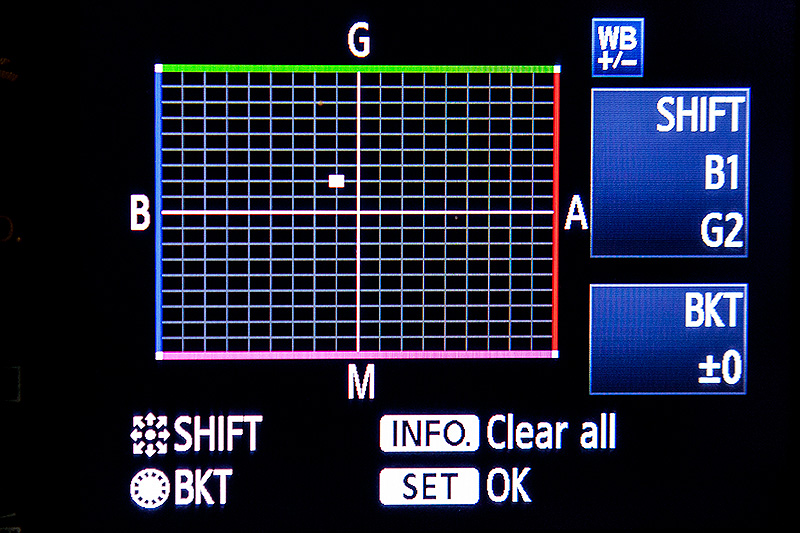
The images were brought into Canon’s EOS Utility software and then into Photo Mechanic on the calibrated computer screen and I had a look. The grey was noticeable pink and the whites on the cardboard box were too and so I adjusted the white balance shift (WB SHIFT/BKT in the camera menu) from it’s starting position of B1,G2 to B1,G4 and took a couple more frames. Much better, but still a tiny bit magenta. I shifted it to B1, G5 and took another picture and the grey was finally grey and the white was finally as white as it could get.

That was the first camera sorted. All I had to do was to get the second one to match it. Leaving the lens on the tripod I simply swapped the bodies over,  matched the exposure and fired a couple more frames. This body was on B0, G1 and, after a bit of fiddling, I got the colours to match by eye on B1 G2. Comparing the frames shot on the two cameras showed that one was a tiny amount more contrasty than the other and so I simply adapted the Picture Style “standard” that I habitually use for RAW files to get the contrast between the two cameras to match as well.

All-in-all it took about thirty-five minutes to set the kit up and get the results that I wanted (including synchronising the clocks). On my shoot today everything was the right colour as soon as I dragged it into Adobe Camera RAW from both cameras and I saved myself a fair amount of computer time – which is important because in the editorial markets where I make most of my money nobody pays for the time you spend in front of the screen and adjusting images from two different cameras can take quite a bit of time.

For me, this kind of techie stuff is vital. A lot of people just plough on and shoot without ever calibrating or changing anything but I am sure that thirty-five minutes work once every few weeks will save an enormous amount of time in between and time is, they say, money!

People in the news bringing back memories

©Neil Turner/TSL. Hilary Mantel, January 2007.

©Neil Turner/TSL. Hilary Mantel, January 2007.

I seem to have a very strong memory for where, when and why I photographed people in the past. When names come up in the news I often think “ah yeah I shot them at such and such a place”. Hilary Mantel, double Booker Prize winning author has been in the news a lot this week. She gave a lecture where she commented on the Duchess of Cambridge and in comparing her to the late Princess Diana (the Mother-in-Law she never knew) called her “precision-made, machine-made, so different from Diana whose human awkwardness and emotional incontinence showed in her every gesture.” The lecture was long and talked of many things but the reactions against Hilary Mantel’s views were both harsh and often mistaken.

This made me wonder if my view of the situation and the criticism is in any way tainted by having met her, by having admired her books and by actually listening to what she said when I watched the extended highlights of the lecture on YouTube. Of course I cannot really be sure but my memory of meeting Ms Mantel is pretty strong. I can remember her apartment and I can remember her hospitality. I can remember her reluctance to have her picture taken and having spent a lot of time chatting before ever getting a camera out of its bag. I can even remember getting to the location with a lot of time to spare and I can even remember the chat that I had with a chap walking his dog along the street where I parked up and waited in the chilly January air.

Without having much to say, I thought that I’d share my favourite frame from the job. It was shot in colour like the rest of the set but I felt the need to convert it to black and white and submitted two versions to the Picture Editor. I wasn’t surprised when they ran it in colour but I have a very strong memory of being mightily disappointed.

For the many techies who read my blog, it was shot on a Canon EOS1D MkII with a Canon 70-200 f2.8L IS lens at 1/250th of a second at f4.5 on 100 ISO. It was lit with a Lumedyne flash with a shoot-through translucent white umbrella deliberately set up to lose as much of the ambient light as possible.

Rubbish on Oxford Street

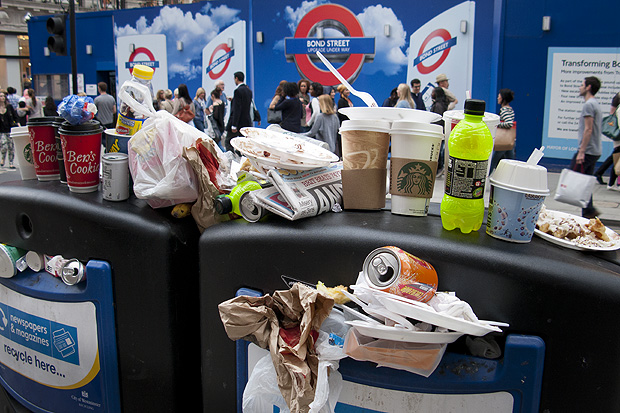
I was having a rare day off on Saturday and after a fantastic lunch in London’s China Town I walked up to Bond Street underground station to get a tube train back to where I am staying in Mile End. I usually carry a compact camera with me (still using my venerable Canon Powershot G9 most of the time) and just outside the station I saw this amazingly full and overflowing rubbish bin. It’s not often that I capture a compact camera picture that goes beyond the family album…

©Neil Turner. Oxford Street, London July 2012.

I took the picture “just because” but the more I looked at it, the more I realised that things like litter and other urban issues that don’t make the headlines absolutely fascinate me. My next thought was that images like this fill stock libraries and that I really should make more effort to shoot good generic images and submit them.

I’m no great fan of Westminster City Council who run this part of London but I admit that they have a tough job and you can see that the vast majority of the waste is fast-food wrappers and packaging. There probably isn’t an easy answer – they are fighting an uphill battle there and very little of the waste is dropped by local people. It’s a tourist area and a shoppers’ area and you might draw the conclusion that those two groups of people are less invested in keeping the place tidy.

I actually thought about labelling the post “off topic” but the  I decided that as it’s my blog, I get to choose what the topic is!

Hero portraits

A few months ago I got a call from a designer who wanted me to shoot some pictures at a gym in east London that would be used in many different ways but primarily as huge prints in the window of their high street premises. My instructions were to shoot what he called “hero portraits” of some of the gym staff and of the two owners who are both fitness experts. That was the extent of the advanced briefing.

©Neil Turner. March 2012, London

The designer was there on the day to act as art director and I turned up with plenty of kit: cameras, lighting, backgrounds, clamps, clips, gels and plenty of batteries. The day started with a quick chat, a couple of test shots and then we decided to shoot “black on black on black” – the team were all wearing black gym kit, we made use of the black rubberised floor in the free weights area and I brought in a six foot by four foot matt black folding Lastolite background. We settled on a mixture of strong side and back-light with some very warm gels being used in different ways in each of the four main shots.

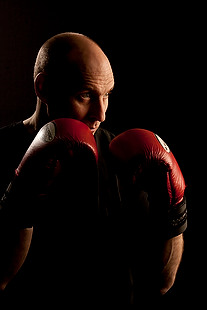
Shot one was of one of the owners who uses boxing and boxing training to work with many of his clients and with some of the group classes he teaches. We went for a simple composition with him putting up his guard as if the 24”x36” soft box that was about four feet away from him was his opponent. That gave us the main light and I used a second head with a grid diffuser behind him to accentuate the shape of his shoulders, neck and head. The first few shots featured black boxing gloves but that was just one bit of black too far and so we swapped them for red and the resulting images were very pleasing.

Shot two was his business partner who does fitness classes and we featured her with a large blue medicine ball, three quarter length and slightly less side lighting.

©Neil Turner. London, March 2012

Shot three was of another male instructor who specializes in power training and he suggested that we used a variation on the American Football quarterback starting position. This was the most fun image to shoot because the shapes were instantly graphic and the light was almost instantly correct. The floor featured in this shot for the first time and so I needed to make sure that it didn’t dominate the composition. In the end I made sure that only the smallest area around his feet had any light on it at all and some nearby kit was used to “flag” the area – stopping unwanted light hitting the rubber tiles.

The fourth and final of the hero portraits was about physiotherapy and for that we had a client sitting on one large blue ball using a blue soft tube across his shoulders to stretch and twist. Four very large prints now feature in the window of the gym. Heroic!

On test: Vanguard Heralder 38 camera bag

When somebody offers me the chance to try out a new camera bag that is winning awards all over the place, I normally jump at that chance. An email from the people behind the Vanguard range of bags arrived in my inbox a few weeks ago and the Heralder 38 arrived at my home shortly afterwards. I have tried so many rucksack bags and been disappointed with the compromises that you have to make in order to get portability and so I keep coming back to shoulder bags – despite the best advice of people who know about back pain.
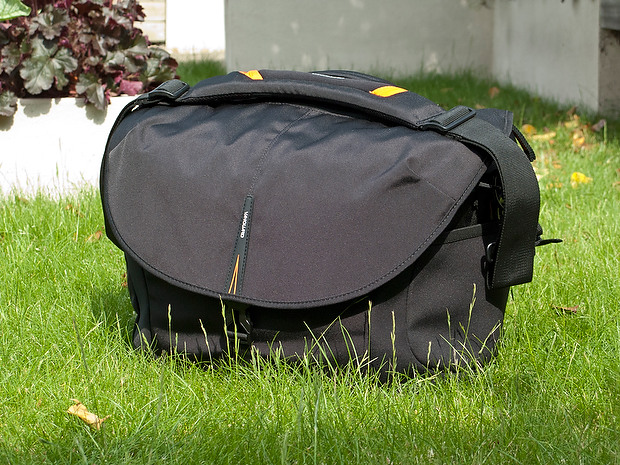
The Vanguard Heralder 38 camera kit + laptop shoulder bag.

Lets put this bag into some sort of context: I have used a Lowe Pro Stealth 650 as my main “carry everything” shoulder bag for many years now and I am used to it, quite like it and would buy the same again to replace it if Lowe Pro hadn’t done what they seem to love doing – which is to take a perfectly good design and “improve” it. The old Stealth 650 that I have is a good bag but the new Stealth 650 is really annoying!

Anyway, back to the review: The way that I test things is to use them in my everyday work and so the amount of testing depends entirely on what I’m up to at any given time. The last couple of weeks have been relatively quiet but I have had enough days out with this bag to have made a lot of important decisions about it. From my own experience of reading reviews, I know that a lot of people skip straight to the end and because of that there will be a “conclusions” section at the bottom.

Most people want their camera bags to be smaller than they need to be, to weigh less than the total of everything that they want to jam in, have super-easy access, look great and to be a joy to carry for several hours. I guess that’s why nobody has ever found the perfect bag. It’s impossible to make that bag on a commercial level because we all have subtly different needs and so the word compromise rears it’s head AGAIN!

What can you get in the bag?

If this bag is going to become my everyday carry everything bag then it needs to swallow my standard amount of kit: Two Canon EOS5D MkII bodies, 16-35 f2.8L, 24-70 f2.8L and 70-200 f2.8L lenses, two 580exII flash units and all of the bits, pieces and accessories that go to support that kit in the field. I also need to put either a 15.4″ Apple MacBook Pro or an 11″ MacBook Air plus gadgets in from time to time. The good news is that everything fits in and the bonus is that I can just fit the 70-200 standing up with its lens hood in place (I hate having to remove and reverse hoods every time you put a lens away).
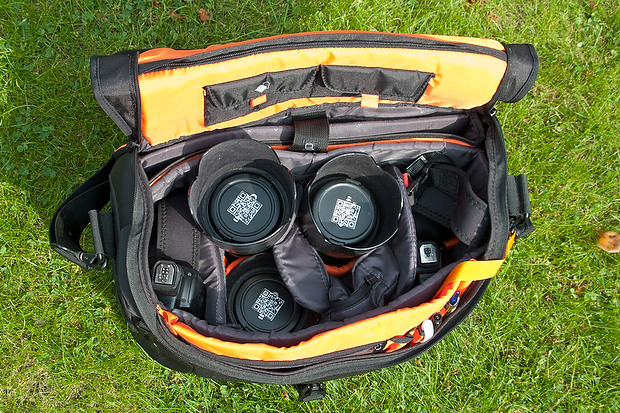
The Heralder 38 showing how my standard kit is laid out when loaded into it.

The bag itself doesn’t have too many pockets and hiding places for anything other than relatively small or flat items such as pens (x3), memory cards (x4) notebooks, passes and business cards. What it does have is a removable pouch which holds a couple of spare batteries for the camera, a couple of spare sets of AAs for the flash units and an electronic release for the camera. Because of this pouch and the excellent use of space within the main compartment of the bag the Heralder 38 passes this test rather comfortably – even with a laptop and related accessories on board.

Ease of Access
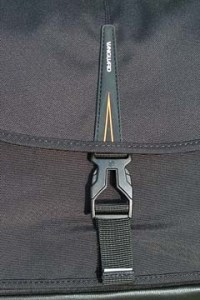
That less than perfect clip…

Shoulder bags are nearly always nicer to work from that rucksacks or rolling cases. I prefer my bags to have a simple method of closing them whilst working and a more secure method for securing the contents when I am simply travelling. The combination of a zip around the whole lid and a single snap-shut clip on this bag meets that requirement too. I suspect that the designers of this model have looked at the old LowePro Stealth bags and decided that they were on to something before designing their own similar solution.

It’s at this point that I found my first ‘issue’ with the Heralder 38. I like to be able to close the bag in work mode one handed. Every Domke and LowePro I have ever owned has the ability to do this in common and the Vanguard looks as if this wouldn’t be a problem either. So far I have struggled like mad with the plastic snap-shut clip fitted to this bag and I cannot work out why. I cannot seem to line it up as easily as the more square ones on my LowePro or on the Think Tank roller that now carries my lights everywhere. I’m still trying to master this clip and failing.

Beyond that niggle, getting kit in and out of the bag whilst moving is as easy as it has ever been on a bag that I’ve used. If they could source a less trendy looking clip I’d be well on the way to proclaiming this bag a massive success.

Carrying the bag

This is where the Heralder 38 comes into its own. Somehow they have made this a superbly comfortable bag to carry. The strap is excellent and the shape of the back of the bag means that it sits on my hip incredibly well. Vanguard have gone some of the way to fooling me into thinking that I am carrying less dead weight than I actually am and that is a huge advantage for this bag when comparing it to the other bags of a similar size that I have owned and/or tried out. Put simply, this is an easy bag to carry – possibly the easiest I’ve ever used.

Extra features

All bags these days come with clips and straps that allow you to attach tripods, monopods and other large and unwieldy accessories. To be honest I never want to be in a position to have to do that and so the bits an pieces that came with this bag that allowed me to do that were removed (where possible) and put into a cupboard.

The bag features lots of handy labels…

What the bag does have (in common with my old LowePro) is a rain cover tucked away in the back of the bag that can be fitted to keep the contents drier than would otherwise be the case. We are in the middle of a spell of beautiful weather here in the south of England and so I haven’t had a chance to test the rain cover yet but I can tell you that it is fast to fit and easy to pack away again. The great news is that it is detachable too – which is a big tick from me. I have had other bags where the rain cover is permanently attached – which means that when it stops rainy you have to leave it out to dry or pack it away wet.

The bag comes with a very stylish luggage tag and an elasticated end pocket that fits a small bottle of water rather well. As someone who carries his bag on the left shoulder, the elasticated pocket is on the wrong end but that’s just a small niggle and not a deal-breaker!

Looks and construction

I guess that when you design a camera bag you have two choices: you either go down the “it’s a camera bag so it should look like one” route or go the other way and design something that looks like a normal holdall. This bag is squarely in the former camp – to the extent that it would be hard to imagine that it was anything else. The black water resistant materials are of a great quality and the plastic base appears to be pretty tough. The orange colour of the interior may be off-putting for some people and I’d prefer something 18% grey myself (like my old LowePro) but it has the advantage of being very visible from a distance and being the colours of The BPPA.

The quality of the stitching and the fabrics tells me that this bag should last a long time. If they put a better snap-shut clip on the bag I think that they will have the whole construction sorted.

Conclusions

This is a very good bag. It is OK to look at, swallows a lot of kit and is easy to work out of. It appears to be well made and the biggest selling point for me is that it is supremely comfortable to carry. The number of distributors for these bags seems to be growing and a quick search of the internet found the best price is as low as £124.98 at Amazon– which is good value for money as far as I’m concerned.
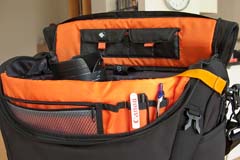
The Vanguard Heralder 38 in use.

So far I only have one real niggle: the snap-shut clip. Beyond that, for the first couple of days I thought that a couple of external pouches would be useful for when I have a few extra bits but I suspect that would alter the superb balance and usability of the bag rather than enhance it.

So that leads me to the big question: “Is this the best bag in its class that I have ever used?” The answer is very close… for portability and comfort of carrying the answer is a big yes. For ease of working is a marginal “no” BUT the bag that I would say beats this one has been modified by LowePro and the new version isn’t as pro’ friendly as the old one and so, if you needed to buy a shoulder bag to carry a decent amount of kit along with a laptop, I don’t know of anything that would beat the Vanguard Heralder 38. I haven’t found the camera bag equivalent of the holy grail yet but there is every chance that it is just a myth anyway.