
Lake District, December 2011. ©Neil Turner
The motto of Christmas 2011… and post No.50!
Lake District, December 2011. ©Neil Turner
The motto of Christmas 2011… and post No.50!
Like most working photographers I sometimes take pictures for the sheer joy of it. Sometimes I even get my iPhone out and do fun pictures. From time to time on this blog I hope to ad a few of the silly, odd and downright comical pictures that I sometimes see.
A lot of my favourites are actually not that good as pictures; I am often amused by wordplay in pictures – like this one…
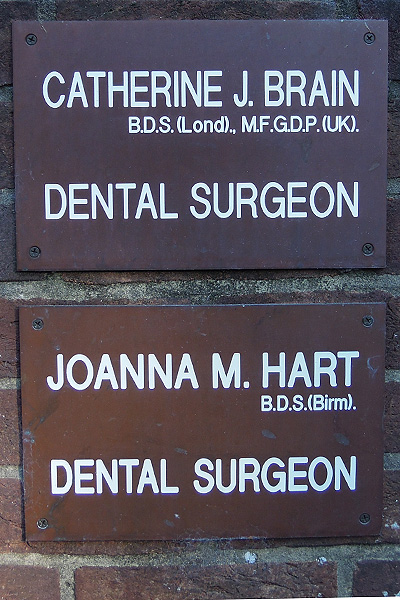
©Neil Turner, October 2011

Main Street, Hawkshead Village. ©Neil Turner
Whilst enjoying a few days away with the whole family in the Lake District over the holidays I shot a few pictures for my own pleasure and for the family album. For no other reason than “I wanted to” most of them were taken at the maximum aperture that the lens could manage – which, given that I mostly used a 50mm f1.4, was f1.4!!! It was great to be away from the big city for a while and take in the countryside and wander through some small towns and villages.
This was taken in Hawkshead Village – a large part of which was refreshingly closed…
Choosing the right lens for the job – written in 2000 for http://www.DPReview.com and it still pretty much stands up today – which cannot be said for everything that I thought that I knew when I’d only been in the profession for 14 years!
There are two ways that you can choose which of your lenses to stick on the camera:
Either of these could be a valid option and, in many cases, the first is decided for you by circumstance. Most news photographers use zoom lenses because it makes sense to have fewer lenses when you are never quite sure what kind of work you will be doing on any given day.
Personally, I use a combination of both approaches. If a position forces me to choose a certain lens then I’m with option 1. Given complete freedom to shoot what I want I’d go with 2. More often than not I’ll go with, say a 24-70mm lens intending to shoot at the 24mm end and get in a position to shoot that way. I will shoot several frames and then start to move around, zoom in and out and shoot a variety of similar images, each with subtle differences. I try to make a point of shooting with just about every focal length available to me on every job. Sometimes I am right about lenses first time but often I’m not. What had seemed like an obvious task for the 28mm ends up being a spectacular 200mm shot and vice-versa but the result is that you often end up with images that are just that bit better.
I nearly always shoot on location so I cannot preplan every detail. Going equipped with a range of lenses is vital. Your choice of lens will depend on so many questions running through your mind. How is this image going to be used? Big, small, upright, horizontal, front page? Double page, back page, website, magazine or newspaper? Is it going to have copy running over it? Will it have more than one usage?
If I cannot answer any or all of those questions, then I’ll shoot every variation I can. Shall I start with a long lens, if it’s a portrait then being further away may relax the subject and I’ll get in with the wide when they are more comfortable. Background, what’s behind them? Can I use a change of lens get rid of a poor background?
Answering self-set questions and making compromises is the key to news photography. Choosing the right lenses helps to reduce the number of technical compromises that you are forced to take, giving you more time to make the creative compromises that you want to make.
Nothing much has changed with my kit for everyday jobs, so here is a refresher of what I use…
It seems to me that every web site about a photographer or photography has to feature a shot of the packed bag with an accompanying view of all of the kit laid out. I’m going halfway with the obligatory bag shot but you are going to have to settle for a bulleted list of the contents. We all know what an EOS 5d MkII looks like and I’m pretty sure that you can guess at what a pile of 8 Gb compact flash cards look like too. My old site has quite a bit of this stuff if you really need a fix!
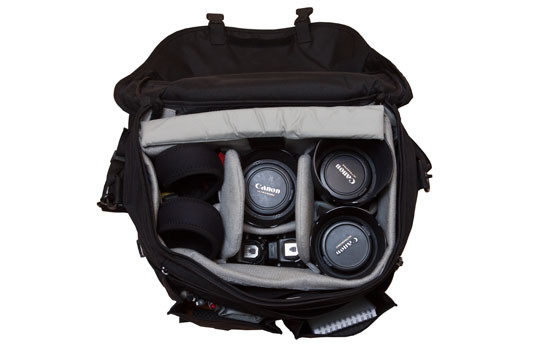
©Neil Turner
So, what’s in your bag mister? (sorry Mr Lehman, I know that’s your line). The bag that I’m using most of the time is a Lowe Pro Stealth Reporter 650AW, and from the left the main items are:
The back section is able to hold an Apple Macbook Pro 15.4 and the various cables will go into one of the front pockets if I need to pack a whole kit into the bag for travelling. There are plenty of bits and pieces in the bag:
Added together, this is one heavy bag. If it has the laptop and all of the computer accesories as well it is barely portable. If I’m travelling on the London Underground or having to do a lot of walking for a job I will try to cut things down and even spread the load in two bags. I’ve written before about the search for the perfect bag and all I can say is that the search continues.
Sometimes I use a nice small Domke J3 bag with two EOS5D MkIIs and some prime lenses – 28mm f1.8, 50mm f1.4 and 85mm f1.8 but most of the time I rely on zoom lenses.
How often do you get your cameras, lenses or lights cleaned and serviced professionally? Every six months? Annually? Every other year? When things go wrong? Sadly, for most professional photographers it is the last one – when the kit goes wrong and needs to be fixed. Almost all of them get their cars service every ten thousand miles or when the service warning light comes on. Over half will get their central heating boilers checked and cleaned every once in a while but their cameras, the equipment on which their livelihood depends seems to get overlooked.
 “My lenses are soft, I’m switching to the other brand” is a cry we have heard regularly over the last coupe of years but is it that one major manufacturer has suddenly started to make bad lenses or is it that the daily wear and tear on even the toughest kit starts to have an effect on image quality?
If the fall off is gradual enough we don’t notice. A lens might go from “wow” through “acceptable” to “oh dear” in twenty stages over thirty months and still we only seek the help of a technician when it gets to “oops”.
Modern camera chips are capable of resolving every bit if detail that our lenses can deliver. A camera such as a Canon EOS5D MkII will show up every glitch and flaw in a lens’ performance in ways that film or smaller chipped cameras never could. It will also show up tiny errors in focusing that would have gone unnoticed in times gone by.
One of my cameras celebrates it’s third birthday next week and it will go away for it’s third service a week or two later. It isn’t particularly cheap but it is a bargain when you think how much I rely on that camera to perform on a daily basis. I have a nine-year old lens that has been to either Fixation orCanon CPS six times to get this or that checked and another seven-year old lens that has made five service trips.
I have always loved the line from “Only Fools and Horses” where Trigger the road sweeper says proudly that he has had the same broom for years but that it has had 17 new heads and 14 new handles. I don’t think that camera maintenance is quite that easy but the concept should apply.
Professional kit is closer to high performance cars and needs to be treated with a bit of TLC every once in a while.
If you talk to any photographer they will almost certainly tell you about the catalogue of bags, cases and pouches that they have bought thinking and hoping in equal part that their lives would be made better by owning and using the perfect holdall. We all know it’s a myth but we all keep buying in the hope that one day that elusive bag will be made and that it will (somehow) save our poor battered spines. Well that’s one kind of bad purchase that we will all own up to but I was put on the spot the other day by a young photographer and asked about my best and worst purchases of recent years. Hmmm…
My reply was that I had been pretty fortunate where cameras and lenses were concerned. I had made pretty good choices on the ‘big ticket’ items – my camera bag is full of the same kit that it was two years ago and (apart from getting newer versions of the same) I’m still happy with my gear. It’s the small things and the software where the good and bad choices seem to come – maybe because they are the nearest thing to impulse purchases that I make.

The Good, the bad and the ugly…
Software tops my list good purchases that I’ve made recently and at the very top is the invoicing software that I’ve been using since I went freelance again in 2008. I found BILLINGS as a ‘staff pick’ at the Apple Store on line and right from day one I have genuinely enjoyed using it and the development that has since taken place from version 2 to version 3 and the addition of an iPhone app has made a good package very good and there is nothing like getting your invoicing right to make you a happier photographer. My other good/great purchase was the iPhone itself. I had tried a Blackberry and I had used a Nokia smart phone but from day one the iPhone has proved itself. It seems as if I get a new ‘life enhancing’ app every week: from cinema bookings to a brilliant parking control app the iPhone becomes more and more important and having the back-up of Mobile Me really helps too.
Back to software – I have used Photo Mechanic for many, many years and I still love it. It is fast, intuitive and does exactly what I need it to do. One colleague refers to it as ‘old school’ and I’ve heard people say that it’s functions are available within newer programmes but I’m far from convinced. Workflow is completely central to the work that we do and so I’m a sucker for anything that is presented as a ‘better, faster, easier’ in the workflow area.
My first ‘bad’ purchase was Adobe Lightroom 3. There is nothing wrong with it. The RAW conversion is exactly the same in Photoshop CS5 but the rest of the file handling and workflow part of it’s capabilities require huge computing power and the patience of a saint. Out of the box it is set up to be thorough but that makes it really slow for the kind of work that I do. By working out the preferences you can decrease it’s thoroughness and speed it up quite a bit but it is still never going to replace Photo Mechanic in my life. That’s an expensive mistake to make but that’s life.
My next ‘bad’ purchase was Apple’s Aperture. Once it came down to just £45.00 in the App Store I was tempted and I gave in. Aperture was an attempt by Apple to take professional workflow, give it the Cupertino treatment and give us a workflow designed from scratch. From version 1 it was flawed and my first experiment with it left me feeling “if only” – in fact a whole list of “if onlys”. Version two came along and they had ticked a couple of boxes but left far too many questions to make it worth pursuing. I bought version 3.1 safe in the knowledge that several of my peers are using it, loving it and even teaching it. I wanted to love it. I tried for well over a month to get on with it but two weeks ago I finally admitted that it was never going to be. Aperture needs power – my Mac has plenty, a Core i5 processor and 8Gb of RAM, but it still never seemed enough. I think that the realisation that Aperture is only at it’s best when you have some expensive plug-ins was a turning point but I soldiered on.
You also need plenty of screen real estate to make the interface appear anything other than cluttered and I do half of my work on a 15″ laptop. I disliked the keyboard shortcuts to start with but got used to those but the reality check was that using Photo Mechanic plus Adobe Camera Raw just makes sense for me.
And here is the truth – what makes a ‘bad’ purchase for one photographer doesn’t mean that it was a bad product. I have owned an Canon 85mm f1.2L lens and sold it again because it didn’t suit me – it’s a hell of a lens, just not for me – I prefer the bargain 85mm f1.8.
So what about an ‘ugly’ purchase? I’m struggling to think of one in the software field. Had I actually bought version 1 of Aperture instead of doing the free trial, that would qualify but I didn’t. I cannot be bothered to list all of my ‘ugly’ camera bag mistakes and so I come to the countless times that I have bought cheap options and regretted them. If I’m shooting with Canon or Vivitar flash units on stands I use the bomb-proof Manfrotto Light-Tite adapters. I tried to use a couple of cheaper ones but they were rubbish and broke under heavy use.
Tripod heads are another way to spend money unwisely. When I left college in 1986 I bought a Manfrotto 155 tripod with a basic head. That got stolen and so I bought another one just the same. When I joined the staff on the newspaper they bought me a new tripod – exactly the same again but with a three-way pan and tilt head complete with a quick-release system and spirit levels. It was a good buy, it worked well and I still have it but I have always wanted an even easier to use tripod head and have bought and sold about half a dozen ball and socket, joystick, friction controlled and fluid heads. I did spend time watching eBay for a geared head at a good price – safe in the knowledge that it would be exactly what I didn’t need and I’ve abandoned the search.
My ugliest purchase ever was a Maxtor USB2 portable hard drive. It failed within days, having never really worked that well anyway. I took it back, they swapped it and the new one failed too. I didn’t lose any data and my only expense was two round trips to the shop to get drives replaced. After the second failure I got a LaCie Rugged drive which is still absolutely fine nearly four years on. I know that it will fail one day and I have duplicates and triplicates of the data stored on it but it has done it’s job.
Making purchasing decisions as a photographer is a tough job but when photography is your livelihood as well as your passion choosing when and what to buy becomes a really tough call. I have a basic kit and I have back-ups for most of it. I have rental accounts with four different companies and I have insurance that should cover my kit against loss, theft and breakages. But what about new, different or specialist gear? The more commercial work that I do, the more that I find myself needing to rent or borrow specialist kit. I have spent hundreds of pounds hiring Canon tilt and shift lenses over the last year or so. I need to seriously consider investing in one or two TSEs because the cost of renting might well be greater than buying, using and then selling on. If a lens costs £2000.00 to buy and it costs £50.00 a day to hire, how many days in a year should you hire before it becomes a better idea to buy? It isn’t 400 days because the lens can be sold. The depreciation on a £2000.00 lens would be somewhere between 1/3 and 1/4 over six months or between £500.00 and £700.00 which is only ten to fourteen days rental (if the days are not continuous) and maybe twenty to thirty days given that you would hire by the week from time to time.
To buy or not to buy, to rent or not to rent – a couple of big questions. One thing is for sure, had I ever been able to rent a Crumpler rucksack camera bag for a few days before lashing out £130.00 I would never, ever, have bought it!
When you work with one camera and you shoot RAW all of the time it really doesn’t matter if that camera has a tendency towards magenta, yellow or cyan – the shift will be consistent and you can cope with it very easily in post-production. If, on the other hand, you work with more than one camera and each of them has a subtle shift in a different direction then your workflow can be slowed down when you have to constantly colour correct images shot under identical lighting in different directions. Like all things in photography, there is more than one way to solve this problem.
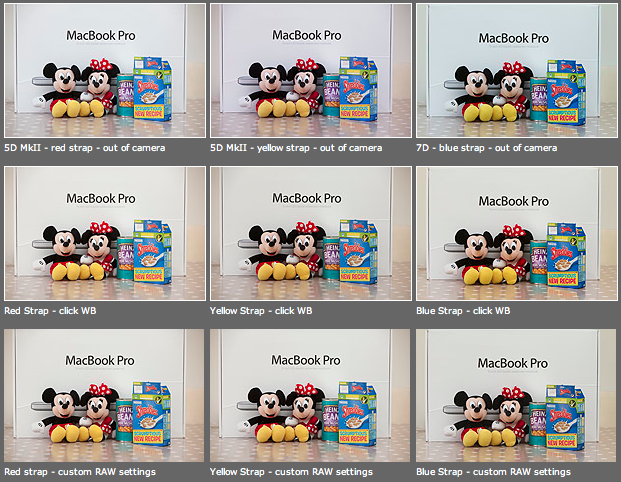
As you can see from the top row of images above – the three cameras that I use have different colour shifts with my slightly newer 5D MkII (codename yellow strap… because it has a yellow strap!) displaying quite a strong magenta shift whilst the 7D (codename blue strap, you can guess why) is a little cold and my oldest 5D MkII (red strap) is pretty neutral but maybe 1/3 of an f-stop brighter. I am going to use the red strap body as my basis for changing the colours on the other two a) because it is the most neutral to start with and b) because it has been serviced and cleaned by Canon quite recently.
Obviously these pictures were shot under controlled conditions using the same light source, the same lens on a tripod and have been converted from their RAW using no adjustments whatsoever. I shot multiple frames using each body as a sample just to make sure that there was no shift between frames on the same camera.
The second row of examples are the same RAW files with a white balance applied to exactly the same spot on the white box between Mickey and Minnie’s ears. As you can see this gets us a whole lot closer to matching the pictures for colour and this technique is fine when you have something in the frame which allows you to use the eye-dropper tool in Adobe Camera RAW (and in other similar raw conversion applications) and it is also fine when you only have a few images to process in this way. If you shoot an event where there are hundreds of frames, then you would spend an unnecessary amount of time balancing in this way.
The third row of examples utilises one of the cool features of the latest versions of Adobe Camera RAW in either Photoshop or Lightroom (and I’m sure that other software does this too) which allows you to set a default set of settings ranging from white balance to black levels, contrast, saturation to sharpening and noise control for each camera which the software detects from the serial number in the EXIF data as you bring it into the RAW conversion control pane. This is great for a lot of work and is a good option if you usually shoot on a fixed white balance.
These three techniques work for pretty much every digital camera and every scan. Some, more modern and more expensive, cameras allow you to go one crucial step further and that is to tell the camera to automatically shift by a fixed amount of colour for every frame – so that if your camera has a magenta shift like my yellow strap camera you can counterbalance that in camera and your images will show up as they should – no matter which white balance you are using at the time. The next few illustrations are based on a Canon 5D MkII using Canon’s own EOS Utility:

The illustration above top left of the three shows the home screen of the EOS Utility application and the “camera settings/remote shooting option is what you need.
This brings up the window on the top right which has an option marked WB shift that allows you to control the cross hairs and set an exact shift for the camera that is connected at the time. It is simple and very, very useful.
The illustration bottom left refers to the technique in Adobe Camera RAW (Photoshop CS4 in this case) in which you set a custom import for each camera and this is the preference pane that you need to find it.
It would be great if there was some software that allowed you to perform an exact “chip” calibration in the same way that you can calibrate a computer screen. Of course, the ability to calibrate the LCD on the back of a DSLR would be cool too but in the mean time here are three ways that you can use the combination of a good RAW converter and your camera’s built-in options to get all of your cameras working the same way as each other. It takes time, it’s fiddly but will save you a great deal of hassle over the course of a few weeks work.
 Neil Turner Photographer