neil turner

In my camera bag

Nothing much has changed with my kit for everyday jobs, so here is a refresher of what I use…

It seems to me that every web site about a photographer or photography has to feature a shot of the packed bag with an accompanying view of all of the kit laid out. I’m going halfway with the obligatory bag shot but you are going to have to settle for a bulleted list of the contents. We all know what an EOS 5d MkII looks like and I’m pretty sure that you can guess at what a pile of 8 Gb compact flash cards look like too. My old site has quite a bit of this stuff if you really need a fix!

©Neil Turner

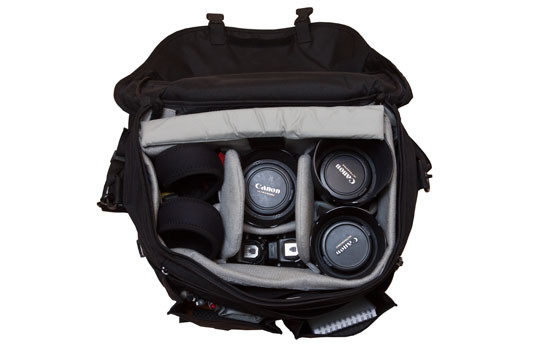
So, what’s in your bag mister? (sorry Mr Lehman, I know that’s your line). The bag that I’m using most of the time is a Lowe Pro Stealth Reporter 650AW, and from the left the main items are:

  • Two Canon EOS 5D MkII bodies
  • Two Canon 580exII flash units
  • Canon 16-35 f2.8L sitting above a Canon 1.4x extender
  • Canon 70-200 f2.8L IS
  • Canon 24-70 f2.8L sitting on an ST-E2 flash transmitter

The back section is able to hold an Apple Macbook Pro 15.4 and the various cables will go into one of the front pockets if I need to pack a whole kit into the bag for travelling. There are plenty of bits and pieces in the bag:

  • Think Tank pixel pocket rocket CF card holder with 8 x Sandisk 8Gb CF cards
  • Notebook, pens, business cards
  • 16 x 2700 MaH AA rechargeable batteries
  • 2 x Spare Canon LP-E6 batteries
  • 2 x Honl Photo Speed Straps
  • 1 x Honl Photo Speed Gobo
  • 1 x Honl Photo Speed Snoot
  • Canon RS-80N3 Remote Switch
  • Various bits of coloured gel (red, green, blue, Full and 1/2 CTO orange, 1/2 CTO blue, purple)

Added together, this is one heavy bag. If it has the laptop and all of the computer accesories as well it is barely portable. If I’m travelling on the London Underground or having to do a lot of walking for a job I will try to cut things down and even spread the load in two bags. I’ve written before about the search for the perfect bag and all I can say is that the search continues.

Sometimes I use a nice small Domke J3 bag with two EOS5D MkIIs and some prime lenses – 28mm f1.8, 50mm f1.4 and 85mm f1.8 but most of the time I rely on zoom lenses.

Pier divers in Bournemouth

Several (actually all) of my recent blog postings have been about old pictures that I have found lying around or in searches for something else and why they are important to me. The latest one shows some young guys diving of of Bournemouth Pier in the early 1990s and it was part of a set that I did for a trades union magazine. The commission was as simple as it was vague – to produce images of the seafront at Bournemouth that could be used in a preview of the union’s annual conference that was being held in the town.

Bournemouth Pier divers. ©Neil Turner, June 1992

Commissions in those days always attracted expenses and that invariably included the cost of film and processing. The job was only a half-day but what a beautiful half day it was. The sun shone, the beaches were packed and nobody seemed to mind me wandering over and shooting their picture. The people diving from the pier made some great pictures but the dangerous nature of what they were doing meant that the client didn’t even want to consider them.

Shooting slide film in those days carried certain risks, not the least of which was that there was only one original. If that got lost or if the client decided to hold on to it there was nothing that could be done about it. Affordable scanners didn’t really exist and getting duplicate transparencies made was very expensive. These days we can just keep as many copies as we have hard drives and in the days of black and white it was always easy enough to knock out an extra print but there was that scary and even precarious time where you had to get the exposure spot on, hope that the film was processed correctly and that the couriers wouldn’t lose the package containing your work. It is quite amusing to think that “fast turnaround” was measured in hours and the three days or so that it would have taken me to get these images from the camera to the client would have seemed eminently reasonable.

How times have changed!

I’ve always liked this picture. It was shot on a Nikon F4S camera with a 24mm f2 Nikkor using Fuji RDP100 transparency film

Good, bad and ugly purchasing decisions

If you talk to any photographer they will almost certainly tell you about the catalogue of bags, cases and pouches that they have bought thinking and hoping in equal part that their lives would be made better by owning and using the perfect holdall. We all know it’s a myth but we all keep buying in the hope that one day that elusive bag will be made and that it will (somehow) save our poor battered spines. Well that’s one kind of bad purchase that we will all own up to but I was put on the spot the other day by a young photographer and asked about my best and worst purchases of recent years. Hmmm…

My reply was that I had been pretty fortunate where cameras and lenses were concerned. I had made pretty good choices on the ‘big ticket’ items – my camera bag is full of the same kit that it was two years ago and (apart from getting newer versions of the same) I’m still happy with my gear. It’s the small things and the software where the good and bad choices seem to come – maybe because they are the nearest thing to impulse purchases that I make.

The Good, the bad and the ugly…

Software tops my list good purchases that I’ve made recently and at the very top is the invoicing software that I’ve been using since I went freelance again in 2008. I found BILLINGS as a ‘staff pick’ at the Apple Store on line and right from day one I have genuinely enjoyed using it and the development that has since taken place from version 2 to version 3 and the addition of an iPhone app has made a good package very good and there is nothing like getting your invoicing right to make you a happier photographer. My other good/great purchase was the iPhone itself. I had tried a Blackberry and I had used a Nokia smart phone but from day one the iPhone has proved itself. It seems as if I get a new ‘life enhancing’ app every week: from cinema bookings to a brilliant parking control app the iPhone becomes more and more important and having the back-up of Mobile Me really helps too.

Back to software – I have used Photo Mechanic for many, many years and I still love it. It is fast, intuitive and does exactly what I need it to do. One colleague refers to it as ‘old school’ and I’ve heard people say that it’s functions are available within newer programmes but I’m far from convinced. Workflow is completely central to the work that we do and so I’m a sucker for anything that is presented as a ‘better, faster, easier’ in the workflow area.

My first ‘bad’ purchase was Adobe Lightroom 3. There is nothing wrong with it. The RAW conversion is exactly the same in Photoshop CS5 but the rest of the file handling and workflow part of it’s capabilities require huge computing power and the patience of a saint. Out of the box it is set up to be thorough but that makes it really slow for the kind of work that I do. By working out the preferences you can decrease it’s thoroughness and speed it up quite a bit but it is still never going to replace Photo Mechanic in my life. That’s an expensive mistake to make but that’s life.

My next ‘bad’ purchase was Apple’s Aperture. Once it came down to just £45.00 in the App Store I was tempted and I gave in. Aperture was an attempt by Apple to take professional workflow, give it the Cupertino treatment and give us a workflow designed from scratch. From version 1 it was flawed and my first experiment with it left me feeling “if only” – in fact a whole list of “if onlys”. Version two came along and they had ticked a couple of boxes but left far too many questions to make it worth pursuing. I bought version 3.1 safe in the knowledge that several of my peers are using it, loving it and even teaching it. I wanted to love it. I tried for well over a month to get on with it but two weeks ago I finally admitted that it was never going to be. Aperture needs power – my Mac has plenty, a Core i5 processor and 8Gb of RAM, but it still never seemed enough. I think that the realisation that Aperture is only at it’s best when you have some expensive plug-ins was a turning point but I soldiered on.

You also need plenty of screen real estate to make the interface appear anything other than cluttered and I do half of my work on a 15″ laptop. I disliked the keyboard shortcuts to start with but got used to those but the reality check was that using Photo Mechanic plus Adobe Camera Raw just makes sense for me.

And here is the truth – what makes a ‘bad’ purchase for one photographer doesn’t mean that it was a bad product. I have owned an Canon 85mm f1.2L lens and sold it again because it didn’t suit me – it’s a hell of a lens, just not for me – I prefer the bargain 85mm f1.8.

So what about an ‘ugly’ purchase? I’m struggling to think of one in the software field. Had I actually bought version 1 of Aperture instead of doing the free trial, that would qualify but I didn’t. I cannot be bothered to list all of my ‘ugly’ camera bag mistakes and so I come to the countless times that I have bought cheap options and regretted them. If I’m shooting with Canon or Vivitar flash units on stands I use the bomb-proof Manfrotto Light-Tite adapters. I tried to use a couple of cheaper ones but they were rubbish and broke under heavy use.

Tripod heads are another way to spend money unwisely. When I left college in 1986 I bought a Manfrotto 155 tripod with a basic head. That got stolen and so I bought another one just the same. When I joined the staff on the newspaper they bought me a new tripod – exactly the same again but with a three-way pan and tilt head complete with a quick-release system and spirit levels. It was a good buy, it worked well and I still have it but I have always wanted an even easier to use tripod head and have bought and sold about half a dozen ball and socket, joystick, friction controlled and fluid heads. I did spend time watching eBay for a geared head at a good price – safe in the knowledge that it would be exactly what I didn’t need and I’ve abandoned the search.

My ugliest purchase ever was a Maxtor USB2 portable hard drive. It failed within days, having never really worked that well anyway. I took it back, they swapped it and the new one failed too. I didn’t lose any data and my only expense was two round trips to the shop to get drives replaced. After the second failure I got a LaCie Rugged drive which is still absolutely fine nearly four years on. I know that it will fail one day and I have duplicates and triplicates of the data stored on it but it has done it’s job.

Making purchasing decisions as a photographer is a tough job but when photography is your livelihood as well as your passion choosing when and what to buy becomes a really tough call. I have a basic kit and I have back-ups for most of it. I have rental accounts with four different companies and I have insurance that should cover my kit against loss, theft and breakages. But what about new, different or specialist gear? The more commercial work that I do, the more that I find myself needing to rent or borrow specialist kit. I have spent hundreds of pounds hiring Canon tilt and shift lenses over the last year or so. I need to seriously consider investing in one or two TSEs because the cost of renting might well be greater than buying, using and then selling on. If a lens costs £2000.00 to buy and it costs £50.00 a day to hire, how many days in a year should you hire before it becomes a better idea to buy? It isn’t 400 days because the lens can be sold. The depreciation on a £2000.00 lens would be somewhere between 1/3 and 1/4 over six months or between £500.00 and £700.00 which is only ten to fourteen days rental (if the days are not continuous) and maybe twenty to thirty days given that you would hire by the week from time to time.

To buy or not to buy, to rent or not to rent – a couple of big questions. One thing is for sure, had I ever been able to rent a Crumpler rucksack camera bag for a few days before lashing out £130.00 I would never, ever, have bought it!
Sticks and stones

My mother told me that “sticks and stones may break your bones, but names can never hurt you” and I spent the first 40+ years of my life without questioning that piece of maternal wisdom. At the ripe old age of 46 I started to realise that certain derogatory terms, when applied to groups of people, can have a bad effect.

not going to equate my profession with religious or ethnic groups who have suffered real physical and emotional harm from the constant repetition of terms deliberately designed to insult them and from name calling intended to isolate them or to incite others to be prejudiced against them. What I am going to do is try to make a case for the quiet burial of collective nouns and occupation based slang terms for photographers that only serve to devalue what we do for a living.

Before I get into the arguments I want to say that photographers often use many of these names for each other in what is meant to be a light hearted and affectionate way. Words get borrowed, used and then abused so we are doing ourselves no favours by perpetuating them. There are a whole raft of pseudo-tabloid terms for photographers that I object to;

  • Snapper – implies that we take snaps, which we don’t. We take photographs, we make photographs and we create photographs.
  • Lensman – what does this mean? It’s just a pointless term that gets trotted out by people who cannot be bothered to use a thesaurus.
  • Camera monkey – particularly offensive, and usually used by ill informed and self important writers.
  • Pap’ – shortened form of ‘paparazzi’, which is liberally used by the ignorant to refer to a wide range of news photographers. I have nothing against the paparazzi (literally translated means buzzing flies) but I object to the pejorative connotations of the word when applied to other photographers.
  • Reptiles – used once to my face by an ‘old school’ journalist who was politely informed that I objected to the term on the grounds that it may well have been used affectionately by him, but that it may not be used so kindly by others.

The list could go on but the point that I’m trying to make here is that words used in jest by friends of our profession get picked up by others and used to denigrate us all. All of this is happening at a time when we are struggling to present a unified, dignified and professional image to a world which at best doesn’t understand what we do and at worst regards us with contempt. The terms that we use to refer to one another are important. Not as important as avoiding undercutting other professionals, not as important as selling out on copyright and not as important as belonging to professional bodies, but in a world where everyone who owns a digital compact camera thinks that they can take ‘professional quality pictures’ every small action has an effect. It’s like the old, and probably untrue, story about a butterfly beating it’s wings in China causing a hurricane in Florida – some very small actions have very large consequences.

As photographers we owe it to ourselves and to our colleagues to avoid using terms for each other that can have negative connotations. When was the last time you heard a Doctor call a colleague a “sawbones” in public? When did you ever hear a lawyer, an accountant, a teacher or a systems analyst use a potentially damaging slang term for a fellow professional? I believe that the use of slang terms is a sign of professional insecurity and we can all help ourselves and our peers by refraining form making those signs.

Names may not hurt you or me individually, but they can eat away at our profession.

What they don’t teach you in college

This post was originally written in 2003. Things, sadly, haven’t really changed and so I thought that it deserved yet another airing.

For better or for worse, the vast majority of people entering the photographic profession are coming from college courses. I have no problem with that, I came from one myself and so did a lot of my favourite photographers. But…

I’ve been a working photographer since 1986 and based on a few things I have picked up since then I have come up with a list of things that they should have taught us that were not on the syllabus. A whole range of vital skills that go a long way to marking out the complete professional from the aspiring “not there yet”.

Obviously when it comes to choosing which lens to use, or selecting backgrounds and props – only experience and familiarity with your kit and brief will do, and colleges are good at telling their students that. There are, however, some skills that are never even mentioned that are vital.

  • People skills: The ability to handle anyone that you are either photographing, who have influence over those being photographed or who are just getting in the way.
  • More people skills: You need to be able to charm the ‘jobsworth’ security man and persuade the reluctant PR and to do it all without breaking into a fit of temper until such times as all else has failed and you have no other option
  • Even more people skills: As a news photographer you need to be able to communicate with anyone from a starving refugee to a pampered celebrity in a meaningful and constructive way – often on the same day! You have to get them to trust you, to do what you want them to do and achieve all of this with dignity and respect.
  • Advanced people skills: As a portraitist you have to have the ability to talk to absolutely anyone and to keep the conversation going at a light but interesting level whilst setting up equipment, making vital technical decisions and shooting the job.
  • Extended people skills: You need to have a sense of your own place in the scheme of things. It’s no use throwing a prima donna tantrum if you are not getting what you want and are never going to get it. It gets even worse when the person you are arguing with is a close personal friend of the editor. Know when to give in, to make another plan and get your shot anyway.

You are probably getting my drift by now. Once you have acquired all of the technical skills and bought all of the kit that you need all that’s required is to learn how to conduct yourself. I often refer to the photographer as the “Social Chameleon”, changing colours and attitude to suit their surroundings. This should be both physical – dressing appropriately so as not antagonize the people that you are dealing with, and mental – adopting the right attitude – be it meek or aggressive, as friendly or confrontational as the situation requires.

Maybe photographers should all adopt some of the techniques used by the best sales people and mix them with skills more common in the diplomatic service. I have watched charity workers running soup kitchens and marvelled at their ability to be both understanding and firm, and I have watched police officers and been stunned by the way that they get the information that they want whilst conducting an otherwise friendly conversation.

My biggest tip on this subject is to find some common ground with whoever you are talking to and work it. It might be sport, it might be the weather or the journey that you both had to get where you have met. If I’m in someone’s home I will often talk about a piece of art or furniture on display or their pet cat or dog. It doesn’t matter what you chat about, you are chatting and barriers are coming down. Avoid contentious subjects unless you are really sure of yourself.

So there you are, what they don’t teach you in college is how to handle people. It’s not just a skill needed by photographers – it’s a life skill. I think that’s why a lot of the greatest photographers have come from other careers where they have learned about people and use those skills in their new profession.

Six feet up is bad?

©Neil Turner, October 2000. Oxford.

©Neil Turner, October 2000. Oxford.

This was first published in the Autumn of 2000 on the DP Review website as a follow-up to a review I did of the original Canon G1 Powershot

It is very easy to hold the camera to your eye and take a picture. Good photography requires us all to think about where we are taking the picture from as well as what we are taking. The best photographs are made when the photographer chooses a vantage point to suit the subject, and it is surprising how few subjects are suited by the height of a human standing at their full five to six feet. This is compounded by the fact that when someone views the image they will see pretty much what they themselves would have taken because they haven’t been told about bending your knees or climbing a ladder to shoot better pictures.

It is no accident that many of the world’s best photographers wear denims most of the time, and I take pride in the fact that I spend so much of my time kneeling that I have “housemaids knee”. Sooner or later I will end up flat on my face or up on a chair to give something extra to a composition – namely a point of view that the person looking at the image would not have seen themself.

This image was shot in the beautiful University City of Oxford on a Canon G1 using the swivel LCD to get the camera at ground level without having to lie in the dirt myself. The lens was less that two inches from the cobble stones and this ultra low angle gives the image a dynamic quality that would have been missing had I been standing at my full five foot ten inches. The photograph is different from most pictures taken of this tourist magnet and I’m sure that my antics were the reason for the puzzled look on the passer by’s face.

My point is that when you get your camera out think about the height of the lens. If you end up shooting from a standing position, well that’s OK – but I will lay good money that 90% of pictures are better when taken from below four feet or over seven.

Developing a new course

Several months ago I had a conversation with a man called Tom Hill who runs a private journalism school called Up To Speed Journalism in my home town of Bournemouth. We were looking at the options of expanding the range of courses on offer to include one for news photographers. A few weeks ago we started looking very seriously at the idea and Tom has now decided to start accepting applications for the first course which runs from January 2011.

I am delighted to have been involved in the development of the course and I will be teaching some of the elements of the course. The big tasks now are to attract the right students and to make sure that we bring the industry along with us at a time when there are very few jobs out there for new entrants to the profession. The idea is simple: to give those who come on the course the information, skills and techniques that they will need to start out on their careers as news photographers. It’s all very exciting and if you want to know more, go to the Up To Speed website where there is quite a bit of information and where you can ask questions about the course.

Colour calibrating digital camera bodies

When you work with one camera and you shoot RAW all of the time it really doesn’t matter if that camera has a tendency towards magenta, yellow or cyan – the shift will be consistent and you can cope with it very easily in post-production. If, on the other hand, you work with more than one camera and each of them has a subtle shift in a different direction then your workflow can be slowed down when you have to constantly colour correct images shot under identical lighting in different directions. Like all things in photography, there is more than one way to solve this problem.

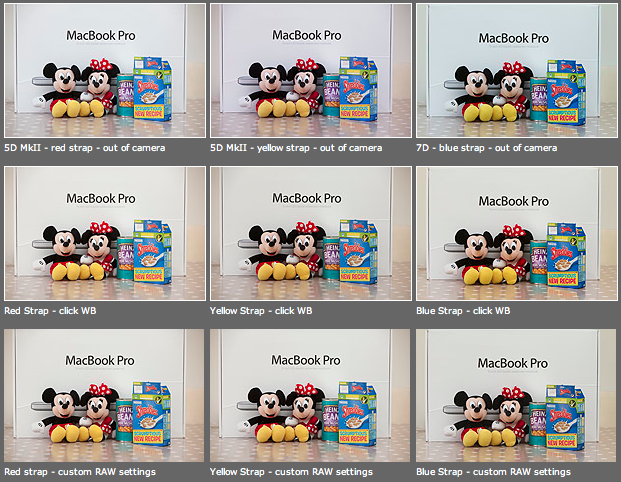
As you can see from the top row of images above – the three cameras that I use have different colour shifts with my slightly newer 5D MkII (codename yellow strap… because it has a yellow strap!) displaying quite a strong magenta shift whilst the 7D (codename blue strap, you can guess why) is a little cold and my oldest 5D MkII (red strap) is pretty neutral but maybe 1/3 of an f-stop brighter. I am going to use the red strap body as my basis for changing the colours on the other two a) because it is the most neutral to start with and b) because it has been serviced and cleaned by Canon quite recently.

Obviously these pictures were shot under controlled conditions using the same light source, the same lens on a tripod and have been converted from their RAW using no adjustments whatsoever. I shot multiple frames using each body as a sample just to make sure that there was no shift between frames on the same camera.

The second row of examples are the same RAW files with a white balance applied to exactly the same spot on the white box between Mickey and Minnie’s ears. As you can see this gets us a whole lot closer to matching the pictures for colour and this technique is fine when you have something in the frame which allows you to use the eye-dropper tool in Adobe Camera RAW (and in other similar raw conversion applications) and it is also fine when you only have a few images to process in this way. If you shoot an event where there are hundreds of frames, then you would spend an unnecessary amount of time balancing in this way.

The third row of examples utilises one of the cool features of the latest versions of Adobe Camera RAW in either Photoshop or Lightroom (and I’m sure that other software does this too) which allows you to set a default set of settings ranging from white balance to black levels, contrast, saturation to sharpening and noise control for each camera which the software detects from the serial number in the EXIF data as you bring it into the RAW conversion control pane. This is great for a lot of work and is a good option if you usually shoot on a fixed white balance.

These three techniques work for pretty much every digital camera and every scan. Some, more modern and more expensive, cameras allow you to go one crucial step further and that is to tell the camera to automatically shift by a fixed amount of colour for every frame – so that if your camera has a magenta shift like my yellow strap camera you can counterbalance that in camera and your images will show up as they should – no matter which white balance you are using at the time. The next few illustrations are based on a Canon 5D MkII using Canon’s own EOS Utility:

The illustration above top left of the three shows the home screen of the EOS Utility application and the “camera settings/remote shooting option is what you need.

This brings up the window on the top right which has an option marked WB shift that allows you to control the cross hairs and set an exact shift for the camera that is connected at the time. It is simple and very, very useful.

The illustration bottom left refers to the technique in Adobe Camera RAW (Photoshop CS4 in this case) in which you set a custom import for each camera and this is the preference pane that you need to find it.

It would be great if there was some software that allowed you to perform an exact “chip” calibration in the same way that you can calibrate a computer screen. Of course, the ability to calibrate the LCD on the back of a DSLR would be cool too but in the mean time here are three ways that you can use the combination of a good RAW converter and your camera’s built-in options to get all of your cameras working the same way as each other. It takes time, it’s fiddly but will save you a great deal of hassle over the course of a few weeks work.