equipment

Anniversaries

©TSL. July 2004. Nine years ago this week Canon delivered my first EOS1D MkII. I shot for the first time with it on a job where staff were using acupuncture in a Sussex school to help boys with their behaviour.

©TSL. July 2004. Nine years ago this week Canon delivered my first EOS1D MkII. I shot for the first time with it on a job where staff were using acupuncture in a Sussex school to help boys with their behaviour.

I woke up this morning to the headline news that it was Nelson Mandela’s 95th birthday. It is also my next-door-neighbour’s 50th birthday and my nephew’s partner is having her birthday celebration this evening as well. I started to think about things that had happened on (or near) this day over time in my life and I came up with a few:

  • 18th July 2012: I was working as a member of the Photo Operations team at the London 2012 Olympic and Paralympic games. I have written before about just how exciting, tiring, inspiring and memorable it was but with the first anniversary athletics event about to happen those memories are coming back as strongly as ever.
  • 18th July 2011: I was coming to the end of the very first cycle of the NCTJ Photojournalism course that I help to teach at Up To Speed in Bournemouth whilst shooting a wide range of both editorial and corporate commissions. That was also an exciting time but for very different reasons.
  • 18th July 2010: I was shooting mostly corporate photography and things were starting to go quiet for the summer months. Really quiet as it turned out.
  • 18th July 2008: I was still employed as a staff photographer at TSL and I spent the day shooting a lovely set of pictures at a school in Hertfordshire that had spent a small fortune making their new building and the grounds as environmentally friendly as possible. I was still unaware that two weeks later I’d be called into a meeting with the Editor and the HR Director to be told that they were making me redundant.
  • 18th July 2003: I had been using my Canon ESO1D cameras for over a year and I was in love. The CRW file format was something of a revaluation and I really enjoyed using it.
  • 18th July 1999: http://www.dg28.com had just been born – I started to publish samples of my work and a few bits of technique advice on my own website for the first time.
  • 18th July 1997: I was starting to experiment with borrowed and rented digital cameras before getting my own DCS520 in late October 1998.
  • 18th July 1995: A month previously I got my own scanner (Kodak RFS2035) and Mac laptop (Powerbook 160c) with Photoshop (v2.5) and began the long journey to digitisation
  • 18th July 1994: Having become a staff photographer at The Times Supplements in January 1994 I had just swapped from shooting with Nikon F4s to Canon EOS1n cameras.
  • 18th July 1993: Life was fun, fast and decidedly unpredictable. One day I would be shooting for a newspaper and the next it was a glossy magazine. On the third day it might be a PR job and you could lay money down that every week would be different from the last. I was shooting with a mixture of Nikon F4, F801 and FM2 cameras as well as having Leica M6s. Some days it would be black and white and some days it would be colour transparency. Some days I’d be using lights and others required nothing more than a fast lens.
  • 18th July 1983: I was working for Jessops when they only had five shops, offered great deals and great service and everyone knew the Jessop family. I was using Olympus OM1n cameras at the time and had acquired an awesome 35mm f2 Zuiko lens.

My career has (so far) failed to stand still for more than a couple of years. Technology changes, my employment status changes and I change. All of that adds up to excitement and that triggers a feeling of keeping it fresh. My style constantly evolves and the client base also evolves. A lot of my colleagues spend a lot of time bemoaning the disappearance of the ‘good old days’ and I am also prone to a bit of nostalgia but we are where we are and just under five years ago I wrote this line:

“It’s an exciting time to be a photographer with new challenges being presented every month and I am on record as saying that I am a very lucky man to be doing what I do.”

Today I’m shooting a nice mixture of editorial and corporate work as well as doing some teaching, writing and consultancy. I spend a lot more time on the beach and I’m constantly looking forward to the next exciting development… whatever that turns out to be!

Fujifilm X20 – a summary of my thoughts

©Neil Turner, May 2013. Mudeford Spit, Dorset

©Neil Turner, May 2013. Mudeford Spit, Dorset

Just over five weeks after taking delivery of my Fujifilm X20 I’m sitting here trying to gather my thoughts and opinions about this intriguing little camera. It is far from perfect and it doesn’t fulfil all of the requirements that I thought that I had when I bought it. In several areas its performance is below par and working with the RAW files is not as easy as it could or should be. All of that having been said, it has become my constant companion almost everywhere I go and I still find myself adoring using it.

Put simply, there’s something about this camera that you’d struggle to put your finger on but that makes taking pictures with it an absolute pleasure. A couple of weeks ago I posted my first update about the X20 and my experiences using it. I tried to summarise the good and the bad points of the camera. You probably won’t be surprised to find out that my opinions have barely changed:

  • The video is still a pain to use and a bigger pain to import and edit.
  • The high ISO performance is still no better than any other camera with a small chip – awful.
  • The RAW file format .raf is not particularly easy to work with and the screen resolution previews in Adobe Camera RAW are worse than slow to generate.
  • The battery life has graduated to awful from appalling now that I have the menus set up better. I have twice got through two batteries in a single day.
  • The build quality of the battery clip is still suspect.

In fact I could have just cut and paste what I wrote back in April with the slight change that the battery life is marginally less awful than first thought. So those are the negatives. What about the positives? You’ll probably have guessed that they have barely changed either. Colours, tonal range, handling and the sheer joy of using it are all very positive comments that I made before and would support still.

©Neil Turner, May 2013. Mudeford Spit, Dorset

©Neil Turner, May 2013. Mudeford Spit, Dorset

I guess that I will never make it as a camera reviewer. The thought of shooting test charts and ISO range comparisons fill me with dread. In a digital world where figures and absolute measurements are the lifeblood of so many websites you should definitely go to DPReview if you want the numbers laid out and explained.

As someone who owns and uses some of the finest DSLR cameras ever made on a daily basis I want something very different from my compact ‘walkabout’ camera. I make the vast majority of my income from taking pictures and I make the rest from teaching, writing and consulting about photography. For me to want to go out and just take pictures for the joy of it, the camera has to be fun to use. And it is on that simple point that Fujifilm are getting it so completely right with their x-series range. The X100 was a great start and the X10 was a brilliant companion. Since then we’ve had the X Pro1, the XE1, X100s and this X20 to enjoy. The single factor that unites all of these cameras is the pleasure you can take from using them when you spend so much time using other (better?) cameras.

That brings me to the next point. There’s no way that I’d use the X20 instead of a Canon EOS5D MkII or MkIII for a normal assignment but on my own time, taking pictures for pleasure and for the family the Fujifilm X20 is wonderful. It will be beaten at some point and it remains true that it isn’t the best compact  in terms of image quality, speed, flexibility or any of a dozen other quantifiable factors. I propose to introduce a new scale based on the likelihood that you’ll actually bother to take the camera out and use it willingly and with a smile on your face. On that measure, and that measure alone, the Fujifilm gets a perfect ten. Right now, I’m off to the shops to get my morning paper; on foot and with my X20 over my shoulder…

©Neil Turner, May 2013. Stourhead, Somerset.

©Neil Turner, May 2013. Stourhead, Somerset.

Final footnote… I was disappointed with the built-in flash and so I decided to buy a small hot-shoe unit to supplement it. I found that one online retailer was selling the Fujifilm EF20 flash that was designed for the X series cameras at under £90.00 and so I bought it. Not a bad investment; I’ve used it quite a bit and it makes a lot of sense to have it because it fits into a pocket without too much difficulty and even has a limited bounce facility. I’ll try to post something cool shot with it soon.

The light in the garden

I don’t do this very often but, given that so many people are interested in the Fujifilm X20, I thought that I’d share a picture that I took yesterday ‘just for the fun of it’. No story, no real importance – just a bit of fun…

©Neil Turner April 2013. The light in our garden yesterday afternoon.

©Neil Turner April 2013. The light in our garden yesterday afternoon.

This was shot as a RAW file and converted with almost no help using Adobe Camera RAW in Photoshop CS6. The camera was in programme mode (yeah I know!) and handled the exposure remarkably well.

1/800 sec;   f/5.0;   ISO 100

Fujifilm X20 – the first update

So here is what I’ve decided to do about writing an X20 review: it’s actually going to be a series of short (ish) updates as, and when, I have got something new to say about it.

Typical UK road sign: the weight is given in metric units whilst the distance is in imperial. Are we European or aren't we? ©Neil Turner, April 2013

Typical UK road sign: the weight is given in metric units whilst the distance is in imperial. Are we European or aren’t we? ©Neil Turner, April 2013

I have been shooting with the new camera as much as I can and in as many different situations as I can. I’ve even used it as a third camera on a live commission. Most of the time I have been using the Fuji RAW mode so that I can get the most out of the files and so that I can compare the different ways that you can choose to work with the images. Most people prefer not to have to read long and drawn out musings when they look at reviews – they just want to cut to the chase and so here are a few likes and dislikes in the form of bullet points:

LIKES

  • The colours – straight out of the camera you have clean, realistic and accurate colours. This shouldn’t be a surprise from the company that brought you Fujichrome all of those years ago.
  • Smooth tonal range – at low ISOs the files have a wonderfully smooth tone
  • Handling – the X20 feels good in my hands and it is very easy to hand hold down to some pretty slow shutter speeds.
  • The manual zoom – it is a model of how other manufacturers should be building cameras – enough said.
  • Buttons and dials – related directly to handling but I felt that the way that Fuji have kept the number of buttons down whilst giving you a lot of freedom to customise deserves credit.
  • The optical viewfinder –  it works really well and the addition of shooting information in the viewfinder is a big bonus.
  • Auto Focus – it is good for a compact and tracks moving subjects rather well.

DISLIKES

  • The battery life is not good when shooting with the LCD screen on. It’s a good job that after market NP-50s are so cheap.
  • The Fuji RAW format (.RAF) takes a lot of computing power and a lot of getting used to.
  • Low light performance – I was expecting this camera to be a couple of stops behind a DSLR but I would estimate that it is at least fours stops worse than a Canon EOS5D MkII
  • Video – it is just not that good or easy to use… and don’t get me started on playback!
  • Battery clip – if the small clip that holds the battery in place lasts as long as I tend to keep my compacts I will be surprised.
  • Buil-in flash – it is as weak as consumer models and you have to remove the lens hood if you don’t want horrible shadows across your pictures when shooting flash.
  • Auto white balance – it isn’t that bad actually, except under mixed lighting when it is a bit unreliable.

I like this camera… a lot. That having been said, I am genuinely disappointed with the files at anything over 640 ISO and there is a build quality question mark on the battery clip – especially as you are going to be swapping the battery out for charging with great regularity. If I needed to, I could shoot some editorial assignments with the X20 and that isn’t something you could say about many compacts. More importantly, I would quite enjoy doing so and that isn’t something you could say about any other compact that I’ve used. Professional photographers talk about their “walk about” cameras and the X20 is certainly my choice for that task. It isn’t the “best” at anything but it does represent a good set of compromises and that, at the end of the day, is what you want from a small camera.

As I said in the opening paragraph, this will be a series of updates rather than a single “this is my opinion” review. At the recommended selling price the Fujifilm X20 is a little expensive but the price is coming down on a weekly basis and once it dips under £400 it will become a well-priced piece of kit.

130411-fuji_x20-002

New toy in the house… a Fujifilm X20

If you get a few professional photographers together there are a few topics of conversation that you are almost guaranteed to experience. One of those is compact digital cameras – the cameras that they carry around ‘just in case’ and take out when they are off duty. I am certainly no exception and it is always an exciting day when a new camera appears on my desk either on test or (in this case) that I have spent my hard earned pennies on.

Fujifilm X20

Fujifilm X20

I am a very fortunate guy because I get to test, review and play with all sorts of new equipment but it takes something quite special for me to put my hand in my pocket and commit to buying anything. I loved the Fujifilm X10 and I have owned and used a vast array of Canon G series digital compacts but the new X20 seemed to tick all of the boxes. I was never that keen on the way that Adobe Camera RAW (or any other RAW converter for that matter) handled the X10 files and so I held off buying the X20 until Adobe released a version of their RAW converter for Photoshop CS6 that handled the Fujifilm RAW format properly.

I will write more and post lots of pictures when I have truly had time to get to grips with this new camera. So far I have been through the menus, tested a few RAW files with the new Adobe converter as well as the SilkyPix application that comes with the camera. It has only been a few hours but I am really loving the feel of my new toy. I guess that the big change from the X10 is the viewfinder information which has transformed a good idea into a really useable tool.

Another interesting feature is that even if you select the 3:2 aspect ratio in the camera menu, the whole area of the chip is still there when you import the RAW file and so you can easily recompose the frame if you made that tiny error!

Such a geek! More to come soon…

Lighting gels… the best in VFM?

Almost all photographers spend money on accessories, gizmos, gadgets and photo-related odds and sods. Sometimes we waste our money but I wanted to put in a brief plug for the things that constantly amaze me by the amount of “bang for the buck” I get from them. I’m talking about lighting gels. They cost a few pounds each and they last for years if you look after them even reasonably well.

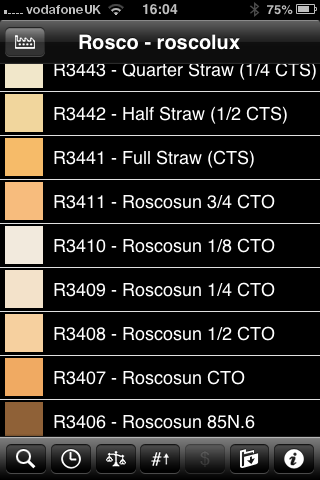
Screen grab from Swatch App

Screen grab from Swatch App

The reason that I am writing this today is that last week I was shooting a job and was slightly embarrassed that the pieces of gel in my lighting kit were looking a bit tatty. I realised that some of them were bought as shared sheets (ie I only had half of a 52 x 61 cm sheet of each) when I was at college in the mid 1980s. I might have added a few more colours and strengths since then but even the newest gel in my bag is five years old. The beauty is that you don’t need to look after them that well really – even a scrunched and screwed up gel is still the same colour and will work. Of course they don’t like extreme heat and they aren’t partial to liquid damage either but at under the boiling point of water and kept dry they are very durable.

When I decided that I needed some new gels I phoned The Flash Centre and they arranged for Rosco to send me some. I have been playing with the iPhone Swatch app for about eighteen months now and it made ordering the new gels rather easy. They arrived rapidly in a strong cardboard tube and all I had to do was cut them down into the right sized pieces to fit into a pocket in my Think Tank rolling case.

This time around I ordered various grades of CTS – that’s Colour Temperature Straw, the gel that changes the light coming out of my flash units to varying degrees of Tungsten right up to the Full CTS which does a very good job of making the Elinchrom Ranger Quadra flash tube into a Tungsten light that very closely matches the Tungsten setting on a Canon EOS DSLR. I also got some ND (Neutral Density) gels and a sheet of a diffuser called ‘tough spun’. I didn’t need to get any effects gels – the purple, orange, red, blue and green gels that I have in the case are fine even if they are old enough to buy alcohol by now.

Comparing the cost of this big batch of new gels to some of the money that I have literally thrown away on rubbish gizmos over the last 30 years I feel very smug. I know that after one single use I will have justified the (tiny) expense and that after the 50th use it will get embarrassing how smug I feel about the VFM (value for money) that you get from quality lighting gels.

Elinchrom Ranger Quadra Update

What do you call it when something that was already very good gets quite a lot better? Well I guess that would be an upgrade. That’s exactly what happened yesterday when I changed to the new Lithium Ion batteries on my Elinchrom Ranger Quadra kit.

New lithium ion on the left and the old lead gel on the right.

New lithium ion on the left and the old lead gel on the right.

From the picture above, you can see that there is an appreciable size difference – which is always handy but there’s no way that I would have swapped them out just because of that – after all, they weren’t exactly huge to start with. There are four real reasons that I swapped:

  1. My old batteries were over four years old and had stopped holding a full charge – especially in the cold weather
  2. Elinchrom claim a higher capacity of up to 320 full-power flashes per charge for the new battery compared to only 150 for the old ones
  3. Faster recycle times. I’m going to have to believe Elinchrom and my own gut feeling here because you cannot compare brand new batteries to four year old ones in any meaningful way but at full power the recycle time appears to have halved to just over 1.5 seconds
  4. They weigh a lot less – 892 grammes less each. The new battery is 784 grammes compared to the old one which was 1,676 grammes. With two batteries in my kit I have saved a massive 1,792 grammes

Less weight, even in a rolling case, has got be a good thing 99% of the time and I am really looking forward to having to carry less. Of course I have always loved using the pack and battery to weight the base of the lighting stand down when working outdoors. I might have to find a few rocks and bricks lying around to supplement the pack more often that I used to but that’s fine by me.

I’ve only managed to shoot two small jobs with them so far and the speed of the recycling is great – even with my four year old Ranger Quadra pack and S heads. Some portraits yesterday afternoon shot indoors and on a lower power setting had the kit recycling in a fraction of a second which made the job go very smoothly indeed.

I have yet to try out the new Quadra Hybrid pack which promises all sorts of extras that I don’t think that I need. Elinchrom offer an upgrade to packs as old as mine to get the brighter display but my purchasing decisions these days are made on a perceived need rather than on wanting the shiniest and newest kit.

I’ve blogged about this Elinchrom kit before. The first time was in May 2009 when I’d only had the kit a short while. 32 months later I blogged again and, in what has become my most popular posting ever, I gave my considered review of the kit. One of the first comments on that posting alerted me to the new batteries being on their way. It’s taken me twelve months to get around to getting the new batteries and having the small modifications done to the S heads and I’m a happy man.

In the “32 months on” review I mentioned a few other things that I’d like to have seen produced to go with this kit. In the last six months I have become less and less pleased with the Skyport remote system that comes with the Ranger Quadra. The original triggers were prone to falling out of the hot shoe and the controls on the mark two version are tough to see in low light. I know that the whole raison d’être of this system is to be small and lightweight but they went too far with the Skyport transmitter – so much so that I’ve gone back to using Pocket Wizard Plus III transceivers a lot of the time at the expense of being able to remotely control the power.

So, Elinchrom – I hope that some senior managers are reading this… if you really want to make my happiness complete, can you please produce a transmitter that works with the EL Skyport receiver built into my Quadra pack that takes AA batteries, is about the size and weight of the Pocket Wizard Plus III unit with a digital display that has all of the functionality of the small Skyport transmitter but that is easy to use in subdued light, doesn’t require a tough-to-find button battery and that stays in the hot shoe properly. Pretty please?

Getting colour right on four year old cameras

Back in June 2010 I wrote a blog post about getting the colours to match on multiple Canon digital camera bodies. Ever since then I have tried really hard to keep my cameras synchronised for colour and contrast as well as making sure that the clocks are set to identical times. What has become obvious to me is that as cameras get older they shift their colour balance and the shift seems to accelerate a little. What has also become obvious is that the clocks built into Canon digital cameras get out of synchronisation far too quickly.

WB Shift on a Canon EOS5D MkII

WB Shift on a Canon EOS5D MkII

Getting the clocks the same is a simple task: you can either do it in the menu on the camera or synchronise the clocks when the camera is connected to the computer using the very useful Canon EOS Utility software – a simple task that I find needs to be checked at least every four to five weeks. When I did the synch’ this morning two Canon EOS5D MkII bodies were nearly fifteen seconds different.

Moving on to the much trickier question of colour, I suggest that you read the old post before actually doing any work. Getting two cameras to match takes a while and getting three to match when one of them has a significantly different chip is even harder. This time I was simply wanting to get my two four-year-old 5D MkIIs to give me the same colour rendition as each other. I had started to notice that one required quite a bit more magenta removal than the other and so I put my 70-200 lens on a tripod, connected the first camera (which was giving me some fairly magenta images) to the laptop and mounted the body onto the lens. I built myself a little still life with a cereal box and a grey card, lit it with a reliable flash on manual power output and shot a frame or two.

My makeshift test target

My makeshift test target

The images were brought into Canon’s EOS Utility software and then into Photo Mechanic on the calibrated computer screen and I had a look. The grey was noticeable pink and the whites on the cardboard box were too and so I adjusted the white balance shift (WB SHIFT/BKT in the camera menu) from it’s starting position of B1,G2 to B1,G4 and took a couple more frames. Much better, but still a tiny bit magenta. I shifted it to B1, G5 and took another picture and the grey was finally grey and the white was finally as white as it could get.

That was the first camera sorted. All I had to do was to get the second one to match it. Leaving the lens on the tripod I simply swapped the bodies over,  matched the exposure and fired a couple more frames. This body was on B0, G1 and, after a bit of fiddling, I got the colours to match by eye on B1 G2. Comparing the frames shot on the two cameras showed that one was a tiny amount more contrasty than the other and so I simply adapted the Picture Style “standard” that I habitually use for RAW files to get the contrast between the two cameras to match as well.

All-in-all it took about thirty-five minutes to set the kit up and get the results that I wanted (including synchronising the clocks). On my shoot today everything was the right colour as soon as I dragged it into Adobe Camera RAW from both cameras and I saved myself a fair amount of computer time – which is important because in the editorial markets where I make most of my money nobody pays for the time you spend in front of the screen and adjusting images from two different cameras can take quite a bit of time.

For me, this kind of techie stuff is vital. A lot of people just plough on and shoot without ever calibrating or changing anything but I am sure that thirty-five minutes work once every few weeks will save an enormous amount of time in between and time is, they say, money!