commercial

Posed by model – my revenge…

Jez Coulson is a great photographer and he is one of my oldest friends in the industry. We went to college together, shared a house and even started a business together – you get the picture, we are friends. A few days ago he was obviously looking through some old pictures and stumbled across one of me that he shot for a brochure. I was “posed by model” playing the part of a young, upwardly mobile, business type talking loudly on his old Motorola mobile phone on a train back in either 1987 or 1988. You can read his blog post here.

The thing is that we often acted as models for each other’s commercial shoots – which was a good way to put a few pounds in each other’s pockets when we were starting out. It happened all of the time and we used a lot of other friends and colleagues for the same purpose. We didn’t really do it on editorial shoots (unless the pictures were captions “POSED BY MODEL”) and definitely not on news jobs.

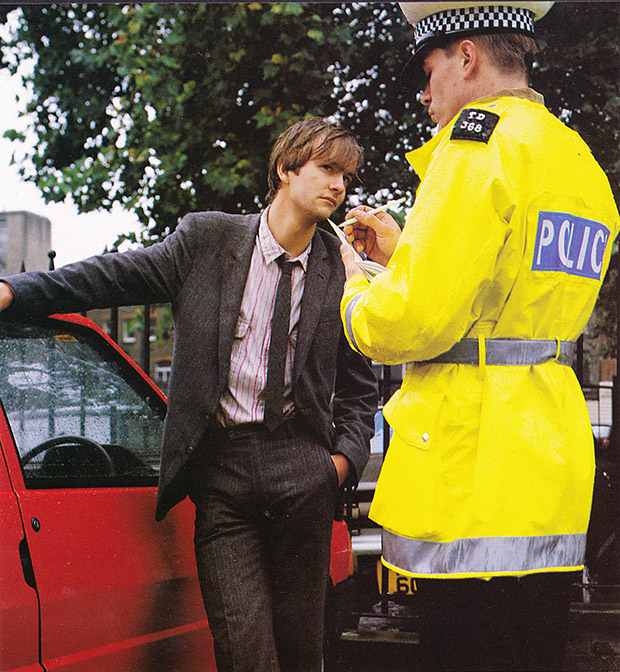
Anyway, Jez posted a picture of a twenty-something me in a suit so I thought that I’d do the same. This was a brochure for an insurance company who covered employees against legal issues and this picture shows Jez leaning on a car that happened to be parked outside our office (no idea whose it was) being given a good talking to by another friend, Peter Anderson, wearing a rented traffic police uniform. Enjoy…

©Neil Turner. London, March 1988

©Neil Turner. London, March 1988

Geek stuff: Shot on 5″x4″ colour transparency Fuji RDP film on an Arca Swiss View camera with a 150mm Rodenstock lens, available light.

Archive photo: Carl Djerassi, London, June 1999

©Neil Turner/TSL. London, June 1999

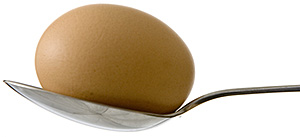
I shot this portrait of Carl Djerassi, co-inventor of the contraceptive pill, scientist and playwright in his London flat. He was mainly resident in San Francisco but kept a home in the UK as well. He was a very quiet and considered man who was used to, but not particularly keen on, publicity. I was attracted to the shape of his dining chairs and the almost egg-like shape of the top. I don’t recall whether we discussed the shape at the time!

Objects of desire

One of the great joys of being a photographer is the wonderful array of gear, technology and toys we get to use on a daily basis. It is also one of the curses of being in business. If I went out and bought every new camera, every new lens, every new application and every new computer that I fancied I would have no home, no car and no life.

That doesn’t stop me looking. The CES show in the USA has thrown up lots of new “I want one of those” moments and a quick calculation says that I would make a £20,000 hole in my finances if I went and bought it all. The serious point here is that for many photography is a hobby and buying new gear is a matter of “I want it, I’m going to have it”. For professional photographers there is a simpler test which asks “will that piece of kit pay for itself, pay my bills and work how it’s supposed to work?”

I’ve said many times that a lot of my clearest thinking comes from teaching and I’m currently updating my notes for teaching some business studies to my NCTJ Photojournalism group at Up To Speed Media in Bournemouth. In many ways the formula is simple: A. you need to take the cost of purchasing the item, insuring and servicing it and divide that by B. the number of days you work in an average year. Dividing A by B gives you C. To get the final figure D. You decide how many years the item might remain useful (longer for lenses, less time for camera bodies, computers and software).  Finally, you divide C by D and that figure is the cost of that piece of kit per working day.

An example: Telephoto zoom lens

  • A. price paid is £1,400 and it adds £20 a year to your insurance and a further £30 a year to service. That’s a total of £1,450
  • B . working 3 days a week on average over a 52 week year. That’s a total of 156 days
  • C. that’s 1,450 ÷ 156 = £9.29
  • D. lenses last on average 3 years

The final figure for owning that particular lens is £3.09 per working day IF you shoot for 468 days over three years. The cost goes down if you work more and it goes up if you work less. Of course one lens isn’t much use without the rest of the kit and so you can go through your whole stash of gear and do the same calculation for each. I tend to go for 2 years for camera bodies and computers, 3 years for heavy use lenses, 5 years for light use lenses and only 1 year for software including upgrades.

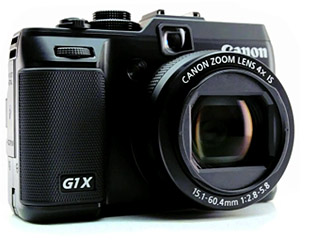
How depressing was that? Let’s end on a lighter note: objects of desire… well… the Canon G1X looks very, very cool, as does the limited edition all black Fujifilm X100. Of course the Canon EOS1DX has to go on the list and I’d love to give the Nikon D4 (and a kit of lenses) a spin. The list is actually a lot longer but nobody reads this far down… do they?

Advice for UK freelancers

Yesterday and today have been largely spent doing accounts. Three months worth of VAT return and my tax return for 2010/2011 (year 3 as a freelance this time around). I feel pretty confident that I have got the numbers right thanks to a combination of decent invoicing software (Billings), some easy to use spreadsheets (Numbers) and a very nice calculator that was a free gift from Canon a few years ago (thanks Canon UK). All of this software and hardware is great but the one piece of advice that I would give to anyone starting out as a freelancer here in the United Kingdom is to book yourself onto as many of the free workshops and seminars that Her Majesty’s Revenue and Customs lay on as you can.

When I was having a month off between leaving my staff job and starting out as a freelancer I managed to get myself onto three of these very handy courses. The first was led by a former Tax Inspector and the theme of the seminar could have been subtitled “how to avoid getting a visit from one of my former colleagues”. The other people on the course were a couple of cab drivers, eBay traders, a golf teacher, a musician and a freelance administrator. Put simply, it was a half day course on the basics of being self-employed:

  • What records to keep
  • How to invoice people legally
  • What you could set against tax
  • What you couldn’t set against tax
  • The pros and cons of using a bookkeeper
  • What an accountant can do for you

A very useful day and at the end of it we were given the business card of the HMRC seminar leader so that we could ask him follow-up questions.

The second course was all about VAT and VAT registration. If you aren’t from the EU and you are wondering what VAT is, well it is Value Added Tax – similar to US sales tax I guess. The seminar leader on this one went through the advantages and disadvantages of registering voluntarily for people whose business turnover is below the limit at which you have to become registered as well as the various different schemes for calculating how much you have to pay the Government four times a year. There were people on the course who had no intention of registering unless that were forced to but the course is still useful because we all pay VAT on everything we buy and knowing how the system works is a big advantage.

The final course that I did was about how to fill in your annual tax return. These forms are legendarily complex and half a day spent with an expert gives you a fair amount of confidence that you can do it. Of course the other angle is that knowing about the form makes it easier to deal with an accountant if you use one. Again, the various options are covered and I left that course wanting to use the on-line systems for everything I do with HMRC.

You can get a couple of the course handouts here and you can book courses at your local tax centre on the telephone. Three half-days doesn’t make you a bookkeeper or an accountant but what they do provide is a sound basic grounding from which it is a lot easier to move forward. The vast majority of photographers that I know are, or have been, self-employed and almost all of them would have benefited from doing these seminars.

In praise of Photo Mechanic

Every software package has its fans, its designers and its detractors. If we all loved the same system then there would be no choice. I wanted to blog about Photo Mechanic and to say how much I like it. That isn’t to say that the others are rubbish – that would childish and purile – just that I find this one application suits me and what I do extremely well. So what is Photo Mechanic? I thought that the description on the company’s own website was hard to beat:

Photo Mechanic is a standalone image browser and workflow accelerator that lets you view your digital photos with convenience and speed. Photo Mechanic displays your “thumbnails” in a familiar “contact sheet” display window. Photo Mechanic helps you find the best photo amongst several similar shots in a preview display that lets you flip through a group of selected photos at high resolution.

Photo Mechanic’s super fast browsing enables you to quickly compare multiple images and select the best ones from a sequence. Its powerful batch processing, full support for image variables, IPTC and Exif metadata, make it the perfect tool for any digital photographer.

Before this becomes an advert and a love-in, there are a few tiny issues with the current (4.6.8) version that I’d love to get sorted. The trouble is that we quickly revert to the “love-in” because the team at Camerabits who design, code and sell Photo Mechanic are second-to-none when it comes to listening to the views, issues and suggestions of their customers. Got a problem? Email Camerabits and nine times out of ten they sort it the same day and the other one out of ten times sees a resolution in the next upgrade.

Screen grab of a Photo Mechanic "contact sheet" window.

Anyway, what do I use it for? Photo Mechanic is the package that I use to import RAW images from my memory cards, edit out the bad pictures, IPTC caption, batch rename, edit again and then send the selected RAW files to my RAW converter of choice (which happens to be ACR in Photoshop CS5.5 but that isn’t important right now). Once the files are converted there they are right back in Photo Mechanic where I can save them to a separate folder, create HTML web galleries, burn discs, FTP or email images to clients or pretty much whatever I might need to do with photographs.

I can hear people saying that there are plenty of packages that can do all or some of the above and even ones that remove the need for a separate RAW converter – all true, but that misses the point. I want my workflow to be fast, repeatable, adaptable and generally hassle free. I want to rely on the trackpad or the mouse as little as possible and have a good, strong set of keyboard shortcuts instead. Bingo – that’s what I get from Photo Mechanic.

In an earlier post I talked about how teaching helps you to get your own practice right and this is very true with using software. If I had to work without Photo Mechanic tomorrow I have a good knowledge of Apple’s Aperture and a very good knowledge of Lightroom and I would never try to dissuade anyone from using those packages. Having had to buy and learn other software has made me appreciate what I have.

The Camerabits website says that version 5 of the software is due in the early part of 2012 and that there will be a separate but interconnected cataloguing application available too. That’s two things from my wish list sorted out – all we need now is a version of Photo Mechanic for the Apple iOS and that would be another thing ticked off that list.
Fun photo: Free cash machine

If only…

Moordown, Bournemouth. ©Neil Turner, December 2011

Chicken or egg? Workflow or mess…

Which came first… the Chicken or the egg, digital imaging or workflow?

One of the rather brilliant side effects of teaching is that you had to look very long and hard at your own practice to make sure that it will stand up to the examination of younger and more eager minds. I have taught workflow on and off for a few years now and I have come to the conclusion that all photographers should get theirs checked every once in a while to make sure that they haven’t fallen into the bad habits trap.

It doesn’t take much time and going through what you do and why you do it with an experienced teacher of these things is a great idea. I have also discovered how useful having a go at a proper edit of someone else’s pictures can be. Photographers are rarely their own best editors and it is a brilliant exercise to do an edit of a job where you give no attention to including pictures just because were hard to take or to pictures that you really like but don’t help tell the story. Captioning should also be part of that exercise because we all make assumptions when we do our IPTC that a disinterested party wouldn’t make. All in all, I thoroughly recommend these exercises to you.

In a rather tongue-in-cheek reference to the Alcoholics Anonymous “Twelve Step Plan” to beat addiction, I developed the photographers 12 step plan to get a good, dependable and repeatable workflow. It doesn’t matter that you can cut twelve steps down to seven or eight if you need to work fast and it really doesn’t matter that step twelve was “relax and put your feet up” anyway. What actually matters is that you have a tried and tested way of getting your valuable pictures from the camera to the client and back them up without making silly mistakes that cost you time, image quality and (worst of all) money.

For years I have been “quoting” the Hippocratic oath that Doctors and other medical folks take when they take up their calling. I have put “quoting” in inverted commas because it turns out that the phrase I have always used isn’t part of the oath at all – it’s just a line from a film!

Anyway I’ve been saying this; “First, do no harm”. It works for medicine and it certainly works for photographer workflows because the idea is that you never damage the original file – always working on a copy. Of course, with Jpegs that have had anything more than very light compression applied that means that you have already sacrificed some quality – but I don’t want to go down the whole RAW Vs Jpeg road again.

At some point in the future I will publish an updated version of the photographer’s 12 step plan with a step-by-step explanation of how my own workflow works but for now I wanted to just outline it. Remember that this can be edited down so that you have fewer steps if needs be:

  1. INGEST/IMPORT – get the images and any supporting files from the camera into the computer. Applications designed to ingest or import files look inside folders and sub-­folders on the memory card in a way that you might not be able to do by simply copying files from the card yourself. It’s important to note that this is one of the easier steps to cut out if you are in a real hurry.
  2. FIRST EDIT – make an initial selection of the images that you are interested in. At this stage you can dispense with very badly exposed frames, pictures where the focus has been missed, where important people have their eyes closed or pictures that are just not very good.
  3. COPY – move a copy of the selected images to a new folder.
  4. RENAME – give the selected pictures a new name. Some clients will have a formula that they want you to follow but otherwise try using a simple word identifier, followed by a six‐digit date and then a sequence number. All good software has the ability to batch rename and sequentially number files. A set of portraits of Tony Blair shot on the 3rd of April 2011 might be blair-­110403-­001 through to blair-­110403-­204. The exact formula that you pick isn’t as important as having one that works for you. The filenames that the camera assigns are not good enough and not unique enough for professional use.
  5. CAPTION – using the IPTC metadata fields to add information about what is in the picture, when and where it was taken and by whom it was taken. This is the best way to insure that your pictures can be found again – all image archiving and storage systems work with metadata.
  6. SECOND EDIT – narrowing the selection of images down to those that will make it into the final edit or the selection that will be delivered to the client.
  7. CONVERT – taking the RAW images from the final edit, making adjustment to colour, exposure, brightness, contrast etc using a RAW converter and then saving the toned images to the required file format.
  8. RETOUCH – opening the images into Adobe Photoshop or a similar application to remove dust spots, make subtle (but ethical) changes that cannot be made in the RAW converter, which, these days, are very few.
  9. SAVE – the final stage before sending to the client is to save the edit in the format that the client requires either JPEG or TIFF are most likely.
  10. DELIVER – most images these days are delivered using the internet. FTP is the most efficient but you may also be asked to email pictures, create web galleries, upload to third party viewing sites or simply burn everything to a disc and put them in the post.
  11. ARCHIVE – make sure that you back up copies of everything that you may need again. External hard drives, cloud storage systems and op?cal discs are the most common options. Multiple back ups are the best way to avoid losing your images due to the ageing of materials or the failure of drives.
  12. RELAX – that’s the end of the process!

Education… over on EPUK…

I write a lot for other websites and towards the end of last year the Editor of the Editorial Photographers UK site asked me to write something about photography education. It started like this:

What price your dream?

In Britain a staggering 1600 photography courses will be touting for students in 2012. Neil Turner, professional photographer and tutor on a new photojournalism course that starts in Bournemouth this month, asks whether enough of these courses actually prepare students for the harsh realities of professional photography today.

If you get a dozen professional photographers together and ask them about the state, standard and suitability of photographic education in this country you’ll get two dozen anecdotes about graduates who don’t know their arse from their f-stop, and a consensus that higher education is failing the students and the industry. Is this true? Are we missing something, or is the system getting it wrong big-time?

If you’d like to read the rest, you can go to THE EPUK WEBSITE