photojournalism

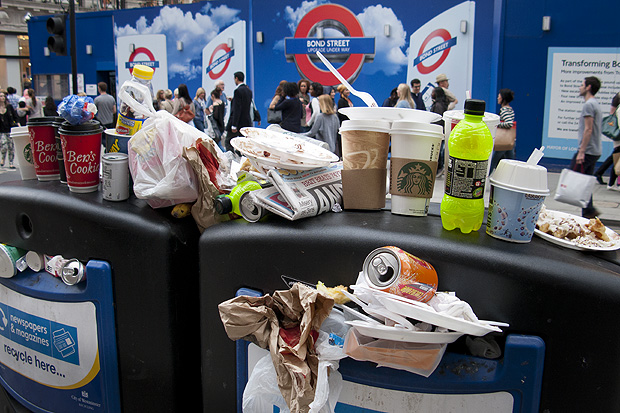
Rubbish on Oxford Street

I was having a rare day off on Saturday and after a fantastic lunch in London’s China Town I walked up to Bond Street underground station to get a tube train back to where I am staying in Mile End. I usually carry a compact camera with me (still using my venerable Canon Powershot G9 most of the time) and just outside the station I saw this amazingly full and overflowing rubbish bin. It’s not often that I capture a compact camera picture that goes beyond the family album…

©Neil Turner. Oxford Street, London July 2012.

I took the picture “just because” but the more I looked at it, the more I realised that things like litter and other urban issues that don’t make the headlines absolutely fascinate me. My next thought was that images like this fill stock libraries and that I really should make more effort to shoot good generic images and submit them.

I’m no great fan of Westminster City Council who run this part of London but I admit that they have a tough job and you can see that the vast majority of the waste is fast-food wrappers and packaging. There probably isn’t an easy answer – they are fighting an uphill battle there and very little of the waste is dropped by local people. It’s a tourist area and a shoppers’ area and you might draw the conclusion that those two groups of people are less invested in keeping the place tidy.

I actually thought about labelling the post “off topic” but the  I decided that as it’s my blog, I get to choose what the topic is!

Why do YOU take pictures?

Most of this blog is about the professional side of photography but, like a lot of people who make their living taking pictures, there is a passionate enthusiast inside me too. From time-to-time I get a lot of emails from keen amateurs asking me how they can improve their photography. The first answer is always “take more pictures” but beyond that it really helps to know what you are taking photographs and who the audience for those pictures is.

©Neil Turner. November 2011, Branksome Beach, Dorset. This picture was taken as part of a set to illustrate why the BH13 post code area is such a desirable place to live.

Defining who your audience is and realising what their requirements are is a huge step towards becoming a better photographer – especially if you care about what others make of your work. Of course there are many among us who would profess that they only take pictures for their own enjoyment and who don’t really care what other people think. I’m sure that those people exist but they are an incredibly tiny minority. The rest of us want to share our work, get feedback on it and (hopefully) have praise heaped upon it.

A few years ago I wrote an essay entitled “Commission Yourself” as an early attempt to give some direction and purpose to photographers who had a desire to be out there taking pictures but who struggled with what, when and why they were doing it.

It doesn’t matter if you are a professional photographer, a keen amateur or a weekend and holiday compact user – shoot the best pictures that you can. It is all a matter of approach so here is how I suggest you try to take pictures. There are a number of things that a professional photographer knows long before he or she starts to take pictures. The pro knows who the client is, what the end use of the pictures will be and what they will be taking pictures of. This enables them to “focus” on the job ahead, an approach that can easily be translated into the type of photography you do.

The “client” could be your partner or your children and you know that the pictures are destined for the family album. The pictures might be of a child’s birthday party. Already you are starting to think in a far clearer manner and you can concentrate on making a list of the important images. You could, for example, need a range of images that would fit accross a double page in the album. You need a shot of the birthday boy – maybe a nice tight one. You need some pictures of the guests – perhaps a wider picture with three or four revellers in it. Some smaller images of a cake and other guests and something with a bit of humour. A total of five or six images, shot from different heights and some tight, some wide. To get five or six good images you will need to shoot at least thirty pictures and on a digital you have wasted nothing by trying different things. You can print images to different sizes and edit on screen adding captions as you go.

By deciding what your goals are in advance you will actually spend less time just snapping and hoping. Next time you will know how well you did and what worked in the framework you set yourself and adjust your self-commission accordingly. It is one of the great ironies in photography that tighter briefs often make better pictures. I have never been able to just “go and take photographs”, but if I am looking for a something specific I nearly always get what I want.

As you become a better photographer you can learn to recognise what you like about certain images and trying to shoot in a given style becomes a great way of finding your own. So go out and commission yourself tomorrow and if nobody is having a party try to document your garden or street. Pick out details and shoot the wide picture – you’ll soon have your own photo story in the can.

Of course it is equally true that there are people out there who don’t really care about what they shoot; they just want to own and be seen with some very cool and expensive gadgets. I have met so many people with cameras over the years who can quote the features of their kit as if they had learned the brochure by heart but who don’t actually like taking pictures. Each to their own.

Another tactic for becoming a better photographer is to analyse and even mimic the pictures that we see from other photographers. Shooting street scenes in the style of Henri Cartier-Bresson or portraits in the style of Terence Donovan can be a real creative spur and sooner or later you will develop your own spin on those styles and start to move towards having your own way of shooting. There are fashions in photography related to specific lenses that you can follow and there is a constant cycle of effects doing the rounds that you can analyse and adopt if you need more inspiration. It’s all out there waiting. Light, subject matter and composition – master being able to assess those three elements in other photographers’ work and you will be well on your way to being a much better photographer.

Beach huts in the winter

A few months ago I wrote about shooting a magazine feature about “walking with speed lights” and promised to say a bit more in time. well, a promise is a promise…

There are days when I just want to go out and take pictures. Most of the time it really doesn’t matter what I’m shooting – as long as I can get my teeth into making the pictures as good as they can be. Winter in the United Kingdom can be pretty un-inspiring and if, like me, you love shooting people outdoors it can be a tough job getting people interested in being out in the cold – especially when there’s a strong chance of getting wet and probably having to be wrapped up in unflattering bad weather gear. A few months ago, in preparing a ‘technique” piece for a photography magazine I decided to go for a walk. The thing that made this an unusual walk is that I took some flash gear with me – nothing too heavy, a couple of Canon Speedlights and a couple of lightweight stands in a simple sling bag – and I decided to shoot anything that I thought would look better with the addition of some off-camera flash.

©Neil Turner, November 2010 – Bournemouth, Dorset.

I tried lots of different pictures but it was this composition that made me happy. One of my favourite spots growing up was a small headland between Bournemouth and Christchurch called Hengistbury Head where there is a nature reserve and a path to some of the coolest beach huts on the planet. On a wet winters day you meet plenty of people walking their dogs and some very hardy bird-watchers.

Great locations are nice but I could have chosen to do this walk almost anywhere in the country and it would have been possible to take interesting pictures. When I’m in London I often walk the canal toe-paths or wander through Epping Forest to see what I can see. Location isn’t as important as the attitude that “something is going to catch my eye”.

The wooden chalets that line the spit are all painted in different colours and no two are alike. What I had wanted to do here was to use flash to make one hut stand out even more from the rest and so I walked along until I saw a very nice one in a muted yellow.

The “normal” exposure here would have been 1/200th of a second at f5.6 on 200 ISO but the skies would have been washed out and I couldn’t achieve my self-set goal. The trick here was getting enough power from two Speedlights to give me a flash exposure of f11 so that I could let the background and sky go two f-stops under exposed.

I found this hut with something right next to it where I could hide a flash. Just along the beach was a freshly painted blue hut that had its own tuft of grass – which was perfect cover for a couple of speedlights. With two flash units simply sitting in plastic bags on the sand and on ¼ power each I played around with composition and with angling the two flashes at different angles before coming up with one of my favourite images of the day. The exposure was 1/200th at f14 on 200 ISO and that allowed me to pick out the single hut better because the flash units were so close to it. The rules of flash fall-off mean that if something is two metres from the light source, and perfectly exposed, anything else that is four metres away will be exactly two f-stops underexposed which plays directly into the hands of anyone being creative with light.

Student work on show.

I’m very pleased to say that two of the students that I have been working with over the last year or so are showing some of their work in London over from tomorrow (Friday 27th April) until Tuesday 8th May. The work will be on the walls at Calumet Photographic’s Drummond Street showroom. The students have both now left the NCTJ Photojournalism course at Up To Speed in Bournemouth and are making their way into the industry.

©Deborah Yawetz

Deborah Yawetz – My interests are wide ranging; there is so much world to see, and people to walk in the shoes of! I enjoy news and wildlife photography: though seemingly different, both have a sense of immediacy, both are challenging and require patience, then finally responding to the moment. I have travelled a lot, most recently to Rwanda and the Serengeti.

I have published work in DV8 magazine in Bournemouth, Shed light events in London and a photo in the Daily ” Echo, Bournemouth. Work experience includes with Redactive publishing and The Times.

©Elizabeth Wainwright

Elizabeth Wainwright – I’ve worked on programmes for NGOs in the UK and in various African countries, and I saw a lot that never seemed to be documented by the media, or to donors. Combining this insight with recent editorial experience on the UK’s longest running environmental magazine, and of course the Photojournalism training, means I am well-placed to bridge the gap between theory and practice; truth and cliché; and do so in an informed, thoughtful way.

I am equally interested in finding homegrown stories: urban beekeeping and UK homelessness are two local stories I am working on. ” The power of storytelling to inspire and trigger change at whatever level – is ultimately what motivates my work.

You are invited to an exhibition featuring work by two new photographers from Friday 27th April until Tuesday 8th May inclusive.

  • Calumet Photographic, 93-103 Drummond Street, London, NW1 2HJ
  • ‘Meet the photographers’ evening on Thursday 3rd May, until 9pm, with drinks and nibbles.
  • The exhibition will be a chance to see a varied mix of work by two recently accredited NCTJ Photojournalists, and during the open evening, to chat more about their work and future projects.
  • More information: ejwainwright@gmail.com / 07841 529773

UK National Symposium on Photography 2012

The fourth National Symposium on Photography takes place this Friday, Saturday and Sunday in London. Timed to coincide with the World Photography Organisation Festival in London, the symposium will feature a very interesting range of debates and events.

I am going to be there, taking part in a panel debate about the future of news photography. The narrative for the debate on the UKNSP website says this:

The ethics of press and public photography, with particular reference to the implications of the Leveson Inquiry. At what stage does photography become harassment? Should there be controls? More broadly, where is the press heading in its use of photography? Should the press, citizen journalists, and members of the public all be treated the same or differently, whether in general or at newsworthy events? This panel discussion features a range of points of view – that of a photographer who gave evidence at the Leveson Enquiry, a leading picture editor and a champion of citizen photography.

It’s going to be a very interesting and maybe even passionate debate. This will be the third time in four years that I’ve taken part in the symposium and I firmly believe that it is developing into and very important event in the UK photography calendar. My fellow panellists are Alan Sparrow, Chairman of the Picture Editors Guild and Executive Picture Editor of Metro UK and Pauline Hadaway, Director of Belfast Exposed Photography and the debate will be chaired by Photographer Andrew Wiard.

The debate starts at 5pm on Friday 27th April at Somerset House in London. Tickets are available from Redeye or from the WPO.

Capture One Pro and other workflows…

One of the subjects that I teach is workflow. I know that I’ve mentioned that before but I thought that I’d remind you of that when I explain why and how I have been learning all about Capture One Pro – the professional RAW conversion, tethered shooting and image enhancement tool from Phase One. I am on version 6.3.5 (the latest available) and this is the first time that I have seen it since version 4 a few years ago.

Principally designed to make the most of Phase One’s own imaging systems, it also works rather well with the whole gamut of professional file formats. I have been using it for quite a few days now and I thought that I’d post some thoughts on here.

Before I get down to my opinions on Capture One Pro I need to say that every piece of software that I’ve used has needed quite a long time to get used to and anyone who does “full reviews” based on a few hours of use is kidding both themselves and their readers. I also need to make it clear that I paid for this software and that I have absolutely no ties to Phase One.

I have now used Aperture, Lightroom, Photoshop, Photoshop Elements, Canon DPP, Graphics Converter and a few others and Capture One Pro is probably the easiest of the lot to get to like. My knowledge of Adobe Camera RAW in Photoshop has been gained over many years and many thousands of edits and it has only taken me a few days to feel almost as comfortable with Capture One. I’m still learning more and the more that I learn the more I like it. That isn’t always true of new software packages – even if you really want to like them…

The workspace that I'm currently using on a 15" MacBook Pro

I like lots of things about the way it works, about the interface and about how good the customer support and instruction manual are. Every time I think that I’ve found a flaw in the feature set of this software I search the knowledge bank or put a note on Twitter and there it is – the answer that tells me that everything I wanted was there all along. That is great but there seems to be one feature from Adobe Camera RAW that I use all of the time that isn’t there with Capture One Pro – good and accurate profiles of all of my Canon lenses ready to apply corrections.

My first impressions of the user interface centred around my inability to find the tools that I actually wanted. I knew that most were there because the literature told me they were and a very brief exchange on Twitter with the workflow genius that is Nick Wilcox-Brown let me know how to find them and add them to my custom user interface or “workspace” as the application calls it. Better still, you can create a range of custom workspaces and save them alongside the suggested ones for dual monitors, simple workflow, black & white or even a replica of the previous version (5) of the software. Being able to customise the workspace is not unique to this application but I believe that they have implemented it really well.

All of the adjustments and all of the options have easily controlled and finely adjustable controls (mostly sliders) and I found myself easing very quickly into the Phase One way of doing things.

Time for a short list of likes:

  • Customisable user interface
  • Easy to learn how to use
  • Extraordinary range of functions
  • Tethered shooting
  • Fantastic image quality
  • Value for money
  • Web contact sheets
  • Output of files to specific sizes

… and dislikes

  • Cannot find profiles for my Canon lenses
  • The sessions menus
  • Applying adjustment “recipes” seems hit and miss
  • The way that it handles IPTC metadata (I know that the sister app Media Pro does that better)
  • Speed of processing batches of files
  • Not recognising the simple tags that I can apply in camera or by using the ‘tag’ function in Photo Mechanic

That is a short list of dislikes and you have to actually use it to decide if you agree about the sessions menus – the way that Capture One likes to create a virtual time bubble for each job in much the same way that Aperture does by default. I may be doing something wrong when I’m trying to create, save and apply “recipes” which are a great idea (again shared with Aperture and others) that allow you to copy all of the adjustments that you have applied to one image to one or more others as well as keeping that set of adjustments for future use/adaptation. Sometimes the recipes worked and other times they didn’t.

My background is in news and editorial photography and IPTC metadata is a fundamental requirement for me and it forms a big part of my own workflow and the personal workflows of people that I work with when I’m doing coaching. Capture One Pro handles IPTC and is compliant with all of the IPTC fundamentals – it just doesn’t do it very well. The same can be said for quite a few image processing applications and I still love good old Photo Mechanic for the speed, accuracy and flexible way that it handles everything except RAW conversions and long term storage.

My final dislike is the speed when processing batches of files. On a two year old Apple MacBook Pro with an i5 2.4Ghz processor, 8GB or RAM it takes 50-60% longer to process a batch of 36 CR2 images from a Canon EOS5D MkII than Adobe Camera RAW inside Photoshop CS5 does. Individual files are shot through in almost the same time but batches are slower. I tried very hard to be scientific when comparing like with like but I am prepared to be proved wrong on this.

This isn’t really a full review – just some thoughts on an application that I am sure to have to teach very soon. Several people have already asked what advantages Capture One would give them over Lightroom or Adobe Camera RAW in Photoshop and, to be honest, I couldn’t really name any. If you already use and are happy with either Adobe product for processing RAW files then it doesn’t really make sense to spend more money and get Capture One Pro. BUT (and it is a but worthy of being in upper case) if you are looking at designing a new workflow for news and editorial work from the ground up and you don’t already have licenses for anything else I would strongly recommend getting Capture One Pro and using it in tandem with Photo Mechanic. Between the two you have a solid, reliable and well priced set of options that will, without doubt, deliver the goods. That would leave you in need of an archiving option and for that Phase One’s Media Pro might be a good solution. There are those who’d argue that between the two Phase One applications you have everything you’d need and they would be right but there is no getting away from the fact that Photo Mechanic does what it does so well that it is worth the money and then some. The same goes for Capture One Pro too.
Re-working old files

With all of the time that I have spent recently trying to get used to the beta versions of Photoshop CS6 and Adobe Camera RAW 7 I have been having quite a few conversations on forums and over email with others going through the same process. One conversation led me to think about even older versions of the software and how I used them and in turn that got thinking about finding an old CR2 two file that I was never truly happy with and having another go with the up-to-date version of ACR. Without looking at the original “finished” JPEG I grabbed a CR2 file from 2008 that I remember being unhappy with and gave it “the treatment”.

©Neil Turner/TSL. May 2008 - RAW file straight out of the camera

©Neil Turner/TSL. May 2008. RAW file Converted with using .xmp settings from 2008 in Photoshop CS5

©Neil Turner/TSL. May 2008. RAW converted today using ACR 7 in Photoshop CS6 Beta

Whilst I was doing the conversion it became obvious to me that I wasn’t really comparing versions of the software – it was that my taste in the way images look has changed. I have no doubt that knowing far more about converting RAW files than I did four years ago helps enormously. You can also factor in the improvements in the adjustment tools available as well but the sum total of all of that means that the newer version is far more subtle and (in my eyes) far better. I made use of the fill-light and the graduated filters. I used a much warmer white balance and my approach to both noise reduction and sharpening has moved on too – although you’d never notice that from these 620 pixel samples.

So there we go. If it wasn’t blindingly obvious before, it is now. RAW conversions depend on a mixture of software and taste and this little experiment has proved to me that my tastes have changed and so, therefore, must the tastes of other people. The final conclusion has to be that every time you create a new folio, make changes to your website or supply a picture you have to make a choice between re-working the files to bring everything up to they way you like things now or leave well alone and allow your images to be “of their time”. Fat chance of the latter happening here…

A nice request for a picture

A few weeks ago I received a lovely email from the widow of a philosopher that I had photographed back in 1996. She had been looking through some of his papers and found a cutting from the Times Higher Education Supplement that had an interview with him along with my portrait of him. She saw the tiny 8 point byline and knowing that search engines are wonderful things she tracked me down. Emails went back and forth and today I got a photocopy of the cutting in the post.

I don’t have much of the work that I did between 1994 and 1998 but her luck was in and I had a Kodak Photo CD with some half decent scans from the job in my loft. It was an easy enough task to find the CD, grab the relevant image from it and get it ready to send to her. The old Kodak Photo CDs used an unusual and proprietary format that Photoshop doesn’t recognise so if anyone else comes across this issue I can confirm that the old Graphics Converter application will happily handle the format and convert your files into useful formats such as PSD, TIF or JPG.

Like most photographers I get regular requests for ‘free’ pictures and I am always wary but somehow a hand-written note from the widow of a very nice man where the words “please” and “thank you” chased away my cynicism rather easily. The portrait is of philosopher and Oxford Professor Bernard Williams (he became Sir Bernard a while after I shot the picture) and here it is…

©Neil Turner/TSL. Oxford, October 1996

Geek footnote: I was using a pair of Canon EOS1n bodies with Canon 28-70 f2.8L and 70-200 f2.8L lenses at the time and this was almost certainly shot on the 70-200. The film was Fuji 200 ISO colour negative scanned on a Kodak RFS scanner.