photojournalist

Fujifilm X20 – a summary of my thoughts

©Neil Turner, May 2013. Mudeford Spit, Dorset

©Neil Turner, May 2013. Mudeford Spit, Dorset

Just over five weeks after taking delivery of my Fujifilm X20 I’m sitting here trying to gather my thoughts and opinions about this intriguing little camera. It is far from perfect and it doesn’t fulfil all of the requirements that I thought that I had when I bought it. In several areas its performance is below par and working with the RAW files is not as easy as it could or should be. All of that having been said, it has become my constant companion almost everywhere I go and I still find myself adoring using it.

Put simply, there’s something about this camera that you’d struggle to put your finger on but that makes taking pictures with it an absolute pleasure. A couple of weeks ago I posted my first update about the X20 and my experiences using it. I tried to summarise the good and the bad points of the camera. You probably won’t be surprised to find out that my opinions have barely changed:

  • The video is still a pain to use and a bigger pain to import and edit.
  • The high ISO performance is still no better than any other camera with a small chip – awful.
  • The RAW file format .raf is not particularly easy to work with and the screen resolution previews in Adobe Camera RAW are worse than slow to generate.
  • The battery life has graduated to awful from appalling now that I have the menus set up better. I have twice got through two batteries in a single day.
  • The build quality of the battery clip is still suspect.

In fact I could have just cut and paste what I wrote back in April with the slight change that the battery life is marginally less awful than first thought. So those are the negatives. What about the positives? You’ll probably have guessed that they have barely changed either. Colours, tonal range, handling and the sheer joy of using it are all very positive comments that I made before and would support still.

©Neil Turner, May 2013. Mudeford Spit, Dorset

©Neil Turner, May 2013. Mudeford Spit, Dorset

I guess that I will never make it as a camera reviewer. The thought of shooting test charts and ISO range comparisons fill me with dread. In a digital world where figures and absolute measurements are the lifeblood of so many websites you should definitely go to DPReview if you want the numbers laid out and explained.

As someone who owns and uses some of the finest DSLR cameras ever made on a daily basis I want something very different from my compact ‘walkabout’ camera. I make the vast majority of my income from taking pictures and I make the rest from teaching, writing and consulting about photography. For me to want to go out and just take pictures for the joy of it, the camera has to be fun to use. And it is on that simple point that Fujifilm are getting it so completely right with their x-series range. The X100 was a great start and the X10 was a brilliant companion. Since then we’ve had the X Pro1, the XE1, X100s and this X20 to enjoy. The single factor that unites all of these cameras is the pleasure you can take from using them when you spend so much time using other (better?) cameras.

That brings me to the next point. There’s no way that I’d use the X20 instead of a Canon EOS5D MkII or MkIII for a normal assignment but on my own time, taking pictures for pleasure and for the family the Fujifilm X20 is wonderful. It will be beaten at some point and it remains true that it isn’t the best compact  in terms of image quality, speed, flexibility or any of a dozen other quantifiable factors. I propose to introduce a new scale based on the likelihood that you’ll actually bother to take the camera out and use it willingly and with a smile on your face. On that measure, and that measure alone, the Fujifilm gets a perfect ten. Right now, I’m off to the shops to get my morning paper; on foot and with my X20 over my shoulder…

©Neil Turner, May 2013. Stourhead, Somerset.

©Neil Turner, May 2013. Stourhead, Somerset.

Final footnote… I was disappointed with the built-in flash and so I decided to buy a small hot-shoe unit to supplement it. I found that one online retailer was selling the Fujifilm EF20 flash that was designed for the X series cameras at under £90.00 and so I bought it. Not a bad investment; I’ve used it quite a bit and it makes a lot of sense to have it because it fits into a pocket without too much difficulty and even has a limited bounce facility. I’ll try to post something cool shot with it soon.

Headteachers or whatever you want to call them…

Almost everyone remembers their head teacher. If they don’t then they will probably remember the Principal, Headmistress, Headmaster, High Master, High Mistress, Direktor or whatever other title the person who led their schools went by. Since 1986 I have photographed hundreds of these people and I have made the journey from being a little bit scared of them through accepting them to being impressed by the work that they do and the huge difference that their being good at their job makes to children and young adults.

I decided to put together a slideshow of some of the headteacher portraits that I have done. Most of the portraits date back to my time at The Times Educational Supplement. I also made the decision to keep them anonymous – I just wanted to show how different they are yet how much they have in common. Some of the Heads featured in this selection are famous in the world of education and one or two have been made Knights or Dames for their services to education. A few have since retired but that doesn’t matter. I don’t want to suggest that the person in charge is the only reason that some schools are better than others but I have yet to visit a successful school that doesn’t have first rate leadership.


Getting colour right on four year old cameras

Back in June 2010 I wrote a blog post about getting the colours to match on multiple Canon digital camera bodies. Ever since then I have tried really hard to keep my cameras synchronised for colour and contrast as well as making sure that the clocks are set to identical times. What has become obvious to me is that as cameras get older they shift their colour balance and the shift seems to accelerate a little. What has also become obvious is that the clocks built into Canon digital cameras get out of synchronisation far too quickly.

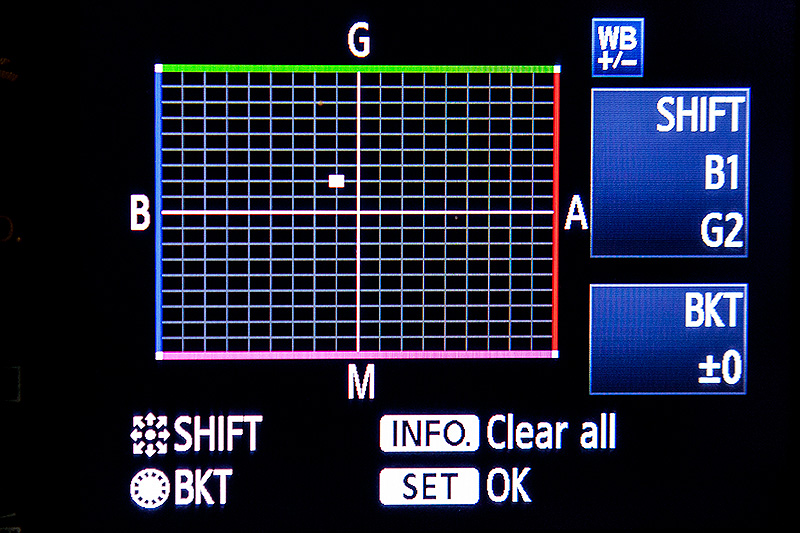
WB Shift on a Canon EOS5D MkII

WB Shift on a Canon EOS5D MkII

Getting the clocks the same is a simple task: you can either do it in the menu on the camera or synchronise the clocks when the camera is connected to the computer using the very useful Canon EOS Utility software – a simple task that I find needs to be checked at least every four to five weeks. When I did the synch’ this morning two Canon EOS5D MkII bodies were nearly fifteen seconds different.

Moving on to the much trickier question of colour, I suggest that you read the old post before actually doing any work. Getting two cameras to match takes a while and getting three to match when one of them has a significantly different chip is even harder. This time I was simply wanting to get my two four-year-old 5D MkIIs to give me the same colour rendition as each other. I had started to notice that one required quite a bit more magenta removal than the other and so I put my 70-200 lens on a tripod, connected the first camera (which was giving me some fairly magenta images) to the laptop and mounted the body onto the lens. I built myself a little still life with a cereal box and a grey card, lit it with a reliable flash on manual power output and shot a frame or two.

My makeshift test target

My makeshift test target

The images were brought into Canon’s EOS Utility software and then into Photo Mechanic on the calibrated computer screen and I had a look. The grey was noticeable pink and the whites on the cardboard box were too and so I adjusted the white balance shift (WB SHIFT/BKT in the camera menu) from it’s starting position of B1,G2 to B1,G4 and took a couple more frames. Much better, but still a tiny bit magenta. I shifted it to B1, G5 and took another picture and the grey was finally grey and the white was finally as white as it could get.

That was the first camera sorted. All I had to do was to get the second one to match it. Leaving the lens on the tripod I simply swapped the bodies over,  matched the exposure and fired a couple more frames. This body was on B0, G1 and, after a bit of fiddling, I got the colours to match by eye on B1 G2. Comparing the frames shot on the two cameras showed that one was a tiny amount more contrasty than the other and so I simply adapted the Picture Style “standard” that I habitually use for RAW files to get the contrast between the two cameras to match as well.

All-in-all it took about thirty-five minutes to set the kit up and get the results that I wanted (including synchronising the clocks). On my shoot today everything was the right colour as soon as I dragged it into Adobe Camera RAW from both cameras and I saved myself a fair amount of computer time – which is important because in the editorial markets where I make most of my money nobody pays for the time you spend in front of the screen and adjusting images from two different cameras can take quite a bit of time.

For me, this kind of techie stuff is vital. A lot of people just plough on and shoot without ever calibrating or changing anything but I am sure that thirty-five minutes work once every few weeks will save an enormous amount of time in between and time is, they say, money!

On test: Vanguard Heralder 38 camera bag

When somebody offers me the chance to try out a new camera bag that is winning awards all over the place, I normally jump at that chance. An email from the people behind the Vanguard range of bags arrived in my inbox a few weeks ago and the Heralder 38 arrived at my home shortly afterwards. I have tried so many rucksack bags and been disappointed with the compromises that you have to make in order to get portability and so I keep coming back to shoulder bags – despite the best advice of people who know about back pain.
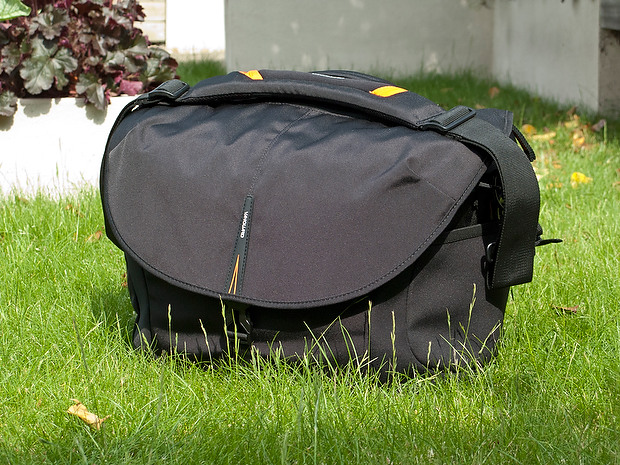
The Vanguard Heralder 38 camera kit + laptop shoulder bag.

Lets put this bag into some sort of context: I have used a Lowe Pro Stealth 650 as my main “carry everything” shoulder bag for many years now and I am used to it, quite like it and would buy the same again to replace it if Lowe Pro hadn’t done what they seem to love doing – which is to take a perfectly good design and “improve” it. The old Stealth 650 that I have is a good bag but the new Stealth 650 is really annoying!

Anyway, back to the review: The way that I test things is to use them in my everyday work and so the amount of testing depends entirely on what I’m up to at any given time. The last couple of weeks have been relatively quiet but I have had enough days out with this bag to have made a lot of important decisions about it. From my own experience of reading reviews, I know that a lot of people skip straight to the end and because of that there will be a “conclusions” section at the bottom.

Most people want their camera bags to be smaller than they need to be, to weigh less than the total of everything that they want to jam in, have super-easy access, look great and to be a joy to carry for several hours. I guess that’s why nobody has ever found the perfect bag. It’s impossible to make that bag on a commercial level because we all have subtly different needs and so the word compromise rears it’s head AGAIN!

What can you get in the bag?

If this bag is going to become my everyday carry everything bag then it needs to swallow my standard amount of kit: Two Canon EOS5D MkII bodies, 16-35 f2.8L, 24-70 f2.8L and 70-200 f2.8L lenses, two 580exII flash units and all of the bits, pieces and accessories that go to support that kit in the field. I also need to put either a 15.4″ Apple MacBook Pro or an 11″ MacBook Air plus gadgets in from time to time. The good news is that everything fits in and the bonus is that I can just fit the 70-200 standing up with its lens hood in place (I hate having to remove and reverse hoods every time you put a lens away).
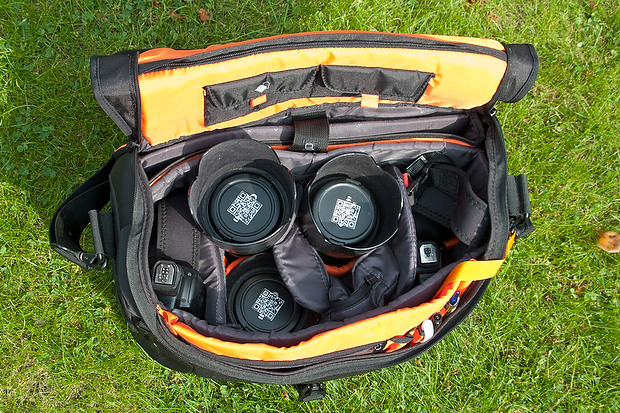
The Heralder 38 showing how my standard kit is laid out when loaded into it.

The bag itself doesn’t have too many pockets and hiding places for anything other than relatively small or flat items such as pens (x3), memory cards (x4) notebooks, passes and business cards. What it does have is a removable pouch which holds a couple of spare batteries for the camera, a couple of spare sets of AAs for the flash units and an electronic release for the camera. Because of this pouch and the excellent use of space within the main compartment of the bag the Heralder 38 passes this test rather comfortably – even with a laptop and related accessories on board.

Ease of Access
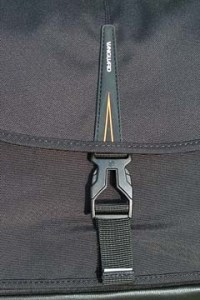
That less than perfect clip…

Shoulder bags are nearly always nicer to work from that rucksacks or rolling cases. I prefer my bags to have a simple method of closing them whilst working and a more secure method for securing the contents when I am simply travelling. The combination of a zip around the whole lid and a single snap-shut clip on this bag meets that requirement too. I suspect that the designers of this model have looked at the old LowePro Stealth bags and decided that they were on to something before designing their own similar solution.

It’s at this point that I found my first ‘issue’ with the Heralder 38. I like to be able to close the bag in work mode one handed. Every Domke and LowePro I have ever owned has the ability to do this in common and the Vanguard looks as if this wouldn’t be a problem either. So far I have struggled like mad with the plastic snap-shut clip fitted to this bag and I cannot work out why. I cannot seem to line it up as easily as the more square ones on my LowePro or on the Think Tank roller that now carries my lights everywhere. I’m still trying to master this clip and failing.

Beyond that niggle, getting kit in and out of the bag whilst moving is as easy as it has ever been on a bag that I’ve used. If they could source a less trendy looking clip I’d be well on the way to proclaiming this bag a massive success.

Carrying the bag

This is where the Heralder 38 comes into its own. Somehow they have made this a superbly comfortable bag to carry. The strap is excellent and the shape of the back of the bag means that it sits on my hip incredibly well. Vanguard have gone some of the way to fooling me into thinking that I am carrying less dead weight than I actually am and that is a huge advantage for this bag when comparing it to the other bags of a similar size that I have owned and/or tried out. Put simply, this is an easy bag to carry – possibly the easiest I’ve ever used.

Extra features

All bags these days come with clips and straps that allow you to attach tripods, monopods and other large and unwieldy accessories. To be honest I never want to be in a position to have to do that and so the bits an pieces that came with this bag that allowed me to do that were removed (where possible) and put into a cupboard.

The bag features lots of handy labels…

What the bag does have (in common with my old LowePro) is a rain cover tucked away in the back of the bag that can be fitted to keep the contents drier than would otherwise be the case. We are in the middle of a spell of beautiful weather here in the south of England and so I haven’t had a chance to test the rain cover yet but I can tell you that it is fast to fit and easy to pack away again. The great news is that it is detachable too – which is a big tick from me. I have had other bags where the rain cover is permanently attached – which means that when it stops rainy you have to leave it out to dry or pack it away wet.

The bag comes with a very stylish luggage tag and an elasticated end pocket that fits a small bottle of water rather well. As someone who carries his bag on the left shoulder, the elasticated pocket is on the wrong end but that’s just a small niggle and not a deal-breaker!

Looks and construction

I guess that when you design a camera bag you have two choices: you either go down the “it’s a camera bag so it should look like one” route or go the other way and design something that looks like a normal holdall. This bag is squarely in the former camp – to the extent that it would be hard to imagine that it was anything else. The black water resistant materials are of a great quality and the plastic base appears to be pretty tough. The orange colour of the interior may be off-putting for some people and I’d prefer something 18% grey myself (like my old LowePro) but it has the advantage of being very visible from a distance and being the colours of The BPPA.

The quality of the stitching and the fabrics tells me that this bag should last a long time. If they put a better snap-shut clip on the bag I think that they will have the whole construction sorted.

Conclusions

This is a very good bag. It is OK to look at, swallows a lot of kit and is easy to work out of. It appears to be well made and the biggest selling point for me is that it is supremely comfortable to carry. The number of distributors for these bags seems to be growing and a quick search of the internet found the best price is as low as £124.98 at Amazon– which is good value for money as far as I’m concerned.
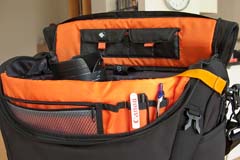
The Vanguard Heralder 38 in use.

So far I only have one real niggle: the snap-shut clip. Beyond that, for the first couple of days I thought that a couple of external pouches would be useful for when I have a few extra bits but I suspect that would alter the superb balance and usability of the bag rather than enhance it.

So that leads me to the big question: “Is this the best bag in its class that I have ever used?” The answer is very close… for portability and comfort of carrying the answer is a big yes. For ease of working is a marginal “no” BUT the bag that I would say beats this one has been modified by LowePro and the new version isn’t as pro’ friendly as the old one and so, if you needed to buy a shoulder bag to carry a decent amount of kit along with a laptop, I don’t know of anything that would beat the Vanguard Heralder 38. I haven’t found the camera bag equivalent of the holy grail yet but there is every chance that it is just a myth anyway.

Grumpy old photographers’ charter

I do a lot of seminar and teaching work these days and one of my most popular presentations is about professionalism. The talk is aimed at new entrants to the profession but it seems to go down well with photographers who have been around a while as well. I have even delivered the same talk to a group of lawyers because actually replacing the word ‘photographer’ with ‘lawyer’ brings a lot of the meaning around to the central idea that, in many ways, professionalism is the same no matter what you do for a living.

©Neil Turner. March 2009, Bournemouth Beach

The final part of the talk is a bit of a dig at myself and my peers. Those of us who have been in the job for a long time and who might just be getting a little complacent about things. I call this part of the talk “The five worst habits of those of us who should know better”:

1. Harking back to a golden age that may, or may not, have existed

It’s a simple idea really – we all look back with slightly misty eyes at the time a few years ago when things were good and before something new came along to spoil everything. Take your pick from the use of colour in newspapers, the whole move to digital, the adoption of multimedia by newspaper websites and several other developments in the industry. The truth is that when I was just starting out there were a few photographers who complained about the arrival of 35mm film and the loss of their beloved Rolleiflex cameras and even one or two who bemoaned the passing of half plate cameras and dark slides with sheet film. I reckon that every photographer has a ‘golden age’ that they look back at and that you can calculate when that was for each of us using a simple formula which compares how long the photographer has been working with when they got their first big front page and divide it all by the first major change in the industry that they went through. There never was a true golden age was there?

2. Forgetting why we came into the job in the first place

Easy to do this… most of us had a desire to tell stories, create arresting and beautiful pictures and to make the world a better place with our photography. Very few of us did it for the money, not many of us did it so that we could play with ever more expensive toys and only a tiny number came into it so that they could work unsocial hours and have to chase clients for money the whole time. If you take a step back and think about your original motivation and it isn’t there any more you really need to make your mind up about whether this is still the business that you want to be in. The older I get, the more I feel the need to shoot pictures that I want to shoot just to keep myself sane and sharp.

3. Failing to keep up with new business practices

“I’ve always done it that way, why should I change now?” is a common lament from photographers who are in trouble of getting it wrong. From the way you buy and use equipment to the way you store your archive and from the way you word your invoices to the way you put your portfolio together should be the subjects of constant review and possible change. Technology affects every single aspect of who we are and what we do and anyone who decides to stop keeping themselves up-to-date with what is happening is consigning themselves to a parallel dimension where they may get some work but where that might  be a temporary state on the road to going out of business.

4. Throwing money and effort into the latest thing

Exactly the opposite of the last problem really. Keeping abreast of developments and knowing where the market is a good idea whereas automatically jumping on every new idea, fad or fashion is not. So many new developments turn out to be ideas that don’t stand the test of time and too many of us have invested too much time and money chasing them. The worst way to do this is to assume that somebody younger and hipper than you automatically knows what to do – that, in my experience, is rarely the case. There’s always a middle-aged geek who you can ask…

5. Letting professionalism slip

Another thing that is far too easy to do. I know that I’ve done it – mainly through over-confidence. You have to remember the maxim that “professionalism is everything we do, everything we say and everything we produce” in our working lives. You can get too close to clients, you can cut corners in your workflow and you can rely too much on automated systems. This is far from a full list but it illustrates the potential pitfalls when it comes to losing our professional edge.

Being a professional photographer is a fulfilling and interesting way to make a living but we all need to remember that it is a profession and not a lucrative hobby. I’ve been wracking my brains to come up with a clever and punchy pay-off line for this blog post but I’ve struggled. I’ll just content myself with some advice: when things are feeling tough and not all all like the ‘old days’ just remember the five worst habits of those of us who should know better and if that doesn’t help… get some help!

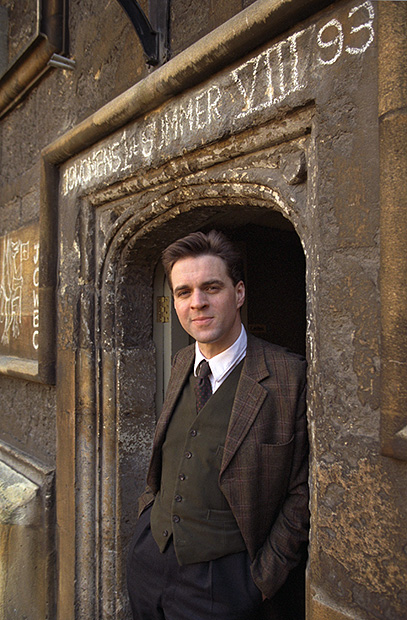
Niall Ferguson, 1997 portrait.

When an email from Channel 4 television landed in my in box with an advertisement for an upcoming and very interesting looking) new programme “China: Triumph and Turmoil” presented by a gentleman called Niall Ferguson. I knew that I’d photographed him before. A quick trawl through my catalogue confirmed that I had indeed shot a portrait of him in 1997 when he was an up and coming star of academia – a professor of History at Oxford University at the age of 32. He was actually born in the same year as me and I was amused at the time by the way he was dressed in the academic uniform of tweeds.

©Neil Turner/TSL. Oxford, January 1997.

I can very clearly remember shooting this portrait. I had driven to Oxford to do another story and the picture desk had rung me and asked me to drop what I was doing, dash across Oxford to do the portrait and then go back to the feature shoot in a primary school. That was the one and only time that they ever asked me to do this and I remember thinking that this must be one important guy if I was being asked to do that.

Since then, he has written yet more books, starred in yet more TV programmes and been seen as a talking head on dozens of television shows. He is clearly still a star of the academic world and obviously a clever chap. His website came up on a quick Google search saying “Niall Ferguson endorses Mitt Romney for President”. Hmmm?

Geek stuff: Portraits shot using two Canon EOS1Dn cameras with 28-70 f2.8L and 70-200 f2.8L lenses on Fuji 200 ISO colour negative film scanned using a Kodak scanner onto a Kodak Photo CD. The software for extracting the PCD format images doesn’t seem to be available any more but Graphics Converter does a wonderful job of extracting a TIFF or a JPEG from the old files.

Note: I need to start wearing my glasses more. The web page for the Channel 4 programme says ” … apparatus” referring to the Chinese state but I read it as “… vast asparagus” – I am getting old!

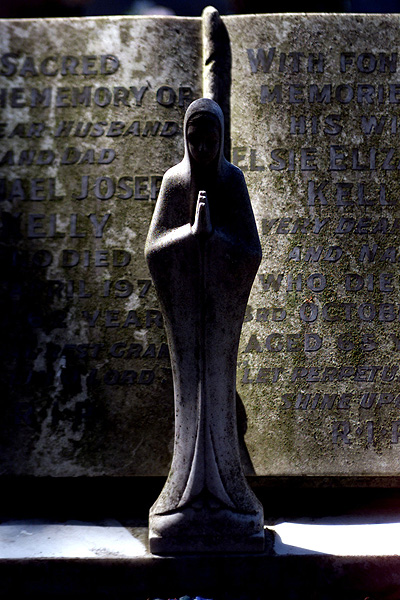
Exceptional light, Barking Cemetery – July 2001

©Neil Turner/TSL. Barking, July 2001

Sometimes the light does all of the work for you. This photograph of a gravestone in an East London cemetery shot in 2001 is classic example of that. I was sent to illustrate a story about using graves and cemeteries as an educational resource and given a day to just find interesting examples.

One of my colleagues had said that Barking cemetery had a very wide cross section of styles of memorials and so I made it my first call as soon after breakfast as I could get there. Morning light in the summer in England can be glorious and on the day in question it was that.

Sitting under some trees with light streaking across the stone this particular memorial caught my eye and the way that the light fell on it made me want to shoot it – even if it wasn’t as historically interesting as some of the others around it.

Like I said, sometimes the light does all of the work for you.

Observational, interactional and ‘dictational’ photojournalism

If you believe the old saying, “there is more than one way to skin a cat” and if you want to carry that thought over into photographic journalism there is definitely more than one way to shoot a story. If you listen to some debates about photojournalism you would find that hard to believe but regular readers of my opinion pieces about photography will know that I am a big fan of the ‘black to white, left to right theory of just about everything’.

©Neil Turner. Bournemouth, Dorset. 11 minutes past 11 on the 11th of the 11th 2011

The idea goes like this: imagine a line from one side of a page to the other and that one extreme of something is placed at the left hand end of that line. Now imagine that the opposite extreme is placed at the right hand end of that line. For illustrative purposes, let’s make those two extremes black on the left and whit on the right. What have you got in between? Every tone of grey that you could imagine. You can have one smooth gradient or you can have it in steps – it really doesn’t matter but what you will have is a smooth transition from one extreme to the other. Salt to sweet. Short to tall. Narrow to wide. It really doesn’t matter.

So how does this translate to different ways of shooting photographs? We are talking about photojournalism here and so I’d like to place “observational” at the left hand end of our imaginary line and “interactional” in the middle with dictational at the other end. That’s the easy bit. What exactly are these three approaches and what else sits along our line?

Observational photography can be defined as a ‘fly-on-the-wall’ approach where the photographer is an almost ghost like figure who tries to have little or no impact on the situation and their subject matter. Some types of street photography where the photographer tries their best to remain unseen and unnoticed are classic examples of observational photography. Some would argue that a lot of sports photography fits these criteria too – after all, the cameras are there but nobody is changing their behaviour for them for 90% of the event. By definition observational photojournalists don’t seek any meaningful contact with their subjects whilst they are shooting and most would eschew contact once they have finished taking the pictures either.

Good photojournalism is nearly always accompanied by good and accurate captioning – which is easy if you are photographing a Manchester United game or the Olympic 100 metres final because the participants have names and/or numbers on their kit and they are all famous athletes. If you are taking pictures of people running from an approaching storm then you would like to know who they are and where they are heading but the only way to find that out is to ask. I can remember a number of occasions where I’ve shot lovely street photos whose value as works of curiosity is pretty high but whose value as a piece of photojournalism is a lot lower because I didn’t have the details of the people in the pictures. When I was young and keen I regularly followed people and plucked up the courage to get their name. These days I tend not to shoot the picture if having no details for the caption devalues the image.

So that’s observational photojournalism dealt with. What about it’s interactional cousin? This is where I’m happiest. Shooting pictures with the full knowledge and either permission or acquiesence of my subjects in ways that allow me to interact with them whilst maintaining the integrity of the pictures is, for me, the gold standard. You can tell stories, relay passions and miseries and generally get under the skin of people. Interesting people. By interacting with your subject the nature of your pictures changes and they will have a lot more of you and a lot more of your subjects soul in them.

Back to that pesky scale… you have observation at one end and interaction in the middle and dozens of shades of whatever you would call it in between. Then there’s the final form of getting the pictures: dictational – where you tell your subjects what you want them to do and then shoot it but I’d find it hard to label that as photojournalism at all. I’ve put it there on our scale miles away from observation and a fair distance from interaction too.

Let’s say that observation is the black on our scale and ‘dictatorial’ is white. What colour is interaction? 18% grey of course! (photographer joke – if you don’t get it, I apologise)