news

Remembrance Day 2014

©Neil Turner, November 2014. An ex-serviceman take a few minutes to himself at The Cenotaph in Bournemouth in the November sunshine ahead of the Service of Remembrance.

©Neil Turner, November 2014. An ex-serviceman take a few minutes to himself at The Cenotaph in Bournemouth in the November sunshine ahead of the Service of Remembrance.

Sometimes I just take a picture because it is there. This year’s Remembrance Day service at The Cenotaph in Bournemouth was well attended and held on a beautiful crisp morning. There were lots of proud ex-servicemen and women there along with the families and friends of those who survived, those who were killed in action and those who have since died. It is always a moving occasion and on the 100th anniversary of the outbreak of World War One it was somehow more moving than ever.

If you haven’t seen Pixelrights – check it out…

pixelrigts_ss
When friends of yours start up a new business it is natural to wish it well and then forget all about it until you see those friends again. That’s kind of what happened with me and Pixelrights. Shaun Curry, one of the founders is an old mate and when he rang me out of the blue a while ago to explain his new business venture I was happy for him and offered my support as I would with pretty much any of my friends.

A few months later Shaun got back to me and asked to ‘borrow’ a couple of pictures for their development website. Always happy to help I sent him a couple of JPEGs and signed up for email, Facebook and Twitter feeds to remain abreast of their progress. Once more, nothing much happened and then Pixelrights offered to develop the new website for The BPPA and suddenly there I was having an in depth explanation of their ideas complete with a demonstration of what their idea could offer.

Passive supporter becomes active advocate over the course of one afternoon. I love the idea and I really love the fact that these are people doing what they are doing for money AND for the love of what they might achieve. So what is Pixelrights? Here’s a cut and paste from their own concept page:

Working in photography and the visual arts ourselves, we wanted to create something that we would not only use, but also enjoy using. We saw the need for simple, functional yet sophisticated portfolios which would serve photographer’s interests and needs, in an honest manner with no marketing trickery.

Pixelrights provides a secure, simple, classically-presented choice of website designs, backed up with state-of-the-art technology, all for a single price. There are no hidden charges to remove branding, no divisive price plans and no subscription fee traps.

What it actually provides is a portfolio of the simplest form with good image protection and the option to allow carefully controlled and monitored sharing. There are quite a few design options and there will probably be more by the time the current “Beta” phase is completed. I have three folios on my pages and I have a range of hidden galleries which are invite only so that clients can go and look at images that I have uploaded for them to Dropbox making use of a cool and simple interface. The whole point of a beta phase is to gather opinions of users and make things even better and that’s exactly what is happening.

I’d strongly recommend that you go and check out Pixelrights for yourself and the best way to get there is via my members page. Make sure that you look at the features and the pricing because this is a good idea from good people with an awful lot of backing from working photographers.

Stage two of the RAW argument

Ten years ago the “should I shoot RAW” debate was raging between all kinds of photographers. Slowly but surely the vast majority of us have moved over to the RAW camp having realised that you not only get better quality but can also save time if your workflow is good enough. OK, so you only get 300 images on an 8 gigabyte memory card but memory is cheap these days and all of the other advantages of shooting Jpegs (unless you are offloading files straight from the camera) have disappeared one by one.

So that’s stage one of the RAW argument out of the way.

Screen Shot 2014-07-17 at 10.39.41

So far, stage two has appeared to be a whole series of “my RAW converter is better than your RAW converter” arguments played out endlessly across social media. Proponents of one system produce videos that “prove” their point of view on YouTube and then those links are posted on Facebook, Twitter and who knows where else until someone else comes along and “proves” the exact opposite. Some of them even try to sell you expensive and largely pointless plug-ins and actions that promise to take your photos and turn them into masterpieces in a single click of a mouse. Is it all valid comment or is it just hot air? I’m leaning heavily towards the latter.

Buying, learning and mastering every single quality converter would be expensive and mind-numbingly dull. Few of us use any software to anywhere near its limitations and some of the claims for various applications go largely un-challenged.

A few years ago people started to talk excitedly about Capture One as being a gold-standard amongst RAW converters. It would have been around version four that I persuaded my then employer to send me on a one-day course to learn the basics of the workflow. It was good. It was actually very good and I bought it (well, my employer bought it for me). Fast forward to version six and I wrote glowingly about it on this blog saying that I really liked it despite a few flaws. Well of course that was comparing it to Adobe Camera RAW in Photoshop as it was then. Both applications have upgraded since then as have Aperture, Canon DPP, Nikon Capture, DxO and a range of others. Each of them has advantages and disadvantages that skilled users of each piece of software can and will point out to anyone who will listen. Those skilled users can also get the very best out of a file using their chosen converter. Capture One Pro 7 is wonderful but so is Adobe Camera RAW 8.5 and so are lots of others.

And here is the first major conclusion – as long as you have the RAW file, you can endlessly go back and rework those files with every new and supposedly better application you try or buy. For the record, I don’t believe that there is anything other than a tiny difference between the best of them when it comes to image quality if the person doing the work has the skills and experience to get the most out of the files or the software. The old “this application is better at recovering highlights” comment that you hear so often is not only subjective but largely a thing of the past. As new versions come out and as new cameras present us with new variants of the RAW formats then differences do become apparent. A quick upgrade to your chosen application and those problems go away again.

Here is the second major conclusion and the principle piece of wisdom that I want to impart: It’s all about the interface. How you interact with the application has a greater influence on what you get out at the end than anything else. Application A does a great job but so do Applications B and C. If you are comfortable with B then choose B and don’t stress about the relative merits of A or C until such times as B can no longer deliver the quality from your files that you and your market demand. Changing workflow and moving to a new RAW converter is painful, time-consuming and throughly depressing (unless you are a geek like me). My heart goes out to the Aperture users who are facing having to do just that at some time in the near future now that Apple have announced that they are stopping development.

As software gets better, the files we process through that software gets better and our workflows become more embedded someone, somewhere will do some “testing” and pronounce that they have the perfect workflow and Groundhog Day will be upon us for the zillionth time.

I sometimes end up working with other photographers files and the difference between types of files is astounding. Canon 5D MkII files next to Canon 5D MkIII files require different handling but the difference between those and something like a Nikon D4S file is astonishing. Not better, not worse but different. Different to the point that you have to tweak your technique. Using the exact same software, workflow computer and set-up the two types of file react very differently to the same treatment. This, ladies and gentlemen, is my third and final major conclusion from stage two of the RAW debate – Not all RAW files are created equally so don’t assume that you can work the same way with them.

Bring on stage three please.

Electrical safety for UK photographers

Most of us use some sort of mains powered gear and most of us fly with our equipment from time to time. The law regarding what you have to do to comply with the rules around safety of the gear can make pretty good bedtime reading – if you need to go to sleep quickly. Portable Appliance Testing or PAT for short is the stuff of myth and legend and here are a few key points that photographers should be aware of gleaned from the UK Health & Safety Executive’s many handouts on the subject.

Portable Appliance Testing (PAT)

Portable appliance testing (PAT) is the term used to describe the examination of electrical appliances and equipment to ensure they are safe to use. Most electrical safety defects can be found by visual examination but some types of defect can only be found by testing. However, it is essential to understand that visual examination is an essential part of the process because some types of electrical safety defect can’t be detected by testing alone.cutouts

A relatively brief user check (based upon simple training and perhaps assisted by the use of a brief checklist) can be a very useful part of any electrical maintenance regime. However, more formal visual inspection and testing by a competent person may also be required at appropriate intervals, depending upon the type of equipment and the environment in which it is used.

Electricity at Work Regulations 1989

These require that any electrical equipment that has the potential to cause injury is maintained in a safe condition. However, the Regulations do not specify what needs to be done, by whom or how frequently (ie they don’t make inspection or testing of electrical appliances a legal requirement, nor do they make it a legal requirement to undertake this annually).

The frequency of inspection and testing depends upon the type of equipment and the environment it is used in. For example, a power tool used on a construction site should be examined more frequently than a lamp in a hotel bedroom.

So what does this actually mean for photographic equipment? Cameras are not covered by PAT but the batteries and chargers are. Batteries used in 99% of cases are contained and sealed and therefore should only require a visual inspection. Damaged terminals or cracked casings can mean that equipment is not safe and the item should either be disposed of or inspected by an approved repair centre.

Please remember that all batteries now have to be disposed of under the Waste Electrical and Electronic Equipment (WEEE) and Restriction of Hazardous Substances in electrical and electronic equipment (RoHS) directives aim to reduce he quantity of waste from electrical and electronic and increase its re-use, recovery and recycling. The RoHS directive aims to limit the environmental impact of electrical and electronic equipment when it reached the end of its life. It does this by minimising the hazardous substances of legislation controlling hazardous substances in electrical equipment across the community.

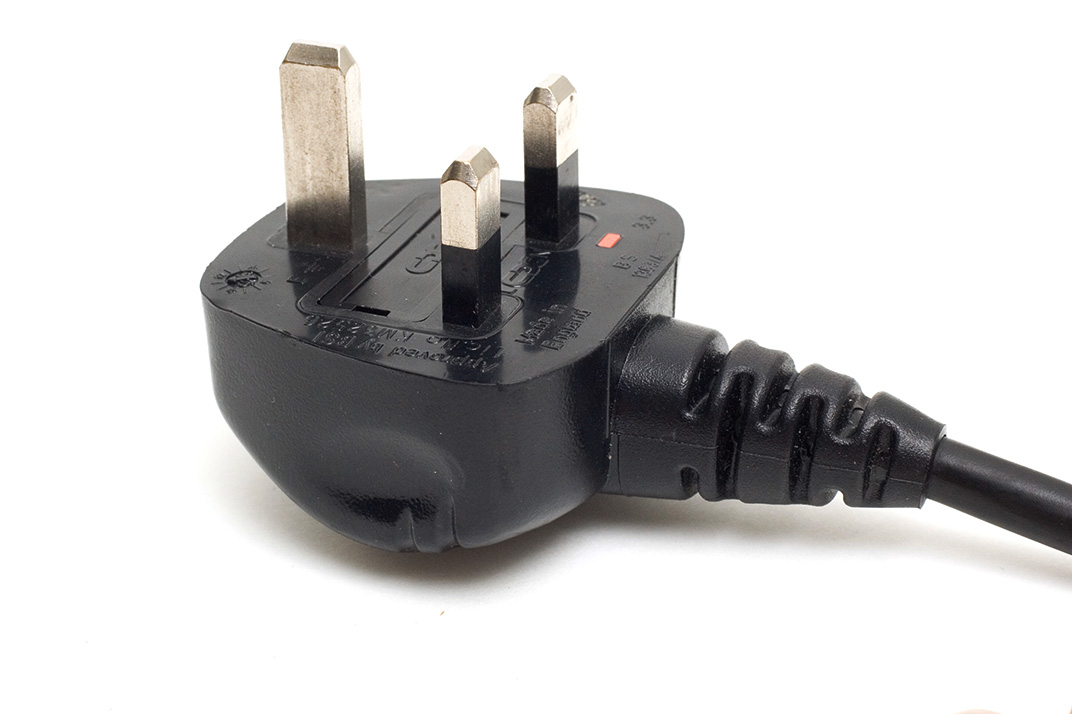
PAT covers all cables and all electronic equipment rated at over 40Watts – which means pretty much everything that we use. The cables, leads and plugs connected to class 1 equipment (everything we use apart from lighting) should be checked visually for damage, breaks and past repairs on a regular basis and should be checked properly on a cycle of between 6 months and 4 years depending on exactly what it is. In practice that means every six months for cables and every year for power adapters, extension leads and battery chargers. Heavy duty batteries and mains powered lights should be professionally tested at least every two years and more regularly if they are subject to heavy use.

Travelling with batteries

The International Air Transport Association (IATA) in association with the International Civil Aviation Organisation (ICAO) and the United Nations (UN) set clearly defined rules regarding the air transportation of Li-Ion batteries.

From January 1st 2012, the 53rd Edition of the IATA Dangerous Goods Regulations requires the independent testing of each type of Li-Ion battery, not just the individual cells, to ensure that the design and construction are compliant with the stringent United Nations regulations. This is a costly process for the manufacturer, but it should assure you, the customer, that the battery design is safe and of the highest possible professional standard. You should check with the manufacturer  of each type of cell whether they comply with the regulations before you travel by air or on certain rail journeys which feature long tunnels.

  • Check-in of Li-Ion batteries is not allowed unless the battery is attached to the camera or the equipment it powers
  • An individual may take on-board, in hand luggage, an unlimited number of Li-Ion batteries that have capacities of 100Wh or less.
  • Li-Ion batteries that have capacities greater than 100Wh, but less than 160Wh, are restricted to 2 items per person, in hand luggage.
  • Li-Ion batteries that have capacities greater than 160Wh cannot be taken as hand luggage or checked-in under any circumstances.

Portfolio features now updated

©Neil Turner/TSL. April 2005. Kabalega, Uganda.

©Neil Turner/TSL. April 2005. Kabalega, Uganda.

The funny thing about updating the features section on my portfolio website is that I have a section called “portraits” and another section that should be called “not portraits”. That isn’t a  particularly elegant way to categorise the thirty plus images featured in that particular gallery but I have yet to find a work that sums it up. Features is as close as I seem to be able to get.

Anyway, it’s a big relief to have finished the refresh and the last of the design updates for now. When I was looking through the huge folder of images that were under consideration I was struck by the picture above of a teenaged Ugandan boy who was part of a group helped to think about issues that were affecting their lives by an art teacher who had visited the United Kingdom where he had picked up this technique. They were an interesting set of images of a fascinating project and I’m really glad to have been able to include this picture in the new folio – even if the picture was shot nearly nine years ago.

The new “features gallery” is now on show at www.dg28.com/folio/features/ and I hope that you have some time to have a look.

Portfolio updates – finally!

©Neil Turner/TSL February 2003. Gordon Ramsay photographed in his kitchen

©Neil Turner/TSL February 2003. Gordon Ramsay photographed in his kitchen

I have just finished uploading a major update to my website with a refreshed selection of new and old images in the portfolio section and an updated look to the templates pages with links to all of my social media.

I still do most of the work on my site myself and so it takes a lot longer to do but I am very happy with the way that photographs look on my site and I guess that is a major selling point. There will be lots more changes over the next couple of weeks but I’d like to invite you come to the site and have a look at the new portraits selection as well as two new galleries of personal work which will definitely be updated as they are both about continuing passions of mine.

My website is www.dg28.com and if you have any feedback, I’d love to hear it.

Eye-Fi card workflow

eye-fi_cards When I was rounding up 2013 I mentioned that I had a lot of success using an Eye-Fi card to wirelessly transmit pictures from my cameras (Canon EOS5D MkIII and Fujifilm X20) to either my iPhone, iPad or laptop where I can do a quick edit and caption before sending them to clients. Inevitably I got a couple of emails using the “ask me anything” feature of this blog asking me to describe my workflow. It is similar between an EOS5D MkIII and the Fujifilm X20 except that the former has twin card slots (one CF compact flash and one SD secure digital) whereas the latter only has the SD slot. I like to shoot RAW which means that in the X20 I have to do an in-camera RAW conversion to create a Jpeg to send out. I have two cards (shown left) – an Eye-Fi branded 8Gb Pro X2 and a Sandisk branded 4Gb one. In practice, they both do much the same job but the orange Eye-Fi one has more options should you want to work differently. Without further ado, here is how it all works on the Canon…

Getting the the settings on the card, your camera and your phone/tablet/computer right is the key to getting everything working well:

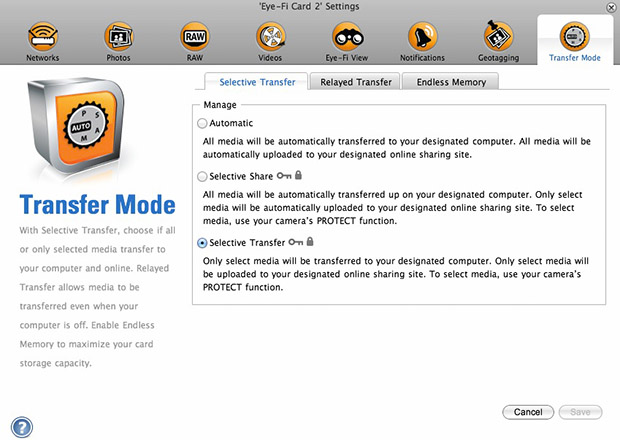
  1. Setting up the Eye-Fi card. When you get the card it should come with an SD card reader and by far the best way to set things up is to use that reader to load the card into a computer. There are lots of options that will appear once you have loaded the supplied “Eye-Fi Centre” application. This workflow is all about working in what the manufacturer calls “direct mode”. I choose to only transfer the files I want to my iPhone and so on the card I have selected “Selective Transfer” via the Eye-Fi Centre application. This means that only images that I have protected in the camera menu get transferred. On the Canon I have assigned the “rate” button to protect images for speed. It is also useful to add a couple of wifi networks and to define which file formats to transfer using the application whilst the card is in the computer because it isn’t possible to alter some settings once the card is in the camera. This whole process takes a few minutes and if you get it right, the whole thing test a lot easier from here on in.eye-fi_screenshot
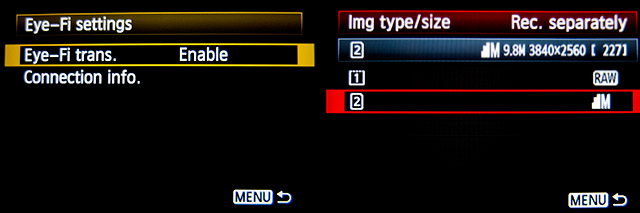
  2. Setting up the camera. In the EOS5D MkIII menu there are three things that I’d recommend you do. The first is to assign the “rate” button to protect selected images. The second is to get the camera to write RAW files to the CF card and medium size Jpegs to the SD (Eye-Fi) card. Finally, you need to enable Eye-Fi transfer from the camera menu. This way you can use the review function with card 2 (the SD slot) and then every time you protect an image written to the Eye-Fi card it will automatically look to transfer that file to the device you have nominated.
    eos_screens
  3. The receiving device. I use an iPhone and an iPad and the whole process is eventually controlled by the free app that Eye-Fi make available through the Apple App Store. There are equally useful apps available for Android powered devices and the functionality is pretty much identical. Apart from loading the app the only other thing you have to do is to download and authorise a small change to your wifi settings on your phone which simply installs the settings for the direct mode to work. Once you launch the app you get an opening window which then gives way to the gallery window which in turn tells you what is happening about transfers. Below you can see the card paring screen and the gallery screen.eye_fi_phone
  4. Editing your pictures. Once you have the image on your phone or tablet you can then use the apps of your choice to edit and caption your image before shifting them on. My personal favourite is Photogene4 which has some good image options such as clarity, contrast, saturation, straighten, crop, sharpen and the ability to add IPTC captions – including defaults such as the EXIF time day and date as well as any pre-loaded captions and copyright information. I find that it’s a good idea to write some generic captions using Apple’s Notes app and then copy and paste them into Photogene4. The app also has the option to upload to a wide range of sharing sites as well as to email and ransomer images to FTP servers – making it really useful for work.photogene
    From shooting a frame to having it uploaded to my own FTP server normally takes twenty to thirty seconds if there is a good phone signal and the various uses that I’ve found for this rapid upload range from offering images to people I’ve photographed to providing almost instant pictures for corporate clients to use for their Facebook, Instagram and Twitter feeds at events. This is a very versatile piece of kit and I haven’t even come close to describing everything that it can do. I like the way that this workflow actually does flow and I love the effect that it has had on a couple of clients who really appreciate what it offers them. My first Eye-Fi card was £24.99 including VAT – possibly the best investment that I’ve ever made!

So here it is… merry Christmas

©Neil Turner, 2013.

©Neil Turner, 2013.

Well today is my last day at the coal face until the new year (unless there’s interesting work and money on offer). Thinking back on the way work has been in 2013, it’s been a funny old year – but I could say that about any one of the last six or seven. Yet again I don’t have any pictures worth entering into competitions but that doesn’t mean that I’m not proud of a lot of the pictures I’ve taken and it certainly doesn’t mean that I haven’t had a lot of fun in the process. There are a few 2014 pictures already in my on-line and hard copy portfolios and my corporate book has had a pretty good year.

I’ve been sticking pictures onto EyeEm and enjoying the work of others on the same platform. I’ve even started to repost some of those images on my Facebook page which is slowly getting more ‘likes’.

Apart from shooting pictures my year has had a lot of great teaching moments and I’m looking forward to returning to the chalk face for one day a week between the new year and Easter.

Blogging has been rewarding and I’ve written a few posts that have been seen by thousands right around the world as well as a few more that only myself and a few regular readers have seen. The highlight of my blogging year was when I wrote about “Photographer B” – a post that was shared and tweeted about more than any other for quite a while. I hope that it made a few people think about what is happening in the world of professional photography.

I tried to resist the temptation of handing out a few awards (no cash, no trophy, just kudos) so, in no particular order here they are:

Best new piece of kit acquired: The EyeFi Prox2 SD card – for transmitting images to my phone, iPad or computer direct from my cameras. The runner-up is the iPhone 5S and an honourable mention goes to the Lithium ion batteries on the Elinchrom Ranger Quadra.

Best piece of old kit: First place goes to my Canon 70-200 f2.8L IS lens. It is 11 years old and just as sharp as ever thanks to one of my other winners. Runner-up is the Elinchrom Ranger Quadra.

Favourite supplier: For the work they’ve done on my gear, for supplying new kit at superb prices and for being some of the nicest people I’ve ever met this award goes to Fixation. I have two runners-up – The Flash Centre and Castle Cameras both of whom treat me very well even though I hardly ever spend any money with them!

Favourite piece of software: For the tenth consecutive year, it has to be Photo Mechanic because it makes my workflow and therefore my working life better. The runner up is Photogene4 on the iOS operating system.

Favourite client: Picking one out of the bunch would be unfair – I would like to say a public ‘thank you” to everyone who has used my services this year and it is heartening to be able to say that I haven’t suffered a single problem of non-paying during 2013.

Unsung hero award: For making great kit that just does its job day after day and week after week I’d like to recognise the contribution that Timberland footwear makes to my working life. I wrote about the photographer and their uniform quite a while ago and nothing has changed.

Happily, I don’t have a crystal ball. If I owned one I’d spend far too much time looking forward and not enough time in the moment and certainly a lot less time trying to perfect the ‘decisive moment’. 2014 promises many things – new cameras, better computers, upgraded software and the ever-present pressure to create more pictures, faster and for less money. It feels as if our industry has lost far too many characters and heroes this year. The list is long and distinguished and I hope that each and every one of them rests in peace.

So that’s it… the 2013 working year is as good as over and all that’s left to say is thanks to everyone who has read and supported this blog, thank you to all of my colleagues and friends who have helped make 2013 memorable and thank you to my lovely wife for her amazing support.