equipment

Nikon Vs Canon (no, really, honest…)

A Wise man said to me recently that the best way of getting a shed load of traffic to your blog was to make the title something like “Canon versus Nikon” of something along those lines. Well, as it happens, I actually do want to write about Canon versus Nikon – or at least to make the point that with the imminent arrival of both the Nikon D4 and the Canon EOS1DX (at least on specification and raison d’être) the two camera giants will have a broadly competitive and similar offering for the first time since the Nikon F3 and the Canon F1n did battle back in the early to mid 1980s. Both of those cameras were built like tanks, had optional and fast motor drives and were principally designed for heavy duty professional use.

The new offerings have remarkably similar specifications – knock for knock, these are the most similar cameras on the pro market for thirty years. There are a few differences of course: Nikon have stuck their necks out and gone for a dual memory card slot with one of them being for a new and largely untried format. Both cameras have the odd quirk here and there but it will all be about personal preference when purchasing decisions need to be made.

Of course one manufacturer might have exactly the lens range you want or the other might just feel better in your hands but, the bottom line is that for the first time in the digital era and maybe even for the first time since the original EOS1 film camera hit the shelves we don’t have a clear leader. Can’t wait to try them out…

Objects of desire

One of the great joys of being a photographer is the wonderful array of gear, technology and toys we get to use on a daily basis. It is also one of the curses of being in business. If I went out and bought every new camera, every new lens, every new application and every new computer that I fancied I would have no home, no car and no life.

That doesn’t stop me looking. The CES show in the USA has thrown up lots of new “I want one of those” moments and a quick calculation says that I would make a £20,000 hole in my finances if I went and bought it all. The serious point here is that for many photography is a hobby and buying new gear is a matter of “I want it, I’m going to have it”. For professional photographers there is a simpler test which asks “will that piece of kit pay for itself, pay my bills and work how it’s supposed to work?”

I’ve said many times that a lot of my clearest thinking comes from teaching and I’m currently updating my notes for teaching some business studies to my NCTJ Photojournalism group at Up To Speed Media in Bournemouth. In many ways the formula is simple: A. you need to take the cost of purchasing the item, insuring and servicing it and divide that by B. the number of days you work in an average year. Dividing A by B gives you C. To get the final figure D. You decide how many years the item might remain useful (longer for lenses, less time for camera bodies, computers and software).  Finally, you divide C by D and that figure is the cost of that piece of kit per working day.

An example: Telephoto zoom lens

  • A. price paid is £1,400 and it adds £20 a year to your insurance and a further £30 a year to service. That’s a total of £1,450
  • B . working 3 days a week on average over a 52 week year. That’s a total of 156 days
  • C. that’s 1,450 ÷ 156 = £9.29
  • D. lenses last on average 3 years

The final figure for owning that particular lens is £3.09 per working day IF you shoot for 468 days over three years. The cost goes down if you work more and it goes up if you work less. Of course one lens isn’t much use without the rest of the kit and so you can go through your whole stash of gear and do the same calculation for each. I tend to go for 2 years for camera bodies and computers, 3 years for heavy use lenses, 5 years for light use lenses and only 1 year for software including upgrades.

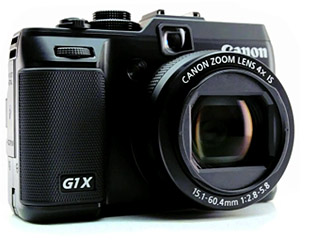
How depressing was that? Let’s end on a lighter note: objects of desire… well… the Canon G1X looks very, very cool, as does the limited edition all black Fujifilm X100. Of course the Canon EOS1DX has to go on the list and I’d love to give the Nikon D4 (and a kit of lenses) a spin. The list is actually a lot longer but nobody reads this far down… do they?

Archive photo: Special needs school, March 1990

Following on from the March 1990 Conductive Education picture that I posted earlier in the week I remembered another special needs picture that I shot a short while later. As it turns out, exactly four weeks later. This shot isn’t as technically sound or as well composed as the previous picture but it does mean a lot to me – because there is a real story to go with it.

© Neil Turner | 30 March 1990 | Southampton

This boy had a target of learning to do up his own zip and was determined to succeed for the camera. I was touched by him and his determination and so I stayed with him whilst he kept trying. After nearly ten minutes he succeeded and I was very nearly in tears. One of the staff had been watching and she was in tears. I have never forgotten that moment.

For the geeks out there, the camera was a Nikon F3P, the lens was a 24mm f2 Nikkor and it was shot on Kodak Tri-X film.

Folio photo #11: Sir Paul Stephenson, February 2009

Sir Paul Stephenson at New Scotland Yard. ©Neil Turner, February 2009

This portrait was made when Sir Paul Stephenson had been in post as the Commissioner of The Metropolitan Police for less than two hours. He had been acting Commissioner but this was taken when he was actually given the job. This frame was right at the end of the session where I had already shot quite a wide variety of pictures in the time allotted. Having packed 90% of my gear away I was told that I still had a couple of minutes and so I did this picture with a press officer holding a Canon Speedlite off to my left with the head zoomed in to create this pool of light effect. Sir Paul has now left the post but this picture is staying in my folio. Shot using a Canon EOS5D MkII with a Canon 24-70 f2.8L lens and a single 580exII flash triggered by a Canon ST-E2 transmitter.

In praise of Photo Mechanic

Every software package has its fans, its designers and its detractors. If we all loved the same system then there would be no choice. I wanted to blog about Photo Mechanic and to say how much I like it. That isn’t to say that the others are rubbish – that would childish and purile – just that I find this one application suits me and what I do extremely well. So what is Photo Mechanic? I thought that the description on the company’s own website was hard to beat:

Photo Mechanic is a standalone image browser and workflow accelerator that lets you view your digital photos with convenience and speed. Photo Mechanic displays your “thumbnails” in a familiar “contact sheet” display window. Photo Mechanic helps you find the best photo amongst several similar shots in a preview display that lets you flip through a group of selected photos at high resolution.

Photo Mechanic’s super fast browsing enables you to quickly compare multiple images and select the best ones from a sequence. Its powerful batch processing, full support for image variables, IPTC and Exif metadata, make it the perfect tool for any digital photographer.

Before this becomes an advert and a love-in, there are a few tiny issues with the current (4.6.8) version that I’d love to get sorted. The trouble is that we quickly revert to the “love-in” because the team at Camerabits who design, code and sell Photo Mechanic are second-to-none when it comes to listening to the views, issues and suggestions of their customers. Got a problem? Email Camerabits and nine times out of ten they sort it the same day and the other one out of ten times sees a resolution in the next upgrade.

Screen grab of a Photo Mechanic "contact sheet" window.

Anyway, what do I use it for? Photo Mechanic is the package that I use to import RAW images from my memory cards, edit out the bad pictures, IPTC caption, batch rename, edit again and then send the selected RAW files to my RAW converter of choice (which happens to be ACR in Photoshop CS5.5 but that isn’t important right now). Once the files are converted there they are right back in Photo Mechanic where I can save them to a separate folder, create HTML web galleries, burn discs, FTP or email images to clients or pretty much whatever I might need to do with photographs.

I can hear people saying that there are plenty of packages that can do all or some of the above and even ones that remove the need for a separate RAW converter – all true, but that misses the point. I want my workflow to be fast, repeatable, adaptable and generally hassle free. I want to rely on the trackpad or the mouse as little as possible and have a good, strong set of keyboard shortcuts instead. Bingo – that’s what I get from Photo Mechanic.

In an earlier post I talked about how teaching helps you to get your own practice right and this is very true with using software. If I had to work without Photo Mechanic tomorrow I have a good knowledge of Apple’s Aperture and a very good knowledge of Lightroom and I would never try to dissuade anyone from using those packages. Having had to buy and learn other software has made me appreciate what I have.

The Camerabits website says that version 5 of the software is due in the early part of 2012 and that there will be a separate but interconnected cataloguing application available too. That’s two things from my wish list sorted out – all we need now is a version of Photo Mechanic for the Apple iOS and that would be another thing ticked off that list.
Folio photo #10: Eton College Choir, March 2004

©Neil Turner/TSL, March 2004

©Neil Turner/TSL, March 2004

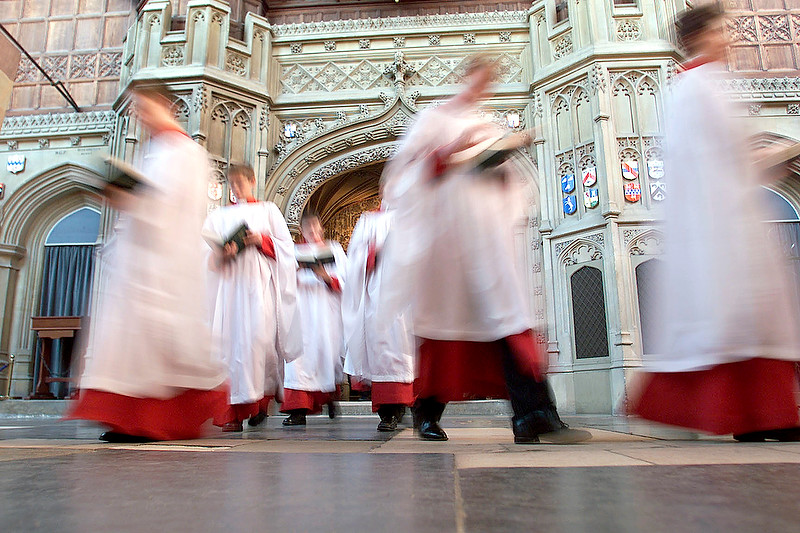
Choristers leaving the College Chapel after early morning prayers at Eton College, Berkshire. The famous public school is offering junior music scholarships in an attempt to attract bright and musically gifted boys to the school. The blur was used in this case to anonymise the pupils. The camera was sat on the ground, propped up with a the lens hood because I didn’t have a tripod and wanted the motion blur. The lens was a Canon 16-35 f2.8L and the camera was an EOS1D.

Folio photo #09: Bournemouth grave digger, October 2008

©Neil Turner. October 2008

Dave Miller has been working for the cemetries service in Bournemouth since leaving school. These days he even lives in a house inside one of the local graveyards. Photographed at dusk in Bournemouth’s North Cemetry for The Guardian. They were running a whole series of pictures of people who do slightly unusual jobs and they times this particular feature to run at halloween.

This frame features four separate flash units – one of which is down inside the grave (which was otherwise empty). Dusk is my favourite time of year for shooting pictures and this particular sunset was very colourful. If you’d like to know even more about this picture, go to this technique page

The day after a bad day at the pool

When we first went digital back in 1998 there were a lot of lessons that we had to learn for ourselves. There hadn’t been much work done by others and there were a lot of mistakes that we made and learned from. One of the worst things to happen to me wasn’t until June of 2006 – long after we all arrogantly thought that we had learned what there was to learn.

I went to shoot some pictures at a swimming event and the atmosphere was loaded with what smelled like chlorine. My cameras had got steamed up quickly and took a while to de-mist and I thought nothing of it, shot the event on a pair of Canon EOS1D MkII cameras and edited my pictures as normal. Nothing wrong… so far. The next day I went to shoot portraits of a young student who had been shortlisted for a writing award – totally run-of-the-mill. The job went well, the pictures looked great on the back of the cameras but when I imported the files from the first camera into the computer I went as white as a sheet.

Dirt on the chip was a common problem, the odd bit of dust that showed up when you stopped the lens down but nothing had prepared me for the amount of spots that were on these pictures.

A small part of the frame before spotting. ©Neil Turner/TSL, June 2006

Thousands of small, circular bright spots in the same place on every single frame. I was swearing, sweating and worrying in equal measure as I put the memory card from the second camera into the card reader. If they were as bad, this job was going to take weeks to edit and retouch. Massive relief… the second camera hadn’t suffered from the same fate. The tighter pictures shot on the longer lens all had the spots whilst the wider pictures shot with a wider lens had none of them. The bonus was that some frames on the spot-free camera were also shot on a longer lens so I had a few spot-free tight portraits too. The panic was almost over but it was clear that at least two or three of the heavily spotted pictures should be in the edit so I spent most of that evening and night painstakingly getting rid of the spots. One-by-one.

The same image after a lot of work getting rid of the spots. ©Neil Turner/TSL, June 2006

After a thorough clean by FIXATION UK the camera was as good as new. The spots were crystallised chlorine and quite why they were only on one of my two cameras used on the bad day at the pool I will never know. People have theorised about having taken the lens off of one and not the other, damaged weather seals, some sort of coating on the chip of one camera that either attracted or repelled the crystals – who knows?

The morals of this story are these:

  • Shooting with two cameras is always a good idea
  • Using a professional to clean problem dirt off of the chip is a great idea
  • Shooting with some wide and some long lens images on both cameras is a good idea too
  • Be careful when taking lenses on and off in unclean environments
  • Retouching spots is a right royal P.I.T.A

That camera went on to give great service for two more years and was sold on having been cleaned and serviced. These days I use a pair of 5D MkII bodies which don’t have the same environmental seals as the 1D series. If I were a rich man, I’d want to own the new 1DX when it comes out!