photojournalism

New year’s resolution

We all do it… make promises to ourselves about what we are going to do and how we are going to do it as another year begins. Take more pictures, get more exercise, make more money, be nicer etc etc. You can take it as read that I’m attempting all of those but I thought that I’d talk about the first one – taking more pictures.

©Neil Turner January 2014

©Neil Turner January 2014. Shot using a Fujifilm X20

Time after time in my career I have realised that the more I shoot, the better my reactions are and the more instinctive the operation of the camera becomes. I’m pretty sure that someone could even devise a mathematical formula for it where x is the number of pictures you shoot over a given period of time, y is the number of days over a given period where you don’t take pictures and z is the probability that when you are shooting an assignment you absolutely nail the job. Unfortunately I’m not an imaginative and innovative mathematician so I’m not going to be able to define that formula – if you have the ability, please feel free to finish the task for me but not until you have read the rest of the puzzle:

All of this seems to be rational, don’t you think? There are a couple of flies in the ointment though: If you do too much of the same kind of thing, you can get into a rut and just keep producing cookie-cutter images.

So does that mean that there is an optimal amount of pictures to be taken? Well yes… and no… If you are shooting very different images on each occasion then you can take a lot more pictures and get a lot sharper without becoming stuck in the rut that I mentioned just now. There is a further variable that we need to include in our increasingly complex formula – having the time between shoots to properly edit our own work and to reflect on why and how certain pictures did and didn’t work and this requires a degree of knowledge and of technical and analytical skill.

Now we need to clarify what the formula needs to say:

  • Take lots of different pictures using different techniques and different equipment.
  • Don’t take so many pictures that you get stuck in your ways.
  • Have the time to edit and analyse your work.
  • Learn from your successes and mistakes.
  • Make sure that you know why and why the pictures that you like worked and why the rest didn’t.

All of this makes me re-assess my new year’s resolution. It isn’t just to take more pictures – it’s to take more different pictures and to learn as much as I can in the process. If I get time I might even learn a bit more about mathematical formulae too.

So here it is… merry Christmas

©Neil Turner, 2013.

©Neil Turner, 2013.

Well today is my last day at the coal face until the new year (unless there’s interesting work and money on offer). Thinking back on the way work has been in 2013, it’s been a funny old year – but I could say that about any one of the last six or seven. Yet again I don’t have any pictures worth entering into competitions but that doesn’t mean that I’m not proud of a lot of the pictures I’ve taken and it certainly doesn’t mean that I haven’t had a lot of fun in the process. There are a few 2014 pictures already in my on-line and hard copy portfolios and my corporate book has had a pretty good year.

I’ve been sticking pictures onto EyeEm and enjoying the work of others on the same platform. I’ve even started to repost some of those images on my Facebook page which is slowly getting more ‘likes’.

Apart from shooting pictures my year has had a lot of great teaching moments and I’m looking forward to returning to the chalk face for one day a week between the new year and Easter.

Blogging has been rewarding and I’ve written a few posts that have been seen by thousands right around the world as well as a few more that only myself and a few regular readers have seen. The highlight of my blogging year was when I wrote about “Photographer B” – a post that was shared and tweeted about more than any other for quite a while. I hope that it made a few people think about what is happening in the world of professional photography.

I tried to resist the temptation of handing out a few awards (no cash, no trophy, just kudos) so, in no particular order here they are:

Best new piece of kit acquired: The EyeFi Prox2 SD card – for transmitting images to my phone, iPad or computer direct from my cameras. The runner-up is the iPhone 5S and an honourable mention goes to the Lithium ion batteries on the Elinchrom Ranger Quadra.

Best piece of old kit: First place goes to my Canon 70-200 f2.8L IS lens. It is 11 years old and just as sharp as ever thanks to one of my other winners. Runner-up is the Elinchrom Ranger Quadra.

Favourite supplier: For the work they’ve done on my gear, for supplying new kit at superb prices and for being some of the nicest people I’ve ever met this award goes to Fixation. I have two runners-up – The Flash Centre and Castle Cameras both of whom treat me very well even though I hardly ever spend any money with them!

Favourite piece of software: For the tenth consecutive year, it has to be Photo Mechanic because it makes my workflow and therefore my working life better. The runner up is Photogene4 on the iOS operating system.

Favourite client: Picking one out of the bunch would be unfair – I would like to say a public ‘thank you” to everyone who has used my services this year and it is heartening to be able to say that I haven’t suffered a single problem of non-paying during 2013.

Unsung hero award: For making great kit that just does its job day after day and week after week I’d like to recognise the contribution that Timberland footwear makes to my working life. I wrote about the photographer and their uniform quite a while ago and nothing has changed.

Happily, I don’t have a crystal ball. If I owned one I’d spend far too much time looking forward and not enough time in the moment and certainly a lot less time trying to perfect the ‘decisive moment’. 2014 promises many things – new cameras, better computers, upgraded software and the ever-present pressure to create more pictures, faster and for less money. It feels as if our industry has lost far too many characters and heroes this year. The list is long and distinguished and I hope that each and every one of them rests in peace.

So that’s it… the 2013 working year is as good as over and all that’s left to say is thanks to everyone who has read and supported this blog, thank you to all of my colleagues and friends who have helped make 2013 memorable and thank you to my lovely wife for her amazing support.

Revisiting my workflow

It is impossible to work digitally without having some sort of workflow. Most are a bit better than adequate, some are good and some are blindingly awful. I think that it is important to have a look at the way you do things every once in a while to make sure that yours is as good as it can be and achieves the four goals of being;

  • Efficient in terms of both time and memory
  • Repeatable so that the purely functional bits can be done almost on auto-pilot
  • Non destructive so that you don’t lose valuable RAW files or save changes to Jpegs shot in camera
  • Able to be short-cut for jobs where time is even more of an issue

I’ve written about my workflow before and I often teach workshops based on the “photographer’s twelve step plan” – a process with 12 distinct stages from camera to client including backing up and having a coffee! In this blog post I’m simply going to go through my basic workflow with a few hints and tips as I go. I normally use Photo Mechanic to import, sort, caption, rename and export my files and Adobe Photoshop CC to convert RAW (Canon CR2 most of the time) files into the required format. The whole process is colour-managed and I do as much as I can in-camera to save myself time when editing. I work on either a MacBook Pro, a MacBook Air or a Mac Mini depending on where I am and what the job is. Anyway, let’s kick off…
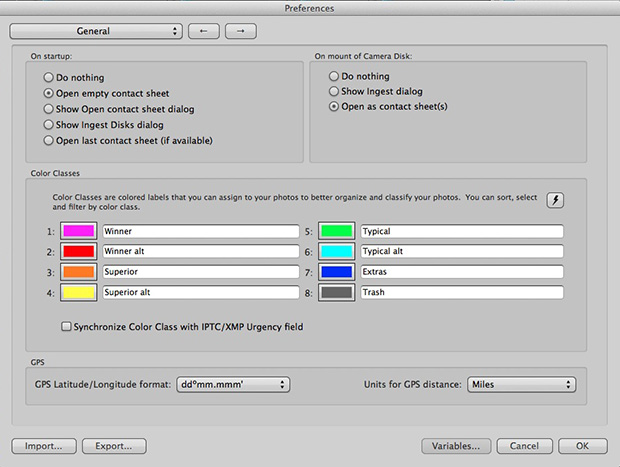
pm_preferences

Before I insert a card into the card reader I launch Photo Mechanic. This screen grab shows the “general” preferences for the application including what I want to happen when I load a memory card. I have checked the box “Open as contact sheet(s)” which means that as soon as the card goes in I see the images in a standard window. In the past I often used “show ingest dialogue” but I have found that ingesting every single frame doesn’t suit me and that it slows the whole process down drastically. Typically I only want between 25% and 35% of the images and so I go through them using the “tag” function (cmd T on a Mac or ctrl T on a PC) to identify those that I’m interested in or those which have unique content.

Once I’ve been through that card and tagged the images I want I use the “copy” function (cmd Y on the Mac and ctrl Y on a PC) and copy those tagged files to a new folder. I use a simple formula YYMMDD-jobname-RAW for those files and then repeat this process with every card used on that job. Photo Mechanic can be set to automatically open and update a new contact sheet with the copied files. I always eject the cards without deleting anything just in case there are problems during the process and put those cards to one side to be deleted later.

pm-preview

pm_contact_sheet

The preview and contact sheet windows are extremely easy ways to look at and select pictures. Once I have my first edit done I apply a generic caption using the Photo mechanic stationery pad (cmd I or ctrl I). At this point I’d like to mention two enormously useful features of Photo Mechanic (available on some other applications too).

The first is variables. These are simple ways of automatically adding information to your captions or filenames. Many are derived from the EXIF data applied in the camera. These include time, day and date as well as other shooting data. Some cameras allow you to set copyright information in the camera and others apply GPS location data too. Other variables might include camera serial numbers, original filenames as well as items that you can add yourself from pre-loaded drop-down menus. I have every county in the United Kingdom loaded as well as a large number of towns and cities and I also have some specific locations where I work regularly pre-loaded. By choosing a specific city from one drop-down menu you can use variables to add it to relevant other areas of the IPTC automatically. You can see some examples of variables in the caption below.

pm_stationery_pad

My main caption starts with {city}, {state}. {iptcday0} {iptcmonthname} {iptcyear4} which will then become something like Brighton, East Sussex. 12 December 2013 if I have all of the right information ready to go. If there are more details to add to the generic caption it is easy enough to do those in batches using the stationery pad.

Variables can also be used in the renaming of files.

pm-rename

This requires you to add the IPTC caption before you rename the files because using the {headline} variable automatically includes the headline you have used in the filename. I find this to be very useful and very good for saving time. In practice Photo Mechanic will sequentially rename 100 files in about ten seconds using this method.

The other really useful feature that Photo Mechanic has for helping with captions is code replacement. The idea is similar to variables except you create your won shortcuts. Sports photographers use this a lot and it saves a great deal of time. Imagine a football (that’s soccer to everyone in north America) team with 22 squad players – many of whom have unfamiliar and difficult to spell names. Using code replacement you can preload a text file with the teams before the game using shirt numbers. The England team, for example, would have numbers from EN01 to EN22 with the names of the players set against those numbers. Using code replacement you would type \EN08\ and the software would immediately recognise that as 8 Wayne Rooney or whatever you have set it to say. I use it for political figures so \dcam\ automatically becomes The Rt Hon David Cameron MP. I can add a second part to that if I so wish \pm\ would add Prime Minister.

I also use code replacement for shooting musicians and bands. It is really easy to create a text file with the names of all of the band members and then use the shortcuts to add the relevant people to each frame. You select the shortcuts yourself and the long versions yourself. Once you get the hang of code replacement, it becomes a central part of your workflow.

At this point I’ll often do a second tighter edit. I’ll keep all of the RAW files that I have copied over from the cards but only convert and send the best to the client. For some news jobs that is only 6-10 images and for other editorial assignments anything between a dozen and thirty. Some of the corporate jobs I shoot end up with a couple of hundred files and working on those proves the efficiency of this workflow because it is scaleable and repeatable.

Once I have my RAW (CR2 or RAF) images selected, captioned and renamed it is time to highlight them all and open them in Adobe Camera RAW in Adobe Photoshop. There are a number of great RAW conversion options out there and whether you use Photoshop, Lightroom, Aperture, Capture One or any of the others you need to make sure that the one you use doesn’t strip your carefully added caption information during the RAW conversion process.

acr-window

This is what the Adobe camera RAW window looks like. You can select a number of images from the strip down the left hand side and apply the same adjustments to all of them. I don’t want to run a complete ACR tutorial here but I would like to mention the straighten, sharpen, crop and lens correction adjustments as well worth learning. Of course those are secondary to the basic correction options such as colour temperature and tint, exposure, contrast, highlight and shadows etc. I find that I rarely need to open an image into Photoshop itself simply because all of the things that I’d normally do to a picture can be done right here in Camera Raw. Every few frames I will highlight those that have been corrected but not yet saved and save them. A decent computer with enough RAM will happily save the adjusted RAW files into whatever format you choose in the background whilst you continue to work on the rest. Once I have hit the “save” button on the last files I then click on “done”. Most of the time I am saving files at their default size as high quality Jpegs with some sharpening into the same folder as the RAW files. Photo Mechanic then updates the folder to show the RAW and Jpeg files together (you can separate them if you wish to) with a thumbnail from the newly saved Jpeg.

One of the best improvements between Adobe Camera RAW in Photoshop CS6 and Photoshop CC is an improved and expanded “save” dialogue window. You now have the option to set a target size, target amount of compression and apply a set degree of sharpening. With modern cameras producing pictures of over 60 megabytes and many of my clients wanting their photographs to be considerably smaller than that I am now using the target size more and more. My default setting is 4800 pixels along the longest side and with a maximum compressed file of 3200 kilobytes.

acr-save

Once I have my images all saved I return to Photo Mechanic and copy the Jpeg files into a new folder ready to send to the client. More and more that folder is a Dropbox one and I will give the link to the images to the client. For news jobs I can simply FTP the images (having saved them at a smaller size) and for some commercial clients that means burning the pictures to a DVD or CD. However they are delivered, the images are correctly sized, nicely prepared from the RAW files and properly captioned and renamed. All of this is done quickly and efficiently without damaging any originals.

When the urgency of the edit is over, I copy the files to a RAID drive in my office, to a portable drive that lives in my car and to a third drive which is away from my office ‘just in case’. I might then treat myself to a coffee…
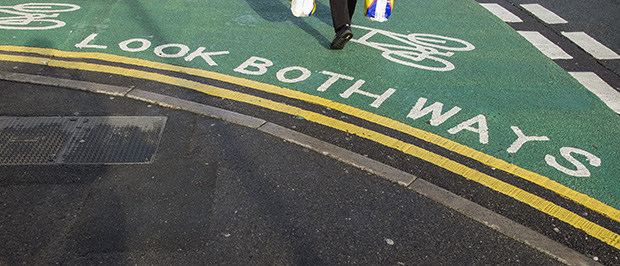
Updating my folio and painting the Forth Bridge

folio_screen_grab

In the UK we have a saying that describes a never-ending task “painting the Forth Bridge”. The idea is simple; once the painters have finished painting the bridge, it’s time to start back at the other end which has been weathering for a number of years by then. Keeping your own portfolio up-to-date is a similar task. There are so many ways to present your work and none of them are perfect and so I keep tinkering with content, layout and even the technology. Five years ago it was Flash and then basic HTML code and then a bit of Javascript and now it is a combination of everything except Flash. My idea is that I want to be able to update easily and regularly without having to format and code stuff. Preparing the images is done using a couple of Photoshop Actions and then the images themselves are inserted into a “slider” which is set to play automatically but which can be stopped and images can be picked out for a closer inspection.

I would be very interested in any views and opinions that anyone has about the site and the way it works. It isn’t an exact science but I think that I’m getting closer to understanding how it all works. Of course photographers are their own worst editors and I suspect that the content will annoy many of you. Whatever you think, let me have it.

The bridge is freshly painted, I’m having a day or two off and then I’m going to start again. One of these days I might even change the colour…

Back on the beach

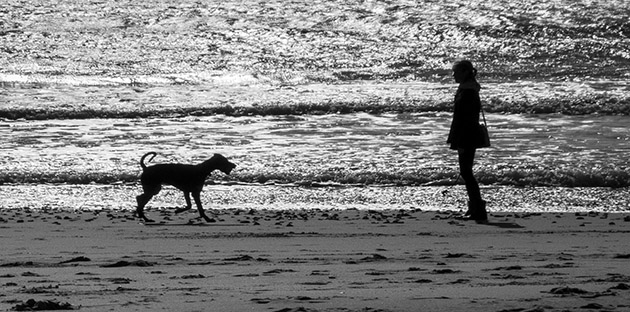
In another “just because” moment I thought that I’d post this picture I grabbed on the beach today. I’ve blogged about my near obsession with shooting dogs on the beach and today I was at my favourite part of my favourite beach when the combination of light and subject matter came together meaning that all I had to do was compose, wait and click.

©Neil Turner, October 2013. Bournemouth

©Neil Turner, October 2013. Bournemouth

I actually saw this picture as a mono image too and anyone who has been following this blog will know that this was a major step forward for me in my quest to be able to truly see in monochrome when I want to. To add the final piece to the jigsaw of this image, I love a good silhouette too.

The picture was shot on a Fujifilm X20 at the fullest extent of its 112mm equivalent zoom and it shows a dog with its owner having something of a difference of opinion about what should happen with a ball. You don’t expect to get such beautiful weather in late October – especially less than 36 hours after a massive storm had lashed this part of the English coast. Within a minute or two of shooting this picture I did a RAW conversion in the camera before using an Eye-Fi card to transfer it to my iPhone 5S where I used the Photogene 4 app to optimise and caption the image before uploading it to EyeEm (in colour). The version shown here is the more considered black and white image converted in Photoshop CC on my Mac at home.

A very old favourite portrait

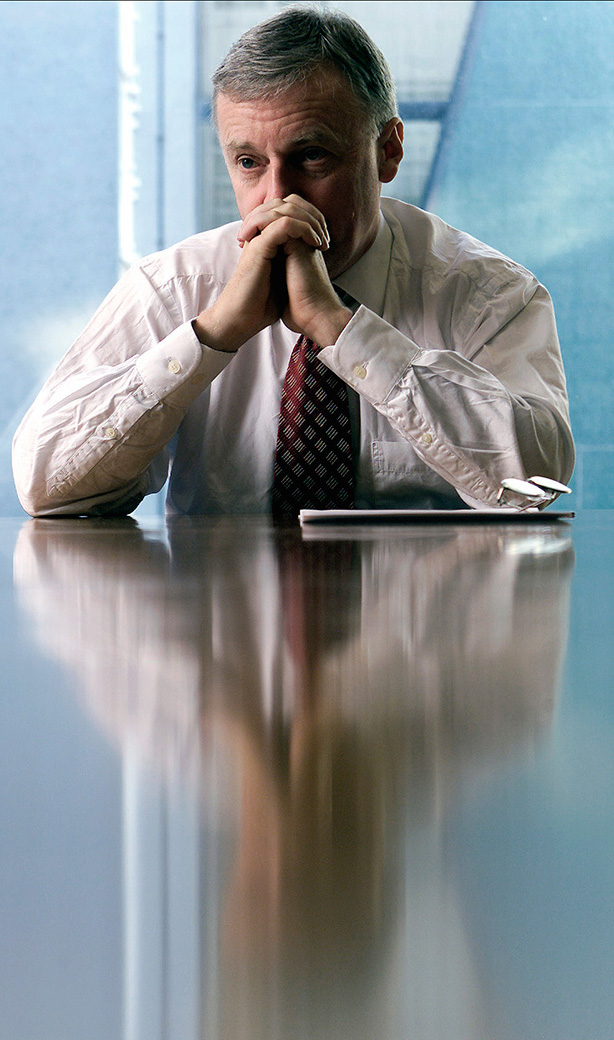
I don’t know if it happens to you when you are looking for something specific but I often search for images and, quite by accident, find something I wasn’t looking for and then that sends me off on a trip down memory lane. I’ve certainly blogged quite a few times in the past about images that meant something to me – either personally or professionally. This portrait of former General Secretary of the Trades Union Congress, John Monks (now Baron Monks of Blackley) was taken in his office at the TUC during an interview with the Times Educational Supplement about his appointment to the Government’s Learning and Skills Council in October 2000.

©Neil Turner/TSL, October 2000. John Monks, TUC General Secretary.

©Neil Turner/TSL, October 2000. John Monks, TUC General Secretary.

The reason that I like this picture is that when I shot it I was delighted to have turned a complete disaster of a shoot into a really nice image. The interview wasn’t going well and the room had a huge picture window which Mr Monks insisted was behind him. The room had dark walls, very dark furniture and no matter how hard I tried the pictures weren’t coming together. I had moved the light (I was working with a single Lumedyne battery powered pack and head with a 70cm shoot through umbrella) to the left of the interviewer and the picture was still boring. There was a decent reflection of the subject in the highly polished table but balancing the lift between the ambient coming through the window and the flash in the room was proving tricky. You need to remember that in those days we were shooting on 1.9 megapixel Kodak DCS520 cameras with tiny LCD screens and you could only get a basic idea of lighting balance.

I was limited where I could place the flash because at that time I was still using Wein optical triggers and the lights in the room had a fault which made them flicker – enough to trigger the flash every second or so. That meant reverting to the emergency back-up synch lead and all of the range restrictions that it placed on where the cable could reach and how it ran around the room.

Gradually I kept changing the shutter speed to allow more and more ambient light into the exposure. I had started at 1/125th of a second at f5.6 on 200 ISO and by the time I got to 1/15th of a second the ambient light really started to kick in and the light reflecting off of the blue tiles and glass in the courtyard outside his window magically took over and eliminated virtually all traces of the gloom and dark wood in the room. I managed to turn the main light off in the room without causing too much trouble – I had to do it because the ambient light inside the room was starting to have an effect on the exposure.

A colourless portrait of a greying man in a dull room sprang into life and I started to relax. This was one of the last frames, shot just as the interview was winding up and it was at 1/8th of a second with the camera resting on the table to try to make sure that there was as little shake as possible. I shot almost all of the interview on a Canon 70-200 f2.8L with a few frames on a Canon 28-70 f2.8L and my old 17-35 f2.8L. Apart from having overcome some difficulties to shoot the portrait, I genuinely loved the colours and I loved the placement of his spectacles. This is a gentle crop that got rid of anything that didn’t add to the overall feel and it quickly became a favourite for a few of the right reasons and many of the wrong ones. That means that it is a good picture and possibly worthy of a place in my portfolio back then but that I was too pleased with my own input to judge that properly!

Sometimes when you shoot pictures through an interview it all goes well and you listen to what’s being said because you are so relaxed. If the pictures are going badly you pick up on the mood of the interview but don’t really hear the conversation. This was definitely a case of the latter. I had no real idea that the interview had been a tough one!

Monochrome and me

I was asked by a good client of mine to have a look at a set of black and white photographs that a new photographer had shot for them. They quite liked them but couldn’t see why they weren’t enthused by them because they fitted the brief. My answer was that if they had been in colour they’d have been seriously dull but that in black and white they were elevated to mediocre because black and white has impact. I tried to find the words to say that for monochrome to work really well you needed the light to contribute to the finished picture in an even more compelling way than it has to for good colour images. That wasn’t to say that great light doesn’t make for great colour pictures – far from it – but by this time my explanation was foundering and I was starting to sound less than coherent. At that point I cut my losses and simply said “to sum up, the light isn’t very interesting and without colour all you have is light and shade”. Wow… nailed it right at the end!

I drove home thinking about my own long and chequered history with shooting black and white: from the first frames I ever shot as a young kid through the exercises in light and shade, focal length and depth of field and movement that I did as a student to the hundreds of rolls I shot as an emerging professional photographer I have never been all that pleased with my ability to consistently shoot interesting black and white images  – ones that I didn’t privately think would look better in colour.

  • Photographic heresy alert – I’m a better photographer in colour and so are 90% of my fellow photographers.
  • Photographic jealousy alert – I envy those who can just “see” in terms of black, white and shades of grey
  • Photographic honesty alert – I have decided to do something about it, 27+ years into my professional career

Thinking long and hard about monochrome and me has been an interesting experience. I’ve found myself examining the way images look through the viewfinder and asking whether the picture I’m about to take relies on colour, light, both or neither. Don’t get me wrong, I don’t have a clipboard or a mental checklist to hand – it’s just a momentary thought that pops up a few times on each job. I’m definitely making progress. I’ve been shooting a lot of events during the Bournemouth Arts By The Sea Festival over the last three weeks and on more than one occasion I knew that some of my pictures were destined to be monochrome, better in black and white.

©Neil Turner, September 2013. The vesry first frame I shot during the Bournemouth Arts By The Sea Festival 2013 - a man reading the programme a few minutes before it all started.

©Neil Turner, September 2013. The very first frame I shot during the Bournemouth Arts By The Sea Festival 2013 – a man reading the programme a few minutes before it all started.

©Neil Turner, October 2013. Mark Kermode playing bass with The Dodge Brothers at the Bournemouth Arts By The Sea Festival

©Neil Turner, October 2013. Mark Kermode playing bass with The Dodge Brothers at the Bournemouth Arts By The Sea Festival

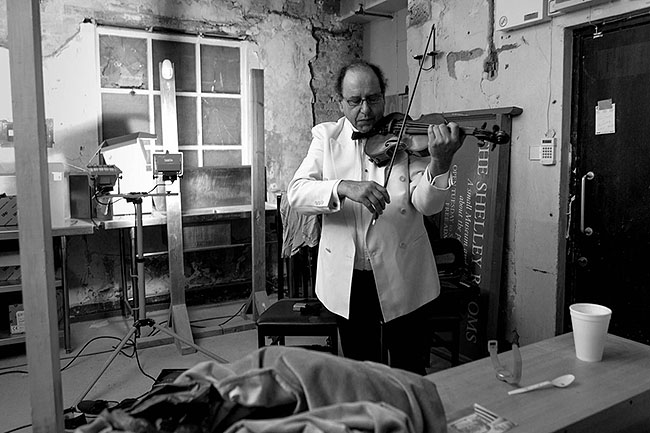
©Neil Turner, September 2013. Violinist Jack Maguire warming up in his makeshift dressing room

©Neil Turner, September 2013. Violinist Jack Maguire warming up in his makeshift dressing room

It isn’t that I’ve never shot anything good in black and white it’s just that most of the time I wasn’t ‘seeing’ without colour. The market for black and white isn’t huge right now anyway and I haven’t had to develop myself in that direction. The funny thing is that it is the explosion of social media and sites like Instagram and EyeEm that have made me experiment more and, more importantly, it has been my love affair with the Fujifilm X20 that has pushed me into shooting pictures that bear little resemblance to the suff that I do for work – often monochrome fits that bill rather well.

Monochrome and Me… it’s been a long and weird relationship. I like to think that it is maturing nicely and that it is now entering something of a golden era. There’s still no money in it but that isn’t really the point.

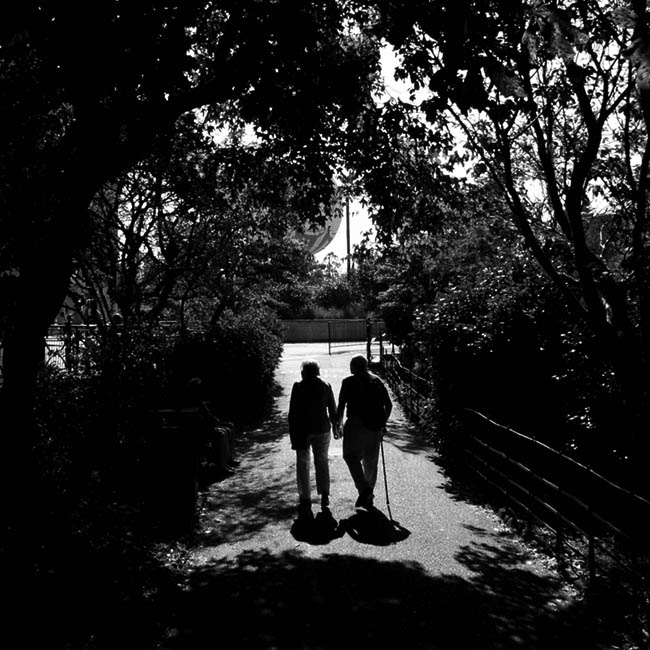
©Neil Turner, September 2013. Pensioners walking out of the Pleasure Gardens, Bournemouth

©Neil Turner, September 2013. Pensioners walking out of the Pleasure Gardens, Bournemouth

Cool watchmakers

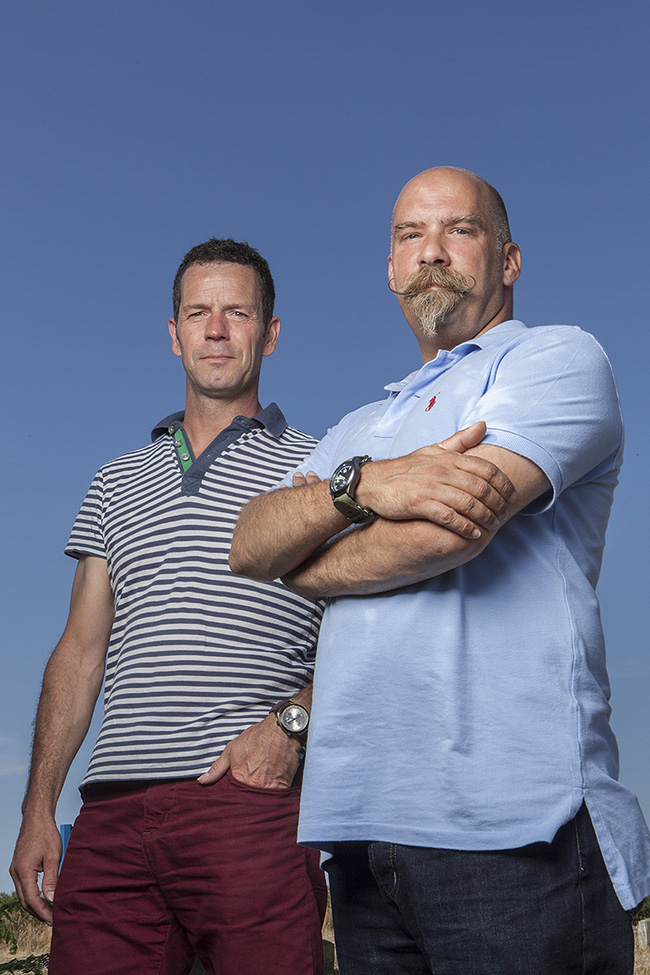
©Neil Turner, July 2013. Alex Brown and Ian Elliott of Elliott Brown.

©Neil Turner, July 2013. Alex Brown and Ian Elliott of Elliott Brown.

I promised to share new work as and when I could and to add a bit of technical detail whilst doing so. This two person portrait shot on a sweltering July day in Dorset for a leading UK business magazine is a great example of the kind of picture I get asked to shoot. The story was a simple one about a new business partnership designing, making and selling very high class mens’ watches.

There was a limited amount of time for the interview, the pictures and a short video grab and so when I got my slot the two subjects, the reporter and the Picture Editor all jumped into my car and we headed about three quarters of a mile from the company offices to shoot on some open heathland because the style of picture I was being asked for needed an expanse of deep blue sky. We couldn’t shoot at the offices because there just too many tall building around and I had to rely on some local knowledge to find the right spot.

The location was far from perfect because I would have liked a decent amount of shade to put my two subjects in. That wasn’t going to be easy and so I had the reporter holding a large black reflector aloft to give me some artificial shade. There was only the slightest breeze but that was enough to force me into something of a ‘plan B’ which was to move into the shade of some tall bushes about fifty yards away. The downside of this was to lose the unbroken blue sky from behind my subjects (you can see some scrubby heath behind them in the bottom of the frame) but it did allow me to balance the flash (single Elinchrom Ranger Quadra with a 32″ x 24″ soft box) with the sky without the subjects being in direct sunshine themselves. Free from his reflector holding duties, the reporter was happy to hold onto the lighting stand to make sure that it didn’t blow over. No matter how light the breeze, soft boxes act like sails!

I have described shooting from the shade a couple of times before and the basic principle is an easy one: the subject is in deep shade and only lit by the flash whereas the rest of the scene is metered normally and the skill comes from balancing the two halves of the exposure. In practice on a bright and sunny day this almost always means the ambient exposure is going to be 1/200th of a second on 200 ISO at somewhere between f16 and f22. All you then need to do is to get enough power out of your flash to balance that. This sometimes means that you have to lose your light modifier (soft box/umbrella etc) if you don’t have a lot of power and almost always means moving the flash quite close to the subject if you want to keep the light modifier in place. Compromise… I’ve used that word once or twice before too. The camera was a Canon EOS5D MkII and the lens was a Canon 24-70 f2.8L.

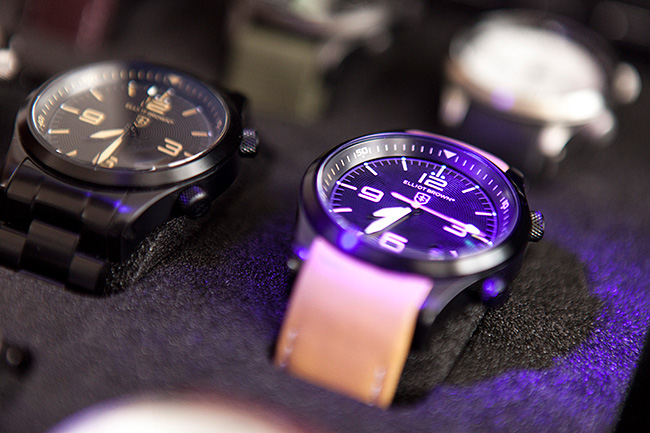
The two guys in the photograph make some very cool watches. It’s a new business by the name of Elliott Brown and their first collection goes on sale about now.

©Neil Turner, July 2103

©Neil Turner, July 2103