photojournalism

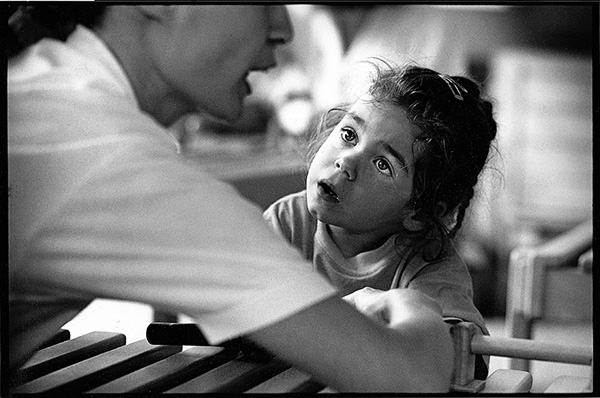
Archive photo: Conductive education, Sussex, March 1990

Please note that I have made a small correction to the caption. The pictures were taken a year later than I originally thought.

©Neil Turner, March 1990

This assignment opened my eyes to a whole world of education. I was fascinated by the ‘special needs’ systems that had grown up in the UK to try to provide a combination of tuition and therapies for children whose families were trying to do the very best for them. On this job I was working with a committed reporter who did her best to bring me up to speed on all of the terminology used in the field and years later I found myself telling younger reporters how things were. To this day, disability remains a topic that I get real satisfaction from showing to the world.

Young child who has cerebral palsy having a physiotherapy session at a residential school in West Sussex under the Conductive Therapy regime. This technique was brought to the UK from Hungary where therapists, known as conductors, use a range of very intensive methods to try to get children who have very badly compromised motor skills to walk unaided.

Judging from the date, I expect that this picture was shot on a Nikon FM2 with a 135mm f2 Nikkor. The film is Kodak Tri-X.

The BPPA and The Leveson Inquiry

I have been involved in writing, amending and publishing a second submission on behalf of The British Press Photographers’ Association to the Leveson Inquiry into  the culture, practice & ethics of the press in the United Kingdom. It has been a huge task and the work of propagating it using social media has now begun.

Lord Justice Leveson’s inquiry was founded to look into the phone hacking scandal that brought about the closure of The News of The World and other unsavoury practices in play within the UK news media. In the first week of evidence it turned into a “photographer bashing” event and The BPPA had to respond on behalf of the thousands of perfectly well behaved and law abiding news photographers out there. Lots of countries have a problem with rogue paparazzi or “stalkerazzi” as they have been memorably named by one UK academic.

If you are a lover of great news photography, please follow @TheBPPA on Twitter like The BPPA on Facebook and read The BPPA blog here on WordPress. The industry is at a crossroads and we need our friends and colleagues to help us get where we need to go.

When Time Out did real news…

Right back in the early days of Insight Photographers, the small agency that we ran from an office in the rather un-trendy (how times change) Hoxton area of London, we used to shoot a lot of stories for Time Out magazine. Some weeks they would have five or six pages of real news and they used to commission some nice work too. One of my favourites from that era was this picture of a man who was part of a group of residents and squatters trying to stop the Department of Transport from bulldozing their houses to build a new piece of road in the Archway/Highgate area intended to speed up the journey up the A1 from Holloway (bear with me if the geography of north London bores you). When I arrived on a hot day from the a brisk walk up from the underground station the bailiffs had gone.

Archway Jack. ©Neil Turner/Insight, May 1989

I found this chap looking rather pleased with himself and asked what had gone on. He just smiled and said “we’ve seen them off”. I asked him if it was OK if I shot his portrait and he agreed. After that, I got my notebook out and asked him his name. He thought about it for a few seconds and then said “call me Jack… Archway Jack”. Of course I asked if that was his real name but he smiled and walked off trying to whistle a tune.

The News Editor somehow tracked him down, got some good quotes from him and the story probably got more space than a simple eviction piece would have. A definite case of “just because the story you were expecting didn’t work out, it doesn’t mean you haven’t got a good story anyway”. All of the Time Out news reporters and editors that I recall went on to do great things. I guess that it was a mix of choosing the right people and being a great place to hone those journalism skills. Quite a few of the freelance photographers that they used did OK too.

This was shot on Kodak Tri-X film using a Nikon FM2 camera and a 24mm f2 Nikkor lens

Chicken or egg? Workflow or mess…

Which came first… the Chicken or the egg, digital imaging or workflow?

One of the rather brilliant side effects of teaching is that you had to look very long and hard at your own practice to make sure that it will stand up to the examination of younger and more eager minds. I have taught workflow on and off for a few years now and I have come to the conclusion that all photographers should get theirs checked every once in a while to make sure that they haven’t fallen into the bad habits trap.
It doesn’t take much time and going through what you do and why you do it with an experienced teacher of these things is a great idea. I have also discovered how useful having a go at a proper edit of someone else’s pictures can be. Photographers are rarely their own best editors and it is a brilliant exercise to do an edit of a job where you give no attention to including pictures just because were hard to take or to pictures that you really like but don’t help tell the story. Captioning should also be part of that exercise because we all make assumptions when we do our IPTC that a disinterested party wouldn’t make. All in all, I thoroughly recommend these exercises to you.

In a rather tongue-in-cheek reference to the Alcoholics Anonymous “Twelve Step Plan” to beat addiction, I developed the photographers 12 step plan to get a good, dependable and repeatable workflow. It doesn’t matter that you can cut twelve steps down to seven or eight if you need to work fast and it really doesn’t matter that step twelve was “relax and put your feet up” anyway. What actually matters is that you have a tried and tested way of getting your valuable pictures from the camera to the client and back them up without making silly mistakes that cost you time, image quality and (worst of all) money.

For years I have been “quoting” the Hippocratic oath that Doctors and other medical folks take when they take up their calling. I have put “quoting” in inverted commas because it turns out that the phrase I have always used isn’t part of the oath at all – it’s just a line from a film!

Anyway I’ve been saying this; “First, do no harm”. It works for medicine and it certainly works for photographer workflows because the idea is that you never damage the original file – always working on a copy. Of course, with Jpegs that have had anything more than very light compression applied that means that you have already sacrificed some quality – but I don’t want to go down the whole RAW Vs Jpeg road again.

At some point in the future I will publish an updated version of the photographer’s 12 step plan with a step-by-step explanation of how my own workflow works but for now I wanted to just outline it. Remember that this can be edited down so that you have fewer steps if needs be:

  1. INGEST/IMPORT – get the images and any supporting files from the camera into the computer. Applications designed to ingest or import files look inside folders and sub-­folders on the memory card in a way that you might not be able to do by simply copying files from the card yourself. It’s important to note that this is one of the easier steps to cut out if you are in a real hurry.
  2. FIRST EDIT – make an initial selection of the images that you are interested in. At this stage you can dispense with very badly exposed frames, pictures where the focus has been missed, where important people have their eyes closed or pictures that are just not very good.
  3. COPY – move a copy of the selected images to a new folder.
  4. RENAME – give the selected pictures a new name. Some clients will have a formula that they want you to follow but otherwise try using a simple word identifier, followed by a six‐digit date and then a sequence number. All good software has the ability to batch rename and sequentially number files. A set of portraits of Tony Blair shot on the 3rd of April 2011 might be blair-­110403-­001 through to blair-­110403-­204. The exact formula that you pick isn’t as important as having one that works for you. The filenames that the camera assigns are not good enough and not unique enough for professional use.
  5. CAPTION – using the IPTC metadata fields to add information about what is in the picture, when and where it was taken and by whom it was taken. This is the best way to insure that your pictures can be found again – all image archiving and storage systems work with metadata.
  6. SECOND EDIT – narrowing the selection of images down to those that will make it into the final edit or the selection that will be delivered to the client.
  7. CONVERT – taking the RAW images from the final edit, making adjustment to colour, exposure, brightness, contrast etc using a RAW converter and then saving the toned images to the required file format.
  8. RETOUCH – opening the images into Adobe Photoshop or a similar application to remove dust spots, make subtle (but ethical) changes that cannot be made in the RAW converter, which, these days, are very few.
  9. SAVE – the final stage before sending to the client is to save the edit in the format that the client requires either JPEG or TIFF are most likely.
  10. DELIVER – most images these days are delivered using the internet. FTP is the most efficient but you may also be asked to email pictures, create web galleries, upload to third party viewing sites or simply burn everything to a disc and put them in the post.
  11. ARCHIVE – make sure that you back up copies of everything that you may need again. External hard drives, cloud storage systems and op?cal discs are the most common options. Multiple back ups are the best way to avoid losing your images due to the ageing of materials or the failure of drives.
  12. RELAX – that’s the end of the process!
Folio photo #09: Bournemouth grave digger, October 2008

©Neil Turner. October 2008

Dave Miller has been working for the cemetries service in Bournemouth since leaving school. These days he even lives in a house inside one of the local graveyards. Photographed at dusk in Bournemouth’s North Cemetry for The Guardian. They were running a whole series of pictures of people who do slightly unusual jobs and they times this particular feature to run at halloween.

This frame features four separate flash units – one of which is down inside the grave (which was otherwise empty). Dusk is my favourite time of year for shooting pictures and this particular sunset was very colourful. If you’d like to know even more about this picture, go to this technique page

Folio photo #07: Ugandan primary school, April 2005

©Neil Turner/TSL, April 2005

Asaba Primary School, Masindi, Uganda. This private primary school has 1000 pupils aged from 3 to 12. Parents in this remote and poor area go to great lengths to give their children the best education that they can afford. Class sizes at Asaba are as small as thirty or forty which compares very favourably to the free schools where eighty or even a hundred children in one class is common.

I was in Uganda to shoot a feature to coincide with a television series about rural African education and Masindi is a very interesting place with the huge contrasts between the locals and the aid agencies, many of whom have regional offices in the town, and their brand new four-wheel drive vehicles which are parked outside their offices.

…and we’re off

20120101-200818.jpg

©Neil Turner, March 2010

The sub heading of this blog is “me writing about photography because I want to” and that’s the truth. Post number 47 and it’s the start of month two.

2012 is underway and I’m planning to do quite a lot of blogging as the year goes by. I’m going to talk about education, press photography, photojournalism, light, technology, workflow, software, cameras and just about anything else that I come across in the day job.

If you read the blog and come up with any questions for me please let me have them. In the mean time, let’s hope that 2012 serves us all well.

2012 – bring it on

The new year is almost here and all I wanted to say was BRING IT ON!!!

20111231-164521.jpg

Christchurch Harbour & Mudeford Spit ©Neil Turner, 2011