wisdom

Where does the work come from?

It has been a little while since I last posted on this blog; apologies for this but sometimes life gets in the way of blogging! Anyway, I thought that those who are interested in the business side of photography might be interested in something that came into my thinking on a long drive back from a job listening to a business programme on BBC radio. When I got home I produced a couple of reports from my invoices using the wonderful Billings Pro application on my Mac. The one that caught my eye was one that gave me the raw data to work out how the bulk of my work (based on turnover) in the last six years as a freelance has come in.

Conventional wisdom says that a photographer gets out there with their folio after making cold calls and arranging appointments with potential clients. When I say ‘conventional wisdom’ I mean ‘what they taught me in college’. It is the classic sales tactic: research potential customers, show them what you have to offer and then (hopefully) close the deal at a mutually acceptable price. 99% of photographers and probably 88% or all businesses will probably tell you that it is neither that simple or that straightforward.

I started by working out some categories for the way I have initially got the work:

  • Cold calling and portfolio viewings
  • People finding me via the web
  • Referrals from family and friends outside the photography business
  • Referrals from other photographers
  • From colleagues I knew before going freelance
  • Sub-contracted work via other photographers
  • Other odd sources

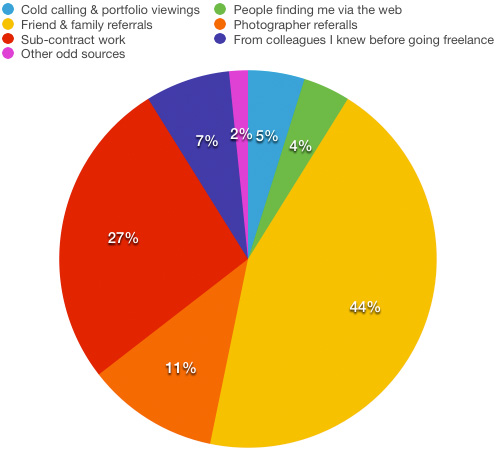
I then quickly added up how much work (monetary value) each of those six sections accounted for and got the following results:

monetary_value


The monetary value for each client is based on that initial method of contact. Some high value clients have been very loyal to me and I hope that I have, in turn, given them the photographs that they need to keep those excellent two-way relationships going. On the flip side, most of the work that has come via the web has been one-off jobs for clients who don’t have a lot of work to commission.

Now I don’t know about you, but I found that to be quite a shocking set of results. Only 5% of my income has been generated by getting out there and trying to make sales in what you would call a ‘traditional’ way yet more than twice that figure came from referrals from other photographers. The sub-contract figure at 27% is also a lot higher than I thought that it would be but the biggest surprise is how low the figure for income generated via work from pre-freelancing colleagues. In my first year as a freelance that figure was considerably higher but it has been eclipsed by the friends and family percentage which, at 44%, is somewhat higher than I would have thought. People finding me through the web includes not only those who have found my website through searches but also the various social media platforms that we all spend so much time working on – 4% isn’t a great return on all of that effort either.

If I had the time, I’d like to work out how different the chart would be if I based the figures on the amount of time spent on the jobs rather than the money invoiced. My strong suspicion is that the cold calling and portfolio section would be a fair bit bigger as would the one for pre-freelancing colleagues because those are both news and editorial biased sections whereas the friends and family one is far more corporate and commercial.

So what conclusion should I draw from this? Maybe I should spend less time trying to generate work from cold-calling and spend a lot more time with family and friends? I suspect that the true answer is that I need to change my targets for the cold calling to more corporate and commercial ones simply because they have a higher value per job.

Space makes you think – part 2

©Neil Turner, March 2013. Family enjoying an early spring afternoon near Fisherman's Walk in Bournemouth, Dorset.

©Neil Turner, March 2013. Family enjoying an early spring afternoon near Fisherman’s Walk in Bournemouth, Dorset.

A very long time ago when I was studying photography at the Medway College of Design I was surrounded by like-minded and equally obsessive photography students who all wanted to unlock the many ‘secrets’ of great photography so that we could all some-day be someone. We were only a very short distance along the journey (it was the first term of the first year) when we were set a project to shoot an object against a background where the object would be very small and still have great composition and make sense. It was a lesson that I will always remember for two reasons:

  • The first is that I loved it and actually shot four or five entirely different pictures – ranging from a damp and golden autumnal leaf on a grey path to a red balloon against a bright blue sky.
  • The second reason is that during a group critique someone (and I have no memory who) said “space makes you think”.

Space makes you think has stuck with me to this day and as a short and snappy phrase it appears in my thinking and in my discussions on a very regular basis. From the day I learned that lesson and then learned to leave space in my compositions for mastheads, strap line, type and headlines I have always looked for pictures with space. Cropping images really tightly is a great way to shoot some subjects and I remember another phrase from my student days which sums that up too “if an element doesn’t add to the composition then it detracts from it”. That’s also true and that, ladies and gentlemen, is why photography is so enthralling, confusing, infuriating and rewarding. Two ‘rules’ that appear to directly contradict one another that form the basis of one of those secrets that we as students of the art/science/profession spend our lives trying to grasp and the interpret in our own ways.

Rules are there to be obeyed most of the time and broken often enough to make sure that we remain creative in our thinking. That was true back at Medway College, it still is and I hope it always will be.

* Those other “obsessives” included Jez Coulson, David Chancellor, Bill Green, Richard Gosler, Mike Cooper, John Baxter, Richard Ansett and Andy Eaves who, I am delighted to tell you, are all still as obsessed as they were! There were 28 photographers in our year and I’m sure more than those listed above are still plying the trade.

How long does gear last?

When I teach new photographers the business studies element of what it is to be a working photographer I go through a whole exercise which adds up the cost of the gear and then divides that cost by the number of working days that it might be expected to last before you need to replace it. My formula was mentioned in a previous post and I try to be realistic about the life span of the principle kit that we need. Camera bodies, for example, last somewhere between two and three years on average whereas lenses last four, five or even six years. It’s a simple idea and when you add it all up you come out with a figure that represents the amount of money it costs to be a photographer based on working a fixed number of days per year. For most photographers that’s around the £45 – £60 mark.

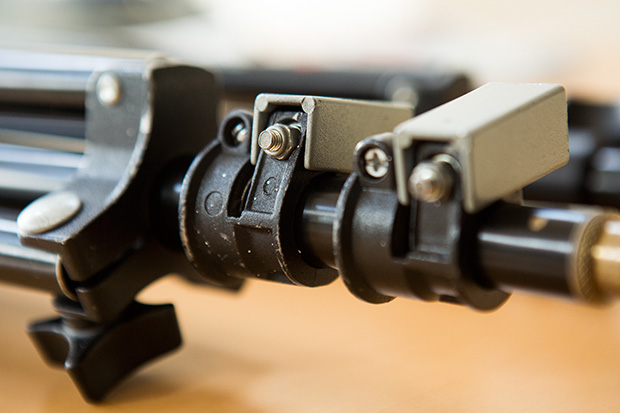
©Neil Turner. March 2014. My Elinca branded lighting stand that is at least 21 years old

©Neil Turner. March 2014. My Elinca branded lighting stand that is at least 21 years old

Some gear, such as tripods and equipment bags last a lot longer and there’s good evidence to say that a Pelican case is for life as long as it doesn’t get stolen. I was looking at some kit this morning and making sure that I had everything that I needed for a two-day job over the weekend when one of my lighting stands came apart. That got me thinking about how much this stand had cost me on a ‘per day’ basis since I bought it somewhere between 1990 and 1993. I won’t go into how I can narrow the dates down but let us say that it is at least 21 years old. At today’s prices this stand would probably cost about £70.00 (but probably cost me a lot less) and by dividing that by 21 you can see that it has cost me £3.33 a year. That’s a meagre £0.26 a month or, if I work 150 days a year that’s £0.02 per working day.

I have used lighting stands every single working day since then and, whilst it hasn’t always been this one, my preference for a specific brand seems to be justified by the way that they take a battering. That brand is Manfrotto – even though this one is labelled “Elinca SA” it is clearly a version of an older Manfrotto 052 model (not the same as the current 052 or 1052) because it is almost identical to another stand that I have which is labelled “Manfrotto 052”. I also have a pair of identical lighter-weight stands where one is branded Manfrotto and the other is branded Lastolite and a pair of tiny stands where one is Manfrotto and the other is Bogen. It doesn’t take a genius to work out that one manufacturer was/is making them and that they were/are being sold under many labels.

Going back to the stand itself, when I say “fell apart” what I mean is that this stand came apart at one of the connections. When I had a good look it was obvious that it had lost a bolt and nut that tightened around the metal tubing keeping it in place. Three minutes later, I’d found a suitable replacement amongst the bits and pieces in my garage and the stand was fixed and ready for a lot of action over the next weekend. So that’s a lighting stand of extreme professional quality that costs me two pennies a day – what a bargain! Of course I have forgotten to add the maintenance costs – £0.12 for the bolt that I fitted today plus my labour at a maximum of ten minutes.

For the record, I have three Manfrotto tripods (all with Manfrotto heads), three Manfrotto monopods and a case full of their accessories (Super-clamps, suction clamp, low-level stand, quick release adapters, a boom and so on). I reckon that I have about £1,000.00 worth of Manfrotto gear in total – most of which is over ten years old and some of which is over twenty years old.

Manfrotto haven’t paid me for this blog post, nor have I spoken to anyone from the company or any of their distributors or retailers. I just think that their kit is pretty good value for money. Of course, if they want to offer me a retrospective bribe…

The term photographer is no longer enough

Just under two years ago I wrote about the definition of the word ‘photographer’ and about how everyone is one these days. I have become more and more interested in the definition and I have come up with the following question:

Can you use the word ‘photographer’ in isolation any more?

What I’m asking there is whether there is anyone out there whose work, hobby or pastime is sufficiently vague that you can just say photographer? I’m probably not the best example but I have my permission to talk about me so here goes; I use a combination of editorial, corporate, press, documentary, portrait, features, PR and commercial in front of the word photographer depending on what I’m shooting, who I’m talking to and where I am. I also use photojournalist from time to time but never ‘just’ photographer without qualifying it.

This got me thinking a bit further. When I teach photography I often compare it to driving. I talk about when you first got behind the wheel of a car and had to think hard about which pedal was which and where the gears were and how some of this was already there because we had been passengers for the preceding 17 years of our lives and we had probably driven go-karts and played computer driving games. The same goes for becoming a photographer. Handling the camera takes a lot of thought at first but it becomes second nature after a while and 99% of us had already been in pictures, used a simple point and shoot as well as doing drawings and getting the basics of composition.

This lead to the thought about the similarities between the word photographer and the word driver. Rarely do you hear ‘driver’ without something more specific in front of it – bus driver, lorry driver, train driver or racing driver amongst many others. I have to wonder whether this is just a natural human need for more information or a desire to stick people and what they do into convenient boxes. I am certain that there are a lot of photographers out there who would rail against being pegged as one kind of photographer and I’m equally certain that there are probably an equal number who would delight in being thought of as completely specialised. Of course there is a group in the middle like me whose descriptor changes on a daily or even hourly basis.

I find it quite amusing when I come across photographers who latch on to genres of photography that either make no sense or that are deliberately elitist or confusing to anyone other than the ‘in-crowd’. I have mentioned my dislike of ‘wedding photojournalism’ before. It is perfectly descriptive but it makes no sense. Wedding photographers are hired by the family or the couple getting married and, no matter what style they shoot in, they are not in any real way acting as journalists using photographs. What they are is wedding photographers using a photojournalistic style. It’s too late to reign it back though. Language is a dynamic and moveable thing and the word photojournalism has already become something different in this context.

When I was first thinking about how I was going to write this post I had just shot a whole series of photographs at a large secondary school where there was a rule that the academic staff were “teachers first and subject specialists second” which meant that nobody working there was a Geography Teacher or a History Teacher or even an English Teacher but were instead a Teacher of Geography or a Teacher of History or a Teacher of English. I spent a while trying to see if I could make that idea work for photography – the idea that we were photographers first and specialists second. Who would prefer to be called a “Photographer of Fashion” or a “Photographer of Sports”? Those work but “Photographer of Portraits” and “Photographer of Corporate (stuff)” don’t really do it for me.

At a dinner party recently I was asked by someone that I’d never met before the obvious “so what do you do?” question. I answered “Editorial & Corporate Photographer” and got a blank look back. The gentleman was an intelligent chap and a local government official but he had to ask me to dissect what an editorial and corporate photographer was. By the end of the conversation I realised that it would have been easier to say “self-employed photographer” and give him the option of digging deeper – so that’s my new tactic at dinner parties.

That incident, the thoughts about teachers and drivers and my general confusion about explaining who I am and what I do have left me pretty much back at the start of this mildly philosophical blog: Each and every time you need to define yourself as a photographer you need to select the appropriate descriptors and adjectives for that particular context. There doesn’t appear to be a solution to this problem that I can see.

I need to go and prepare for tomorrow’s session where, if I were to use my driving analogy, I’m going to be the driving instructor. I suspect that the comparison between photography and driving has many miles to run…

Eye-Fi card workflow

eye-fi_cards When I was rounding up 2013 I mentioned that I had a lot of success using an Eye-Fi card to wirelessly transmit pictures from my cameras (Canon EOS5D MkIII and Fujifilm X20) to either my iPhone, iPad or laptop where I can do a quick edit and caption before sending them to clients. Inevitably I got a couple of emails using the “ask me anything” feature of this blog asking me to describe my workflow. It is similar between an EOS5D MkIII and the Fujifilm X20 except that the former has twin card slots (one CF compact flash and one SD secure digital) whereas the latter only has the SD slot. I like to shoot RAW which means that in the X20 I have to do an in-camera RAW conversion to create a Jpeg to send out. I have two cards (shown left) – an Eye-Fi branded 8Gb Pro X2 and a Sandisk branded 4Gb one. In practice, they both do much the same job but the orange Eye-Fi one has more options should you want to work differently. Without further ado, here is how it all works on the Canon…

Getting the the settings on the card, your camera and your phone/tablet/computer right is the key to getting everything working well:

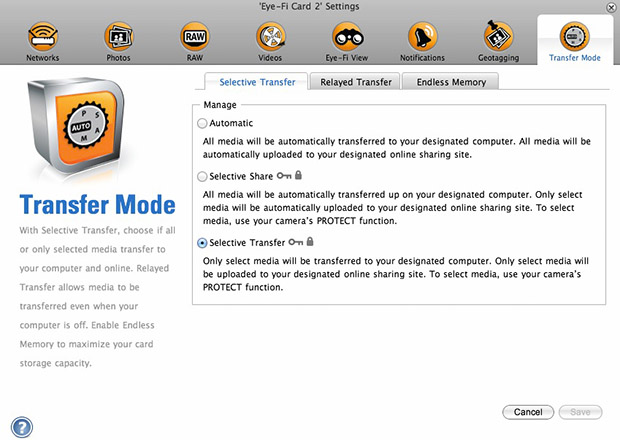
  1. Setting up the Eye-Fi card. When you get the card it should come with an SD card reader and by far the best way to set things up is to use that reader to load the card into a computer. There are lots of options that will appear once you have loaded the supplied “Eye-Fi Centre” application. This workflow is all about working in what the manufacturer calls “direct mode”. I choose to only transfer the files I want to my iPhone and so on the card I have selected “Selective Transfer” via the Eye-Fi Centre application. This means that only images that I have protected in the camera menu get transferred. On the Canon I have assigned the “rate” button to protect images for speed. It is also useful to add a couple of wifi networks and to define which file formats to transfer using the application whilst the card is in the computer because it isn’t possible to alter some settings once the card is in the camera. This whole process takes a few minutes and if you get it right, the whole thing test a lot easier from here on in.eye-fi_screenshot
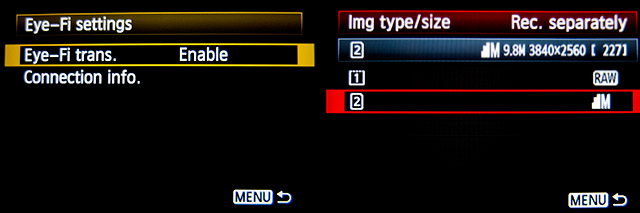
  2. Setting up the camera. In the EOS5D MkIII menu there are three things that I’d recommend you do. The first is to assign the “rate” button to protect selected images. The second is to get the camera to write RAW files to the CF card and medium size Jpegs to the SD (Eye-Fi) card. Finally, you need to enable Eye-Fi transfer from the camera menu. This way you can use the review function with card 2 (the SD slot) and then every time you protect an image written to the Eye-Fi card it will automatically look to transfer that file to the device you have nominated.
    eos_screens
  3. The receiving device. I use an iPhone and an iPad and the whole process is eventually controlled by the free app that Eye-Fi make available through the Apple App Store. There are equally useful apps available for Android powered devices and the functionality is pretty much identical. Apart from loading the app the only other thing you have to do is to download and authorise a small change to your wifi settings on your phone which simply installs the settings for the direct mode to work. Once you launch the app you get an opening window which then gives way to the gallery window which in turn tells you what is happening about transfers. Below you can see the card paring screen and the gallery screen.eye_fi_phone
  4. Editing your pictures. Once you have the image on your phone or tablet you can then use the apps of your choice to edit and caption your image before shifting them on. My personal favourite is Photogene4 which has some good image options such as clarity, contrast, saturation, straighten, crop, sharpen and the ability to add IPTC captions – including defaults such as the EXIF time day and date as well as any pre-loaded captions and copyright information. I find that it’s a good idea to write some generic captions using Apple’s Notes app and then copy and paste them into Photogene4. The app also has the option to upload to a wide range of sharing sites as well as to email and ransomer images to FTP servers – making it really useful for work.photogene
    From shooting a frame to having it uploaded to my own FTP server normally takes twenty to thirty seconds if there is a good phone signal and the various uses that I’ve found for this rapid upload range from offering images to people I’ve photographed to providing almost instant pictures for corporate clients to use for their Facebook, Instagram and Twitter feeds at events. This is a very versatile piece of kit and I haven’t even come close to describing everything that it can do. I like the way that this workflow actually does flow and I love the effect that it has had on a couple of clients who really appreciate what it offers them. My first Eye-Fi card was £24.99 including VAT – possibly the best investment that I’ve ever made!

New year’s resolution

We all do it… make promises to ourselves about what we are going to do and how we are going to do it as another year begins. Take more pictures, get more exercise, make more money, be nicer etc etc. You can take it as read that I’m attempting all of those but I thought that I’d talk about the first one – taking more pictures.

©Neil Turner January 2014

©Neil Turner January 2014. Shot using a Fujifilm X20

Time after time in my career I have realised that the more I shoot, the better my reactions are and the more instinctive the operation of the camera becomes. I’m pretty sure that someone could even devise a mathematical formula for it where x is the number of pictures you shoot over a given period of time, y is the number of days over a given period where you don’t take pictures and z is the probability that when you are shooting an assignment you absolutely nail the job. Unfortunately I’m not an imaginative and innovative mathematician so I’m not going to be able to define that formula – if you have the ability, please feel free to finish the task for me but not until you have read the rest of the puzzle:

All of this seems to be rational, don’t you think? There are a couple of flies in the ointment though: If you do too much of the same kind of thing, you can get into a rut and just keep producing cookie-cutter images.

So does that mean that there is an optimal amount of pictures to be taken? Well yes… and no… If you are shooting very different images on each occasion then you can take a lot more pictures and get a lot sharper without becoming stuck in the rut that I mentioned just now. There is a further variable that we need to include in our increasingly complex formula – having the time between shoots to properly edit our own work and to reflect on why and how certain pictures did and didn’t work and this requires a degree of knowledge and of technical and analytical skill.

Now we need to clarify what the formula needs to say:

  • Take lots of different pictures using different techniques and different equipment.
  • Don’t take so many pictures that you get stuck in your ways.
  • Have the time to edit and analyse your work.
  • Learn from your successes and mistakes.
  • Make sure that you know why and why the pictures that you like worked and why the rest didn’t.

All of this makes me re-assess my new year’s resolution. It isn’t just to take more pictures – it’s to take more different pictures and to learn as much as I can in the process. If I get time I might even learn a bit more about mathematical formulae too.

Revisiting my workflow

It is impossible to work digitally without having some sort of workflow. Most are a bit better than adequate, some are good and some are blindingly awful. I think that it is important to have a look at the way you do things every once in a while to make sure that yours is as good as it can be and achieves the four goals of being;

  • Efficient in terms of both time and memory
  • Repeatable so that the purely functional bits can be done almost on auto-pilot
  • Non destructive so that you don’t lose valuable RAW files or save changes to Jpegs shot in camera
  • Able to be short-cut for jobs where time is even more of an issue

I’ve written about my workflow before and I often teach workshops based on the “photographer’s twelve step plan” – a process with 12 distinct stages from camera to client including backing up and having a coffee! In this blog post I’m simply going to go through my basic workflow with a few hints and tips as I go. I normally use Photo Mechanic to import, sort, caption, rename and export my files and Adobe Photoshop CC to convert RAW (Canon CR2 most of the time) files into the required format. The whole process is colour-managed and I do as much as I can in-camera to save myself time when editing. I work on either a MacBook Pro, a MacBook Air or a Mac Mini depending on where I am and what the job is. Anyway, let’s kick off…
pm_preferences

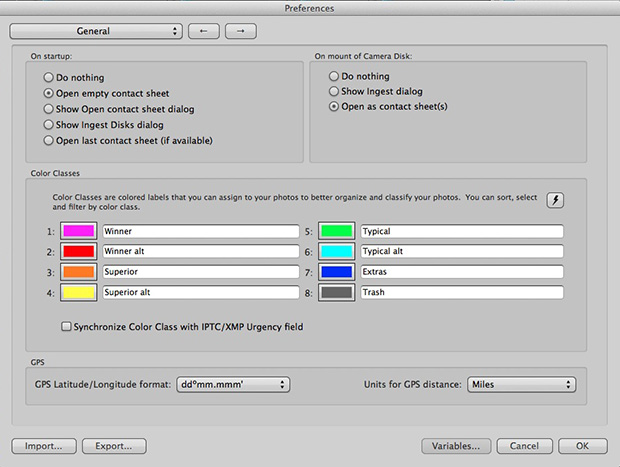
Before I insert a card into the card reader I launch Photo Mechanic. This screen grab shows the “general” preferences for the application including what I want to happen when I load a memory card. I have checked the box “Open as contact sheet(s)” which means that as soon as the card goes in I see the images in a standard window. In the past I often used “show ingest dialogue” but I have found that ingesting every single frame doesn’t suit me and that it slows the whole process down drastically. Typically I only want between 25% and 35% of the images and so I go through them using the “tag” function (cmd T on a Mac or ctrl T on a PC) to identify those that I’m interested in or those which have unique content.

Once I’ve been through that card and tagged the images I want I use the “copy” function (cmd Y on the Mac and ctrl Y on a PC) and copy those tagged files to a new folder. I use a simple formula YYMMDD-jobname-RAW for those files and then repeat this process with every card used on that job. Photo Mechanic can be set to automatically open and update a new contact sheet with the copied files. I always eject the cards without deleting anything just in case there are problems during the process and put those cards to one side to be deleted later.

pm-preview

pm_contact_sheet

The preview and contact sheet windows are extremely easy ways to look at and select pictures. Once I have my first edit done I apply a generic caption using the Photo mechanic stationery pad (cmd I or ctrl I). At this point I’d like to mention two enormously useful features of Photo Mechanic (available on some other applications too).

The first is variables. These are simple ways of automatically adding information to your captions or filenames. Many are derived from the EXIF data applied in the camera. These include time, day and date as well as other shooting data. Some cameras allow you to set copyright information in the camera and others apply GPS location data too. Other variables might include camera serial numbers, original filenames as well as items that you can add yourself from pre-loaded drop-down menus. I have every county in the United Kingdom loaded as well as a large number of towns and cities and I also have some specific locations where I work regularly pre-loaded. By choosing a specific city from one drop-down menu you can use variables to add it to relevant other areas of the IPTC automatically. You can see some examples of variables in the caption below.

pm_stationery_pad

My main caption starts with {city}, {state}. {iptcday0} {iptcmonthname} {iptcyear4} which will then become something like Brighton, East Sussex. 12 December 2013 if I have all of the right information ready to go. If there are more details to add to the generic caption it is easy enough to do those in batches using the stationery pad.

Variables can also be used in the renaming of files.

pm-rename

This requires you to add the IPTC caption before you rename the files because using the {headline} variable automatically includes the headline you have used in the filename. I find this to be very useful and very good for saving time. In practice Photo Mechanic will sequentially rename 100 files in about ten seconds using this method.

The other really useful feature that Photo Mechanic has for helping with captions is code replacement. The idea is similar to variables except you create your won shortcuts. Sports photographers use this a lot and it saves a great deal of time. Imagine a football (that’s soccer to everyone in north America) team with 22 squad players – many of whom have unfamiliar and difficult to spell names. Using code replacement you can preload a text file with the teams before the game using shirt numbers. The England team, for example, would have numbers from EN01 to EN22 with the names of the players set against those numbers. Using code replacement you would type \EN08\ and the software would immediately recognise that as 8 Wayne Rooney or whatever you have set it to say. I use it for political figures so \dcam\ automatically becomes The Rt Hon David Cameron MP. I can add a second part to that if I so wish \pm\ would add Prime Minister.

I also use code replacement for shooting musicians and bands. It is really easy to create a text file with the names of all of the band members and then use the shortcuts to add the relevant people to each frame. You select the shortcuts yourself and the long versions yourself. Once you get the hang of code replacement, it becomes a central part of your workflow.

At this point I’ll often do a second tighter edit. I’ll keep all of the RAW files that I have copied over from the cards but only convert and send the best to the client. For some news jobs that is only 6-10 images and for other editorial assignments anything between a dozen and thirty. Some of the corporate jobs I shoot end up with a couple of hundred files and working on those proves the efficiency of this workflow because it is scaleable and repeatable.

Once I have my RAW (CR2 or RAF) images selected, captioned and renamed it is time to highlight them all and open them in Adobe Camera RAW in Adobe Photoshop. There are a number of great RAW conversion options out there and whether you use Photoshop, Lightroom, Aperture, Capture One or any of the others you need to make sure that the one you use doesn’t strip your carefully added caption information during the RAW conversion process.

acr-window

This is what the Adobe camera RAW window looks like. You can select a number of images from the strip down the left hand side and apply the same adjustments to all of them. I don’t want to run a complete ACR tutorial here but I would like to mention the straighten, sharpen, crop and lens correction adjustments as well worth learning. Of course those are secondary to the basic correction options such as colour temperature and tint, exposure, contrast, highlight and shadows etc. I find that I rarely need to open an image into Photoshop itself simply because all of the things that I’d normally do to a picture can be done right here in Camera Raw. Every few frames I will highlight those that have been corrected but not yet saved and save them. A decent computer with enough RAM will happily save the adjusted RAW files into whatever format you choose in the background whilst you continue to work on the rest. Once I have hit the “save” button on the last files I then click on “done”. Most of the time I am saving files at their default size as high quality Jpegs with some sharpening into the same folder as the RAW files. Photo Mechanic then updates the folder to show the RAW and Jpeg files together (you can separate them if you wish to) with a thumbnail from the newly saved Jpeg.

One of the best improvements between Adobe Camera RAW in Photoshop CS6 and Photoshop CC is an improved and expanded “save” dialogue window. You now have the option to set a target size, target amount of compression and apply a set degree of sharpening. With modern cameras producing pictures of over 60 megabytes and many of my clients wanting their photographs to be considerably smaller than that I am now using the target size more and more. My default setting is 4800 pixels along the longest side and with a maximum compressed file of 3200 kilobytes.

acr-save

Once I have my images all saved I return to Photo Mechanic and copy the Jpeg files into a new folder ready to send to the client. More and more that folder is a Dropbox one and I will give the link to the images to the client. For news jobs I can simply FTP the images (having saved them at a smaller size) and for some commercial clients that means burning the pictures to a DVD or CD. However they are delivered, the images are correctly sized, nicely prepared from the RAW files and properly captioned and renamed. All of this is done quickly and efficiently without damaging any originals.

When the urgency of the edit is over, I copy the files to a RAID drive in my office, to a portable drive that lives in my car and to a third drive which is away from my office ‘just in case’. I might then treat myself to a coffee…
Poor old Photographer B

There is a heated discussion about the winner of this year’s Taylor Wessing Portrait prize on a photographers’ forum at the moment. Some people love Spencer Murphy’s picture and other’s don’t get it – which makes it a perfect demonstration that personal taste is a major factor in “liking” an image. One thread of the debate is the winning photographer’s use of large format film and The Guardian having quoted him as saying “I chose to shoot the series on a large format film, to give the images a depth and timelessness that I think would have been hard to achieve on a digital camera.” Hard to achieve? Hard for whom?

All of this prompted me to expand a little on something that is happening in photography right now that frustrates me: To make myself clear – I applaud photographers who find ways to make an overcrowded and homogenised market work for them and I applaud the way that they are using different methods to enable them to “see” better.

The idea is gaining momentum that just because something is shot on film it somehow has greater validity and greater truth. This really angers me.

If Photographer A likes the way that they work with film and that there is a market for that work then Photographer A has found a niche and I’m happy for them. Photographer B on the other hand creates great work without resorting to film but potential clients who have bought into the myth about the validity of film are already starting to question why Photographer B isn’t going with the fashion and using Photographer C who is happy to take the money but doesn’t work better on film. Basically, we are in a situation where the means of production could overtake the end result as the goal of the commission. Nobody wins – especially photographers D-Z.

The place where this is most frightening is in our colleges and universities where the small resurgence of film is being leapt upon by lecturers who are miles out of their depth in the digital world supported by managers who are desperate to validate their investments in silver based facilities and avoid having to spend on up-to-date digital ones. We have a generation of students being equipped for professional life in the 1980s based on the achievements of a tiny number of photographers achieving critical acclaim by “seeing differently” and then talking nonsense about it to a small clique of art lovers who lap up all of this stuff so that they can repeat it at Islington dinner parties and sound as if they know what they are talking about.

I come from a newspaper background where there is a good deal of nostalgia for shooting film. Happily most of us who wish to can indulge in this kind of work as part hobby and part self-expression. Each to their own and vive la difference and so on. We owe it to ourselves and each other to take the utmost care that our professional lives are not going to get hijacked by a notion that film – or “heritage media” as I quite mischievously like to call it – is better. After all, there’s a lot of truth in the old saying “be careful what you wish for.”

For the record I like Spencer Murphy’s work and I don’t blame him for mining the niche that he has helped to create. Portraiture should be about telling the subject’s story and not about how we shot the picture. I’ve been guilty on many occasions of shooting pictures where you notice the “how” before the “who” and the “why”. Photographic portraiture is as difficult as you want to make it. Spencer Murphy suggests that he has made a virtue out of simple by shooting with what is in truth a complex medium. My head hurts…