Editorial

So I bought a Canon 7D MkII

I wrote a long blog post about this time last year talking about the choice between three of Canon’s full-frame DSLR cameras. At that stage in my work I couldn’t imagine buying another crop frame camera after selling my original EOS7D and giving my opinion of it as “loving everything about the camera apart from the image quality above 800 ISO”. Well, hold the front page – the EOS7D Mk II can handle ISOs a fair bit higher than 800.

Cropped area of approximately a frame shot at 3200 ISO blown up to 100%

Cropped area of approximately a frame shot at 3200 ISO blown up to 100%

In the frame above shot at 3200 ISO you can see some noise in the out of focus areas but it isn’t nasty and it isn’t overwhelming. In the sample shot under ‘press conference’ conditions at 1600 ISO I think that the camera performed brilliantly. I would say that the MkII is at least two stops better in low light than the original 7D and maybe a bit more under certain lighting conditions and those two stops are the difference between a camera that is very usable as an every day available light camera and one that isn’t.

So far I have been delighted with it. I’ve used it on ten assignments already and it is rapidly becoming one of those things that goes into the bag first. (more…)

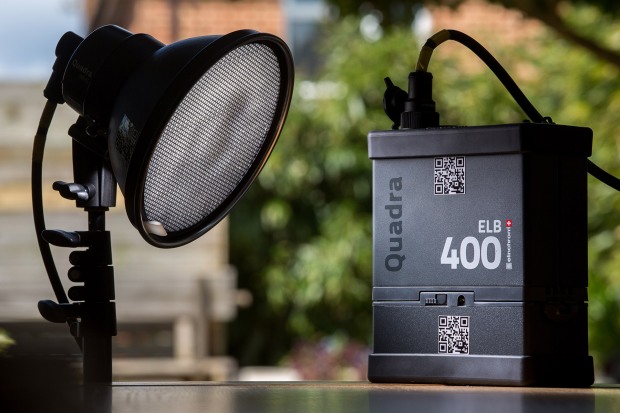
Elinchrom Quadra ELB

27 April 2016. Bournemouth, Dorset. Elinchrom Quadra ELB. Hillcrest Road Neil Turner

When I get a new piece of kit worthy of mention, I usually write a first hand account of how it is working out and go into details based on using it on a few jobs. I bought an Elinchrom Quadra ELB HS kit a couple of weeks ago and I thought that it was about time I gave some first impressions on this blog. Sadly, I haven’t used it for anything particularly interesting and I certainly haven’t stretched it beyond what I would normally do with my old Quadras (some executive portraits and a quick location shoot) but I can already see a lot of small but amazingly significant changes from the original system.

Those of you who read this blog regularly will know that I was very impressed with the Quadra when I wrote about it in my “32 Months On” and was further impressed when the Lithium Ion batteries came out. The differences between the ELB and the Quadra for most jobs aren’t huge but everything about the new kit tells me that the designers have listened and that the manufacturers have allowed their engineers to implement some great changes. For me, the positive changes with the pack are:

  • Far better display
  • Vastly improved menu system
  • Ability to recondition flattened lithium batteries
  • Better cable port covers
  • All of my old Quadra bits and cables are compatible with the new pack

I have the new High Synch head too which brings one key improvement which is the ability to synch with my cameras at shutter speeds right up to 1/8000th of a second using the EL Skyport Plus HS Transmitter and I’ll talk about these a bit further down the page.

Let’s talk about the menus: (more…)

Thinking on your feet

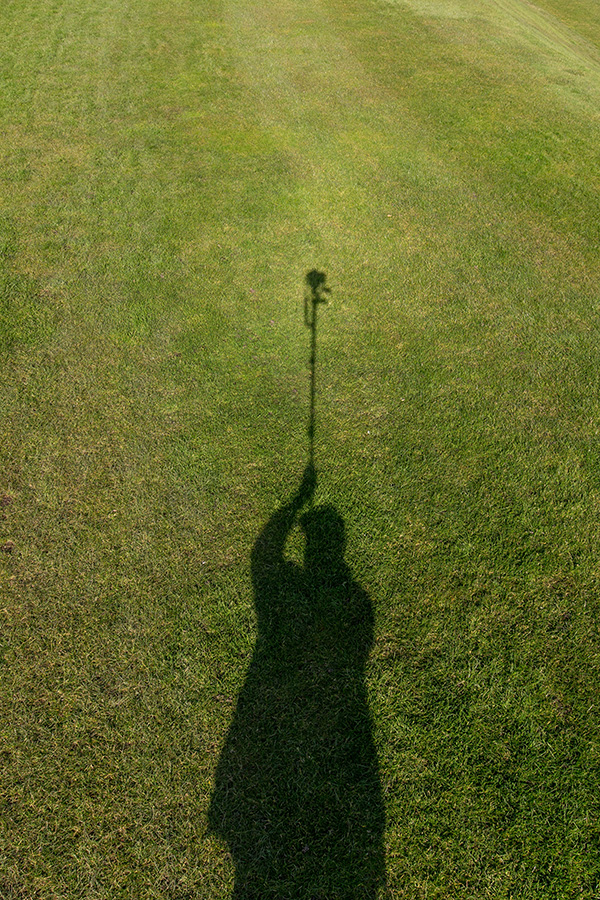
My shadow using a monopod to get a high angle picture. March 2016 ©Neil Turner

My shadow using a monopod to get a high angle picture. March 2016 ©Neil Turner

I was out shooting a job yesterday and needed to get quite a bit of extra height. The best place to shoot the picture from was on the side of a grassy hill which was very wet and the client’s health and safety policies meant that it wasn’t going to be easy to use a step ladder – whilst building a tower was outside the budget. In an ideal world a proper pole-cam or even a drone would have been the best option but the light was right and I needed to improvise.

Having used the Canon EOS6D as a remote via their iPhone app once before I was reasonably confident that my idea would work but the app has been replaced/updated and it meant learning the new one on the job. I had a basic monopod, a tripod head and a Manfrotto Super Clamp in the car but no proper way to attach the phone to the monopod to use as a viewfinder and remote release. With a proper pole-cam you rest the base of the pole on the ground and it is pretty stable. You also have a cradle for the phone or even a tablet if you want to go bigger. I had to tuck the foot of the monopod into my belt to get enough height but I had about an hour so I went into full “1970s Blue Peter” improvisation mode.

The cradle that holds my iPhone in my car was pressed into service and that attached very easily to the Manfrotto Super Clamp. Having extended the monopod to its full height I then attached the clamp to the second stage of the monopod (about eye-level when the whole thing was in use I guessed). Then I stuck the tripod head onto the monopod tilting down a little and put the EOS6D with a Canon 16-35 f4L IS lens on it. Whilst all of this was being done I was downloading the latest Canon Camera Connect app from the Apple App Store.

After a few minutes messing with settings I had the system working. I could use the phone as a viewfinder and a remote release for the Canon DSLR and I set about shooting the pictures without leaving the ground myself. After a minute or two I decided that I needed more height to look down on the subject a bit more and so I tilted the tripod head down a little and when I put the camera back into the air the foot of the monopod was resting on my chest. Even with a camera as light as the 6D I couldn’t hold it up for more than a minute at a time but we got the shot and I only got pointed at (and laughed at) by a small handful of passers-by. I wouldn’t want to have to work this way very often but, having just edited and uploaded the pictures, I know that I have a “Blue Peter”** solution that works.

** Blue Peter was required viewing as a child growing up in the 1970s. They always showed you how to make useful things from odds and ends lying around the house.

Don’t panic…

I use Apple products. In fact, I use a lot of Apple products and some of my less generous colleagues might even label me a “fanboy”. I’d call that unfair because I’m not blind to their faults and I know that, like all technology, it will fail at some point.

I have tried my best to develop ways of avoiding failures, making sure that they cause as little damage or disruption as possible and generally covering my back wherever and whenever possible. The other day, whilst doing routine updates to one of the Macs in my office, I experienced something that would probably have completely freaked most computer users out and necessitated a lot of aggravation or even a visit to a service centre or Genius Bar.

dock_error

Simply put, all of the applications went AWOL. The dock, of which you can see a screenshot above just showed a whole row of question marks indicating that the applications were missing and a quick visit to the applications folder showed that the Mac clearly thought so too. The error message said that I didn’t have permissions to use the folder which made me believe and/or hope that nothing was actually missing. The “missing” applications included Time Machine and all of the repair and diagnostic tools that I would normally go straight to. I looked in the bin and I tried to search for items that I know should have in my applications folder but found nothing.

This has never happened to me before and I have never heard it described so I tried solution number one – to use a different device, get onto the internet and search the collected knowledge of the world’s computer users. The general consensus appeared to be that I had a major issue and that I needed to reinstall the Mac operating system. Easier said than done given that, despite trying every kind of reboot and diagnostic test I could, the App Store, all web browsers and Time Machine were amongst the locked/blocked/missing applications.

I could have done it all from one of the other Macs but I have, for many years, had a back-up drive from which I can boot my computers. These days it is a USB3 SSD drive with OSX Yosemite loaded on it and I used that to reboot my computer and install a fresh copy of OSX. Twenty-five minutes later with a mildly raised heart rate and some cramp in my fingers from keeping them crossed my computer was back as if nothing had happened. No screwdrivers were involved and nobody had to drive anywhere. No data was lost and I could get on with work.

Just in case you are wondering, panicking wasn’t even in the top ten ways to sort this out – about five places below a stiff drink or three!

A case that proves the old military phrase that I was taught at school in the 1970s and 1980s – “precise and proper planning prevents poor performance”.

Another Merry Christmas

Lights from the Old Vic Theatre reflecting on wet roads near London's Waterloo station.

Bringing home the panettone. London. 17th December 2015.  ©Neil Turner

Another year is drawing to its end and I hope that you have enjoyed reading some (or all) of my blog posts through 2015. I just wanted to post a sort of a Christmas themed street photo to round the year off.

I have entitled it ‘bringing home the panettone’ which makes it a bit festive but it was taken as I was on my way to meet up with some friends and colleagues for a Christmas drink and meal and that adds to its seasonal feeling. Being an independent and freelance photographer I don’t get to spend enough time working with a team and it is lovely to get to be part of an office party like this one was.

2015 has been a good year for me and for my work but it has been tinged by the sadness of losing too many fellow photographers, most of whom were far too young.

Thanks for reading my blog, thanks for contributing and I wish you a very merry Christmas and successful new year.

Technical stuff: Fujifilm X100S 1/80th of a second at f2 on 2000 ISO.

My iPhone & not taking pictures with it

iphone_grabThere’s no getting away from two facts:

1. I am a fan of almost everything Apple for the work that I do and the way that I do it.

2. I rely on my two and a bit year old iPhone 5S for quite a lot of things when I’m out on assignments.

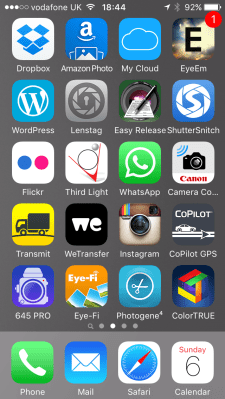
The speed of the 4G network and the brilliant array of apps available for all smartphones has changed the way that I do some of my jobs quite a lot in the last few years. Recently I wrote about getting pictures away quickly  and I have also written about the workflow that I use with some of the phone apps and you can see from a current grab of one of the app pages on my phone I have quite a few ways to do similar things.

I’d like to talk in this blog about some of many of the ‘un-sung heroes’ of my mobile life – at least one of which is a very new and a very, very welcome addition to the set up.

The backbone of my mobile image acquisition and transmission system is formed of the Eye-Fi and Photogene apps which have been covered at length before but you can also see plenty of other work related apps on this single screen. (more…)

Canon 16-35 f4 L IS

Test shot with Canon 16-35 f4 L IS in the crypt of St Martin-in-the-Fields

London. 08 December 2015 Test shot with Canon 16-35 f4 L IS in the crypt of St Martin-in-the-Fields Photo: Neil Turner

A couple of months ago I cracked and bought the Canon 16-35 f4 L IS lens to replace my very elderly 16-35 f2.8L having borrowed both this one and the f2.8L MkII to see what all the fuss was about. I shoot quite a few pictures of buildings and having a 16mm lens is very useful – especially when the space is really tight.

My old 16-35 and just about every other super-wide lens I have ever used has suffered from barrel distortion, been less than pin sharp in the corners and generally required a bit of work to get great pictures that are as free from distortion as possible.

I was on a job last night in a tight space where the 16-35 f4 L IS was being pressed into service to do shots of an empty venue before an event. I hadn’t brought a tripod because I hadn’t expected to be doing these shots but I did my best with what I had. The photo above was taken hand-held at 1/60th of a second at f4 on 2500 ISO with the IS switched on with a Canon EOS5D MkIII. I have applied no correction to the uprights and the frame is un-cropped at 16mm focal length.  (more…)