photojournalism

Working other people’s files

From time to time I work with teams of photographers as an editor. It’s part of the ‘rich portfolio’ of roles that I have these days. 80% or more of my work is still shooting pictures and that’s great but for the other 20% of my working life I enjoy doing some other photo-related stuff. I’ve written before about teaching and running workshops and one of the workshops that I do is about sharpening up your workflow. For me the best way to help others improve their workflow is to sit down with them and go through how they work and then refine what they already do rather than to throw everything out and start again.

Editing other people’s work is a whole other matter. Imagine being in a deadline driven environment where you have several photographers all shooting RAW and where you have to occasionally grab their memory cards and do some of their edits for them. On one recent job I handled CR2 files from Canon EOS1DX, EOS5D MkIII and EOS5D MkII cameras as well as NEF files from Nikon D4S, D4, D3S, D3, D800 and D610 cameras over a two week period. Some of the cameras were left on factory settings and others had been set up by their owners to the point where none of the settings were left unchanged. RAW files obviously allow you to return the completely unchanged state but I am a believer in the idea that you trust the photographer to have made changes on purpose and to respect those changes wherever possible as you come to edit their files.

The old, old Nikon Vs Canon debate morphs into a NEF Vs CR2 debate. As a long-time Canon user myself I thought that I’d find the CR2 files far easier to work with and I was ready to spend far more time getting NEFs right. The biggest shock was that it was entirely the other way around. Files from the latest Nikon cameras can be easy to work with. Really easy. I realised after only a few hours that, as long as the in-camera settings weren’t eccentric, NEFs from the D4, D4S and the D800 were not only easy to work with (requiring relatively few adjustments) but that the quality was uniformly high. In contrast the imported CR2 files from all of the Canons looked a lot less impressive as they landed in Photo Mechanic and then in Adobe Camera RAW. On average, it took more clicks of the mouse (maybe 50% more) to get the CR2s looking as good as they should.

Needless to say, this was quite a revelation. It isn’t as if I hadn’t worked with other people’s files before but this was the first time that I had seen the results of so many different people’s work from so many different cameras in such a compressed space in time. The pictures were all coming from top class photographers and the end results were largely indistinguishable from one another but the route to get there was certainly different. There are way too many variables to draw any definitive conclusions from this but I can say the following;

  • Any reservations that I might have once had about the NEF file format are long gone
  • The results achievable from both NEF and CR2 full-frame cameras are on a par with one another
  • The idea that the colours rendered by Nikons and Canons are inherently different has a small toehold in fact
  • The RAW files from all of these cameras are incredibly versatile and you can get the desired results from either
  • Given the choice I’d go with the NEF from a well set up D4S as the file from other people I’d prefer to work with

Since that event where I worked all of these files side-by-side I have also had a long play with NEFs from a D810 and a D800E. They both require careful handling because of the absence of a low-pass filter over the chip. This gives greater apparent sharpness and a degree of “pop” that is hard to describe but on the flip side it is much easier to mis-handle the files and introduce noise and chromatic problems when using a RAW converter or Photoshop itself. To get around this you find yourself constantly switching between degrees of magnification on the screen to check the effects of any changes to contract, highlight, shadow, saturation or sharpening that you apply. I found this to have a significant slowing effect on my workflow but I also loved the quality of the images produced. The D810 is a camera that I’d happily add to my list of those producing desirable files to work with.

So, NEF Vs CR2? Out of the blocks the NEF files that I’ve worked with over the last few months streak into an early lead but the CR2s catch up along the back straight and they are neck and neck at the line. For now…

One that didn’t make the folio

©Neil Turner/TSL. June 2008, Hertfordshire.

©Neil Turner/TSL. June 2008, Hertfordshire.

When I was putting a massive “long-list” of photographs that I was considering putting into one of the galleries on my portfolio website I looked at this picture and couldn’t make my mind up one way or the other. I was aware that I already had a lot of images from schools – which isn’t surprising when you consider that I have worked in over 3,500 of them in 15 different countries – and that it didn’t add anything to the mix.

I like this picture a lot because it is simple, demonstrates the use of good composition and shallow depth of field as well as reminding me of the kind of work that still makes me want to get out of bed in the morning and go and shoot pictures. These days most of my school based work is shooting for their prospectuses and websites with the odd news story thrown in from time to time but this remains the kind of picture that has a lot of uses and draws the most comment from those who are commissioning the work.

The truth is that almost anyone could take an acceptable picture of primary school children on a scavenger hunt in an enclosed copse. I hope that it also proves that it takes a lot more to produce as good as this on a miserable and rainy day early in the morning when the light is awful and the gear is getting wet. I have kept a few photographs that didn’t make it to one side and I intend to publish a few of them here on the blog with a bit of the background to why I like them along with a bit of the story.


Techie Stuff: Canon EOS1D MkII with a 16-35mm f2.8L lens at 16mm. Canon CR2 RAW file 640 ISO, 1/90th of a second at f2.8 on daylight white balance and converted using Adobe Camera RAW in Photoshop. At the time it would have been ACR in Photoshop CS3 but the file was re-worked using ACR in Photoshop CC.

Portfolio features now updated

©Neil Turner/TSL. April 2005. Kabalega, Uganda.

©Neil Turner/TSL. April 2005. Kabalega, Uganda.

The funny thing about updating the features section on my portfolio website is that I have a section called “portraits” and another section that should be called “not portraits”. That isn’t a  particularly elegant way to categorise the thirty plus images featured in that particular gallery but I have yet to find a work that sums it up. Features is as close as I seem to be able to get.

Anyway, it’s a big relief to have finished the refresh and the last of the design updates for now. When I was looking through the huge folder of images that were under consideration I was struck by the picture above of a teenaged Ugandan boy who was part of a group helped to think about issues that were affecting their lives by an art teacher who had visited the United Kingdom where he had picked up this technique. They were an interesting set of images of a fascinating project and I’m really glad to have been able to include this picture in the new folio – even if the picture was shot nearly nine years ago.

The new “features gallery” is now on show at www.dg28.com/folio/features/ and I hope that you have some time to have a look.

Portfolio updates – finally!

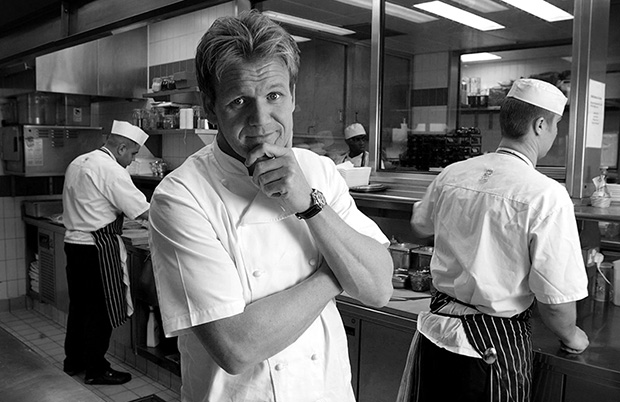
©Neil Turner/TSL February 2003. Gordon Ramsay photographed in his kitchen

©Neil Turner/TSL February 2003. Gordon Ramsay photographed in his kitchen

I have just finished uploading a major update to my website with a refreshed selection of new and old images in the portfolio section and an updated look to the templates pages with links to all of my social media.

I still do most of the work on my site myself and so it takes a lot longer to do but I am very happy with the way that photographs look on my site and I guess that is a major selling point. There will be lots more changes over the next couple of weeks but I’d like to invite you come to the site and have a look at the new portraits selection as well as two new galleries of personal work which will definitely be updated as they are both about continuing passions of mine.

My website is www.dg28.com and if you have any feedback, I’d love to hear it.

My Fujifilm X20 – the final word?

It’s amazing how often a casual conversation or a quick exchange on a Facebook group can spark a train of thought. Earlier today a comment by a friend and fellow photographer about how a photo sharing site had made him look around him and start taking pictures for the love of it again. I agreed whole-heartedly and began to think about uploading a few more pictures here. That moved my train of thought onto the various reviews and updates that I’ve written on this blog and elsewhere about the Fujifilm X20 that has been my almost constant companion for the last 11 months. So what I decided to do was to say a few words to summarise my experiences with this camera and add some pictures shot in the last couple of weeks.

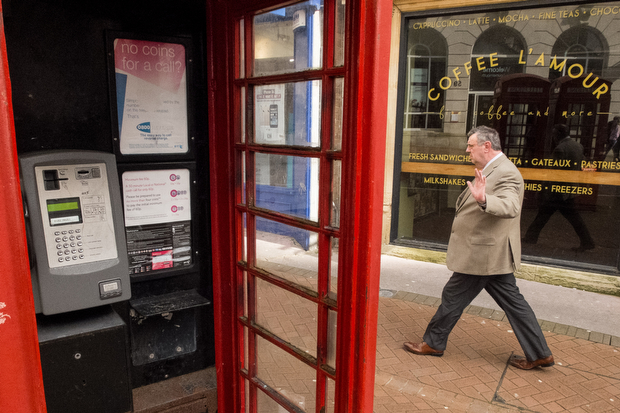
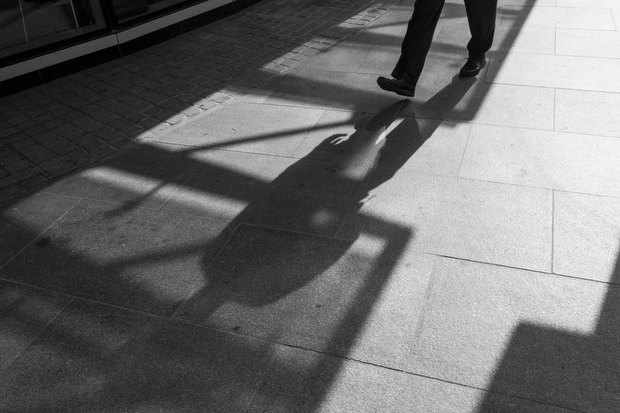
©Neil Turner, March 2014. The photographer's shadow forms part of the scene as an elderly couple walk along South Bank of the River Thames in London.

©Neil Turner, March 2014. The photographer’s shadow forms part of the scene as an elderly couple walk along South Bank of the River Thames in London.

In general, my opinions about this camera have barely changed since I posted the first update back in mid April 2013. Given the product cycle that Fujifilm seems to gallop through the X20 is probably about to be superseded anyway but I thought that I’d offer some advice to make this camera (that I still like very much) better if they want to bring out an X30.

  • The battery life has to improve. Despite doing everything possible to limit power drain I get through two batteries a day when shooting with ordinary SD cards and up to four batteries a day when I’m using one of my Eye-Fi cards. This makes a cool and convenient camera a lot less convenient and pushes up the cost of ownership – even if you go for third party spare batteries.
  • Start-up delay. About once in every third time I switch the camera on it takes three or four seconds to adjust and get the exposure correct. The first picture is often three or more stops over-exposed.
  • Autofocus at the telephoto end of the range. My camera sometimes refuses to auto focus when the lens is zoomed all the way to the 112mm equivalent end of its range.
  • The review time options for looking at images you have just shot are too restrictive. There are no options between 1.5 seconds and zoom (unlimited).
  • The built-in flash isn’t compatible with the lens hood – you get shadows and so to use that function you need to remove the hood.
  • The video isn’t great – but I didn’t buy this camera to shoot video.

On top of all of that it would be great if the focal range went from 24-120, the camera had two SD slots and if there were lens correction options for Adobe Camera RAW because at the 28mm end there is the slightest barrel distortion.

This is a great camera and I love using it. I am seriously tempted by the X100S too. Having borrowed one for an extended period, I would very much like to own one. Fujifilm have done a great job with their X-series cameras and they should be very proud of the effect that their cameras have had on a lot of very old and very picky professionals (like me) who all grin like idiots when using the kit. So now, without further ado, here are a few more recent X20 images for you…

So there you go Fujifilm… bring on the X30…

Dogs on the beach and the Fujifilm X20

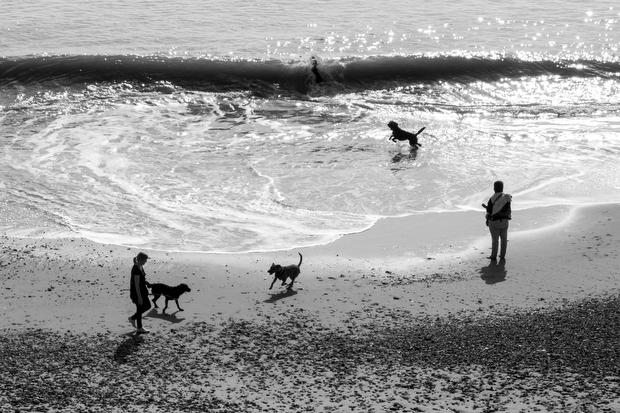
My addiction to taking pictures of dogs walking on the beach with or without their owners shows no signs of abating and neither does my joy at shooting pictures with my Fujifilm X20. When I get to shoot bon the beach with the X20 my photographic life is almost complete (laughs ironically there). So, once again, for no other reason that I loved taking and editing the picture here is a photograph taken last Saturday at Boscombe Manor during a break in the foul weather that the whole of the country has been getting.

© Neil Turner, February 2014. A couple walk their dog on the beach between storms.

© Neil Turner, February 2014. A couple walk their dog on the beach between storms.

To the north of us was the wreckage of broken beach huts, to the east was an area closed off to the public and to the west was the only stretch of the beach where you could walk with reasonable safety. Happy days.

The term photographer is no longer enough

Just under two years ago I wrote about the definition of the word ‘photographer’ and about how everyone is one these days. I have become more and more interested in the definition and I have come up with the following question:

Can you use the word ‘photographer’ in isolation any more?

What I’m asking there is whether there is anyone out there whose work, hobby or pastime is sufficiently vague that you can just say photographer? I’m probably not the best example but I have my permission to talk about me so here goes; I use a combination of editorial, corporate, press, documentary, portrait, features, PR and commercial in front of the word photographer depending on what I’m shooting, who I’m talking to and where I am. I also use photojournalist from time to time but never ‘just’ photographer without qualifying it.

This got me thinking a bit further. When I teach photography I often compare it to driving. I talk about when you first got behind the wheel of a car and had to think hard about which pedal was which and where the gears were and how some of this was already there because we had been passengers for the preceding 17 years of our lives and we had probably driven go-karts and played computer driving games. The same goes for becoming a photographer. Handling the camera takes a lot of thought at first but it becomes second nature after a while and 99% of us had already been in pictures, used a simple point and shoot as well as doing drawings and getting the basics of composition.

This lead to the thought about the similarities between the word photographer and the word driver. Rarely do you hear ‘driver’ without something more specific in front of it – bus driver, lorry driver, train driver or racing driver amongst many others. I have to wonder whether this is just a natural human need for more information or a desire to stick people and what they do into convenient boxes. I am certain that there are a lot of photographers out there who would rail against being pegged as one kind of photographer and I’m equally certain that there are probably an equal number who would delight in being thought of as completely specialised. Of course there is a group in the middle like me whose descriptor changes on a daily or even hourly basis.

I find it quite amusing when I come across photographers who latch on to genres of photography that either make no sense or that are deliberately elitist or confusing to anyone other than the ‘in-crowd’. I have mentioned my dislike of ‘wedding photojournalism’ before. It is perfectly descriptive but it makes no sense. Wedding photographers are hired by the family or the couple getting married and, no matter what style they shoot in, they are not in any real way acting as journalists using photographs. What they are is wedding photographers using a photojournalistic style. It’s too late to reign it back though. Language is a dynamic and moveable thing and the word photojournalism has already become something different in this context.

When I was first thinking about how I was going to write this post I had just shot a whole series of photographs at a large secondary school where there was a rule that the academic staff were “teachers first and subject specialists second” which meant that nobody working there was a Geography Teacher or a History Teacher or even an English Teacher but were instead a Teacher of Geography or a Teacher of History or a Teacher of English. I spent a while trying to see if I could make that idea work for photography – the idea that we were photographers first and specialists second. Who would prefer to be called a “Photographer of Fashion” or a “Photographer of Sports”? Those work but “Photographer of Portraits” and “Photographer of Corporate (stuff)” don’t really do it for me.

At a dinner party recently I was asked by someone that I’d never met before the obvious “so what do you do?” question. I answered “Editorial & Corporate Photographer” and got a blank look back. The gentleman was an intelligent chap and a local government official but he had to ask me to dissect what an editorial and corporate photographer was. By the end of the conversation I realised that it would have been easier to say “self-employed photographer” and give him the option of digging deeper – so that’s my new tactic at dinner parties.

That incident, the thoughts about teachers and drivers and my general confusion about explaining who I am and what I do have left me pretty much back at the start of this mildly philosophical blog: Each and every time you need to define yourself as a photographer you need to select the appropriate descriptors and adjectives for that particular context. There doesn’t appear to be a solution to this problem that I can see.

I need to go and prepare for tomorrow’s session where, if I were to use my driving analogy, I’m going to be the driving instructor. I suspect that the comparison between photography and driving has many miles to run…

Eye-Fi card workflow

eye-fi_cards When I was rounding up 2013 I mentioned that I had a lot of success using an Eye-Fi card to wirelessly transmit pictures from my cameras (Canon EOS5D MkIII and Fujifilm X20) to either my iPhone, iPad or laptop where I can do a quick edit and caption before sending them to clients. Inevitably I got a couple of emails using the “ask me anything” feature of this blog asking me to describe my workflow. It is similar between an EOS5D MkIII and the Fujifilm X20 except that the former has twin card slots (one CF compact flash and one SD secure digital) whereas the latter only has the SD slot. I like to shoot RAW which means that in the X20 I have to do an in-camera RAW conversion to create a Jpeg to send out. I have two cards (shown left) – an Eye-Fi branded 8Gb Pro X2 and a Sandisk branded 4Gb one. In practice, they both do much the same job but the orange Eye-Fi one has more options should you want to work differently. Without further ado, here is how it all works on the Canon…

Getting the the settings on the card, your camera and your phone/tablet/computer right is the key to getting everything working well:

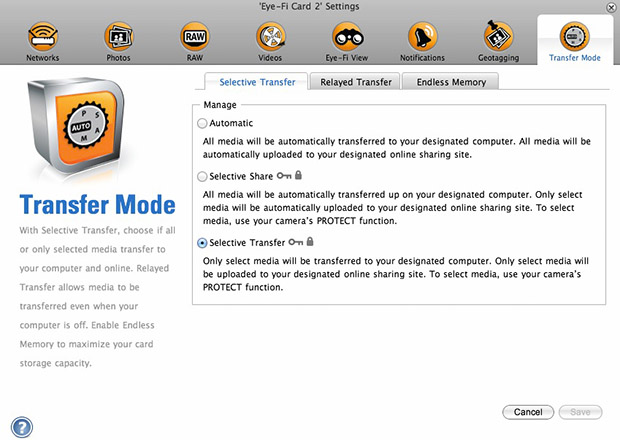
  1. Setting up the Eye-Fi card. When you get the card it should come with an SD card reader and by far the best way to set things up is to use that reader to load the card into a computer. There are lots of options that will appear once you have loaded the supplied “Eye-Fi Centre” application. This workflow is all about working in what the manufacturer calls “direct mode”. I choose to only transfer the files I want to my iPhone and so on the card I have selected “Selective Transfer” via the Eye-Fi Centre application. This means that only images that I have protected in the camera menu get transferred. On the Canon I have assigned the “rate” button to protect images for speed. It is also useful to add a couple of wifi networks and to define which file formats to transfer using the application whilst the card is in the computer because it isn’t possible to alter some settings once the card is in the camera. This whole process takes a few minutes and if you get it right, the whole thing test a lot easier from here on in.eye-fi_screenshot
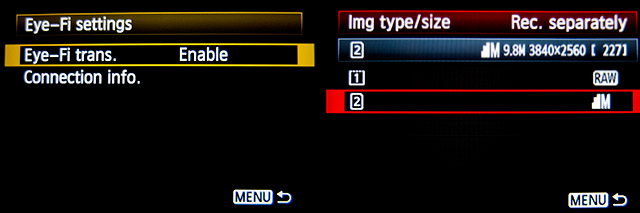
  2. Setting up the camera. In the EOS5D MkIII menu there are three things that I’d recommend you do. The first is to assign the “rate” button to protect selected images. The second is to get the camera to write RAW files to the CF card and medium size Jpegs to the SD (Eye-Fi) card. Finally, you need to enable Eye-Fi transfer from the camera menu. This way you can use the review function with card 2 (the SD slot) and then every time you protect an image written to the Eye-Fi card it will automatically look to transfer that file to the device you have nominated.
    eos_screens
  3. The receiving device. I use an iPhone and an iPad and the whole process is eventually controlled by the free app that Eye-Fi make available through the Apple App Store. There are equally useful apps available for Android powered devices and the functionality is pretty much identical. Apart from loading the app the only other thing you have to do is to download and authorise a small change to your wifi settings on your phone which simply installs the settings for the direct mode to work. Once you launch the app you get an opening window which then gives way to the gallery window which in turn tells you what is happening about transfers. Below you can see the card paring screen and the gallery screen.eye_fi_phone
  4. Editing your pictures. Once you have the image on your phone or tablet you can then use the apps of your choice to edit and caption your image before shifting them on. My personal favourite is Photogene4 which has some good image options such as clarity, contrast, saturation, straighten, crop, sharpen and the ability to add IPTC captions – including defaults such as the EXIF time day and date as well as any pre-loaded captions and copyright information. I find that it’s a good idea to write some generic captions using Apple’s Notes app and then copy and paste them into Photogene4. The app also has the option to upload to a wide range of sharing sites as well as to email and ransomer images to FTP servers – making it really useful for work.photogene
    From shooting a frame to having it uploaded to my own FTP server normally takes twenty to thirty seconds if there is a good phone signal and the various uses that I’ve found for this rapid upload range from offering images to people I’ve photographed to providing almost instant pictures for corporate clients to use for their Facebook, Instagram and Twitter feeds at events. This is a very versatile piece of kit and I haven’t even come close to describing everything that it can do. I like the way that this workflow actually does flow and I love the effect that it has had on a couple of clients who really appreciate what it offers them. My first Eye-Fi card was £24.99 including VAT – possibly the best investment that I’ve ever made!