Author: dg28

I've been a full-time editorial & corporate photographer since 1986 and I'm still as passionate about the work now as I was then. These days I also write about photography, teach photography and act as a consultant on all things photographic - so, basically, photography is my professional life.

Work in progress – an iPad workflow

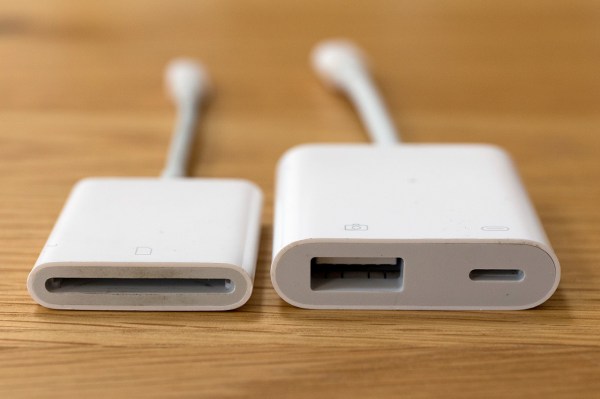
Whilst I’m not able to be out shooting I have decided to take a serious look at the workflow options using an iPad or even an iPhone and to see whether they really can replace a lightweight laptop in my working life. I have even bought a new iPad Mini 4 (already upgraded to iOS11) because I’m sure that I will be using the tablet for some form of mobile editing. Should you be seeking wisdom and a fully-formed solution I’m prepared to stick a plot-spoiler in here and tell you that it is still very much a ‘work in progress’ and that I don’t have an answer for you. Yet.

My starting point for this is having used my phone as an occasional method of getting pictures away quickly – mostly for clients to be able to use my pictures in their social media and on their websites instead of their own pictures taken with their phones and tablets. If you are prepared to work with JPEG files then this isn’t too tricky, but what if you want to base everything on a RAW workflow? Not so simple?

I know that a lot of photographers have worked out their own workflows for using iPads as their principal location editing devices. I have been trawling blogs and YouTube videos trying to get my head around how and why they have decided to go down this route and the fact that several photographers that I respect and even admire have gone this way means that it has to be a serious option for professional editorial and corporate photography. A lot of the same people, driven by a desire to reduce the weight of their kit, have also gone to mirrorless camera systems.

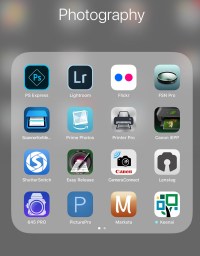
As part of my search I’ve used a LOT of different apps. Amongst others, and in no particular order: Lightroom, FSN Pro, Shuttersnitch, Marksta, PS Express, PicturePro, Transmit, Affinity and the sadly no-longer-supported Photogene4. These range from Lightroom being free with the right Adobe CC subscription to a chunky £49.99 for PicturePro.

So here is what I do know: (more…)

A freelancer’s nightmare

It all started with a twinge in the small of my back. The twinge became an ache and the ache became pain. A visit to the Doctor led to some prescription pain killers and a referral to a back-pain clinic two months into the future. Still working at full speed, I lost the feeling in the soles of my feet and had a few cramps. Every day it got a little worse and then, one Sunday morning, I couldn’t get out of bed without crying with the pain. We made our way to the accident & emergency department of the local hospital where an MRI scan confirmed that I was in trouble. They admitted me to hospital and just over a week later I had two operations on my spine.

The operations were three weeks ago today and, although I’m back home, I’m looking at several months before I can even start to think about working as a photographer. I’m on crutches, my rehabilitation is underway and it’s a struggle.

It has to be one of the worst fears of the freelancer – suffering some sort of injury or illness that keeps you from doing your work which in turn means a loss of income and knowing that your clients will have to look elsewhere for someone to provide the services that you have been providing.

All of this devastating news made me want to compose this rather different blog post and my advice comes in two parts:

  • What to do to avoid and prepare for a sudden, unplanned period of time off
  • What to do if it happens to you

The message has to be that it can happen to you. One minute you are buzzing around going from job to job and regularly burning the midnight oil to get those edits done, your cashflow is looking good and your clients keep coming back and the next you are laid up with an injury. (more…)

New MacBook Pro

new_mac_spec

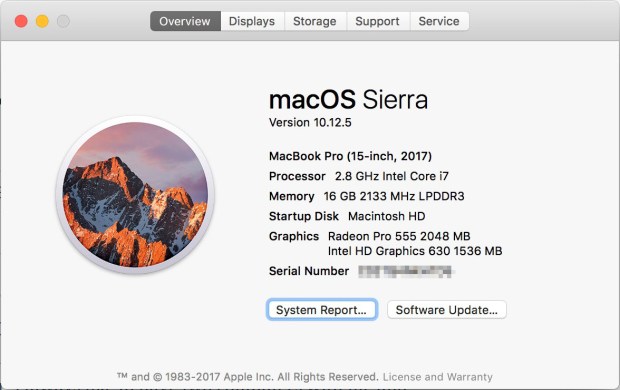
About two weeks ago I hit the “buy” button and my new Apple MacBook Pro arrived a couple of days later. I was right in the middle of working as a picture editor with the team at Wimbledon and it was something of a gamble to switch computers during one of the busiest work periods of my year. I always like to have two computers with me and my six year old Apple MacBook Air was showing distinct signs of being unwell. By unwell I mean that the Thunderbolt port wasn’t working properly and the machine kept telling me that there was no hardware installed to enable wifi. I suspected that none of this was terminal but it was a signal that it was time to upgrade.

I got back to the flat where I was staying two days after placing the order and there was a parcel waiting for me. I unpacked the new laptop at the end of a twelve hour day and, using the USB Type C to USB3 adapter that I had also ordered I plugged my portable hard drive which had my Time Machine back up on it. By the time I’d had a cold drink and unpacked the other bits and pieces that I’d ordered my new Mac was well into the process of swallowing all of the data that my old one had given up an hour or so earlier. (more…)

Using autocomplete with Photo Mechanic

I am a big fan of Photo Mechanic and every time I think that I know it inside out I find something new to make my workflow even slicker. I discovered autocomplete in 2013 and I have been using it and evangelising about it ever since. I made this short video at the beginning of 2016 about how it works and I hope that you learn from it.

NB I would strongly advise you to maximise the player window before you watch the video as some of the important details look a bit small on the page otherwise.

Using the Canon W-E1 wifi adapter

When Canon announced the W-E1 wifi adapter for the EOS7D MkII and the EOS5S and 5SR I was decidedly underwhelmed for two reasons;

  • The first was that it was not backwards compatible with the two EOS5D MkIII bodies that I had at the time.
  • The second was that it took away the ability to record to two cards when it was in use.

At the time I couldn’t see any advantage over any of the SD based transmitters from Eye-Fi or Toshiba amongst others. I didn’t buy one and I couldn’t see myself buying one either.

Fast forward ten months and my need to use remote cameras controlled by an iOS devices has grown and I only had one – the wonderfully simple Canon EOS6D. I didn’t want to use either of the EOS5D MkIV bodies as a remote and so I bought the W-E1 adapter to use in my EOS7D MkII. (more…)

Setting up FTP from a Canon EOS 5D MkIV

A couple of weeks ago I spent a couple of days helping to teach other photographers to send pictures direct from their Canon EOS 5D MkIVs. Over the last couple of years I have taught dozens of people how to do this and set up a huge number of cameras; mostly Canons ranging from the 5D MkII, MkIII and MkIV to the various EOS1D series models as well as various Nikon D4, D4S and D5 models. It’s not rocket science but it is something that takes a lot of practice before it becomes part of your toolkit.

I use this technology all of the time myself and it was suggested to me that I might like to try my hand at making an instructional video. I have a face for radio and so my two thumbs are making a welcome return to the media (last seen holding a power tool in the 1985 Argos catalogue). You might like to check out this old blog post about why I need to get pictures away quickly too.

Here’s a link to the 1080p version on Vimeo
There’s also a 720p option on YouTube.

I’m always happy to answer questions and even happier to get feedback. This is my first real attempt at a “how to” video so be gentle with me!

For those who are interested it was all filmed using a Canon EOS7D MkII and a Canon 24-70 f4L IS lens before being edited in Apple iMovie with some help from Apple Keynote.

Shooting fish in a barrel

London. January 2011. © Neil Turner

In 2008 when I had just left my staff job at TSL I was asked by a reporter working for a photographic magazine about what I intended to do with my career. I pointed out that I had an enormous amount of experience working in schools and universities and that in my time working for the Times Educational Supplement, Times Higher Education Supplement and Nursery World Magazine I had shot pictures in over 3,000 places of learning in at least 13 countries and that it seemed like a “no-brainer” to market myself as a photographer specialising in those areas. Plenty of prospectuses and websites as well as editorial shoots later my tally of educational visits and shoots tops 3,500 and I’m still in love with the genre. The reporter asked what special skills I had that made me good at that part of the job and my response was that if you can’t get great pictures of kids then you really shouldn’t be a photographer because it was “shooting fish in a barrel“. (more…)

AA batteries

Eneloop AA 1.2v batteries and Think Tank 8 AA battery holder.

Back in September 2008 when I returned to the world of freelancing I tried every way that I could think of to cut my ‘cost of doing business’. One of the central ideas was to reduce the number of disposable batteries that I bought and used. I had a number of speed lights and a whole bag full of triggers, transmitters and gadgets almost all of which took AA sized batteries and so I went out and bought a lot of NiCd (nickel cadmium) rechargeables along with three decent quality chargers.

Every-once-in-a-while I would buy a few single use batteries if I was on a job which justified doing so but I kept to my plan and used the NiCd ones where I could. Over time they lost their power and after about four years they were relegated to being used in kids toys and my wireless keyboard. I bought some new NiCds but the way that I used them meant that the dreaded memory effect killed them off more quickly than I would have liked. (more…)