iPhone

Performing the ritual of “The Selfie”

For as long as I can remember I have shot pictures of my wife and I on holiday with a compact camera at arm’s length. I have examples in the family album dating back to 1984 and, whilst I’m not claiming to have invented “The Selfie”, it really isn’t anything new in our house. We started doing those pictures just because there was never anyone else around to take the picture for us and so it was very much a second best picture. Slowly and over the many holidays that we have enjoyed together it became something of a tradition to do at least one of those arm’s length couple pictures but we always liked to get a passer-by to do the picture if we could. It is a phenomenon that I am fascinated by and I often shoot pictures of people as they perform the Ritual of the Selfie.
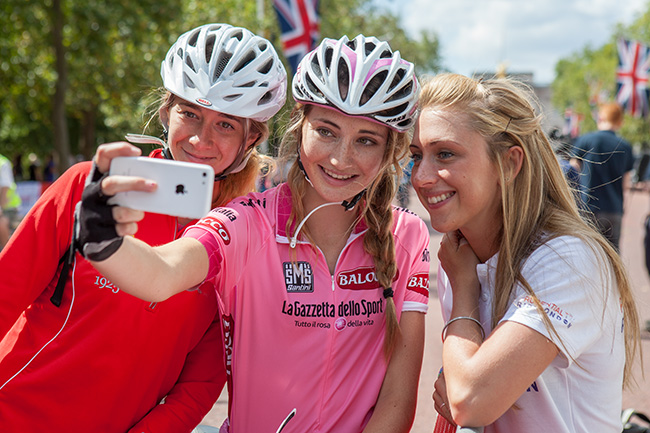
Olympic and Commonwealth Gold medallist Laura Trott posing with riders on The Mall in a break between media interviews during the Freecycle event - part of Prudential RideLondon. 9th August 2014.

Olympic and Commonwealth Gold medallist Laura Trott posing with riders on The Mall in a break between media interviews during the Prudential RideLondon Freecycle event. ©Neil Turner, 9th August 2014.

I was prompted to compose this blog post because I suddenly realised why it works so well. One of the media team working with Prudential RideLondon had offered to take the picture and the three young women dutifully posed but their faces didn’t come alive until they rescued the phone and performed the ritual of the selfie. There seems to be a confidence and a joy in taking your own picture of yourself and your friends or, in this case, you, your friend and an Olympic and Commonwealth champion. Is it because these days that can see themselves in the screen and only shoot when they are happy with what they see? I believe that there’s an element of that in it but the sense of self-reliance is just as important as far as I can see. There is a joy in The Selfie that is missing from a perfectly well taken group photo. Time after time we all saw people enjoying taking self portraits during the event and that’s the case almost everywhere almost every day.

Where I depart from the celebration of The Selfie is where media outlets and PR companies encourage people to do it and post them as part of marketing campaigns. For me the innocence and joy of the ritual gets lost when it is prompted like that. Where I also have an worries about it is when people do it dozens or even hundreds of times a day. I had a link request on EyeEm the other day from a guy who have over 6,000 images on his account and, from what I could see, they were all of himself.

I don’t object to The Selfie at all. In fact I indulge in the ritual myself from time to time. All I’d ask is that marketing people without another great idea stop trying to make something from them that isn’t really there. Photography is about a lot of things and fun is right up there as one of the most important.
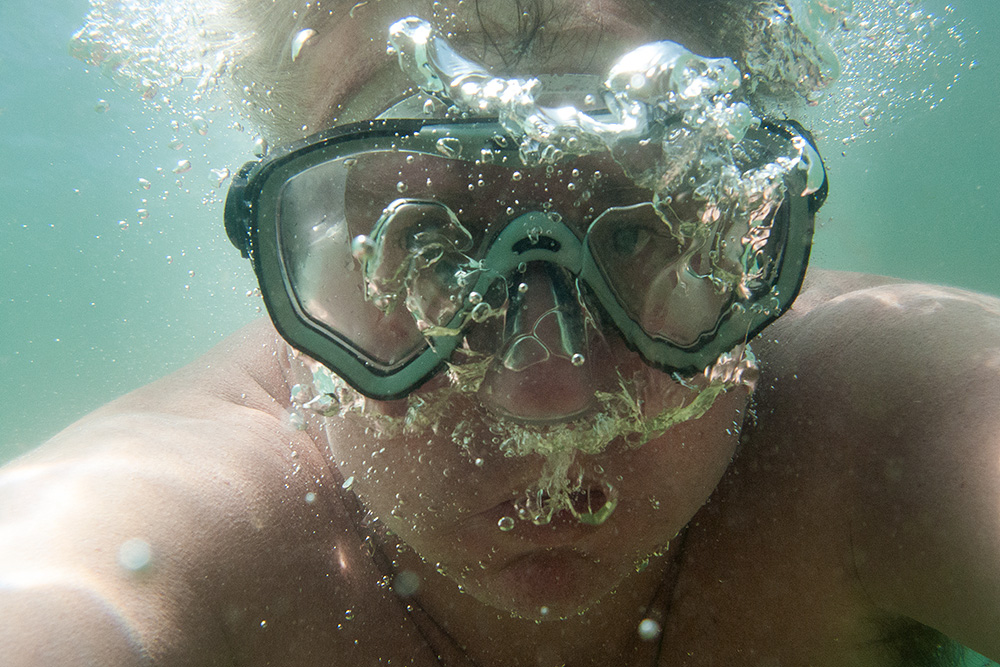
The one "selfie" that I do like of mine - under water at the beach in Bournemouth in the summer of 2013. ©Neil Turner.

The one “selfie” that I do like of mine – under water at the beach in Bournemouth in the summer of 2013. ©Neil Turner.
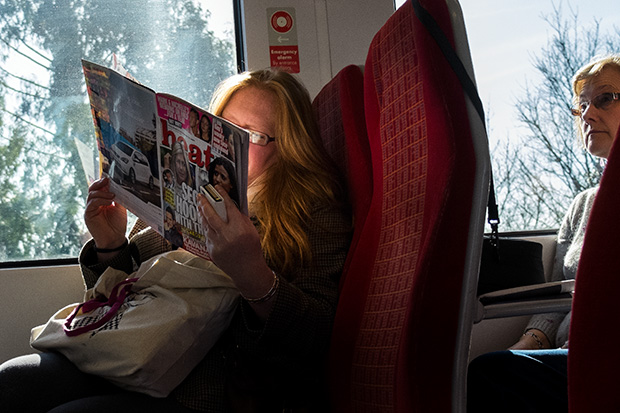
The light on the train

March 2014. Passenger on the train between Bournemouth and London Waterloo reading HEAT magazine as the train passes through Woking. ©Neil Turner

© Neil Turner, March 2014. Passenger on the train between Bournemouth & London Waterloo reading HEAT magazine.


Every once in a while I take the train to London for meetings and the occasional job where I don’t have to carry half a ton of cameras, lights and computers. One of my favourite ways to pass the time is to do a bit of train photography and yesterday’s journey gave me a few nice frames where the light was good. Normally I just bung them from the camera (in this case my adorable Fujifilm X20) via an Eye-Fi card onto my iPhone or iPad and then straight to Twitter or EyeEm. I rarely give them a second glance when I get home but I wanted to post this picture because of the light. The sun was coming at just the right angle to reflect a lot of light back into the woman’s face from the pages of Heat Magazine at exactly the same time as the woman sitting behind her appeared to be getting interested in the page through the small gap between the seats. I have no idea if she was actually looking at the page or whether it was a happy coincidence – either way, the light made me do it!

This frame was taken about five minutes after I’d posted a similar but inferior one on EyeEm so I kept it and decided that it would make a nice “just because” picture on this blog. I’m sure that I’ll get around to writing something more serious soon…

Out Walking

Ever since I started using the EyeEm photo sharing site I have been trying to shoot more pictures “just for the fun of it”. The platform allows you to add your pictures to albums and one of my favourites is entitled “Out Walking”. I often shoot with my Fujifilm X20 with and Eye-Fi card in it, convert the RAW fils to Jpeg using the neat film simulation modes before uploading them to my iPhone and going through the process I described in my Eye-Fi Workflow post a week or so ago. I also vowed a while ago to get better at black and white. I’m not sure that’s going quite so well but I often combine the two. It’s great fun and even mildly addictive!

Anyway, for no other reason that I want to share them, here are some of the images.

© Neil Turner, January 2014. Man holding sign offering tattoos an tattoo removal touts for business on the pavement just outside one of main areas of Camden Market

© Neil Turner, January 2014. Man holding sign offering tattoos an tattoo removal touts for business on the pavement just outside one of main areas of Camden Market

© Neil Turner January 2014. Cold and bored stall-holder selling keep calm t-shirts at Camden Market.

© Neil Turner January 2014. Cold and bored stall-holder selling keep calm t-shirts at Camden Market.

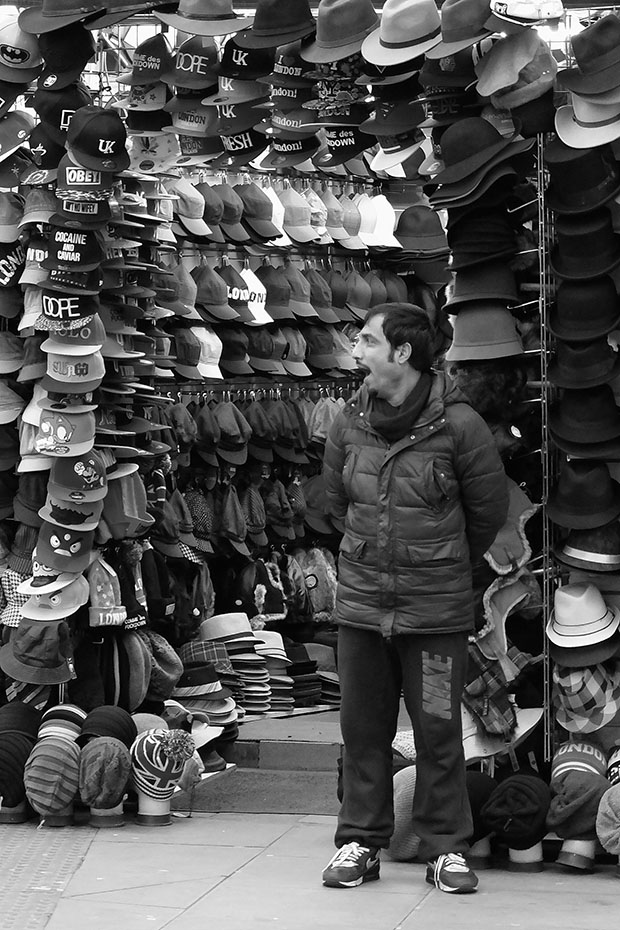
© Neil Turner, January 2014. Bored shop keeper outside his open hat shop just outside one of main areas of Camden Market

© Neil Turner, January 2014. Bored shop keeper outside his open hat shop just outside one of main areas of Camden Market

Eye-Fi card workflow

eye-fi_cards When I was rounding up 2013 I mentioned that I had a lot of success using an Eye-Fi card to wirelessly transmit pictures from my cameras (Canon EOS5D MkIII and Fujifilm X20) to either my iPhone, iPad or laptop where I can do a quick edit and caption before sending them to clients. Inevitably I got a couple of emails using the “ask me anything” feature of this blog asking me to describe my workflow. It is similar between an EOS5D MkIII and the Fujifilm X20 except that the former has twin card slots (one CF compact flash and one SD secure digital) whereas the latter only has the SD slot. I like to shoot RAW which means that in the X20 I have to do an in-camera RAW conversion to create a Jpeg to send out. I have two cards (shown left) – an Eye-Fi branded 8Gb Pro X2 and a Sandisk branded 4Gb one. In practice, they both do much the same job but the orange Eye-Fi one has more options should you want to work differently. Without further ado, here is how it all works on the Canon…

Getting the the settings on the card, your camera and your phone/tablet/computer right is the key to getting everything working well:

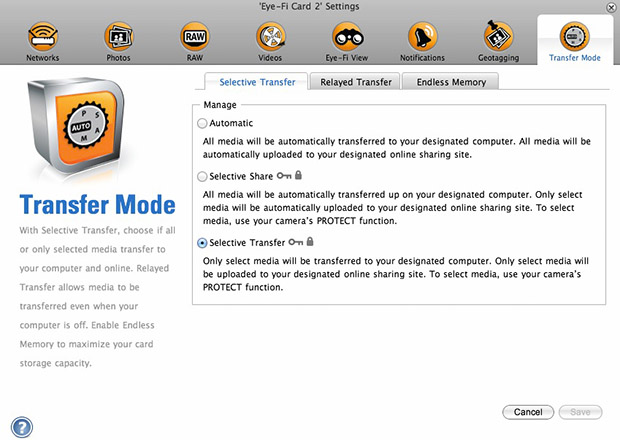
  1. Setting up the Eye-Fi card. When you get the card it should come with an SD card reader and by far the best way to set things up is to use that reader to load the card into a computer. There are lots of options that will appear once you have loaded the supplied “Eye-Fi Centre” application. This workflow is all about working in what the manufacturer calls “direct mode”. I choose to only transfer the files I want to my iPhone and so on the card I have selected “Selective Transfer” via the Eye-Fi Centre application. This means that only images that I have protected in the camera menu get transferred. On the Canon I have assigned the “rate” button to protect images for speed. It is also useful to add a couple of wifi networks and to define which file formats to transfer using the application whilst the card is in the computer because it isn’t possible to alter some settings once the card is in the camera. This whole process takes a few minutes and if you get it right, the whole thing test a lot easier from here on in.eye-fi_screenshot
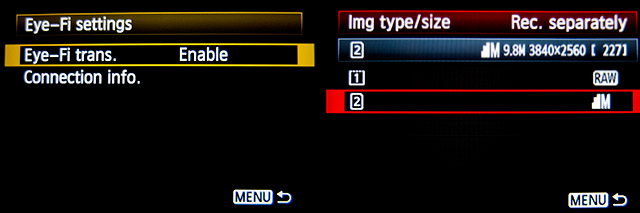
  2. Setting up the camera. In the EOS5D MkIII menu there are three things that I’d recommend you do. The first is to assign the “rate” button to protect selected images. The second is to get the camera to write RAW files to the CF card and medium size Jpegs to the SD (Eye-Fi) card. Finally, you need to enable Eye-Fi transfer from the camera menu. This way you can use the review function with card 2 (the SD slot) and then every time you protect an image written to the Eye-Fi card it will automatically look to transfer that file to the device you have nominated.
    eos_screens
  3. The receiving device. I use an iPhone and an iPad and the whole process is eventually controlled by the free app that Eye-Fi make available through the Apple App Store. There are equally useful apps available for Android powered devices and the functionality is pretty much identical. Apart from loading the app the only other thing you have to do is to download and authorise a small change to your wifi settings on your phone which simply installs the settings for the direct mode to work. Once you launch the app you get an opening window which then gives way to the gallery window which in turn tells you what is happening about transfers. Below you can see the card paring screen and the gallery screen.eye_fi_phone
  4. Editing your pictures. Once you have the image on your phone or tablet you can then use the apps of your choice to edit and caption your image before shifting them on. My personal favourite is Photogene4 which has some good image options such as clarity, contrast, saturation, straighten, crop, sharpen and the ability to add IPTC captions – including defaults such as the EXIF time day and date as well as any pre-loaded captions and copyright information. I find that it’s a good idea to write some generic captions using Apple’s Notes app and then copy and paste them into Photogene4. The app also has the option to upload to a wide range of sharing sites as well as to email and ransomer images to FTP servers – making it really useful for work.photogene
    From shooting a frame to having it uploaded to my own FTP server normally takes twenty to thirty seconds if there is a good phone signal and the various uses that I’ve found for this rapid upload range from offering images to people I’ve photographed to providing almost instant pictures for corporate clients to use for their Facebook, Instagram and Twitter feeds at events. This is a very versatile piece of kit and I haven’t even come close to describing everything that it can do. I like the way that this workflow actually does flow and I love the effect that it has had on a couple of clients who really appreciate what it offers them. My first Eye-Fi card was £24.99 including VAT – possibly the best investment that I’ve ever made!

Experimenting with EyeEm

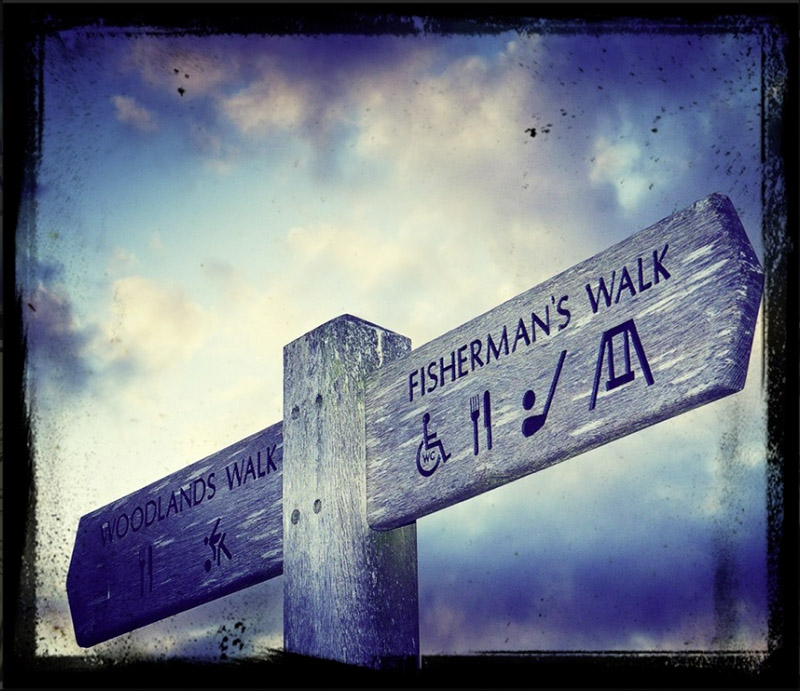
©Neil Turner, June 2013. Fisherman's Walk, Bournemouth.

©Neil Turner, June 2013. Fisherman’s Walk, Bournemouth.

A lot of photographers have been playing around with various image sharing sites. Most are doing it because it’s fun and others because they have been told that it’s a great way to get noticed by new audiences and to be seen by clients as “up-to-date”. I simply wanted to ‘have a go’. Get with the fun. A lot of photographers that I like and respect have been uploading some lovely work using EyeEm over the last few weeks and, although I’ll never beat them, I thought that I’d join them.

I missed out on Instagram and I have publicly parted company with Flickr. I’ve used Moby to share a few images in Twitter and of course TwitPic has seen a few of my pictures too.

A couple of weeks ago I set myself the challenge of uploading a few pictures to the EyeEm sharing site to see what happened. The experiment isn’t over – far from it but I am starting to find it a bit limiting and I’m starting to worry that the lens of the camera on my iPhone is showing it’s 3 years and 4 months age.

Anyway, if you are on EyeEm please let me know and please think about following my experiment. I promise not to bombard you with art – even if I’m tempted! Most of the images have nothing to do with the kind of professional work that I do and a surprising number so far have been shot around my home town of Bournemouth.

The picture that you can see above is about the most extreme treatment that I’ve given any of my pictures to date. For the geeks amongst you it was processed (contrast, sharpening and cropping) in Adobe Photoshop Express on an iPhone and then given the moody treatment and distressed border in the EyeEm app on the phone.

Lighting gels… the best in VFM?

Almost all photographers spend money on accessories, gizmos, gadgets and photo-related odds and sods. Sometimes we waste our money but I wanted to put in a brief plug for the things that constantly amaze me by the amount of “bang for the buck” I get from them. I’m talking about lighting gels. They cost a few pounds each and they last for years if you look after them even reasonably well.

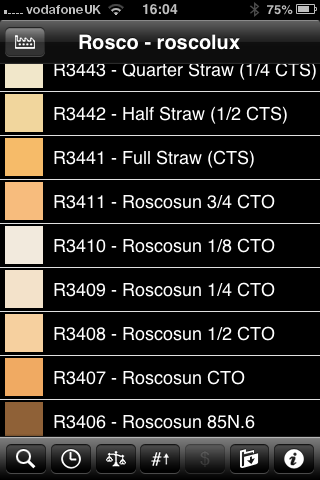
Screen grab from Swatch App

Screen grab from Swatch App

The reason that I am writing this today is that last week I was shooting a job and was slightly embarrassed that the pieces of gel in my lighting kit were looking a bit tatty. I realised that some of them were bought as shared sheets (ie I only had half of a 52 x 61 cm sheet of each) when I was at college in the mid 1980s. I might have added a few more colours and strengths since then but even the newest gel in my bag is five years old. The beauty is that you don’t need to look after them that well really – even a scrunched and screwed up gel is still the same colour and will work. Of course they don’t like extreme heat and they aren’t partial to liquid damage either but at under the boiling point of water and kept dry they are very durable.

When I decided that I needed some new gels I phoned The Flash Centre and they arranged for Rosco to send me some. I have been playing with the iPhone Swatch app for about eighteen months now and it made ordering the new gels rather easy. They arrived rapidly in a strong cardboard tube and all I had to do was cut them down into the right sized pieces to fit into a pocket in my Think Tank rolling case.

This time around I ordered various grades of CTS – that’s Colour Temperature Straw, the gel that changes the light coming out of my flash units to varying degrees of Tungsten right up to the Full CTS which does a very good job of making the Elinchrom Ranger Quadra flash tube into a Tungsten light that very closely matches the Tungsten setting on a Canon EOS DSLR. I also got some ND (Neutral Density) gels and a sheet of a diffuser called ‘tough spun’. I didn’t need to get any effects gels – the purple, orange, red, blue and green gels that I have in the case are fine even if they are old enough to buy alcohol by now.

Comparing the cost of this big batch of new gels to some of the money that I have literally thrown away on rubbish gizmos over the last 30 years I feel very smug. I know that after one single use I will have justified the (tiny) expense and that after the 50th use it will get embarrassing how smug I feel about the VFM (value for money) that you get from quality lighting gels.

The value of your online portfolio

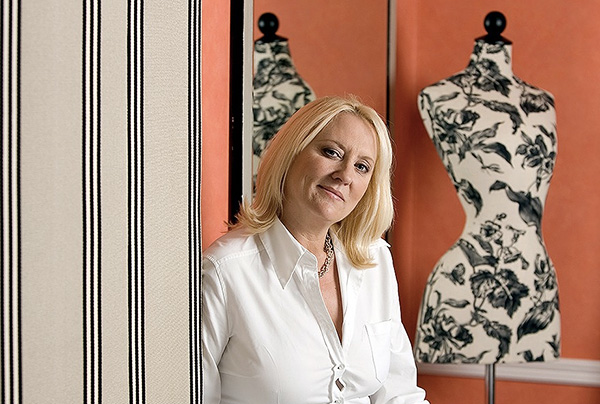
martina_cole

Crime writer Martina Cole photographed at a London hotel © Neil Turner/TSL

I’ve had a web presence of some sort or other since 1999. First of all I was just dipping my digital toe in the water with some free web space and free software supplied by AOL when I was with them. That morphed into the original dg28.com website which was all about helping other photographers to understand light and lighting. Like most things we do in life, my site has grown and changed and it has mirrored my work – both have been through many changes to get to where I am now.

January as a freelance is traditionally a tough time – or so I’m told. One of my goals for this month has been to re-evaluate my online presence and to give my website both a freshen-up and to make it more iPad/iPhone/Android friendly. Work, happily, got in the way and so I haven’t got anywhere near finishing what I started. I have given a lot of thought to deciding exactly what the point of an online portfolio is:

  • I know that I haven’t been inundated with work from it
  • I’m sure that my SEO (search engine optimisation) isn’t state of the art
  • My Google rankings by name are great
  • My Google rankings by occupation, specialism, location and other useful factors are not great
  • I know that it gets a lot of visitors because I have all of the relevant analytical data

Who are my visitors? Where do they come from? Why are they visiting my portfolio so much? Would they notice if it wasn’t there? Would my business suffer? Five very important questions to which I don’t know the definitive answers. That got me thinking and it got me going online to see what other people thought about the very same issue. Professional photography is unlike most other businesses – clients that I work with don’t order online and the amount of repeat business is good but not to the extent that we’d like it to be.

From digging around myself, chatting to friends, colleagues and a couple of web professionals and generally canvassing opinion I have come up with a few absolute truths and one or two bits of generally accepted notions by which changes and upgrades to my web presence are going to be governed in future:

  • You have to have a web presence
  • It has to be good
  • It has to show your work off
  • It has to be focused and demonstrate clearly who you are and what you do
  • You have to assume that it is being looked at by the right people
  • Probably fewer than 10% of the viewers are the right people
  • Most of those ‘right people’ are there because they want to look at my work – they haven’t stumbled across my site randomly

So that means if I want to do more than one thing, I have to have more than one website. That means that I need to show pictures – the kind of pictures that I want people to notice, be impressed by and then to commission something along the same or similar lines.

By now I sense that most people who have read this far are saying “tell us something we didn’t know”. I apologise for being un-original but the truth is that there isn’t a magic formula – despite what SEO expert George keeps emailing to say. So where next? Should I invest money in getting a site built for me that is a bit better than I could build myself? What format should the pictures (because they are the most important thing on the site) be in?

In trying to answer those questions I have been looking at a lot of options ranging from template drive sites to slide shows to contact sheets to bespoke (and expensive) “wow” sites. As I get nearer to the end of the revamp process I find myself getting more and more apprehensive about the various options and technologies. So here is the thing… I have been playing with a software package called Wowslider and I have put a single test page together and asking for opinions and feedback about that page. So here it is www.dg28.com/folio/2013-01/ and I’d be very interested to hear opinions. I know this one thing for sure… what worked last year is probably very different from what will work next year and so January 2014 will probably see me going through this very process again. See you in twelve months time!

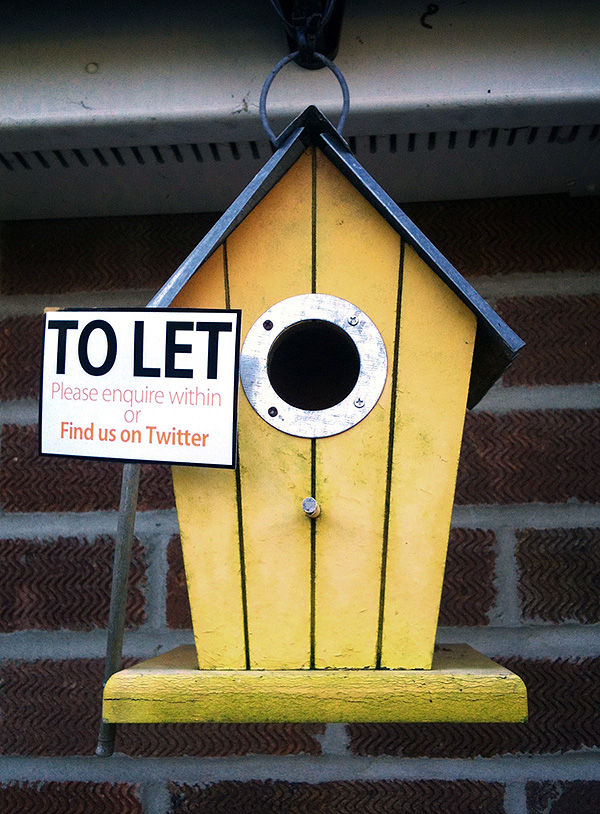
Fun picture: bird house to let

©Neil Turner. February 2012, Bournemouth

Completely staged photo opportunity this morning in Bournemouth…