commercial

The Press Photographer’s Year

ppy_2013_grab

I always have a look at who has won various competitions and I’m always interested to see what the judges go for. Most competitions leave me a little cold but The Press Photographer’s Year is different. Well thought out categories, independently judged (I have to say that, I’ve been on the Jury twice myself) and backed by The BPPA I have always been part jealous and part proud of the winners. Jealous because I never seem to win anything and proud because I can call most of the winners my colleagues and friends

Press photography has a tough time in the UK. It’s undervalued by the publishers and misunderstood by a lot of the public. This year’s batch of winning and selected images will go on show at The Royal National Theatre next Saturday the 6th of July for seven weeks where it will be seen by a huge number of people who wouldn’t necessarily go to a photography exhibition. Please take some time to look at the winners’ slide show on The PPY website and please try to make some time to go to the exhibition and see for yourself just how good the work that these guys produce on a daily basis is.

So, congratulations to Adrian Dennis of AFP, Jack Hill of The Times and all of the other winners and thank you to Diageo for supporting this great project. Maybe next year I’ll actually enter!

Ask me anything…

©Neil Turner, June 2012. Dorset.

©Neil Turner, June 2012. Dorset.

Whilst looking back through some of my most popular blog posts in the last few years a surprising number of them were written in response to questions that other photographers and students of photography have asked me. That got me thinking about posting this simple update with a very simple request/offer:

“ASK ME ANYTHING… WELL SOMETHING… ALMOST ANYTHING…”

So not exactly ANYTHING – I’m only going to answer interesting questions about photography and my own work! Please use the contact form or reply to this blog posting. You could tweet me but I might miss that given the avalanche of stuff that goes across my desk each day. I will then pick out a couple of questions and use them to write future blog posts. Great… get other people to come up with the ideas!!!

← Back

Thank you for your response. ✨

Editorial portraits folio

Like most photographers I’m always looking at new ways of showing my portfolio. I’ve saved the presentation version of my editorial portraits folio as a QuickTime movie and posted it here. Please let me know what you think. If you look at it without going for the full-sized version the captions are a bit small but, apart from that, I quite like it!

Hero portraits

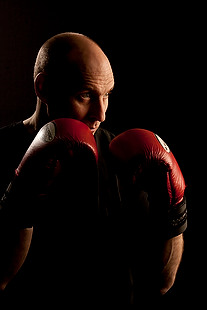
A few months ago I got a call from a designer who wanted me to shoot some pictures at a gym in east London that would be used in many different ways but primarily as huge prints in the window of their high street premises. My instructions were to shoot what he called “hero portraits” of some of the gym staff and of the two owners who are both fitness experts. That was the extent of the advanced briefing.

©Neil Turner. March 2012, London

The designer was there on the day to act as art director and I turned up with plenty of kit: cameras, lighting, backgrounds, clamps, clips, gels and plenty of batteries. The day started with a quick chat, a couple of test shots and then we decided to shoot “black on black on black” – the team were all wearing black gym kit, we made use of the black rubberised floor in the free weights area and I brought in a six foot by four foot matt black folding Lastolite background. We settled on a mixture of strong side and back-light with some very warm gels being used in different ways in each of the four main shots.

Shot one was of one of the owners who uses boxing and boxing training to work with many of his clients and with some of the group classes he teaches. We went for a simple composition with him putting up his guard as if the 24”x36” soft box that was about four feet away from him was his opponent. That gave us the main light and I used a second head with a grid diffuser behind him to accentuate the shape of his shoulders, neck and head. The first few shots featured black boxing gloves but that was just one bit of black too far and so we swapped them for red and the resulting images were very pleasing.

Shot two was his business partner who does fitness classes and we featured her with a large blue medicine ball, three quarter length and slightly less side lighting.

©Neil Turner. London, March 2012

Shot three was of another male instructor who specializes in power training and he suggested that we used a variation on the American Football quarterback starting position. This was the most fun image to shoot because the shapes were instantly graphic and the light was almost instantly correct. The floor featured in this shot for the first time and so I needed to make sure that it didn’t dominate the composition. In the end I made sure that only the smallest area around his feet had any light on it at all and some nearby kit was used to “flag” the area – stopping unwanted light hitting the rubber tiles.

The fourth and final of the hero portraits was about physiotherapy and for that we had a client sitting on one large blue ball using a blue soft tube across his shoulders to stretch and twist. Four very large prints now feature in the window of the gym. Heroic!

Grumpy old photographers’ charter

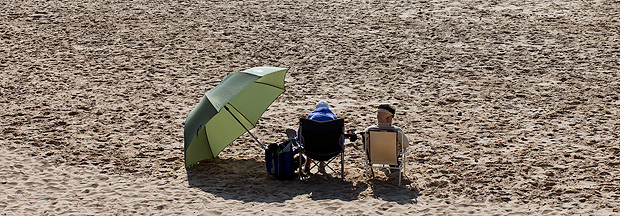
I do a lot of seminar and teaching work these days and one of my most popular presentations is about professionalism. The talk is aimed at new entrants to the profession but it seems to go down well with photographers who have been around a while as well. I have even delivered the same talk to a group of lawyers because actually replacing the word ‘photographer’ with ‘lawyer’ brings a lot of the meaning around to the central idea that, in many ways, professionalism is the same no matter what you do for a living.

©Neil Turner. March 2009, Bournemouth Beach

The final part of the talk is a bit of a dig at myself and my peers. Those of us who have been in the job for a long time and who might just be getting a little complacent about things. I call this part of the talk “The five worst habits of those of us who should know better”:

1. Harking back to a golden age that may, or may not, have existed

It’s a simple idea really – we all look back with slightly misty eyes at the time a few years ago when things were good and before something new came along to spoil everything. Take your pick from the use of colour in newspapers, the whole move to digital, the adoption of multimedia by newspaper websites and several other developments in the industry. The truth is that when I was just starting out there were a few photographers who complained about the arrival of 35mm film and the loss of their beloved Rolleiflex cameras and even one or two who bemoaned the passing of half plate cameras and dark slides with sheet film. I reckon that every photographer has a ‘golden age’ that they look back at and that you can calculate when that was for each of us using a simple formula which compares how long the photographer has been working with when they got their first big front page and divide it all by the first major change in the industry that they went through. There never was a true golden age was there?

2. Forgetting why we came into the job in the first place

Easy to do this… most of us had a desire to tell stories, create arresting and beautiful pictures and to make the world a better place with our photography. Very few of us did it for the money, not many of us did it so that we could play with ever more expensive toys and only a tiny number came into it so that they could work unsocial hours and have to chase clients for money the whole time. If you take a step back and think about your original motivation and it isn’t there any more you really need to make your mind up about whether this is still the business that you want to be in. The older I get, the more I feel the need to shoot pictures that I want to shoot just to keep myself sane and sharp.

3. Failing to keep up with new business practices

“I’ve always done it that way, why should I change now?” is a common lament from photographers who are in trouble of getting it wrong. From the way you buy and use equipment to the way you store your archive and from the way you word your invoices to the way you put your portfolio together should be the subjects of constant review and possible change. Technology affects every single aspect of who we are and what we do and anyone who decides to stop keeping themselves up-to-date with what is happening is consigning themselves to a parallel dimension where they may get some work but where that might  be a temporary state on the road to going out of business.

4. Throwing money and effort into the latest thing

Exactly the opposite of the last problem really. Keeping abreast of developments and knowing where the market is a good idea whereas automatically jumping on every new idea, fad or fashion is not. So many new developments turn out to be ideas that don’t stand the test of time and too many of us have invested too much time and money chasing them. The worst way to do this is to assume that somebody younger and hipper than you automatically knows what to do – that, in my experience, is rarely the case. There’s always a middle-aged geek who you can ask…

5. Letting professionalism slip

Another thing that is far too easy to do. I know that I’ve done it – mainly through over-confidence. You have to remember the maxim that “professionalism is everything we do, everything we say and everything we produce” in our working lives. You can get too close to clients, you can cut corners in your workflow and you can rely too much on automated systems. This is far from a full list but it illustrates the potential pitfalls when it comes to losing our professional edge.

Being a professional photographer is a fulfilling and interesting way to make a living but we all need to remember that it is a profession and not a lucrative hobby. I’ve been wracking my brains to come up with a clever and punchy pay-off line for this blog post but I’ve struggled. I’ll just content myself with some advice: when things are feeling tough and not all all like the ‘old days’ just remember the five worst habits of those of us who should know better and if that doesn’t help… get some help!

The best lens for portraits?

On a photographers’ forum last week there was a lot of discussion about the best lens for portraits. Can of worms opened. Mac vs PC or Nikon vs Canon style debate well and truly started.

I have written before about portrait lenses and I won’t bore you with repeating my previous post (if you missed it, catch up here) except to say that when people ask this question they normally mean headshots or mug shots where the subjects head and shoulders will fill most of the frame.

©Neil Turner, February 2012. Bournemouth.

This portrait of a local artist was shot using an 85mm f1.8 Canon lens wide open but what lens should you use for this kind of picture. The debate will rage and answers anywhere between 85mm and 135mm (all measured on full-frame cameras) will be given, supported, doubted and even ridiculed. Most arguments that don’t get broad agreement also don’t have a simple answer. Sure there’s something lovely about the feel of a portrait shot on an 85 but what about the degree to which you have to invade the subject’s ‘personal space’ to get the composition? What about those 85mm lenses where the close focus isn’t good enough to get that bit tighter still? With a 135mm lens the personal space issues largely go away and the close focus issues almost always go away too – but is the effect as nice? Can you ever include something of the environment in those pictures? Would you even want to?

The actual answer (as always) is that it depends on you, your technique and your own taste in pictures. A few weeks ago I was looking back at some corporate headshots that I had shot and I had to tell another photographer on the other side of the world how I had shot them so that he could replicate them so that when his pictures and my pictures were printed on the same page nobody (hopefully) could tell that two photographers were involved. One of the things I needed to give him was the focal length of the lens used so I got the pictures, went through the EXIF data and noted it all down. I had used a 70-200 f2.8L lens and so the actual focal length was between 120mm and 130mm.

I was a little surprised that it was that long and so I grabbed a folder of images that I keep on my hard drive of corporate portraits to show prospective clients some examples of what I have done in the past and looked through the EXIF on those. These were pictures that, by definition, I really like and it quickly transpired that the tighter compositions were all shot between 120mm and 150mm on the 70-200. Again, quite a surprise – I had always seen myself as an 85mm lens user!

Well, one thing led to another and I decided to do a quick ‘audit’ of all of my favourite environmental portraits to see what lenses I have favoured. This was less of a shock because in the folder of 120 of my favourites the widest lens used was 16mm (on a 1.3x crop body, so we’ll call that 21mm for the purposes of this exercise) and the longest was a 300mm (on a 1.6x crop body which becomes 480mm in this context). There was a lot of bunching in the 35-45mm area and some more around the 120-150 area but the spread of focal lengths was otherwise pretty even – which pleased me greatly because it confirmed what I always say to others;

“There is no such thing as THE perfect portrait lens”.

This exercise is a bit time-consuming but it could have a lot of uses in professional photography. For example, anyone used to zooms wanting to buy a couple of prime lenses should think about going through the exercise to help them decide which ones would suit their style. Anyone wanting to know what lenses to replace as a matter of priority in these cash-strapped times could also benefit from a focal length analysis. The reverse is also true – a photographer who wants to change the way they do stuff could see what they normally shoot with and deliberately avoid those focal lengths. The possibilities are endless once you start to think and we can all do with a bit of style analysis from time to time. How we choose and use lenses has always been a preoccupation of mine and this exercise has helped me to rationalise that.

Indeed why stop there? EXIF data is amazingly useful and so you could also do an aperture comparison. My quick one revealed that I shoot a surprisingly large amount of pictures using three apertures f2.8, f8 and f22. In my sample, those three apertures accounted for over 50% of my pictures. I’m not sure what to make of it but I will work it out one day.

©Neil Turner/TSL. January 2008, London. 173mm focal length on a 1.3x crop body = 225mm

What started out as a simple answer to a simple question somehow turned into statistical analysis. Many people would say that is the exact opposite (they might even use the word antithesis) of what we, as creative people, should be doing. I have a lot of sympathy for that argument but, in a world where there are tens of thousands of great photographers vying for work, every little advantage we can eek out for ourselves and every piece of information that we have to work with could just be worth it’s weight in fluorite glass.

Capture One Pro and other workflows…

One of the subjects that I teach is workflow. I know that I’ve mentioned that before but I thought that I’d remind you of that when I explain why and how I have been learning all about Capture One Pro – the professional RAW conversion, tethered shooting and image enhancement tool from Phase One. I am on version 6.3.5 (the latest available) and this is the first time that I have seen it since version 4 a few years ago.

Principally designed to make the most of Phase One’s own imaging systems, it also works rather well with the whole gamut of professional file formats. I have been using it for quite a few days now and I thought that I’d post some thoughts on here.

Before I get down to my opinions on Capture One Pro I need to say that every piece of software that I’ve used has needed quite a long time to get used to and anyone who does “full reviews” based on a few hours of use is kidding both themselves and their readers. I also need to make it clear that I paid for this software and that I have absolutely no ties to Phase One.

I have now used Aperture, Lightroom, Photoshop, Photoshop Elements, Canon DPP, Graphics Converter and a few others and Capture One Pro is probably the easiest of the lot to get to like. My knowledge of Adobe Camera RAW in Photoshop has been gained over many years and many thousands of edits and it has only taken me a few days to feel almost as comfortable with Capture One. I’m still learning more and the more that I learn the more I like it. That isn’t always true of new software packages – even if you really want to like them…

The workspace that I'm currently using on a 15" MacBook Pro

I like lots of things about the way it works, about the interface and about how good the customer support and instruction manual are. Every time I think that I’ve found a flaw in the feature set of this software I search the knowledge bank or put a note on Twitter and there it is – the answer that tells me that everything I wanted was there all along. That is great but there seems to be one feature from Adobe Camera RAW that I use all of the time that isn’t there with Capture One Pro – good and accurate profiles of all of my Canon lenses ready to apply corrections.

My first impressions of the user interface centred around my inability to find the tools that I actually wanted. I knew that most were there because the literature told me they were and a very brief exchange on Twitter with the workflow genius that is Nick Wilcox-Brown let me know how to find them and add them to my custom user interface or “workspace” as the application calls it. Better still, you can create a range of custom workspaces and save them alongside the suggested ones for dual monitors, simple workflow, black & white or even a replica of the previous version (5) of the software. Being able to customise the workspace is not unique to this application but I believe that they have implemented it really well.

All of the adjustments and all of the options have easily controlled and finely adjustable controls (mostly sliders) and I found myself easing very quickly into the Phase One way of doing things.

Time for a short list of likes:

  • Customisable user interface
  • Easy to learn how to use
  • Extraordinary range of functions
  • Tethered shooting
  • Fantastic image quality
  • Value for money
  • Web contact sheets
  • Output of files to specific sizes

… and dislikes

  • Cannot find profiles for my Canon lenses
  • The sessions menus
  • Applying adjustment “recipes” seems hit and miss
  • The way that it handles IPTC metadata (I know that the sister app Media Pro does that better)
  • Speed of processing batches of files
  • Not recognising the simple tags that I can apply in camera or by using the ‘tag’ function in Photo Mechanic

That is a short list of dislikes and you have to actually use it to decide if you agree about the sessions menus – the way that Capture One likes to create a virtual time bubble for each job in much the same way that Aperture does by default. I may be doing something wrong when I’m trying to create, save and apply “recipes” which are a great idea (again shared with Aperture and others) that allow you to copy all of the adjustments that you have applied to one image to one or more others as well as keeping that set of adjustments for future use/adaptation. Sometimes the recipes worked and other times they didn’t.

My background is in news and editorial photography and IPTC metadata is a fundamental requirement for me and it forms a big part of my own workflow and the personal workflows of people that I work with when I’m doing coaching. Capture One Pro handles IPTC and is compliant with all of the IPTC fundamentals – it just doesn’t do it very well. The same can be said for quite a few image processing applications and I still love good old Photo Mechanic for the speed, accuracy and flexible way that it handles everything except RAW conversions and long term storage.

My final dislike is the speed when processing batches of files. On a two year old Apple MacBook Pro with an i5 2.4Ghz processor, 8GB or RAM it takes 50-60% longer to process a batch of 36 CR2 images from a Canon EOS5D MkII than Adobe Camera RAW inside Photoshop CS5 does. Individual files are shot through in almost the same time but batches are slower. I tried very hard to be scientific when comparing like with like but I am prepared to be proved wrong on this.

This isn’t really a full review – just some thoughts on an application that I am sure to have to teach very soon. Several people have already asked what advantages Capture One would give them over Lightroom or Adobe Camera RAW in Photoshop and, to be honest, I couldn’t really name any. If you already use and are happy with either Adobe product for processing RAW files then it doesn’t really make sense to spend more money and get Capture One Pro. BUT (and it is a but worthy of being in upper case) if you are looking at designing a new workflow for news and editorial work from the ground up and you don’t already have licenses for anything else I would strongly recommend getting Capture One Pro and using it in tandem with Photo Mechanic. Between the two you have a solid, reliable and well priced set of options that will, without doubt, deliver the goods. That would leave you in need of an archiving option and for that Phase One’s Media Pro might be a good solution. There are those who’d argue that between the two Phase One applications you have everything you’d need and they would be right but there is no getting away from the fact that Photo Mechanic does what it does so well that it is worth the money and then some. The same goes for Capture One Pro too.

Elinchrom Ranger Quadra – 32 months on…

Most of the camera equipment reviews that you read are written after using the kit for a few days – or even a few minutes in extreme cases. I know. I’ve done several two or three day reviews myself. I was looking at my kit the other day and thought that it would be very useful to write a few lines about my Elinchrom Ranger Quadra system which I have been using for very nearly three years and which has been used on hundreds of assignments.

Build Quality:

When I wrote my first “mini-review” about the system in June 2009 I had only been using it for a couple of weeks but, after years of using the similarly specified Lumedyne Signature and Classic outfits, I can safely say that the Elinchrom fitted straight into my way of working very quickly. Back then I decided to talk about build quality first:

MAY 2009: The first point is to re-emphasise just how small and light this kit is compared to most other portable flash equipment – even Canon and Nikon Speedlights with external battery packs aren’t that much bigger or heavier.

The second point is that being small and light doesn’t appear to make this gear any less robust or well made than anything else. As a long time user of Lumedyne kit I can vouch that the combined weight of a Lumedyne Signature pack and head is almost identical to the Elinchrom Ranger Quadra. The Elinchrom pack, however, seems infinitely more robust with it’s rubberised edges and properly weather resistant control panel whilst the head is both simple and tiny. Connecting the two is a sensible and nicely made piece of cable with easy to use fittings. I have just been and tried the “heavy winter gloves test” and can report that it is very easy to attach and detach the cable with them on.

At this point I had better introduce a small criticism, lest anyone think that I’m doing a PR puff for the manufacturers. I like to attach my packs to the stand to give a bit more stability in the wind and the Lumedyne packs had very functional ‘D’ rings at either end that allowed you to attach a strap and anchor the pack to the stand. The Elinchrom Ranger Quadra pack has well made but small eyelets through which you have to slot either a large split ring or the small karabiner type ring that was supplied with my kit. Neither is a good solution and I will be on the lookout for a better way of attaching a small strap.

Whilst I’m doing the criticism thing, I have an admission to make: I wasn’t all that keen on the battery catches when I first got the kit. I found them to be stiff and not easy to use. Something has happened and I’m now completely fine with them. Maybe they have loosened off a touch or I have just worked out my technique. Probably a bit of both, but the end result is that the batteries come on and off nicely now and I withdraw my earlier criticism.

Now in 2012, to be completely honest, my opinion has barely changed. The battery clips have eased a little more and the ‘D’ rings still bug me. The screw caps that cover the two power lead sockets have survived all this time and still work very well and are still attached. I know that Elinchrom have made a few design changes since I got my kit but these three things have not changed at all.

The size and weight of the heads was flagged up as a potential issue by a couple of early reviewers but I can honestly say that 32 months on I have not had any problems other than a bad drop of a head which buckled the small ‘spill-kill’ reflector to the extent that I had to replace the reflector. No damage to the head, the flash tube or the modelling light. I had early reservations about the strength of the stand adapter on the heads and for a while I chose to remove the swivel completely and replace it with a brass stud which then fitted into a Manfrotto Light-Tite. In the end, my worries abated and I went back to the original tilt mechanism.

Not long after buying the kit I experimented with ways of attaching a soft box without buying the Elinchrom adapter. You can see my best attempt in the picture to the left. It was a complete fluke that the spill-kill reflector wedged directly into a blank Photoflex Speed Ring and I still use this IF I need two soft boxes on a single shoot. In the end I gave in and bought it and I now feel rather silly that I didn’t do it straight away. The adapter is a decent option and it works very well with my Elinchrom and Chimera soft boxes.

Thirty-two months down the line and the kit still looks great and works like new. I have looked after it, kept it in decent bags and cases and always put it away properly. The few times that I have used it in the rain, I have used plastic covers made from heavy duty PVC and freezer bags to keep the rain off. There are a few bits of paint missing on the pack and the batteries. The one exception, and the main reason that I chose to write this now, is that the two batteries are starting to lose power. I have no idea how many charge cycles they have been through but it is a large enough number for me to start to think about replacing them. Three years is a good life for this kind of batteries and I’m not going to hold any loss of capacity after that time against Elinchrom. The cables are tough and well made and all of mine are still OK.

In Use:

After a few months I fed some thoughts back to Elinchrom via the folks at The Flash Centre in London and those were:

  1. that the digital display was hard to see in bright light
  2. that lining up the power leads with the sockets was difficult in low light
  3. that the Skyport triggers needed a locking ring so that they didn’t keep popping out of the camera’s hot shoe.

I wasn’t the only person making these suggestions and in an upgrade they fixed the display issue and the Skyport trigger issue as well. But what else did I think back 32 months ago?

MAY 2009: That’s the construction out of the way. What about actually using them? I have read through the manuals for the head, pack and Skyport remote trigger system and it is all pretty logical. If you buy this kit, I would strongly recommend that you go through a few practice sessions before going live because some bits of the menu system are not too obvious without the book. Changing stuff like the duration of the beep that signifies that the pack has recharged or whether the readout is in f-stops or watt/seconds isn’t too much of a problem but switching Skyport channels for the first time isn’t all that easy. Getting the hang of how the asymmetrical flash output works with two heads attached to one pack isn’t something is obvious either.

The manual is well written and it doesn’t take long to master these functions once you know what goes where and which button to press first. It isn’t second nature yet, but that will come soon. Much excitement has been generated by the LED modeling light and the idea that it can double as a video light. I have a pair of Canon EOS5D MkII bodies and am starting to shoot some video with them. The amount of fill light that these LEDs put out is very useful and I would argue that they give the Elinchrom a really strong market advantage over other systems. The real joy of this system is the light that it puts out.

The light quality is great in every measurable way. Every flash at a given setting gives out an identical amount of light and the colour of the light doesn’t change when you dial the power up or down. The colour temperature of the tubes seems to be about 5300K and so I have set up a custom balance on my cameras for that. The only light modifier that I’ve used with it so far has been an Elinchrom 40″ (100 cm) shoot through umbrella and my gut feeling is that I will use this combination a lot over the next few weeks. The maximum power output is 400 w/s and for my money that figure is accurate. More importantly, it seems to be more than 1 f-stop more powerful than my old Lumedyne 200 w/s outfits. There could be any number of reasons for this but the outcome remains that I have more power at my disposal than I had before. Having the audible charge indicator is great and being able to turn it off is also a bonus. I have already made use of that function on more than occasion. The recycle time is a little slower than the Lumedyne 200 w/s kit and I found on the first couple of shoots that this was a possible issue. It has gone away now and I am getting used to the extra half second delay – especially when using the audible indicator.

The final point that I wanted to make was about the Skyport system. The pack has a Skyport receiver built-in as well as a synch socket (3.5 jack) and an optical slave. My kit came with a single skyport trigger and I have bought a second one along with a receiver that will work with either a Canon speedlight or one of my old Vivitar 285s. The system seems to work very well and I am not missing my Pocket Wizards enough to get them out of the boot and connect them up. My only criticism of the Skyports is that the transmitters don’t lock into your hot shoe and can be knocked out relatively easily. I’d like to see a transmitter with a lever style lock on the market from Elinchrom so that the system is foolproof rather than just very good.

In practice, 400 watt/seconds is quite a lot of power. Whether it is enough for every eventuality is debatable but in 32 months I have only found it wanting (by a stop or two at most) on two occasions and even then I made it work. Most of my work is portraiture and most of that is lit with this system and I have a real confidence in the kit that makes doing my job a lot easier.

If I were designing this system from scratch I would probably have not bothered with the complete miniaturisation of the heads. I think that I would have gone for a larger head with the standard Elinchrom bayonet fit and a stronger tilt mechanism. Of course that is based entirely on the way that I work and what I use the kit for. I have got used to the tiny heads and, for me, it would make sense for Elinchrom to bring out a version of the head built into the larger Ranger housing as well as this small version. That would eliminate any issues with adaptors as well as maximum umbrella size. It would also remove the need to only use Elinchrom’s own narrower shafted umbrellas.

The newer version of the Skyport trigger solved one problem and introduced a different one. It now stays in the shoe nicely but the words are now moulded in instead of being painted on which makes actually changing some settings quite tricky in low light. I’d also prefer a slightly larger version of the trigger with easier to change channels, a battery level indicator, AA or AAA batteries and at least 50% more range.

In my 2009 review I was confident that I would learn all of the functions and not need to bring the manual with me. I was WRONG. I have never completely mastered the menu system and I have a paper version of the instructions in the case as well as a PDF version on my iPhone. I don’t need to consult it often but when I want to do something in the menu it is helpful to have the manual there with me.

Conclusions:

In May 2009 I was “a happy bunny”. Not much has changed there. Actually, nothing has changed there.

I have some minor niggles but I still love using the Elinchrom Ranger Quadra and I would still advise any photographer in the market for a portable battery powered system to strongly consider it. In value for money terms, it is hard to beat. In light quality terms it is excellent and it passes the most important test of all – it is portable enough to actually take with you, even if you are a photographer working alone and a long way from the car.

If the folks at Elinca came to me with their notebooks and asked me to advise them where to take this system next, I’d be very happy to talk to them. This is a 9/10 product for the kind of work that I do. I have even used my own kit a dozen times when teaching location lighting courses with groups of six to eight people and nobody has managed to break it. I’m glad that the version two pack is better than my nearly three year old one which makes it even easier for me to recommend. There are half a dozen accessories that I would find useful – ranging from an adapter to be able to use a Canon or Nikon Speedlight with the Elinchrom bayonet mount accessories to a properly fitted rain jacket for the pack and a mains AC battery eliminator for when I am using the kit indoors for long periods.