opinion

iPad workflow part two

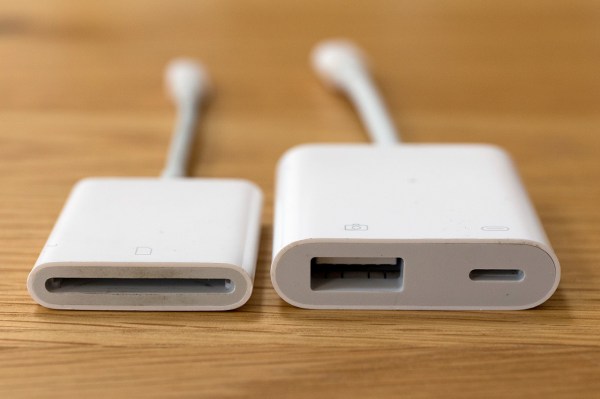
Apple’s Lightning to SD Card and USB3 to Camera adapters

A few weeks ago I promised to keep working on my iPad workflow and keep readers of this blog up-to-date with my thoughts. Lot of other things have got in the way lately but here is the second instalment. I’ve decided to break the whole process down into four parts:

  • Getting the images onto the iPad
  • Toning and captioning them
  • Getting the pictures to where they are needed
  • My conclusions and (hopefully) a settled workflow

The accessories that I’ve used to import images from memory cards onto an iPad for photo editing.Because I’m vaguely logical, I’m going to tackle them in order and so I’m going to outline the ways that I have looked at getting my pictures onto the iPad. Because this is an examination of the possibilities I’m going to consider all of my options and because I’m a Canon user I will tend to lean towards the options for EOS cameras although much of what I’m talking about is not make specific. I have experimented with several ways to get the pictures onto the iPad and I’ve tried all of them as JPEGs and RAW files too: (more…)

Working with Foliobook

The landscape version of the opening page of my Foliobook iPad portfolio.

My previous post about developing a workflow for acquiring, editing and transmitting images using my iPad is still a “work in progress” and that work has been going on alongside another tablet related project. This time it is to get a decent and easily adapted portfolio onto that iPad so that when I need to show pictures I have a pretty good folio with me. I’m sufficiently “old school” to love the look and feel of a printed portfolio and in the past I have used the Foliobook app on an iPad as a back up to the printed work – a way of having a wider selection of pictures just in case the potential client wanted to see more.

I would be the first to admit that I never really used Foliobook to its full potential. A few galleries of randomly sized pictures with graphics ‘straight out of the box’ was about as good as it got. No longer. That £9.99 that I spent all that time ago has now been well and truly exploited! (more…)

Work in progress – an iPad workflow

Whilst I’m not able to be out shooting I have decided to take a serious look at the workflow options using an iPad or even an iPhone and to see whether they really can replace a lightweight laptop in my working life. I have even bought a new iPad Mini 4 (already upgraded to iOS11) because I’m sure that I will be using the tablet for some form of mobile editing. Should you be seeking wisdom and a fully-formed solution I’m prepared to stick a plot-spoiler in here and tell you that it is still very much a ‘work in progress’ and that I don’t have an answer for you. Yet.

My starting point for this is having used my phone as an occasional method of getting pictures away quickly – mostly for clients to be able to use my pictures in their social media and on their websites instead of their own pictures taken with their phones and tablets. If you are prepared to work with JPEG files then this isn’t too tricky, but what if you want to base everything on a RAW workflow? Not so simple?

I know that a lot of photographers have worked out their own workflows for using iPads as their principal location editing devices. I have been trawling blogs and YouTube videos trying to get my head around how and why they have decided to go down this route and the fact that several photographers that I respect and even admire have gone this way means that it has to be a serious option for professional editorial and corporate photography. A lot of the same people, driven by a desire to reduce the weight of their kit, have also gone to mirrorless camera systems.

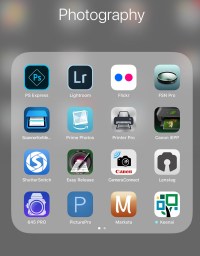
As part of my search I’ve used a LOT of different apps. Amongst others, and in no particular order: Lightroom, FSN Pro, Shuttersnitch, Marksta, PS Express, PicturePro, Transmit, Affinity and the sadly no-longer-supported Photogene4. These range from Lightroom being free with the right Adobe CC subscription to a chunky £49.99 for PicturePro.

So here is what I do know: (more…)

Using the Canon W-E1 wifi adapter

When Canon announced the W-E1 wifi adapter for the EOS7D MkII and the EOS5S and 5SR I was decidedly underwhelmed for two reasons;

  • The first was that it was not backwards compatible with the two EOS5D MkIII bodies that I had at the time.
  • The second was that it took away the ability to record to two cards when it was in use.

At the time I couldn’t see any advantage over any of the SD based transmitters from Eye-Fi or Toshiba amongst others. I didn’t buy one and I couldn’t see myself buying one either.

Fast forward ten months and my need to use remote cameras controlled by an iOS devices has grown and I only had one – the wonderfully simple Canon EOS6D. I didn’t want to use either of the EOS5D MkIV bodies as a remote and so I bought the W-E1 adapter to use in my EOS7D MkII. (more…)

Shooting fish in a barrel

London. January 2011. © Neil Turner

In 2008 when I had just left my staff job at TSL I was asked by a reporter working for a photographic magazine about what I intended to do with my career. I pointed out that I had an enormous amount of experience working in schools and universities and that in my time working for the Times Educational Supplement, Times Higher Education Supplement and Nursery World Magazine I had shot pictures in over 3,000 places of learning in at least 13 countries and that it seemed like a “no-brainer” to market myself as a photographer specialising in those areas. Plenty of prospectuses and websites as well as editorial shoots later my tally of educational visits and shoots tops 3,500 and I’m still in love with the genre. The reporter asked what special skills I had that made me good at that part of the job and my response was that if you can’t get great pictures of kids then you really shouldn’t be a photographer because it was “shooting fish in a barrel“. (more…)

AA batteries

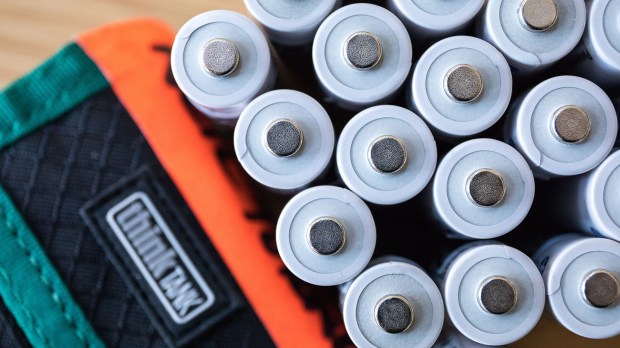
Eneloop AA 1.2v batteries and Think Tank 8 AA battery holder.

Back in September 2008 when I returned to the world of freelancing I tried every way that I could think of to cut my ‘cost of doing business’. One of the central ideas was to reduce the number of disposable batteries that I bought and used. I had a number of speed lights and a whole bag full of triggers, transmitters and gadgets almost all of which took AA sized batteries and so I went out and bought a lot of NiCd (nickel cadmium) rechargeables along with three decent quality chargers.

Every-once-in-a-while I would buy a few single use batteries if I was on a job which justified doing so but I kept to my plan and used the NiCd ones where I could. Over time they lost their power and after about four years they were relegated to being used in kids toys and my wireless keyboard. I bought some new NiCds but the way that I used them meant that the dreaded memory effect killed them off more quickly than I would have liked. (more…)

The third kit fetish

The Phottix 70cm collapsible beauty dish, adapted to fit an Elinchrom Ranger Quadra head.

Everyone knows about the fetish for camera bags shared by most photographers and anyone who has read this blog will know about my own personal one for card readers but there is a third one that has been exercising me of late. I have mentioned it quite a few times over the years and a particular need to have a repeatable set up has led me down this particular equipment rabbit hole once again.

I’m talking about lighting. I’m talking specifically about light modifiers. Those umbrellas, snoots, dishes, soft boxes and hybrid gadgets that you place on the fronts of your flash units in order to control and improve the light. (more…)

RGB and me

I get involved in a lot of discussions about the finer points of photography both online and in person. One of the most common this year has been the about choosing which RGB colour space we should all be working in. The truth is that there are a number of variables which, between them, should point you in one direction or another. There are plenty of RGB colour spaces but the main two are Adobe RGB and sRGB – mainly because these are the options you have when shooting with most DSLR cameras. There are a couple of others (Colormatch and ProPhoto) that offer wide gamuts and some real technical advantages but, as I hope to explain, this isn’t necessarily helpful. More isn’t just a waste, it’s a potential problem.

Ideal Worlds

In an ideal world we would have cameras, viewing and reproduction systems that gave us every tiny subtle variation in colour that the human eye can see on a good day in great light. We don’t. Yet. (more…)