technique

Elinchrom Quadra ELB

27 April 2016. Bournemouth, Dorset. Elinchrom Quadra ELB. Hillcrest Road Neil Turner

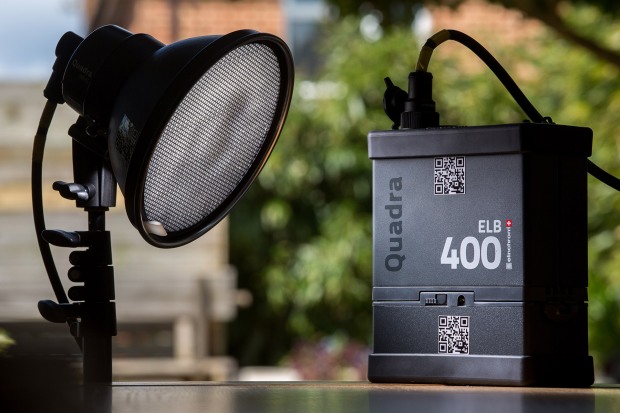
When I get a new piece of kit worthy of mention, I usually write a first hand account of how it is working out and go into details based on using it on a few jobs. I bought an Elinchrom Quadra ELB HS kit a couple of weeks ago and I thought that it was about time I gave some first impressions on this blog. Sadly, I haven’t used it for anything particularly interesting and I certainly haven’t stretched it beyond what I would normally do with my old Quadras (some executive portraits and a quick location shoot) but I can already see a lot of small but amazingly significant changes from the original system.

Those of you who read this blog regularly will know that I was very impressed with the Quadra when I wrote about it in my “32 Months On” and was further impressed when the Lithium Ion batteries came out. The differences between the ELB and the Quadra for most jobs aren’t huge but everything about the new kit tells me that the designers have listened and that the manufacturers have allowed their engineers to implement some great changes. For me, the positive changes with the pack are:

  • Far better display
  • Vastly improved menu system
  • Ability to recondition flattened lithium batteries
  • Better cable port covers
  • All of my old Quadra bits and cables are compatible with the new pack

I have the new High Synch head too which brings one key improvement which is the ability to synch with my cameras at shutter speeds right up to 1/8000th of a second using the EL Skyport Plus HS Transmitter and I’ll talk about these a bit further down the page.

Let’s talk about the menus: (more…)
Thinking on your feet

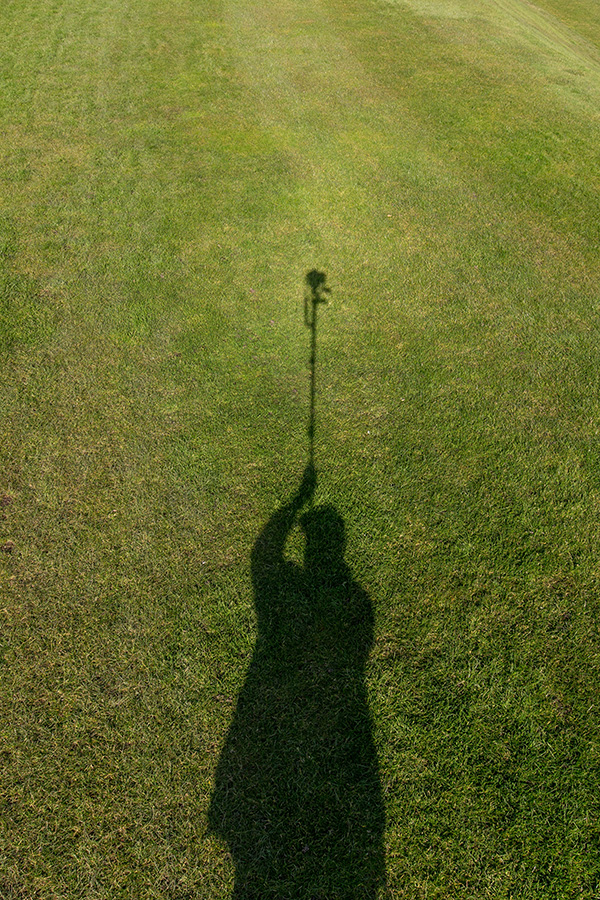
My shadow using a monopod to get a high angle picture. March 2016 ©Neil Turner

My shadow using a monopod to get a high angle picture. March 2016 ©Neil Turner

I was out shooting a job yesterday and needed to get quite a bit of extra height. The best place to shoot the picture from was on the side of a grassy hill which was very wet and the client’s health and safety policies meant that it wasn’t going to be easy to use a step ladder – whilst building a tower was outside the budget. In an ideal world a proper pole-cam or even a drone would have been the best option but the light was right and I needed to improvise.

Having used the Canon EOS6D as a remote via their iPhone app once before I was reasonably confident that my idea would work but the app has been replaced/updated and it meant learning the new one on the job. I had a basic monopod, a tripod head and a Manfrotto Super Clamp in the car but no proper way to attach the phone to the monopod to use as a viewfinder and remote release. With a proper pole-cam you rest the base of the pole on the ground and it is pretty stable. You also have a cradle for the phone or even a tablet if you want to go bigger. I had to tuck the foot of the monopod into my belt to get enough height but I had about an hour so I went into full “1970s Blue Peter” improvisation mode.

The cradle that holds my iPhone in my car was pressed into service and that attached very easily to the Manfrotto Super Clamp. Having extended the monopod to its full height I then attached the clamp to the second stage of the monopod (about eye-level when the whole thing was in use I guessed). Then I stuck the tripod head onto the monopod tilting down a little and put the EOS6D with a Canon 16-35 f4L IS lens on it. Whilst all of this was being done I was downloading the latest Canon Camera Connect app from the Apple App Store.

After a few minutes messing with settings I had the system working. I could use the phone as a viewfinder and a remote release for the Canon DSLR and I set about shooting the pictures without leaving the ground myself. After a minute or two I decided that I needed more height to look down on the subject a bit more and so I tilted the tripod head down a little and when I put the camera back into the air the foot of the monopod was resting on my chest. Even with a camera as light as the 6D I couldn’t hold it up for more than a minute at a time but we got the shot and I only got pointed at (and laughed at) by a small handful of passers-by. I wouldn’t want to have to work this way very often but, having just edited and uploaded the pictures, I know that I have a “Blue Peter”** solution that works.

** Blue Peter was required viewing as a child growing up in the 1970s. They always showed you how to make useful things from odds and ends lying around the house.

Getting to grips with my Sony RX1

Stage door of the Apollo Theatre, London. ©Neil Turner, January 2016

Stage door of the Apollo Theatre, London. ©Neil Turner, January 2016

A week ago I was shocked when the lovely folks at Castle Cameras here in Bournemouth got in touch to let me know that I’d won a new camera in a Sony competition that they were running on their Flickr site. I had completely forgotten that I had entered and when they told me to come and collect my shiny new Sony Cybershot RX1 I popped up later that afternoon. I spent most of the rest of that day playing with the camera and (shock horror) reading the instruction manual. I checked out what “the internet” had to say about the camera and stuck it in my bag determined to give it a proper outing at the first opportunity. You can see the winning picture here.

The weather hasn’t been great and I have been a bit busy with the day job and so it took a full six days before I got a proper chance to take some pictures. I happened to be in London with about three hours to kill yesterday and even though the weather was poor I was determined to have a wander and see whether I could get to grips with the RX1. I don’t really write full-on product reviews because there are other people that do it so much better than I can and this particular model Sony has been around for quite a while. It is, however, a very close contemporary of my beloved Fujifilm X100S and I was keen to find out whether the Sony could do two things: (more…)

Don’t panic…

I use Apple products. In fact, I use a lot of Apple products and some of my less generous colleagues might even label me a “fanboy”. I’d call that unfair because I’m not blind to their faults and I know that, like all technology, it will fail at some point.

I have tried my best to develop ways of avoiding failures, making sure that they cause as little damage or disruption as possible and generally covering my back wherever and whenever possible. The other day, whilst doing routine updates to one of the Macs in my office, I experienced something that would probably have completely freaked most computer users out and necessitated a lot of aggravation or even a visit to a service centre or Genius Bar.

dock_error

Simply put, all of the applications went AWOL. The dock, of which you can see a screenshot above just showed a whole row of question marks indicating that the applications were missing and a quick visit to the applications folder showed that the Mac clearly thought so too. The error message said that I didn’t have permissions to use the folder which made me believe and/or hope that nothing was actually missing. The “missing” applications included Time Machine and all of the repair and diagnostic tools that I would normally go straight to. I looked in the bin and I tried to search for items that I know should have in my applications folder but found nothing.

This has never happened to me before and I have never heard it described so I tried solution number one – to use a different device, get onto the internet and search the collected knowledge of the world’s computer users. The general consensus appeared to be that I had a major issue and that I needed to reinstall the Mac operating system. Easier said than done given that, despite trying every kind of reboot and diagnostic test I could, the App Store, all web browsers and Time Machine were amongst the locked/blocked/missing applications.

I could have done it all from one of the other Macs but I have, for many years, had a back-up drive from which I can boot my computers. These days it is a USB3 SSD drive with OSX Yosemite loaded on it and I used that to reboot my computer and install a fresh copy of OSX. Twenty-five minutes later with a mildly raised heart rate and some cramp in my fingers from keeping them crossed my computer was back as if nothing had happened. No screwdrivers were involved and nobody had to drive anywhere. No data was lost and I could get on with work.

Just in case you are wondering, panicking wasn’t even in the top ten ways to sort this out – about five places below a stiff drink or three!

A case that proves the old military phrase that I was taught at school in the 1970s and 1980s – “precise and proper planning prevents poor performance”.

Canon 16-35 f4 L IS

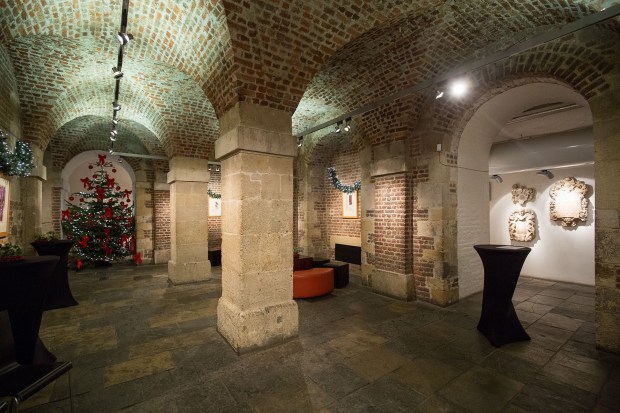
Test shot with Canon 16-35 f4 L IS in the crypt of St Martin-in-the-Fields

London. 08 December 2015 Test shot with Canon 16-35 f4 L IS in the crypt of St Martin-in-the-Fields Photo: Neil Turner

A couple of months ago I cracked and bought the Canon 16-35 f4 L IS lens to replace my very elderly 16-35 f2.8L having borrowed both this one and the f2.8L MkII to see what all the fuss was about. I shoot quite a few pictures of buildings and having a 16mm lens is very useful – especially when the space is really tight.

My old 16-35 and just about every other super-wide lens I have ever used has suffered from barrel distortion, been less than pin sharp in the corners and generally required a bit of work to get great pictures that are as free from distortion as possible.

I was on a job last night in a tight space where the 16-35 f4 L IS was being pressed into service to do shots of an empty venue before an event. I hadn’t brought a tripod because I hadn’t expected to be doing these shots but I did my best with what I had. The photo above was taken hand-held at 1/60th of a second at f4 on 2500 ISO with the IS switched on with a Canon EOS5D MkIII. I have applied no correction to the uprights and the frame is un-cropped at 16mm focal length.  (more…)

What makes this photo a Flickr favourite?

Waiting for people and texting their friends outside the Apple Store, Covent Garden.

Waiting for people and texting their friends outside the Apple Store, Covent Garden. © Neil Turner. November 2015

When I rejoined Flickr a couple of months ago my main aim was to learn the ins and outs of how it works so that I could help an important client build their Flickr profile. One of the side-effects is that I have become quite interested in how and why some pictures get no attention and why some others get loads. This was made all the more interesting when one single picture of mine went from the normal 100-200 views and 2-3 likes to having over 10,000 views and around 130 likes.

I don’t think that it is any better or worse than most of the rest of the (178 and counting) pictures I have uploaded so why did it get so much attention?

I genuinely don’t think that it is because it is a wonderful image so maybe it is because someone influential in the Flickr-sphere decided that they liked it and that prompted their followers to also like it. Maybe it is because I uploaded it on the right day at the right time in the right groups to get so much attention.

The truth is that I don’t know – (more…)

Post production is all about the details

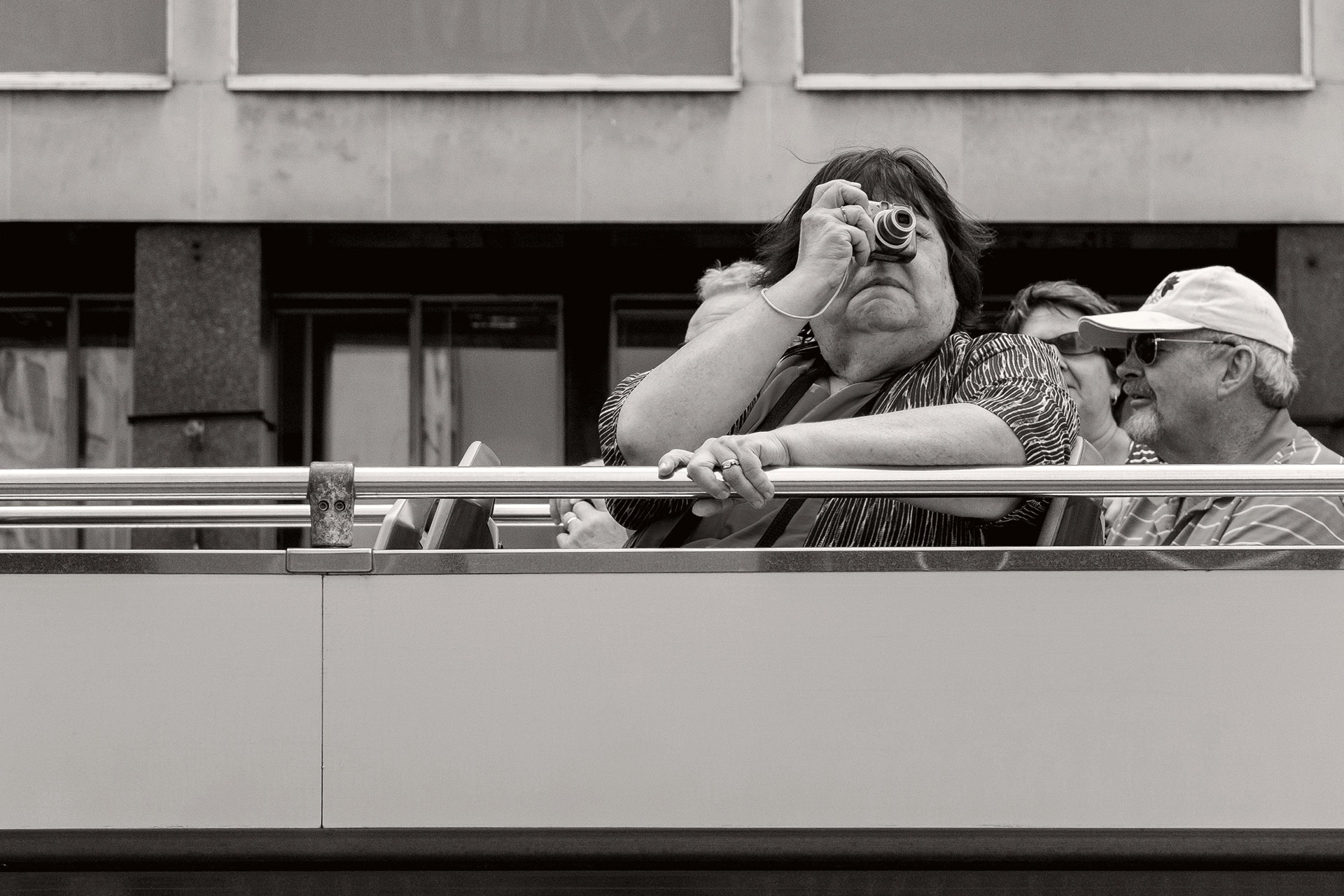
Passenger on the top deck of a tourist bus passing through Waterloo. © Neil Turner

Passenger on the top deck of a tourist bus passing through Waterloo.
© Neil Turner

I’ve read a lot about the ‘instagramisation’ of photography. I think that means taking slightly dull images, applying filters and presets to them and presenting them as bits of creativity. At the right time and in the right place those kinds of pictures have value and can make significant additions to creative campaigns and can go a long way towards making some elements of social media and social marketing more visually interesting. I’m not talking about that here – this blog post is all about choosing between making decisions about individual pictures or letting technology take over and ‘improve’ your work for you.

If you are on Facebook or any other social media that has targeted advertising you will probably get as many ‘suggestions’ as I do for people selling magical presets or add-ons to make my pictures instantly better. That’s great – or at least it would be if I wanted all of my images to exhibit a sameness with each other and with those of so many others. Trying to reduce professional post-production down to a series of mouse-clicks using algorithms and actions developed for others isn’t, in my opinion, a very good idea. (more…)

The story behind a picture #3

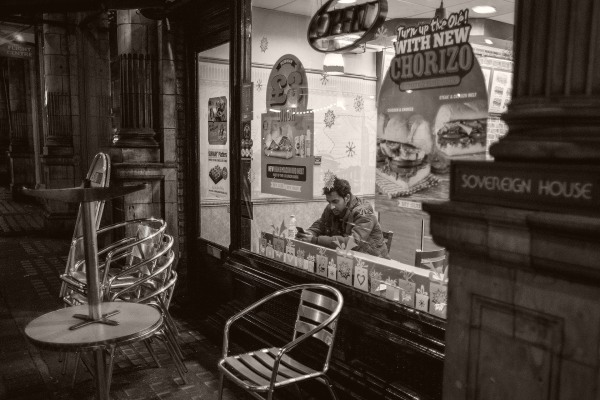
Sitting in the window seat at Subway on Shaftesbury Avenue Photo: Neil Turner Photo: Neil Turner

Sitting in the window seat at Subway on Shaftesbury Avenue
© Neil Turner, November 2014.

This photograph falls into the ‘personal work’ category. I had been to a meeting in central London during the evening and had arrived fashionably on-time having failed to park in my favourite evening parking space near the location of the meeting. That had forced me to park a bit further away. As a result my walk back to my car at around 10.30pm was both longer and much more interesting than usual.

I nearly always have a camera with me and it is nearly always either my Fujifilm X100S or it’s little brother the X20 but on this evening I had a Canon EOS6D with a couple of fast prime lenses and so I shot some photographs of things that interested me as I walked. This shop window – a branch of Subway that stays open until the early hours was the very first thing that caught my eye and I was very interested to see just how good the EOS6D is at higher ISOs. This was shot at 3200 ISO with a shutter speed of 1/250th of a second at f1.8 using a Canon EF 28mm f1.8 lens. For a DSLR this is about as unobtrusive as you can get – the quiet shutter mode is really good and the speed and accuracy of the auto focus on the centre focusing point means that you can ‘snatch’ a frame in really low light with quite a high degree of certainty.

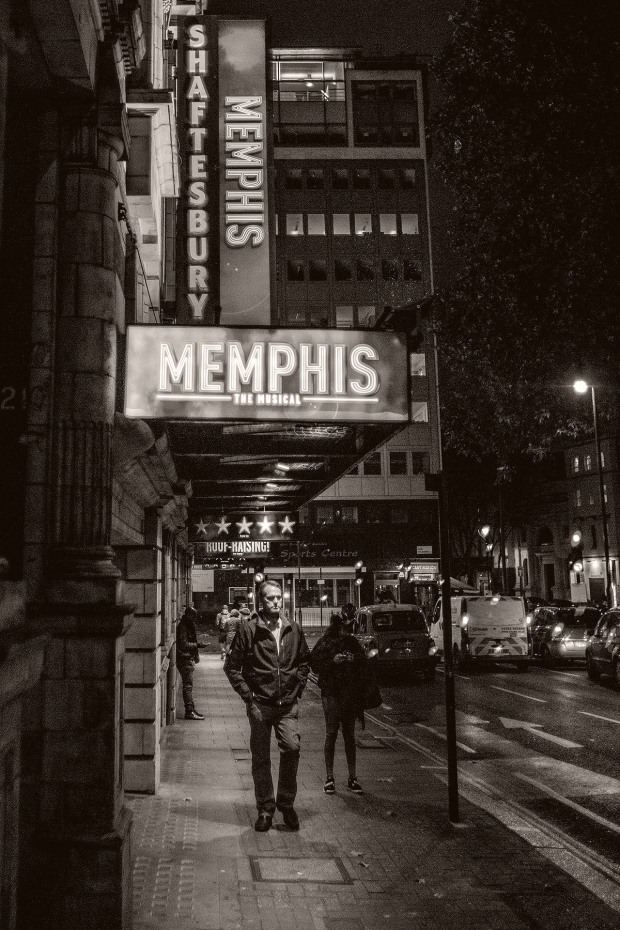
Just around the corner I saw the potential for another nice image with the frontage of a theatre after the last member of the public had left the building. I composed, waited and finally got this frame as a solo pedestrian passed through the frame.

Pedestrian passes under the "Memphis" banner outside a west end theatre at night. © Neil Turner November 2014.

Pedestrian passes under the “Memphis” banner outside a west end theatre at night. © Neil Turner November 2014.

This photograph was also shot at 3200 ISO but was better lit at 1/640th of a second at f1.8. I was actually quite disappointed when I got back to my car and realised that I had a two and a half hour drive home. I knew that I had half a dozen good photographs and I sat in the car and transferred a couple of them to my phone using the camera’s built-in wifi before uploading them to EyeEm and Twitter. Then I drove home…