Editorial

Fujifilm X20 – a summary of my thoughts

©Neil Turner, May 2013. Mudeford Spit, Dorset

©Neil Turner, May 2013. Mudeford Spit, Dorset

Just over five weeks after taking delivery of my Fujifilm X20 I’m sitting here trying to gather my thoughts and opinions about this intriguing little camera. It is far from perfect and it doesn’t fulfil all of the requirements that I thought that I had when I bought it. In several areas its performance is below par and working with the RAW files is not as easy as it could or should be. All of that having been said, it has become my constant companion almost everywhere I go and I still find myself adoring using it.

Put simply, there’s something about this camera that you’d struggle to put your finger on but that makes taking pictures with it an absolute pleasure. A couple of weeks ago I posted my first update about the X20 and my experiences using it. I tried to summarise the good and the bad points of the camera. You probably won’t be surprised to find out that my opinions have barely changed:

  • The video is still a pain to use and a bigger pain to import and edit.
  • The high ISO performance is still no better than any other camera with a small chip – awful.
  • The RAW file format .raf is not particularly easy to work with and the screen resolution previews in Adobe Camera RAW are worse than slow to generate.
  • The battery life has graduated to awful from appalling now that I have the menus set up better. I have twice got through two batteries in a single day.
  • The build quality of the battery clip is still suspect.

In fact I could have just cut and paste what I wrote back in April with the slight change that the battery life is marginally less awful than first thought. So those are the negatives. What about the positives? You’ll probably have guessed that they have barely changed either. Colours, tonal range, handling and the sheer joy of using it are all very positive comments that I made before and would support still.
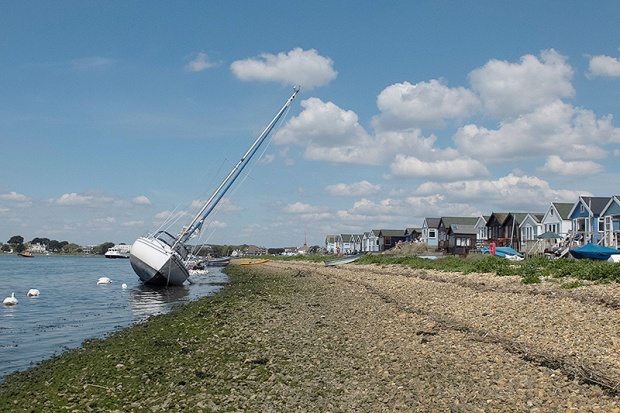
©Neil Turner, May 2013. Mudeford Spit, Dorset

©Neil Turner, May 2013. Mudeford Spit, Dorset

I guess that I will never make it as a camera reviewer. The thought of shooting test charts and ISO range comparisons fill me with dread. In a digital world where figures and absolute measurements are the lifeblood of so many websites you should definitely go to DPReview if you want the numbers laid out and explained.

As someone who owns and uses some of the finest DSLR cameras ever made on a daily basis I want something very different from my compact ‘walkabout’ camera. I make the vast majority of my income from taking pictures and I make the rest from teaching, writing and consulting about photography. For me to want to go out and just take pictures for the joy of it, the camera has to be fun to use. And it is on that simple point that Fujifilm are getting it so completely right with their x-series range. The X100 was a great start and the X10 was a brilliant companion. Since then we’ve had the X Pro1, the XE1, X100s and this X20 to enjoy. The single factor that unites all of these cameras is the pleasure you can take from using them when you spend so much time using other (better?) cameras.

That brings me to the next point. There’s no way that I’d use the X20 instead of a Canon EOS5D MkII or MkIII for a normal assignment but on my own time, taking pictures for pleasure and for the family the Fujifilm X20 is wonderful. It will be beaten at some point and it remains true that it isn’t the best compact  in terms of image quality, speed, flexibility or any of a dozen other quantifiable factors. I propose to introduce a new scale based on the likelihood that you’ll actually bother to take the camera out and use it willingly and with a smile on your face. On that measure, and that measure alone, the Fujifilm gets a perfect ten. Right now, I’m off to the shops to get my morning paper; on foot and with my X20 over my shoulder…
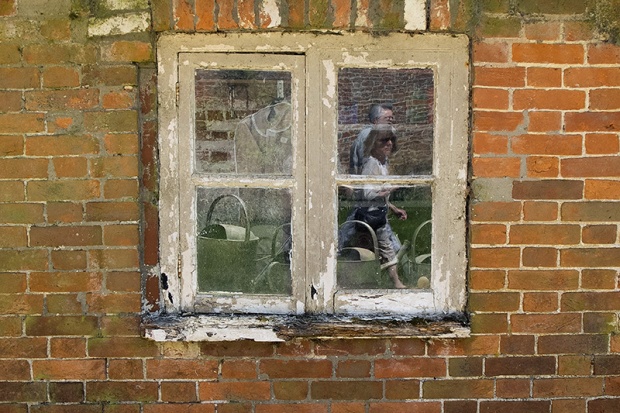
©Neil Turner, May 2013. Stourhead, Somerset.

©Neil Turner, May 2013. Stourhead, Somerset.

Final footnote… I was disappointed with the built-in flash and so I decided to buy a small hot-shoe unit to supplement it. I found that one online retailer was selling the Fujifilm EF20 flash that was designed for the X series cameras at under £90.00 and so I bought it. Not a bad investment; I’ve used it quite a bit and it makes a lot of sense to have it because it fits into a pocket without too much difficulty and even has a limited bounce facility. I’ll try to post something cool shot with it soon.

Editorial portraits folio

Like most photographers I’m always looking at new ways of showing my portfolio. I’ve saved the presentation version of my editorial portraits folio as a QuickTime movie and posted it here. Please let me know what you think. If you look at it without going for the full-sized version the captions are a bit small but, apart from that, I quite like it!

Headteachers or whatever you want to call them…

Almost everyone remembers their head teacher. If they don’t then they will probably remember the Principal, Headmistress, Headmaster, High Master, High Mistress, Direktor or whatever other title the person who led their schools went by. Since 1986 I have photographed hundreds of these people and I have made the journey from being a little bit scared of them through accepting them to being impressed by the work that they do and the huge difference that their being good at their job makes to children and young adults.

I decided to put together a slideshow of some of the headteacher portraits that I have done. Most of the portraits date back to my time at The Times Educational Supplement. I also made the decision to keep them anonymous – I just wanted to show how different they are yet how much they have in common. Some of the Heads featured in this selection are famous in the world of education and one or two have been made Knights or Dames for their services to education. A few have since retired but that doesn’t matter. I don’t want to suggest that the person in charge is the only reason that some schools are better than others but I have yet to visit a successful school that doesn’t have first rate leadership.


The constant software update dilemma

Back in the day we used to occasionally try out new chemicals and different printing papers. We used to experiment with new film stock when it hit the market and, on the whole, it was a welcome distraction from the day-to-day work. In the digital era we have to get new cameras a bit more often and we need to keep our IT current but the biggest battle and the largest dilemma is software. Because I teach a bit and because I am a complete anorak** I always have a look at new software packages as they become available.

menu_bar_screen_grab

Keeping up to date is not cheap. Upgrades are often necessary – especially when none of the software companies make their RAW converters backwards compatible when new cameras and new lenses hit the market. The move by Adobe towards the monthly or annual subscription model is very interesting and brings into very sharp focus the real cost of having the latest software. I have written before about making the business case for buying new gear and the same formula should apply to upgrading software. Every time I talk or write about these kinds of financial decisions, the same piece of music pops into my head… Bruce Springsteen’s song “Cautious Man” where there is a line that says:

“When something caught his eye he’d measure his need
And then very carefully he’d proceed”

lightroom_5_screen_shot

This week, to misquote the wonderful Fast Show, “I are mostly been playing with Lightroom”. To be more precise I have been looking at the new Lightroom 5 beta that Adobe have made available. This comes against a background of having experimented with pretty much every version of Lightroom since it hit the shops back in 2007 and found that I wasn’t entirely sold on the application despite seeing why others love it so much. And that is a huge part of the software conundrum – there are lots of options that achieve pretty much the same end result but get there via very different routes. If, like me, you shoot RAW pictures you need to have a way of editing, captioning, renaming, converting, saving, delivering and archiving your work. This can be achieved using a single application or you can use three , four or five different ones – it really doesn’t matter as long as your workflow is repeatable, flexible, efficient and accurate.

I will write a lot more about Lightroom 5 when I have really used it properly but I have to say that it seems a lot quicker than the previous version and the interface for Adobe RAW Converter is even closer to to the version that I use in Photoshop CS6 than ever – making using Lightroom a lot easier for me. I have also realised that Adobe’s efforts to create a programme for photographers to edit their work in are bearing fruit. The time has definitely arrived when I could easily do without Photoshop altogether and run pretty much everything from Lightroom. Of course that doesn’t mean that I want to… yet.

Lighting gels… the best in VFM?

Almost all photographers spend money on accessories, gizmos, gadgets and photo-related odds and sods. Sometimes we waste our money but I wanted to put in a brief plug for the things that constantly amaze me by the amount of “bang for the buck” I get from them. I’m talking about lighting gels. They cost a few pounds each and they last for years if you look after them even reasonably well.

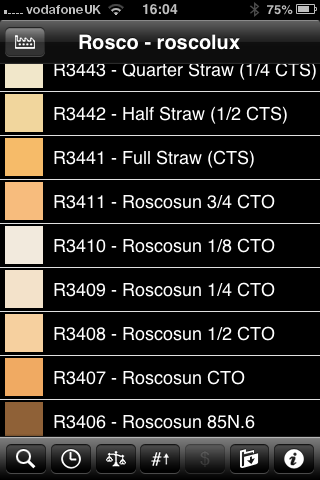
Screen grab from Swatch App

Screen grab from Swatch App

The reason that I am writing this today is that last week I was shooting a job and was slightly embarrassed that the pieces of gel in my lighting kit were looking a bit tatty. I realised that some of them were bought as shared sheets (ie I only had half of a 52 x 61 cm sheet of each) when I was at college in the mid 1980s. I might have added a few more colours and strengths since then but even the newest gel in my bag is five years old. The beauty is that you don’t need to look after them that well really – even a scrunched and screwed up gel is still the same colour and will work. Of course they don’t like extreme heat and they aren’t partial to liquid damage either but at under the boiling point of water and kept dry they are very durable.

When I decided that I needed some new gels I phoned The Flash Centre and they arranged for Rosco to send me some. I have been playing with the iPhone Swatch app for about eighteen months now and it made ordering the new gels rather easy. They arrived rapidly in a strong cardboard tube and all I had to do was cut them down into the right sized pieces to fit into a pocket in my Think Tank rolling case.

This time around I ordered various grades of CTS – that’s Colour Temperature Straw, the gel that changes the light coming out of my flash units to varying degrees of Tungsten right up to the Full CTS which does a very good job of making the Elinchrom Ranger Quadra flash tube into a Tungsten light that very closely matches the Tungsten setting on a Canon EOS DSLR. I also got some ND (Neutral Density) gels and a sheet of a diffuser called ‘tough spun’. I didn’t need to get any effects gels – the purple, orange, red, blue and green gels that I have in the case are fine even if they are old enough to buy alcohol by now.

Comparing the cost of this big batch of new gels to some of the money that I have literally thrown away on rubbish gizmos over the last 30 years I feel very smug. I know that after one single use I will have justified the (tiny) expense and that after the 50th use it will get embarrassing how smug I feel about the VFM (value for money) that you get from quality lighting gels.

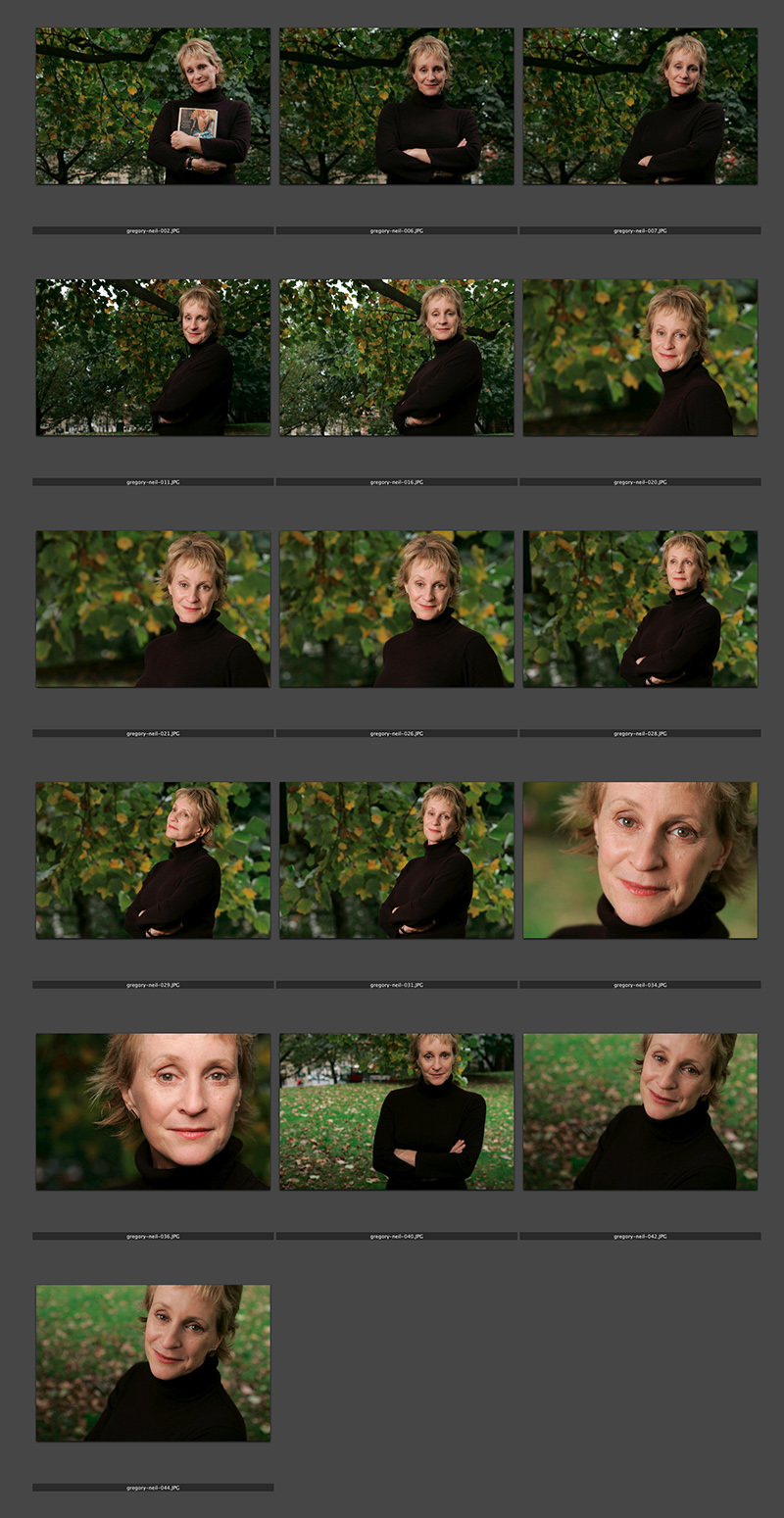
Philippa Gregory – the contact sheet

© Neil Turner/TSL. Philippa Gregory, October 2004

© Neil Turner/TSL. Philippa Gregory, October 2004

I haven’t done one of these contact sheets for a long time and I thought that this set was an interesting example. I submitted this set of sixteen pictures and they are all landscape in orientation. That’s because the slot they were shot for was across two pages and always a squarish landscape image. As I said in the previous post, the whole thing was done in ten minutes on a dull Autumn (fall) day in Hyde Park. That time included setting up and breaking down the Lumedyne light and chatting to the subject. Note that she is clutching her novel in the opening frame. I find that it’s always a good idea to do that if their publicist insists so that you can then go on to get the pictures that will actually get used.

Saving an author’s life

This is not a claim to any act of great heroism, it’s not even a particularly accurate heading but I’ve been wanting to tell more ‘stories behind the pictures’ for quite a while and I’ve decided to give them all pretty eye-catching headlines. This portrait of the author Philippa Gregory has a story behind it that I have enjoyed telling many times over the years since I took it in 2004.

©Neil Turner/TSL. Philippa Gergory, October 2004.

©Neil Turner/TSL. Philippa Gergory, October 2004.

I was shooting a lot of portraits of authors and academics at the time and I was given the job of meeting Philippa Gregory who had just written “The Other Boleyn Girl” and shooting her portrait to accompany an  interview in one of the magazines that I worked for. No problem, run of the mill? Well… yes and no. The location that I was given was rapidly becoming an issue.

Let me explain: in the three or four years leading up to this particular job I had been sent to shoot three portraits of authors at a particular hotel in central London favoured by one or two publishers as a place for them to stay if they needed a hotel or as a great place to hire a private room for interviews and photography when they were on the publicity trail promoting new books. Once again, pretty run of the mill stuff. Except. Except the three previous subjects that I had shot at this particular venue had all died within a few months of having their picture taken by me. I’m not superstitious. I live at No13 and I couldn’t care less about black cats crossing my path. I have a healthy respect for ladders and I try to avoid blindly walking under them – that’s a mixture of common sense and the fact that my Father once dropped some turpentine on me when he was painting our house when I was about six or seven years old. Superstitious I am not but I did have a 100% record of people that I photographed at this hotel being dead pretty shortly after having their picture taken.

This presented me with a few issues.

  1. I didn’t know how well I would be able to put the idea of another ex-author on my hands when shooting if I decided to ignore what was rapidly becoming a curse.
  2. If I wanted to go elsewhere, how was I going to explain that idea in mid-October to the author and her publicist?
  3. Where else could I go and how far should I be away from the hotel to avoid worrying?
  4. What would the reporter who was doing the interview think?

Driving to the location I decided to try my best to get the subject away from the hotel. Hyde Park was only a couple of hundred yards away and  it shouldn’t be too tough to get her to cross four lanes of fast moving traffic in heels just to have her picture taken under the trees. Well, I arrived nice and early and I spoke to the publicist about atmosphere and about getting a picture that nobody else was going to get. I laid on what little charm I have and we agreed that a short walk (using the underpass rather than running across the road) was going to be OK. I got in before the interview, Philippa Gregory seemed happy to get some fresh air and we had ten productive minutes under some trees shooting a pleasant set of portraits. I even delivered her safely back to the hotel-of-doom in time for the interviewer to do her bit.

Now I’m not claiming to have actually saved the author’s life as such. I don’t even believe in curses or even in extended coincidence and the real truth is that all three of the authors that died were in their late 80s and 90s when I took their pictures. I was telling this story to an author’s agent the other day and she asked me what I would do if I was sent back to the same hotel to photograph an elderly author who was, for argument’s sake, wheelchair bound and it was a day when it was bitterly cold? Tough question…

For those amongst you who always want to know about gear and settings:

  • Canon EOS1D MkII with a 70-200 f2.8L IS lens at 145mm 
  • 1/22nd of a second at f5.6 on 100 ISO
  • Lumedyne Signature Series flash kit with 32″x24″ Chimera Softbox

Getting colour right on four year old cameras

Back in June 2010 I wrote a blog post about getting the colours to match on multiple Canon digital camera bodies. Ever since then I have tried really hard to keep my cameras synchronised for colour and contrast as well as making sure that the clocks are set to identical times. What has become obvious to me is that as cameras get older they shift their colour balance and the shift seems to accelerate a little. What has also become obvious is that the clocks built into Canon digital cameras get out of synchronisation far too quickly.

WB Shift on a Canon EOS5D MkII

WB Shift on a Canon EOS5D MkII

Getting the clocks the same is a simple task: you can either do it in the menu on the camera or synchronise the clocks when the camera is connected to the computer using the very useful Canon EOS Utility software – a simple task that I find needs to be checked at least every four to five weeks. When I did the synch’ this morning two Canon EOS5D MkII bodies were nearly fifteen seconds different.

Moving on to the much trickier question of colour, I suggest that you read the old post before actually doing any work. Getting two cameras to match takes a while and getting three to match when one of them has a significantly different chip is even harder. This time I was simply wanting to get my two four-year-old 5D MkIIs to give me the same colour rendition as each other. I had started to notice that one required quite a bit more magenta removal than the other and so I put my 70-200 lens on a tripod, connected the first camera (which was giving me some fairly magenta images) to the laptop and mounted the body onto the lens. I built myself a little still life with a cereal box and a grey card, lit it with a reliable flash on manual power output and shot a frame or two.

My makeshift test target

My makeshift test target

The images were brought into Canon’s EOS Utility software and then into Photo Mechanic on the calibrated computer screen and I had a look. The grey was noticeable pink and the whites on the cardboard box were too and so I adjusted the white balance shift (WB SHIFT/BKT in the camera menu) from it’s starting position of B1,G2 to B1,G4 and took a couple more frames. Much better, but still a tiny bit magenta. I shifted it to B1, G5 and took another picture and the grey was finally grey and the white was finally as white as it could get.

That was the first camera sorted. All I had to do was to get the second one to match it. Leaving the lens on the tripod I simply swapped the bodies over,  matched the exposure and fired a couple more frames. This body was on B0, G1 and, after a bit of fiddling, I got the colours to match by eye on B1 G2. Comparing the frames shot on the two cameras showed that one was a tiny amount more contrasty than the other and so I simply adapted the Picture Style “standard” that I habitually use for RAW files to get the contrast between the two cameras to match as well.

All-in-all it took about thirty-five minutes to set the kit up and get the results that I wanted (including synchronising the clocks). On my shoot today everything was the right colour as soon as I dragged it into Adobe Camera RAW from both cameras and I saved myself a fair amount of computer time – which is important because in the editorial markets where I make most of my money nobody pays for the time you spend in front of the screen and adjusting images from two different cameras can take quite a bit of time.

For me, this kind of techie stuff is vital. A lot of people just plough on and shoot without ever calibrating or changing anything but I am sure that thirty-five minutes work once every few weeks will save an enormous amount of time in between and time is, they say, money!